A.1 Introduction
This appendix provides essential Python programming knowledge for engineering students. We’ll cover fundamental concepts progressively, from basic variables to scientific computing with NumPy and visualization with Matplotlib. Each concept builds upon previous ones, so work through sections sequentially.
Why Python for Engineering?
Readable syntax: Easy to learn and understand
Powerful libraries: NumPy, SciPy, Matplotlib for scientific computing
Versatile: From data analysis to web development
Free and open-source: No licensing costs
Large community: Extensive documentation and support
A.2 Variables and Data Types
A.2.1 Creating Variables
Variables store data values. Python automatically determines the data type.
age = 25
height = 5.9
temperature = -10.5

# Text (strings)
name = "John"
university = 'University of Alberta'
course = """Sensing Techniques
and Data Analytics"""

# Boolean (True/False)
is_student = True
has_graduated = False

# Display variables
print("Name:", name)
print("Age:", age)
print("Height:", height)
print("Is student:", is_student)
Name: John
Age: 25
Height: 5.9
Is student: True
A.2.2 Data Types
Python has several built-in data types:
print(type(42))          # <class 'int'>
print(type(3.14))        # <class 'float'>
print(type("Hello"))     # <class 'str'>
print(type(True))        # <class 'bool'>

# Type conversion
x = "123"
y = int(x)        # Convert string to integer
z = float(x)      # Convert string to float
w = str(456)      # Convert number to string

print(f"x: {x} (type: {type(x)})")
print(f"y: {y} (type: {type(y)})")
print(f"z: {z} (type: {type(z)})")
print(f"w: {w} (type: {type(w)})")
<class 'int'>
<class 'float'>
<class 'str'>
<class 'bool'>
x: 123 (type: <class 'str'>)
y: 123 (type: <class 'int'>)
z: 123.0 (type: <class 'float'>)
w: 456 (type: <class 'str'>)
A.2.3 Variable Naming Rules
student_count = 30
Temperature2 = 25.5
_private_var = "hidden"
MAX_PRESSURE = 1000

# Invalid variable names (will cause errors)
# 2temperature = 25    # Can't start with number
# student-count = 30   # Can't use hyphens
# class = "A"          # Can't use reserved keywords
A.3 Basic Operations
A.3.1 Arithmetic Operations
a = 10
b = 3

addition = a + b        # 13
subtraction = a - b     # 7
multiplication = a * b  # 30
division = a / b        # 3.333...
floor_division = a // b # 3 (integer division)
remainder = a % b       # 1 (modulo)
power = a ** b         # 1000 (10^3)

print(f"{a} + {b} = {addition}")
print(f"{a} / {b} = {division}")
print(f"{a} ** {b} = {power}")
10 + 3 = 13
10 / 3 = 3.3333333333333335
10 ** 3 = 1000
A.3.2 Comparison Operations
x = 5
y = 10

print(f"{x} == {y}:", x == y)  # False (equal to)
print(f"{x} != {y}:", x != y)  # True (not equal to)
print(f"{x} < {y}:", x < y)    # True (less than)
print(f"{x} > {y}:", x > y)    # False (greater than)
print(f"{x} <= {y}:", x <= y)  # True (less than or equal)
print(f"{x} >= {y}:", x >= y)  # False (greater than or equal)
5 == 10: False
5 != 10: True
5 < 10: True
5 > 10: False
5 <= 10: True
5 >= 10: False
A.3.3 String Operations
first_name = "John"
last_name = "Johnson"

# String concatenation
full_name = first_name + " " + last_name
print("Full name:", full_name)

# String formatting (f-strings - recommended)
age = 22
message = f"Hello, I'm {first_name} and I'm {age} years old."
print(message)

# String methods
text = "  Python Programming  "
print("Original:", repr(text))
print("Uppercase:", text.upper())
print("Lowercase:", text.lower())
print("Stripped:", text.strip())
print("Length:", len(text))
Full name: John Johnson
Hello, I'm John and I'm 22 years old.
Original: ' Python Programming '
Uppercase: PYTHON PROGRAMMING
Lowercase: python programming
Stripped: Python Programming
Length: 22
A.4 Control Structures
A.4.1 Conditional Statements (if/elif/else)
temperature = 25

if temperature > 30:
    print("It's hot!")
elif temperature > 20:
    print("It's warm.")
elif temperature > 10:
    print("It's cool.")
else:
    print("It's cold!")

# Engineering example: Stress analysis
stress = 250  # MPa
yield_strength = 300  # MPa

if stress > yield_strength:
    safety_factor = yield_strength / stress
    print(f"DANGER: Stress exceeds yield strength!")
    print(f"Safety factor: {safety_factor:.2f}")
elif stress > 0.8 * yield_strength:
    safety_factor = yield_strength / stress
    print(f"WARNING: High stress level")
    print(f"Safety factor: {safety_factor:.2f}")
else:
    safety_factor = yield_strength / stress
    print(f"Safe operation")
    print(f"Safety factor: {safety_factor:.2f}")
It's warm.
WARNING: High stress level
Safety factor: 1.20
A.4.2 For Loops
print("Counting from 1 to 5:")
for i in range(1, 6):
    print(f"Count: {i}")

# Loop through a list
sensors = ["accelerometer", "strain gauge", "GPS", "temperature"]
print("\nAvailable sensors:")
for sensor in sensors:
    print(f"- {sensor}")

# Loop with enumerate (get index and value)
print("\nSensors with numbers:")
for index, sensor in enumerate(sensors, 1):
    print(f"{index}. {sensor}")

# Engineering example: Calculate forces
loads = [100, 150, 200, 175, 125]  # kN
print("\nLoad Analysis:")
for i, load in enumerate(loads):
    moment = load * (i + 1) * 2  # Simple calculation
    print(f"Load {i+1}: {load} kN, Moment: {moment} kN⋅m")
Counting from 1 to 5:
Count: 1
Count: 2
Count: 3
Count: 4
Count: 5
Available sensors:
- accelerometer
- strain gauge
- GPS
- temperature
Sensors with numbers:
1. accelerometer
2. strain gauge
3. GPS
4. temperature
Load Analysis:
Load 1: 100 kN, Moment: 200 kN⋅m
Load 2: 150 kN, Moment: 600 kN⋅m
Load 3: 200 kN, Moment: 1200 kN⋅m
Load 4: 175 kN, Moment: 1400 kN⋅m
Load 5: 125 kN, Moment: 1250 kN⋅m
Figure 1:Demonstrating for loops with range, lists, enumerate, and engineering load analysis
A.4.3 While Loops
count = 0
while count < 5:
    print(f"Iteration: {count}")
    count += 1

# Engineering example: Convergence iteration
tolerance = 0.001
max_iterations = 100
iteration = 0
error = 1.0

print("\nIterative solution:")
while error > tolerance and iteration < max_iterations:
    # Simulate some calculation
    old_value = 1.0 + iteration * 0.1
    new_value = old_value * 0.9
    error = abs(new_value - old_value)

    iteration += 1
    print(f"Iteration {iteration}: Error = {error:.6f}")

if error <= tolerance:
    print("Convergence achieved!")
else:
    print("Maximum iterations reached")
Output
Iteration: 0
Iteration: 1
Iteration: 2
Iteration: 3
Iteration: 4

Iterative solution:
Iteration 1: Error = 0.100000
Iteration 2: Error = 0.110000
Iteration 3: Error = 0.120000
Iteration 4: Error = 0.130000
Iteration 5: Error = 0.140000
Iteration 6: Error = 0.150000
Iteration 7: Error = 0.160000
Iteration 8: Error = 0.170000
Iteration 9: Error = 0.180000
Iteration 10: Error = 0.190000
Iteration 11: Error = 0.200000
Iteration 12: Error = 0.210000
Iteration 13: Error = 0.220000
Iteration 14: Error = 0.230000
Iteration 15: Error = 0.240000
Iteration 16: Error = 0.250000
Iteration 17: Error = 0.260000
Iteration 18: Error = 0.270000
Iteration 19: Error = 0.280000
Iteration 20: Error = 0.290000
Iteration 21: Error = 0.300000
Iteration 22: Error = 0.310000
Iteration 23: Error = 0.320000
Iteration 24: Error = 0.330000
Iteration 25: Error = 0.340000
Iteration 26: Error = 0.350000
Iteration 27: Error = 0.360000
Iteration 28: Error = 0.370000
Iteration 29: Error = 0.380000
Iteration 30: Error = 0.390000
Iteration 31: Error = 0.400000
Iteration 32: Error = 0.410000
Iteration 33: Error = 0.420000
Iteration 34: Error = 0.430000
Iteration 35: Error = 0.440000
Iteration 36: Error = 0.450000
Iteration 37: Error = 0.460000
Iteration 38: Error = 0.470000
Iteration 39: Error = 0.480000
Iteration 40: Error = 0.490000
Iteration 41: Error = 0.500000
Iteration 42: Error = 0.510000
Iteration 43: Error = 0.520000
Iteration 44: Error = 0.530000
Iteration 45: Error = 0.540000
Iteration 46: Error = 0.550000
Iteration 47: Error = 0.560000
Iteration 48: Error = 0.570000
Iteration 49: Error = 0.580000
Iteration 50: Error = 0.590000
Iteration 51: Error = 0.600000
Iteration 52: Error = 0.610000
Iteration 53: Error = 0.620000
Iteration 54: Error = 0.630000
Iteration 55: Error = 0.640000
Iteration 56: Error = 0.650000
Iteration 57: Error = 0.660000
Iteration 58: Error = 0.670000
Iteration 59: Error = 0.680000
Iteration 60: Error = 0.690000
Iteration 61: Error = 0.700000
Iteration 62: Error = 0.710000
Iteration 63: Error = 0.720000
Iteration 64: Error = 0.730000
Iteration 65: Error = 0.740000
Iteration 66: Error = 0.750000
Iteration 67: Error = 0.760000
Iteration 68: Error = 0.770000
Iteration 69: Error = 0.780000
Iteration 70: Error = 0.790000
Iteration 71: Error = 0.800000
Iteration 72: Error = 0.810000
Iteration 73: Error = 0.820000
Iteration 74: Error = 0.830000
Iteration 75: Error = 0.840000
Iteration 76: Error = 0.850000
Iteration 77: Error = 0.860000
Iteration 78: Error = 0.870000
Iteration 79: Error = 0.880000
Iteration 80: Error = 0.890000
Iteration 81: Error = 0.900000
Iteration 82: Error = 0.910000
Iteration 83: Error = 0.920000
Iteration 84: Error = 0.930000
Iteration 85: Error = 0.940000
Iteration 86: Error = 0.950000
Iteration 87: Error = 0.960000
Iteration 88: Error = 0.970000
Iteration 89: Error = 0.980000
Iteration 90: Error = 0.990000
Iteration 91: Error = 1.000000
Iteration 92: Error = 1.010000
Iteration 93: Error = 1.020000
Iteration 94: Error = 1.030000
Iteration 95: Error = 1.040000
Iteration 96: Error = 1.050000
Iteration 97: Error = 1.060000
Iteration 98: Error = 1.070000
Iteration 99: Error = 1.080000
Iteration 100: Error = 1.090000
Maximum iterations reached
A.5 Functions
A.5.1 Defining Functions
def greet(name):
    """Greet a person by name"""
    return f"Hello, {name}!"

# Function with multiple parameters
def calculate_area(length, width):
    """Calculate rectangle area"""
    area = length * width
    return area

# Function with default parameters
def calculate_volume(length, width, height=1.0):
    """Calculate volume with default height"""
    volume = length * width * height
    return volume

# Using functions
message = greet("Alice")
print(message)

area = calculate_area(5, 3)
print(f"Area: {area}")

volume1 = calculate_volume(5, 3)      # height = 1.0 (default)
volume2 = calculate_volume(5, 3, 2)   # height = 2
print(f"Volume 1: {volume1}")
print(f"Volume 2: {volume2}")
Hello, Alice!
Area: 15
Volume 1: 15.0
Volume 2: 30
Figure 2:Demonstrating function definitions with parameters, defaults, and engineering calculations
A.5.2 Engineering Functions
def calculate_stress(force, area):
    """
    Calculate stress given force and area

    Parameters:
    force (float): Applied force in Newtons
    area (float): Cross-sectional area in m²

    Returns:
    float: Stress in Pa
    """
    if area <= 0:
        raise ValueError("Area must be positive")

    stress = force / area
    return stress

def safety_factor(material_strength, applied_stress):
    """Calculate safety factor"""
    if applied_stress <= 0:
        raise ValueError("Applied stress must be positive")

    sf = material_strength / applied_stress
    return sf

# Example usage
force = 10000  # N
area = 0.01    # m²
yield_strength = 250e6  # Pa

stress = calculate_stress(force, area)
sf = safety_factor(yield_strength, stress)

print(f"Applied force: {force} N")
print(f"Cross-sectional area: {area} m²")
print(f"Calculated stress: {stress/1e6:.2f} MPa")
print(f"Safety factor: {sf:.2f}")
Applied force: 10000 N
Cross-sectional area: 0.01 m²
Calculated stress: 1.00 MPa
Safety factor: 250.00
A.5.3 Lambda Functions (Anonymous Functions)
square = lambda x: x ** 2
add = lambda x, y: x + y

print(f"Square of 5: {square(5)}")
print(f"Sum of 3 and 4: {add(3, 4)}")

# Useful with built-in functions
numbers = [1, 4, 9, 16, 25]
square_roots = list(map(lambda x: x**0.5, numbers))
print(f"Numbers: {numbers}")
print(f"Square roots: {square_roots}")

# Filter even numbers
all_numbers = [1, 2, 3, 4, 5, 6, 7, 8, 9, 10]
even_numbers = list(filter(lambda x: x % 2 == 0, all_numbers))
print(f"Even numbers: {even_numbers}")
Square of 5: 25
Sum of 3 and 4: 7
Numbers: [1, 4, 9, 16, 25]
Square roots: [1.0, 2.0, 3.0, 4.0, 5.0]
Even numbers: [2, 4, 6, 8, 10]
A.6 Data Structures
A.6.1 Lists
measurements = [1.2, 2.5, 3.1, 4.8, 2.9]
sensor_types = ["accelerometer", "strain", "displacement", "temperature"]
mixed_data = [1, "sensor", 3.14, True]

# Accessing elements (0-indexed)
print(f"First measurement: {measurements[0]}")
print(f"Last measurement: {measurements[-1]}")
print(f"Second sensor: {sensor_types[1]}")

# Slicing lists
print(f"First 3 measurements: {measurements[:3]}")
print(f"Last 2 measurements: {measurements[-2:]}")
print(f"Every second measurement: {measurements[::2]}")

# Modifying lists
measurements.append(5.2)        # Add to end
measurements.insert(0, 0.8)     # Insert at position
measurements.remove(2.5)        # Remove specific value
last_value = measurements.pop() # Remove and return last

print(f"Modified measurements: {measurements}")
print(f"Removed value: {last_value}")

# List operations
temperatures = [20.1, 22.5, 19.8, 21.3, 23.0]
print(f"Length: {len(temperatures)}")
print(f"Maximum: {max(temperatures)}")
print(f"Minimum: {min(temperatures)}")
print(f"Sum: {sum(temperatures)}")
print(f"Average: {sum(temperatures)/len(temperatures):.2f}")
First measurement: 1.2
Last measurement: 2.9
Second sensor: strain
First 3 measurements: [1.2, 2.5, 3.1]
Last 2 measurements: [4.8, 2.9]
Every second measurement: [1.2, 3.1, 2.9]
Modified measurements: [0.8, 1.2, 3.1, 4.8, 2.9]
Removed value: 5.2
Length: 5
Maximum: 23.0
Minimum: 19.8
Sum: 106.7
Average: 21.34
A.6.2 Dictionaries
sensor_data = {
    "temperature": 23.5,
    "humidity": 65,
    "pressure": 1013.25,
    "location": "Building A"
}

# Accessing values
print(f"Temperature: {sensor_data['temperature']}°C")
print(f"Location: {sensor_data['location']}")

# Adding/modifying values
sensor_data["wind_speed"] = 5.2
sensor_data["temperature"] = 24.1

print(f"Updated data: {sensor_data}")

# Dictionary methods
print(f"Keys: {list(sensor_data.keys())}")
print(f"Values: {list(sensor_data.values())}")

# Iterating through dictionaries
print("\nSensor readings:")
for parameter, value in sensor_data.items():
    print(f"{parameter}: {value}")

# Engineering example: Material properties
steel_properties = {
    "density": 7850,        # kg/m³
    "young_modulus": 200e9, # Pa
    "yield_strength": 250e6, # Pa
    "poisson_ratio": 0.3
}

print(f"\nSteel Properties:")
for property_name, value in steel_properties.items():
    print(f"{property_name}: {value}")
Temperature: 23.5°C
Location: Building A
Updated data: {'temperature': 24.1, 'humidity': 65, 'pressure': 1013.25, 'location': 'Building A', 'wind_speed': 5.2}
Keys: ['temperature', 'humidity', 'pressure', 'location', 'wind_speed']
Values: [24.1, 65, 1013.25, 'Building A', 5.2]
Sensor readings:
temperature: 24.1
humidity: 65
pressure: 1013.25
location: Building A
wind_speed: 5.2
Steel Properties:
density: 7850
young_modulus: 200000000000.0
yield_strength: 250000000.0
poisson_ratio: 0.3
A.6.3 Tuples
coordinates = (45.5, -73.6)  # latitude, longitude
rgb_color = (255, 128, 0)    # red, green, blue

# Accessing tuple elements
latitude, longitude = coordinates  # Tuple unpacking
print(f"Latitude: {latitude}, Longitude: {longitude}")

red, green, blue = rgb_color
print(f"RGB: R={red}, G={green}, B={blue}")

# Tuples in engineering
beam_dimensions = (0.3, 0.5, 12.0)  # width, height, length (m)
width, height, length = beam_dimensions

area = width * height
volume = area * length

print(f"\nBeam Analysis:")
print(f"Dimensions: {width}m × {height}m × {length}m")
print(f"Cross-sectional area: {area} m²")
print(f"Volume: {volume} m³")
Latitude: 45.5, Longitude: -73.6
RGB: R=255, G=128, B=0
Beam Analysis:
Dimensions: 0.3m × 0.5m × 12.0m
Cross-sectional area: 0.15 m²
Volume: 1.7999999999999998 m³
A.7 NumPy Fundamentals
A.7.1 Introduction to NumPy
NumPy is the foundation for scientific computing in Python. It provides efficient arrays and mathematical functions.
import numpy as np

# Creating NumPy arrays
measurements = np.array([1.2, 2.5, 3.1, 4.8, 2.9])
matrix_2d = np.array([[1, 2, 3], [4, 5, 6], [7, 8, 9]])

print(f"1D array: {measurements}")
print(f"2D array:\n{matrix_2d}")

# Array properties
print(f"\nArray shape: {measurements.shape}")
print(f"Array size: {measurements.size}")
print(f"Data type: {measurements.dtype}")
print(f"2D array shape: {matrix_2d.shape}")
1D array: [1.2 2.5 3.1 4.8 2.9]
2D array:
[[1 2 3]
[4 5 6]
[7 8 9]]
Array shape: (5,)
Array size: 5
Data type: float64
2D array shape: (3, 3)
A.7.2 Creating Arrays
import numpy as np

zeros_array = np.zeros(5)
ones_array = np.ones((3, 4))
identity_matrix = np.eye(3)
range_array = np.arange(0, 10, 2)
linspace_array = np.linspace(0, 1, 11)
random_array = np.random.random(5)

print(f"Zeros: {zeros_array}")
print(f"Ones:\n{ones_array}")
print(f"Identity:\n{identity_matrix}")
print(f"Range: {range_array}")
print(f"Linspace: {linspace_array}")
print(f"Random: {random_array}")

# Engineering example: Time series
time = np.linspace(0, 10, 101)  # 10 seconds, 101 points
frequency = 2  # Hz
amplitude = 5
signal = amplitude * np.sin(2 * np.pi * frequency * time)

print(f"\nTime array shape: {time.shape}")
print(f"Signal array shape: {signal.shape}")
print(f"First 5 time points: {time[:5]}")
print(f"First 5 signal values: {signal[:5]}")
Zeros: [0. 0. 0. 0. 0.]
Ones:
[[1. 1. 1. 1.]
[1. 1. 1. 1.]
[1. 1. 1. 1.]]
Identity:
[[1. 0. 0.]
[0. 1. 0.]
[0. 0. 1.]]
Range: [0 2 4 6 8]
Linspace: [0. 0.1 0.2 0.3 0.4 0.5 0.6 0.7 0.8 0.9 1. ]
Random: [0.70057893 0.75695514 0.77375565 0.15431653 0.62415934]
Time array shape: (101,)
Signal array shape: (101,)
First 5 time points: [0. 0.1 0.2 0.3 0.4]
First 5 signal values: [ 0. 4.75528258 2.93892626 -2.93892626 -4.75528258]
A.7.3 Array Operations
import numpy as np

# Element-wise operations
data1 = np.array([1, 2, 3, 4, 5])
data2 = np.array([2, 4, 6, 8, 10])

addition = data1 + data2
multiplication = data1 * data2
power = data1 ** 2
division = data2 / data1

print(f"Data 1: {data1}")
print(f"Data 2: {data2}")
print(f"Addition: {addition}")
print(f"Multiplication: {multiplication}")
print(f"Power: {power}")
print(f"Division: {division}")

# Mathematical functions
angles = np.array([0, 30, 45, 60, 90])  # degrees
angles_rad = np.radians(angles)
sin_values = np.sin(angles_rad)
cos_values = np.cos(angles_rad)

print(f"\nAngles (degrees): {angles}")
print(f"Sin values: {sin_values}")
print(f"Cos values: {cos_values}")

# Statistical operations
measurements = np.array([12.1, 11.8, 12.3, 11.9, 12.0, 12.2, 11.7])
print(f"\nMeasurements: {measurements}")
print(f"Mean: {np.mean(measurements):.2f}")
print(f"Standard deviation: {np.std(measurements):.3f}")
print(f"Maximum: {np.max(measurements)}")
print(f"Minimum: {np.min(measurements)}")
Data 1: [1 2 3 4 5]
Data 2: [ 2 4 6 8 10]
Addition: [ 3 6 9 12 15]
Multiplication: [ 2 8 18 32 50]
Power: [ 1 4 9 16 25]
Division: [2. 2. 2. 2. 2.]
Angles (degrees): [ 0 30 45 60 90]
Sin values: [0. 0.5 0.70710678 0.8660254 1. ]
Cos values: [1.00000000e+00 8.66025404e-01 7.07106781e-01 5.00000000e-01
6.12323400e-17]
Measurements: [12.1 11.8 12.3 11.9 12. 12.2 11.7]
Mean: 12.00
Standard deviation: 0.200
Maximum: 12.3
Minimum: 11.7
A.7.4 Array Indexing and Slicing
import numpy as np

# 1D array indexing
data = np.array([10, 20, 30, 40, 50, 60, 70, 80, 90, 100])

print(f"Full array: {data}")
print(f"First element: {data[0]}")
print(f"Last element: {data[-1]}")
print(f"First 5 elements: {data[:5]}")
print(f"Last 3 elements: {data[-3:]}")
print(f"Every second element: {data[::2]}")

# 2D array indexing
matrix = np.array([[1, 2, 3, 4],
                   [5, 6, 7, 8],
                   [9, 10, 11, 12]])

print(f"\nMatrix:\n{matrix}")
print(f"Element at row 1, column 2: {matrix[1, 2]}")
print(f"First row: {matrix[0, :]}")
print(f"Second column: {matrix[:, 1]}")
print(f"Submatrix (first 2 rows, last 2 columns):\n{matrix[:2, -2:]}")

# Boolean indexing
measurements = np.array([1.2, 2.5, 3.1, 4.8, 2.9, 5.2, 1.8])
high_values = measurements > 3.0
print(f"\nMeasurements: {measurements}")
print(f"Values > 3.0: {measurements[high_values]}")

# Engineering example: Filter data
pressure_readings = np.array([1013, 1015, 1009, 1020, 1025, 995, 1018])
normal_pressure = (pressure_readings >= 1000) & (pressure_readings <= 1020)
print(f"Pressure readings: {pressure_readings}")
print(f"Normal pressure readings: {pressure_readings[normal_pressure]}")
Full array: [ 10 20 30 40 50 60 70 80 90 100]
First element: 10
Last element: 100
First 5 elements: [10 20 30 40 50]
Last 3 elements: [ 80 90 100]
Every second element: [10 30 50 70 90]
Matrix:
[[ 1 2 3 4]
[ 5 6 7 8]
[ 9 10 11 12]]
Element at row 1, column 2: 7
First row: [1 2 3 4]
Second column: [ 2 6 10]
Submatrix (first 2 rows, last 2 columns):
[[3 4]
[7 8]]
Measurements: [1.2 2.5 3.1 4.8 2.9 5.2 1.8]
Values > 3.0: [3.1 4.8 5.2]
Pressure readings: [1013 1015 1009 1020 1025 995 1018]
Normal pressure readings: [1013 1015 1009 1020 1018]
A.7.5 Array Reshaping and Manipulation
import numpy as np

# Reshaping arrays
data_1d = np.arange(12)
data_2d = data_1d.reshape(3, 4)
data_3d = data_1d.reshape(2, 2, 3)

print(f"1D array: {data_1d}")
print(f"2D array:\n{data_2d}")
print(f"3D array:\n{data_3d}")

# Transpose
matrix = np.array([[1, 2, 3], [4, 5, 6]])
transposed = matrix.T
print(f"\nOriginal matrix:\n{matrix}")
print(f"Transposed matrix:\n{transposed}")

# Concatenation
array1 = np.array([1, 2, 3])
array2 = np.array([4, 5, 6])
concatenated = np.concatenate([array1, array2])
print(f"\nArray 1: {array1}")
print(f"Array 2: {array2}")
print(f"Concatenated: {concatenated}")

# Stacking
stacked_vertical = np.vstack([array1, array2])
stacked_horizontal = np.hstack([array1, array2])
print(f"Vertical stack:\n{stacked_vertical}")
print(f"Horizontal stack: {stacked_horizontal}")
1D array: [ 0 1 2 3 4 5 6 7 8 9 10 11]
2D array:
[[ 0 1 2 3]
[ 4 5 6 7]
[ 8 9 10 11]]
3D array:
[[[ 0 1 2]
[ 3 4 5]]
[[ 6 7 8]
[ 9 10 11]]]
Original matrix:
[[1 2 3]
[4 5 6]]
Transposed matrix:
[[1 4]
[2 5]
[3 6]]
Array 1: [1 2 3]
Array 2: [4 5 6]
Concatenated: [1 2 3 4 5 6]
Vertical stack:
[[1 2 3]
[4 5 6]]
Horizontal stack: [1 2 3 4 5 6]
A.8 Matplotlib Basics
A.8.1 Introduction to Matplotlib
Matplotlib is Python’s primary plotting library. We’ll use the pyplot interface, which provides MATLAB-like plotting commands.
import matplotlib.pyplot as plt
import numpy as np

# Basic line plot
x = np.linspace(0, 10, 100)
y = np.sin(x)

plt.figure(figsize=(8, 6))
plt.plot(x, y)
plt.title('Sine Wave')
plt.xlabel('x')
plt.ylabel('sin(x)')
plt.grid(True)
plt.show()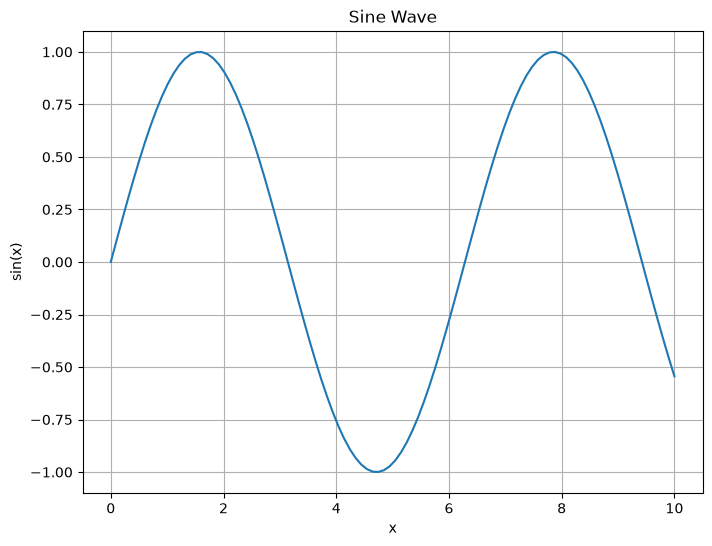
A.8.2 Line Plots
import matplotlib.pyplot as plt
import numpy as np

# Multiple lines on same plot
x = np.linspace(0, 2*np.pi, 100)
y1 = np.sin(x)
y2 = np.cos(x)
y3 = np.sin(x) * np.cos(x)

plt.figure(figsize=(10, 6))
plt.plot(x, y1, label='sin(x)', color='blue', linewidth=2)
plt.plot(x, y2, label='cos(x)', color='red', linestyle='--')
plt.plot(x, y3, label='sin(x)cos(x)', color='green', marker='o', markersize=3)

plt.title('Trigonometric Functions')
plt.xlabel('Angle (radians)')
plt.ylabel('Amplitude')
plt.legend()
plt.grid(True, alpha=0.3)
plt.tight_layout()
plt.show()

# Engineering example: Vibration analysis
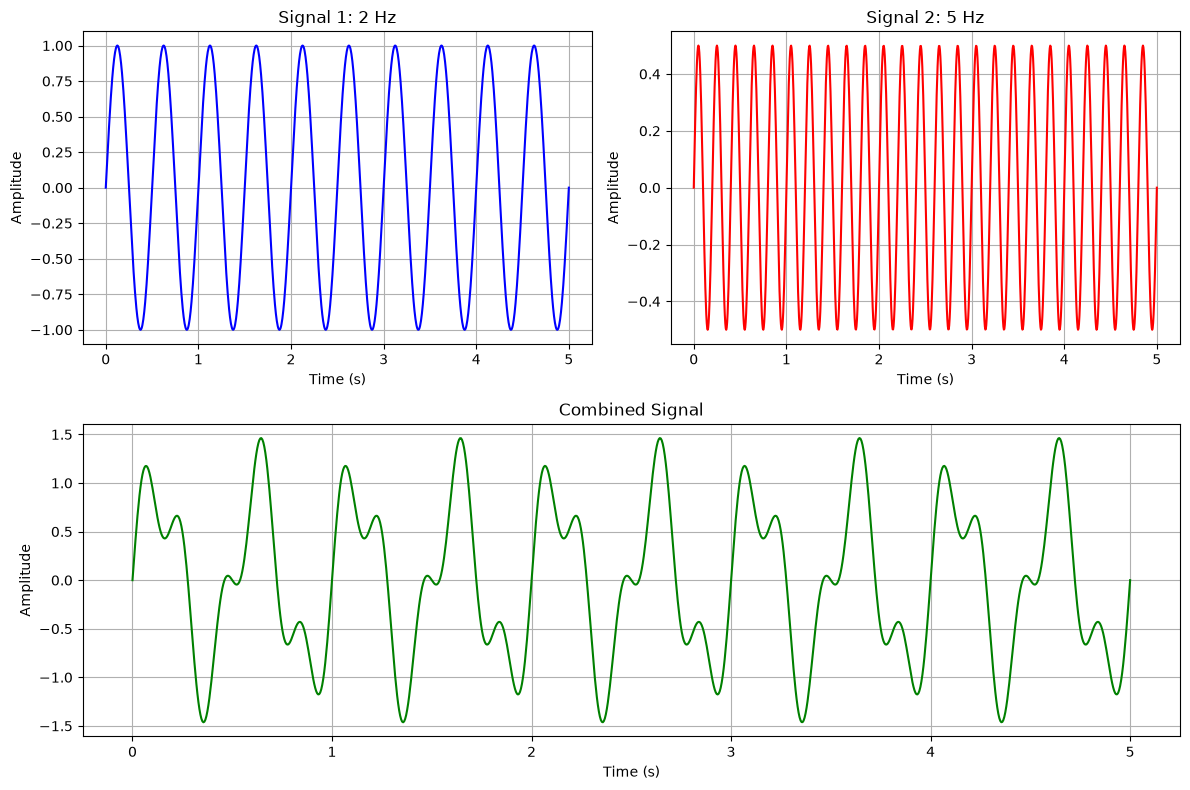
time = np.linspace(0, 5, 1000)
frequency1 = 2  # Hz
frequency2 = 5  # Hz
amplitude1 = 1.0
amplitude2 = 0.5

signal1 = amplitude1 * np.sin(2 * np.pi * frequency1 * time)
signal2 = amplitude2 * np.sin(2 * np.pi * frequency2 * time)
combined = signal1 + signal2

plt.figure(figsize=(12, 8))

plt.subplot(2, 2, 1)
plt.plot(time, signal1, 'b-', linewidth=1.5)
plt.title(f'Signal 1: {frequency1} Hz')
plt.xlabel('Time (s)')
plt.ylabel('Amplitude')
plt.grid(True)

plt.subplot(2, 2, 2)
plt.plot(time, signal2, 'r-', linewidth=1.5)
plt.title(f'Signal 2: {frequency2} Hz')
plt.xlabel('Time (s)')
plt.ylabel('Amplitude')
plt.grid(True)

plt.subplot(2, 1, 2)
plt.plot(time, combined, 'g-', linewidth=1.5)
plt.title('Combined Signal')
plt.xlabel('Time (s)')
plt.ylabel('Amplitude')
plt.grid(True)

plt.tight_layout()
plt.show()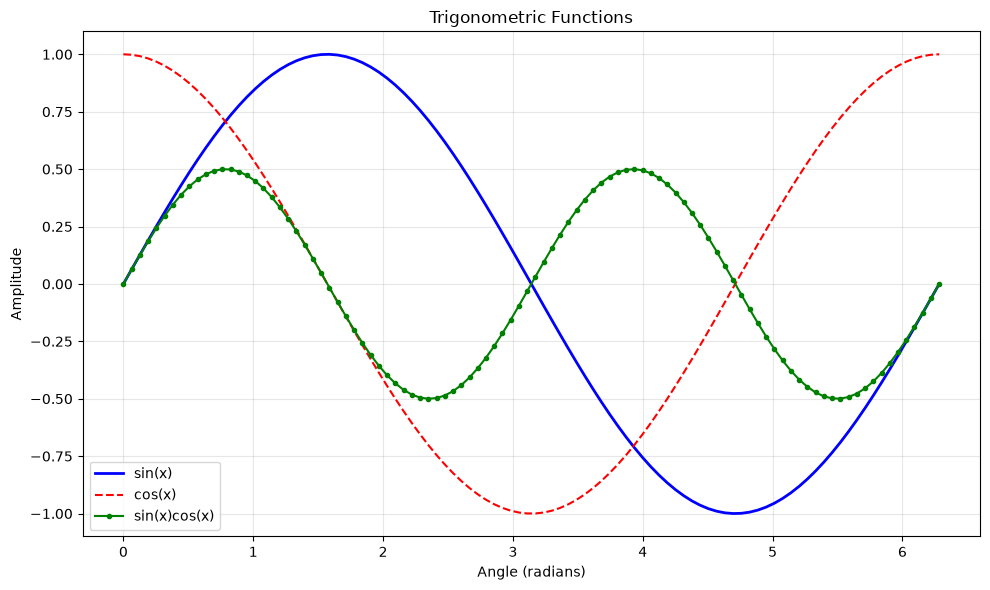
A.8.3 Scatter Plots
import matplotlib.pyplot as plt
import numpy as np

# Basic scatter plot
np.random.seed(42)  # For reproducible results
x = np.random.normal(0, 1, 50)
y = 2 * x + np.random.normal(0, 0.5, 50)

plt.figure(figsize=(8, 6))
plt.scatter(x, y, alpha=0.7, color='blue')
plt.title('Scatter Plot Example')
plt.xlabel('X values')
plt.ylabel('Y values')
plt.grid(True, alpha=0.3)
plt.show()

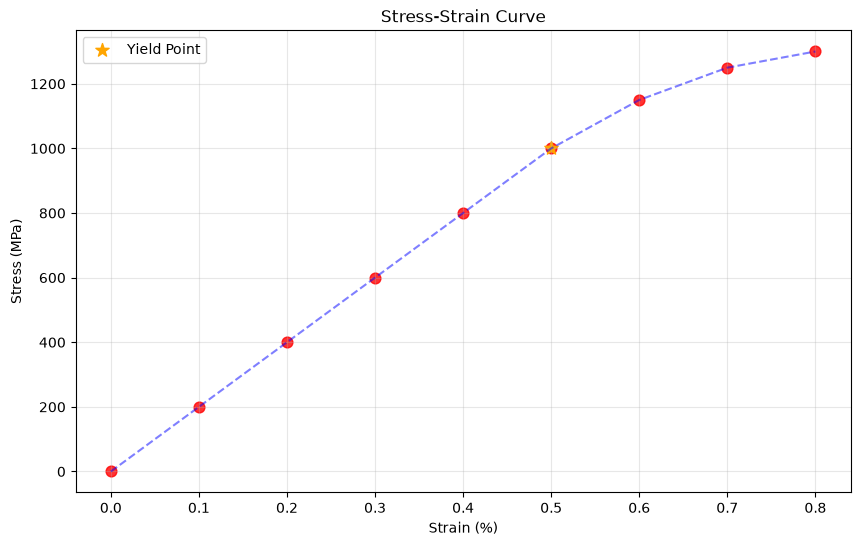
# Engineering example: Stress-strain data
strain = np.array([0, 0.001, 0.002, 0.003, 0.004, 0.005, 0.006, 0.007, 0.008])
stress = np.array([0, 200, 400, 600, 800, 1000, 1150, 1250, 1300])  # MPa

plt.figure(figsize=(10, 6))
plt.scatter(strain * 100, stress, color='red', s=60, alpha=0.8)
plt.plot(strain * 100, stress, 'b--', alpha=0.5)  # Connect points

# Find yield point (approximately)
elastic_limit = 1000  # MPa
yield_index = np.where(stress >= elastic_limit)[0][0]
plt.scatter(strain[yield_index] * 100, stress[yield_index],
           color='orange', s=100, marker='*', label='Yield Point')

plt.title('Stress-Strain Curve')
plt.xlabel('Strain (%)')
plt.ylabel('Stress (MPa)')
plt.legend()
plt.grid(True, alpha=0.3)
plt.show()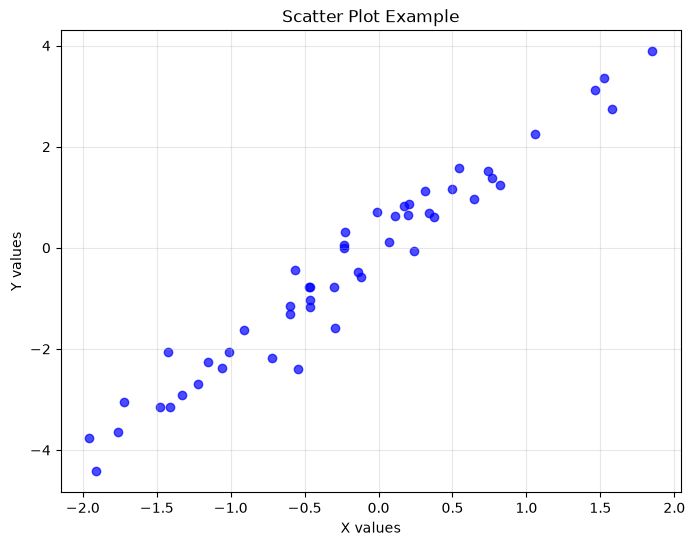
A.8.4 Bar Charts
import matplotlib.pyplot as plt
import numpy as np

# Basic bar chart
materials = ['Steel', 'Aluminum', 'Concrete', 'Wood', 'Composite']
strengths = [400, 280, 40, 50, 600]  # MPa

plt.figure(figsize=(10, 6))
bars = plt.bar(materials, strengths, color=['gray', 'silver', 'brown', 'orange', 'black'])
plt.title('Material Strength Comparison')
plt.xlabel('Material')
plt.ylabel('Tensile Strength (MPa)')
plt.xticks(rotation=45)

# Add value labels on bars
for bar, strength in zip(bars, strengths):
    plt.text(bar.get_x() + bar.get_width()/2, bar.get_height() + 10,
             f'{strength}', ha='center', va='bottom', fontweight='bold')

plt.tight_layout()
plt.show()

# Grouped bar chart
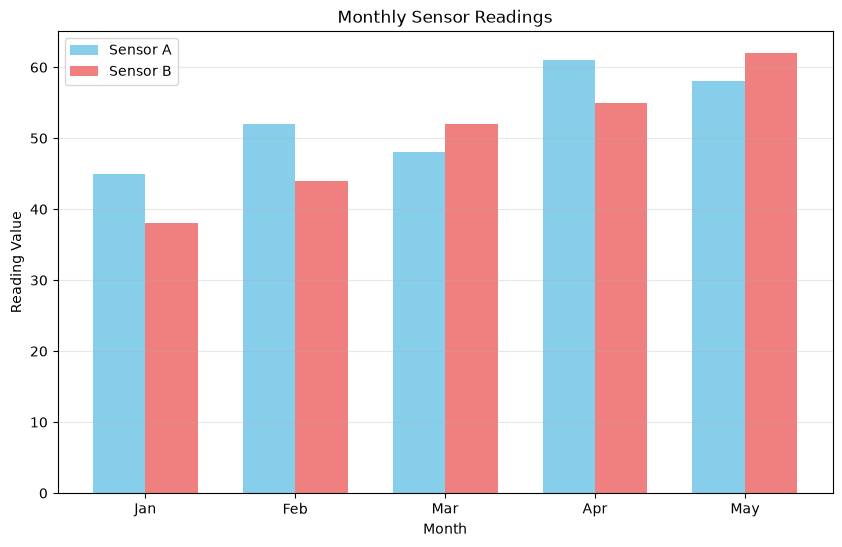
months = ['Jan', 'Feb', 'Mar', 'Apr', 'May']
sensor_a = [45, 52, 48, 61, 58]
sensor_b = [38, 44, 52, 55, 62]

x = np.arange(len(months))
width = 0.35

plt.figure(figsize=(10, 6))
plt.bar(x - width/2, sensor_a, width, label='Sensor A', color='skyblue')
plt.bar(x + width/2, sensor_b, width, label='Sensor B', color='lightcoral')

plt.title('Monthly Sensor Readings')
plt.xlabel('Month')
plt.ylabel('Reading Value')
plt.xticks(x, months)
plt.legend()
plt.grid(axis='y', alpha=0.3)
plt.show()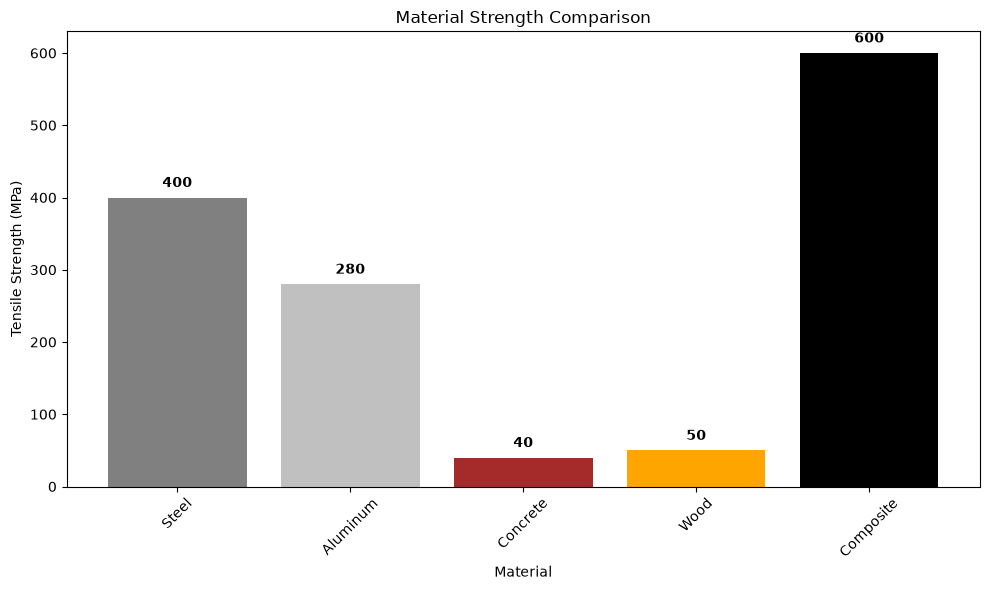
A.8.5 Histograms
import matplotlib.pyplot as plt
import numpy as np

# Basic histogram
np.random.seed(42)
data = np.random.normal(100, 15, 1000)  # Normal distribution

plt.figure(figsize=(10, 6))
plt.hist(data, bins=30, alpha=0.7, color='skyblue', edgecolor='black')
plt.title('Histogram of Random Data')
plt.xlabel('Value')
plt.ylabel('Frequency')
plt.grid(axis='y', alpha=0.3)
plt.show()

# Engineering example: Measurement distribution
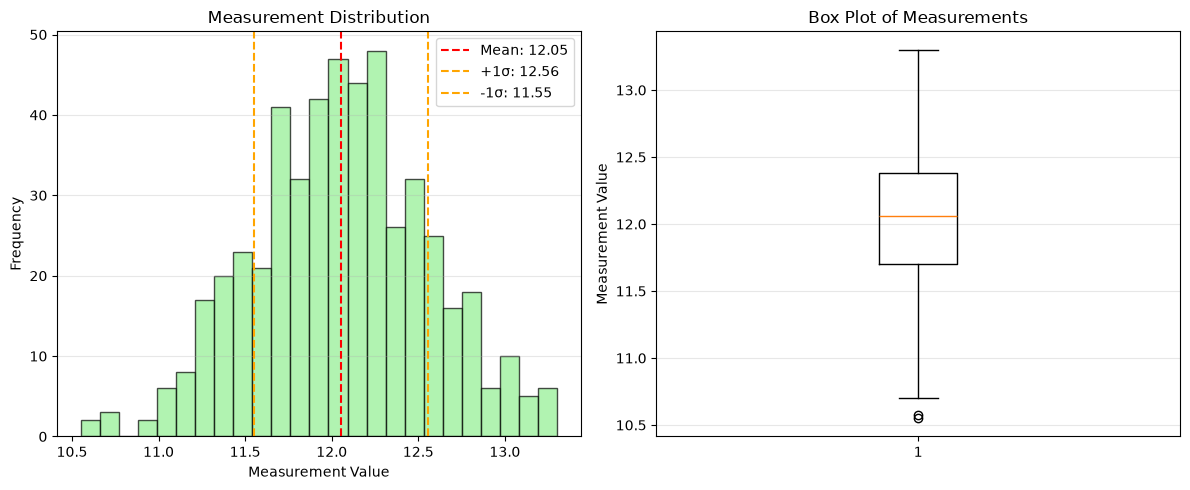
measurements = np.random.normal(12.0, 0.5, 500)  # Mean=12, std=0.5

plt.figure(figsize=(12, 5))

plt.subplot(1, 2, 1)
plt.hist(measurements, bins=25, alpha=0.7, color='lightgreen', edgecolor='black')
plt.axvline(np.mean(measurements), color='red', linestyle='--',
           label=f'Mean: {np.mean(measurements):.2f}')
plt.axvline(np.mean(measurements) + np.std(measurements), color='orange',
           linestyle='--', label=f'+1σ: {np.mean(measurements) + np.std(measurements):.2f}')
plt.axvline(np.mean(measurements) - np.std(measurements), color='orange',
           linestyle='--', label=f'-1σ: {np.mean(measurements) - np.std(measurements):.2f}')
plt.title('Measurement Distribution')
plt.xlabel('Measurement Value')
plt.ylabel('Frequency')
plt.legend()
plt.grid(axis='y', alpha=0.3)

plt.subplot(1, 2, 2)
plt.boxplot(measurements)
plt.title('Box Plot of Measurements')
plt.ylabel('Measurement Value')
plt.grid(axis='y', alpha=0.3)

plt.tight_layout()
plt.show()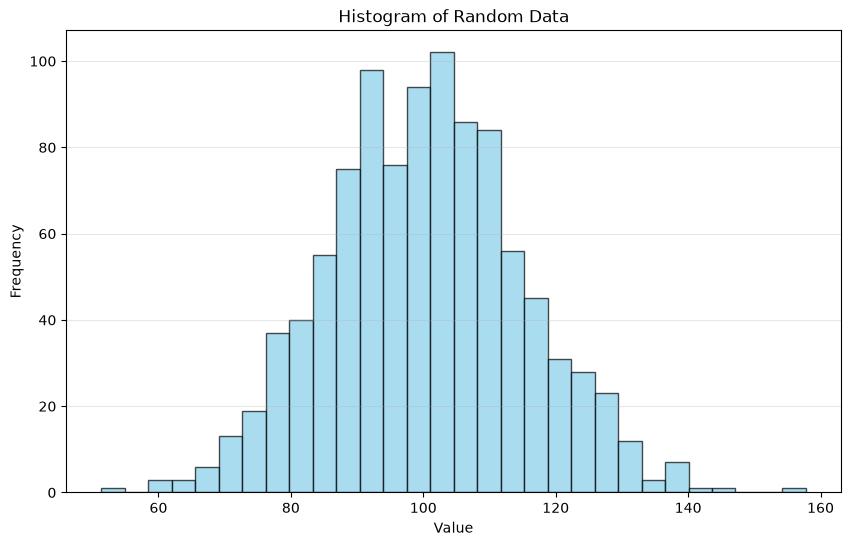
A.8.6 Subplots and Figure Layout
import matplotlib.pyplot as plt
import numpy as np

# Multiple subplots
fig, axes = plt.subplots(2, 2, figsize=(12, 10))

# Data for plots
x = np.linspace(0, 10, 100)
y1 = np.sin(x)
y2 = np.cos(x)
y3 = np.exp(-x/5) * np.sin(x)
y4 = x**2

# Plot 1: Sine wave
axes[0, 0].plot(x, y1, 'b-')
axes[0, 0].set_title('Sine Wave')
axes[0, 0].set_xlabel('x')
axes[0, 0].set_ylabel('sin(x)')
axes[0, 0].grid(True)

# Plot 2: Cosine wave
axes[0, 1].plot(x, y2, 'r-')
axes[0, 1].set_title('Cosine Wave')
axes[0, 1].set_xlabel('x')
axes[0, 1].set_ylabel('cos(x)')
axes[0, 1].grid(True)

# Plot 3: Damped oscillation
axes[1, 0].plot(x, y3, 'g-')
axes[1, 0].set_title('Damped Oscillation')
axes[1, 0].set_xlabel('x')
axes[1, 0].set_ylabel('Amplitude')
axes[1, 0].grid(True)

# Plot 4: Parabola
axes[1, 1].plot(x, y4, 'm-')
axes[1, 1].set_title('Parabola')
axes[1, 1].set_xlabel('x')
axes[1, 1].set_ylabel('x²')
axes[1, 1].grid(True)

plt.tight_layout()
plt.show()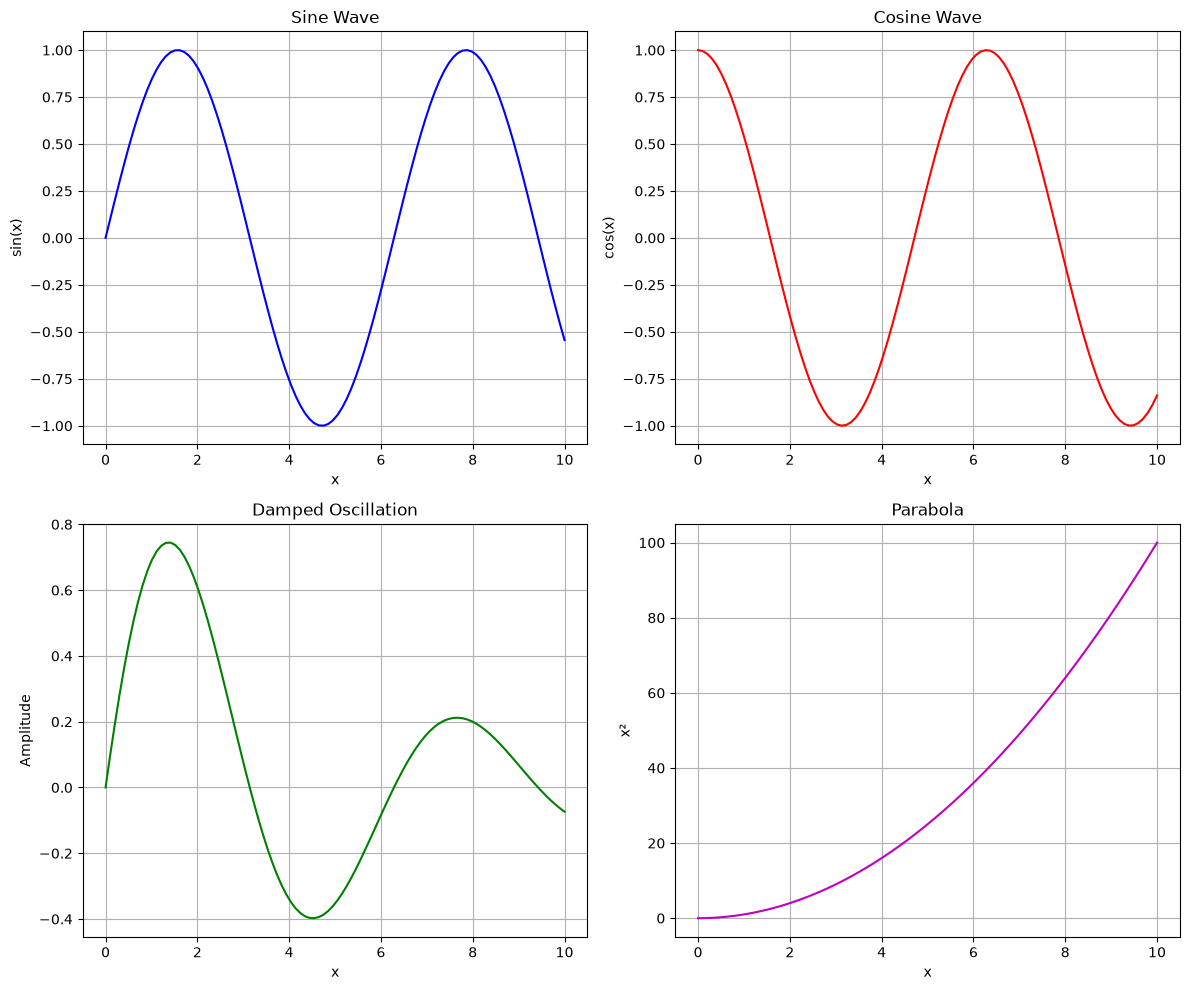
A.8.7 Customizing Plots
import matplotlib.pyplot as plt
import numpy as np

# Highly customized plot
x = np.linspace(0, 4*np.pi, 200)
y1 = np.sin(x)
y2 = np.sin(x + np.pi/4)

plt.figure(figsize=(12, 8))

# Create the plot
plt.plot(x, y1, color='#2E86AB', linewidth=2.5, linestyle='-',
         marker='o', markersize=4, markevery=20, label='sin(x)')
plt.plot(x, y2, color='#A23B72', linewidth=2.5, linestyle='--',
         marker='s', markersize=4, markevery=20, label='sin(x + π/4)')

# Customize the plot
plt.title('Customized Sine Waves', fontsize=18, fontweight='bold', pad=20)
plt.xlabel('Angle (radians)', fontsize=14, fontweight='bold')
plt.ylabel('Amplitude', fontsize=14, fontweight='bold')

# Customize axes
plt.xlim(0, 4*np.pi)
plt.ylim(-1.2, 1.2)
plt.xticks(np.arange(0, 4*np.pi + 0.1, np.pi/2),
           ['0', 'π/2', 'π', '3π/2', '2π', '5π/2', '3π', '7π/2', '4π'])
plt.yticks(np.arange(-1, 1.1, 0.5))

# Add grid and legend
plt.grid(True, alpha=0.3, linestyle='-', linewidth=0.5)
plt.legend(fontsize=12, loc='upper right', frameon=True, shadow=True)

# Add annotations
plt.annotate('Maximum', xy=(np.pi/2, 1), xytext=(np.pi/2, 1.3),
            arrowprops=dict(arrowstyle='->', color='red', lw=1.5),
            fontsize=12, ha='center')

plt.tight_layout()
plt.show()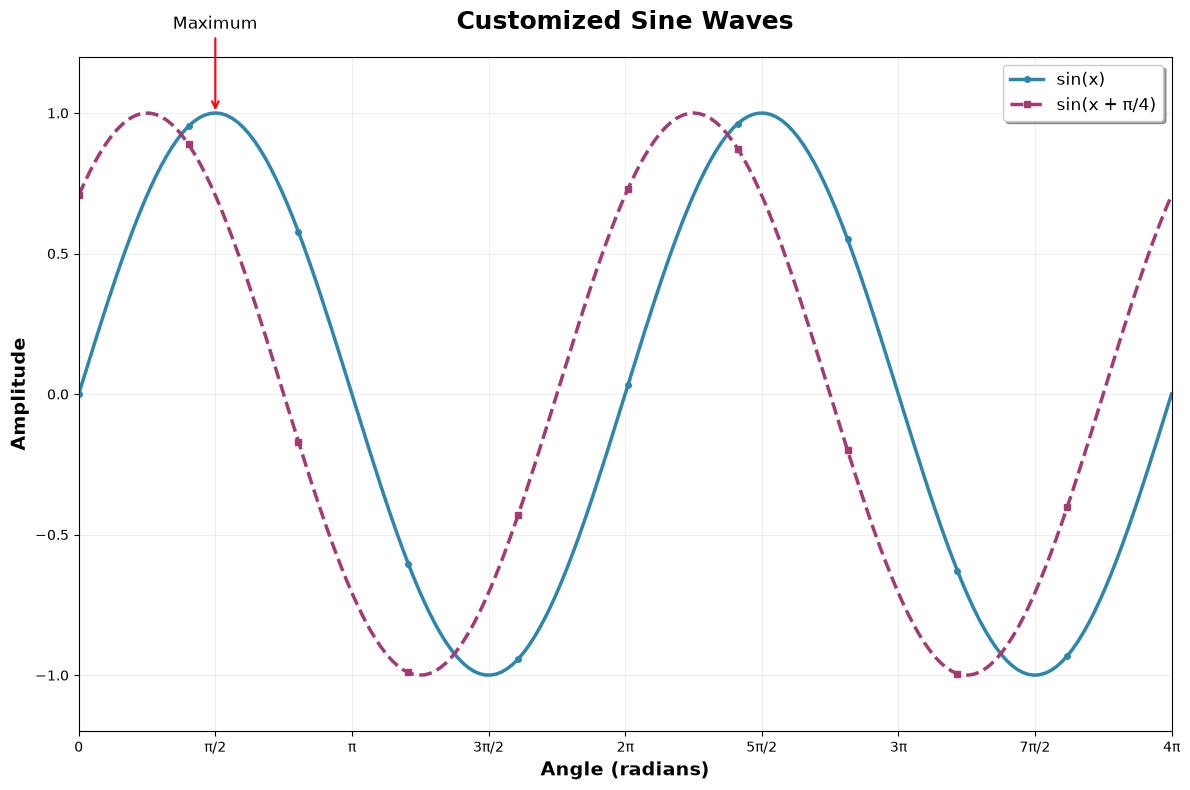
A.9 File Input/Output
A.9.1 Reading and Writing Text Files
# Writing to a file
data_to_write = """Sensor,Temperature,Humidity,Pressure
Sensor_A,23.5,65,1013.2
Sensor_B,24.1,62,1014.8
Sensor_C,22.8,68,1012.5
Sensor_D,25.0,60,1015.1"""

# Write data to file
with open('sensor_data.txt', 'w') as file:
    file.write(data_to_write)

print("Data written to file successfully!")

# Reading from a file
with open('sensor_data.txt', 'r') as file:
    content = file.read()
    print("File content:")
    print(content)

# Reading line by line
print("\nReading line by line:")
with open('sensor_data.txt', 'r') as file:
    for line_number, line in enumerate(file, 1):
        print(f"Line {line_number}: {line.strip()}")
Data written to file successfully!
File content:
Sensor,Temperature,Humidity,Pressure
Sensor_A,23.5,65,1013.2
Sensor_B,24.1,62,1014.8
Sensor_C,22.8,68,1012.5
Sensor_D,25.0,60,1015.1
Reading line by line:
Line 1: Sensor,Temperature,Humidity,Pressure
Line 2: Sensor_A,23.5,65,1013.2
Line 3: Sensor_B,24.1,62,1014.8
Line 4: Sensor_C,22.8,68,1012.5
Line 5: Sensor_D,25.0,60,1015.1
A.9.2 Working with CSV Files
import csv

# Writing CSV data
sensor_readings = [
    ['Time', 'Temperature', 'Pressure', 'Humidity'],
    ['00:00', 23.5, 1013.2, 65],
    ['01:00', 24.1, 1014.8, 62],
    ['02:00', 22.8, 1012.5, 68],
    ['03:00', 25.0, 1015.1, 60]
]

with open('readings.csv', 'w', newline='') as csvfile:
    writer = csv.writer(csvfile)
    writer.writerows(sensor_readings)

print("CSV file created successfully!")

# Reading CSV data
with open('readings.csv', 'r') as csvfile:
    reader = csv.reader(csvfile)
    headers = next(reader)  # Read header row
    print(f"Headers: {headers}")

    print("\nData rows:")
    for row in reader:
        print(row)

# Using DictReader for named access
print("\nUsing DictReader:")
with open('readings.csv', 'r') as csvfile:
    reader = csv.DictReader(csvfile)
    for row in reader:
        print(f"Time: {row['Time']}, Temperature: {row['Temperature']}°C")
CSV file created successfully!
Headers: ['Time', 'Temperature', 'Pressure', 'Humidity']
Data rows:
['00:00', '23.5', '1013.2', '65']
['01:00', '24.1', '1014.8', '62']
['02:00', '22.8', '1012.5', '68']
['03:00', '25.0', '1015.1', '60']
Using DictReader:
Time: 00:00, Temperature: 23.5°C
Time: 01:00, Temperature: 24.1°C
Time: 02:00, Temperature: 22.8°C
Time: 03:00, Temperature: 25.0°C
A.9.3 NumPy File Operations
import numpy as np

# Saving NumPy arrays
time_data = np.linspace(0, 10, 100)
sensor_data = np.sin(2 * np.pi * time_data) + 0.1 * np.random.normal(0, 1, 100)

# Save as binary file (.npy)
np.save('sensor_array.npy', sensor_data)
print("NumPy array saved as binary file!")

# Save as text file
data_combined = np.column_stack((time_data, sensor_data))
np.savetxt('sensor_data.txt', data_combined,
           header='Time Sensor_Reading', delimiter='\t', fmt='%.6f')
print("NumPy array saved as text file!")

# Loading NumPy arrays
loaded_binary = np.load('sensor_array.npy')
loaded_text = np.loadtxt('sensor_data.txt')

print(f"Loaded binary data shape: {loaded_binary.shape}")
print(f"Loaded text data shape: {loaded_text.shape}")
print(f"First 5 binary values: {loaded_binary[:5]}")
print(f"First 5 text rows:\n{loaded_text[:5]}")
NumPy array saved as binary file!
NumPy array saved as text file!
Loaded binary data shape: (100,)
Loaded text data shape: (100, 2)
First 5 binary values: [0.07783611 0.53778936 0.87308235 0.94466337 0.5500414 ]
First 5 text rows:
[[0. 0.077836]
[0.10101 0.537789]
[0.20202 0.873082]
[0.30303 0.944663]
[0.40404 0.550041]]
A.10 Error Handling
A.10.1 Try-Except Blocks
# Basic error handling
def safe_divide(a, b):
    try:
        result = a / b
        return result
    except ZeroDivisionError:
        print("Error: Cannot divide by zero!")
        return None
    except TypeError:
        print("Error: Invalid data types for division!")
        return None

# Test the function
print(safe_divide(10, 2))    # Normal case
print(safe_divide(10, 0))    # Division by zero
print(safe_divide(10, "a"))  # Type error

# Engineering example: Safe calculation
def calculate_stress(force, area):
    try:
        if area <= 0:
            raise ValueError("Area must be positive")

        stress = force / area
        return stress

    except ValueError as e:
        print(f"Value Error: {e}")
        return None
    except TypeError:
        print("Error: Force and area must be numbers")
        return None
    except Exception as e:
        print(f"Unexpected error: {e}")
        return None

# Test stress calculation
print(f"Stress: {calculate_stress(1000, 0.01)} Pa")
print(f"Stress: {calculate_stress(1000, 0)}")      # Invalid area
print(f"Stress: {calculate_stress('1000', 0.01)}")  # Invalid type
5.0
Error: Cannot divide by zero!
None
Error: Invalid data types for division!
None
Stress: 100000.0 Pa
Value Error: Area must be positive
Stress: None
Error: Force and area must be numbers
Stress: None
A.10.2 File Handling with Error Management
def read_sensor_data(filename):
    """Safely read sensor data from file"""
    try:
        with open(filename, 'r') as file:
            lines = file.readlines()

        # Process the data
        data = []
        for line_num, line in enumerate(lines[1:], 2):  # Skip header
            try:
                values = line.strip().split(',')
                temperature = float(values[1])
                pressure = float(values[2])
                data.append((temperature, pressure))
            except (ValueError, IndexError) as e:
                print(f"Warning: Error processing line {line_num}: {e}")
                continue

        return data

    except FileNotFoundError:
        print(f"Error: File '{filename}' not found")
        return []
    except PermissionError:
        print(f"Error: Permission denied to read '{filename}'")
        return []
    except Exception as e:
        print(f"Unexpected error reading file: {e}")
        return []

# Test file reading
data = read_sensor_data('sensor_data.txt')
if data:
    print(f"Successfully read {len(data)} data points")
    print(f"First 3 points: {data[:3]}")
else:
    print("No data read")
Output
Warning: Error processing line 2: list index out of range
Warning: Error processing line 3: list index out of range
Warning: Error processing line 4: list index out of range
Warning: Error processing line 5: list index out of range
Warning: Error processing line 6: list index out of range
Warning: Error processing line 7: list index out of range
Warning: Error processing line 8: list index out of range
Warning: Error processing line 9: list index out of range
Warning: Error processing line 10: list index out of range
Warning: Error processing line 11: list index out of range
Warning: Error processing line 12: list index out of range
Warning: Error processing line 13: list index out of range
Warning: Error processing line 14: list index out of range
Warning: Error processing line 15: list index out of range
Warning: Error processing line 16: list index out of range
Warning: Error processing line 17: list index out of range
Warning: Error processing line 18: list index out of range
Warning: Error processing line 19: list index out of range
Warning: Error processing line 20: list index out of range
Warning: Error processing line 21: list index out of range
Warning: Error processing line 22: list index out of range
Warning: Error processing line 23: list index out of range
Warning: Error processing line 24: list index out of range
Warning: Error processing line 25: list index out of range
Warning: Error processing line 26: list index out of range
Warning: Error processing line 27: list index out of range
Warning: Error processing line 28: list index out of range
Warning: Error processing line 29: list index out of range
Warning: Error processing line 30: list index out of range
Warning: Error processing line 31: list index out of range
Warning: Error processing line 32: list index out of range
Warning: Error processing line 33: list index out of range
Warning: Error processing line 34: list index out of range
Warning: Error processing line 35: list index out of range
Warning: Error processing line 36: list index out of range
Warning: Error processing line 37: list index out of range
Warning: Error processing line 38: list index out of range
Warning: Error processing line 39: list index out of range
Warning: Error processing line 40: list index out of range
Warning: Error processing line 41: list index out of range
Warning: Error processing line 42: list index out of range
Warning: Error processing line 43: list index out of range
Warning: Error processing line 44: list index out of range
Warning: Error processing line 45: list index out of range
Warning: Error processing line 46: list index out of range
Warning: Error processing line 47: list index out of range
Warning: Error processing line 48: list index out of range
Warning: Error processing line 49: list index out of range
Warning: Error processing line 50: list index out of range
Warning: Error processing line 51: list index out of range
Warning: Error processing line 52: list index out of range
Warning: Error processing line 53: list index out of range
Warning: Error processing line 54: list index out of range
Warning: Error processing line 55: list index out of range
Warning: Error processing line 56: list index out of range
Warning: Error processing line 57: list index out of range
Warning: Error processing line 58: list index out of range
Warning: Error processing line 59: list index out of range
Warning: Error processing line 60: list index out of range
Warning: Error processing line 61: list index out of range
Warning: Error processing line 62: list index out of range
Warning: Error processing line 63: list index out of range
Warning: Error processing line 64: list index out of range
Warning: Error processing line 65: list index out of range
Warning: Error processing line 66: list index out of range
Warning: Error processing line 67: list index out of range
Warning: Error processing line 68: list index out of range
Warning: Error processing line 69: list index out of range
Warning: Error processing line 70: list index out of range
Warning: Error processing line 71: list index out of range
Warning: Error processing line 72: list index out of range
Warning: Error processing line 73: list index out of range
Warning: Error processing line 74: list index out of range
Warning: Error processing line 75: list index out of range
Warning: Error processing line 76: list index out of range
Warning: Error processing line 77: list index out of range
Warning: Error processing line 78: list index out of range
Warning: Error processing line 79: list index out of range
Warning: Error processing line 80: list index out of range
Warning: Error processing line 81: list index out of range
Warning: Error processing line 82: list index out of range
Warning: Error processing line 83: list index out of range
Warning: Error processing line 84: list index out of range
Warning: Error processing line 85: list index out of range
Warning: Error processing line 86: list index out of range
Warning: Error processing line 87: list index out of range
Warning: Error processing line 88: list index out of range
Warning: Error processing line 89: list index out of range
Warning: Error processing line 90: list index out of range
Warning: Error processing line 91: list index out of range
Warning: Error processing line 92: list index out of range
Warning: Error processing line 93: list index out of range
Warning: Error processing line 94: list index out of range
Warning: Error processing line 95: list index out of range
Warning: Error processing line 96: list index out of range
Warning: Error processing line 97: list index out of range
Warning: Error processing line 98: list index out of range
Warning: Error processing line 99: list index out of range
Warning: Error processing line 100: list index out of range
Warning: Error processing line 101: list index out of range
No data read
A.11 Common Engineering Patterns
A.11.1 Data Processing Pipeline
import numpy as np
import matplotlib.pyplot as plt

def process_sensor_data(raw_data, filter_outliers=True, smooth_data=True):
    """
    Complete data processing pipeline for sensor data
    """
    # Step 1: Convert to NumPy array
    data = np.array(raw_data)
    print(f"Original data: {len(data)} points")

    # Step 2: Remove outliers (if requested)
    if filter_outliers:
        mean = np.mean(data)
        std = np.std(data)
        threshold = 3 * std

        outlier_mask = np.abs(data - mean) < threshold
        data = data[outlier_mask]
        print(f"After outlier removal: {len(data)} points")

    # Step 3: Smooth data (if requested)
    if smooth_data and len(data) > 5:
        # Simple moving average
        window_size = 5
        smoothed = []
        for i in range(len(data)):
            start = max(0, i - window_size//2)
            end = min(len(data), i + window_size//2 + 1)
            smoothed.append(np.mean(data[start:end]))
        data = np.array(smoothed)
        print("Data smoothed with moving average")

    return data

# Example usage
np.random.seed(42)
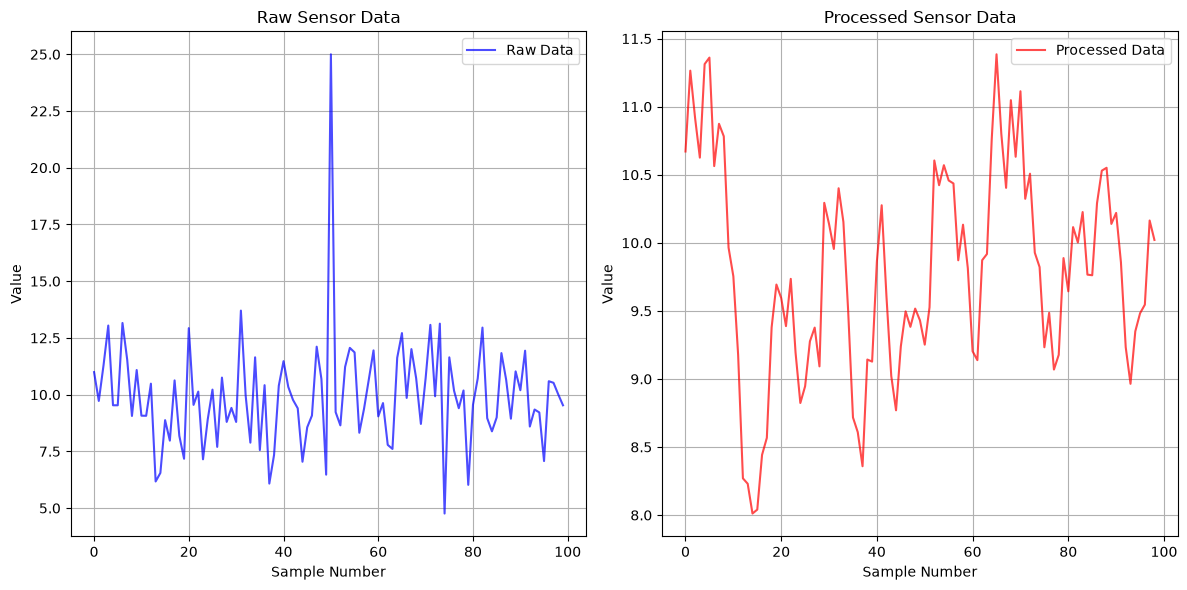
raw_measurements = np.random.normal(10, 2, 100)
raw_measurements[50] = 25  # Add an outlier

processed_data = process_sensor_data(raw_measurements)

# Visualize results
plt.figure(figsize=(12, 6))
plt.subplot(1, 2, 1)
plt.plot(raw_measurements, 'b-', alpha=0.7, label='Raw Data')
plt.title('Raw Sensor Data')
plt.xlabel('Sample Number')
plt.ylabel('Value')
plt.legend()
plt.grid(True)

plt.subplot(1, 2, 2)
plt.plot(processed_data, 'r-', alpha=0.7, label='Processed Data')
plt.title('Processed Sensor Data')
plt.xlabel('Sample Number')
plt.ylabel('Value')
plt.legend()
plt.grid(True)

plt.tight_layout()
plt.show()
Original data: 100 points
After outlier removal: 99 points
Data smoothed with moving average
A.11.2 Simple Statistics Calculator
import numpy as np

class StatisticsCalculator:
    """A class for calculating common engineering statistics"""

    def __init__(self, data):
        self.data = np.array(data)
        self.n = len(self.data)

    def mean(self):
        return np.mean(self.data)

    def standard_deviation(self):
        return np.std(self.data, ddof=1)  # Sample standard deviation

    def coefficient_of_variation(self):
        return self.standard_deviation() / self.mean() * 100

    def confidence_interval(self, confidence=0.95):
        """Calculate confidence interval for the mean"""
        from scipy import stats

        mean = self.mean()
        std_err = self.standard_deviation() / np.sqrt(self.n)

        # t-distribution for small samples
        alpha = 1 - confidence
        t_value = stats.t.ppf(1 - alpha/2, self.n - 1)

        margin_error = t_value * std_err
        return mean - margin_error, mean + margin_error

    def summary_report(self):
        """Generate a comprehensive statistics report"""
        print("=" * 50)
        print("STATISTICAL ANALYSIS REPORT")
        print("=" * 50)
        print(f"Sample size: {self.n}")
        print(f"Mean: {self.mean():.4f}")
        print(f"Standard deviation: {self.standard_deviation():.4f}")
        print(f"Minimum: {np.min(self.data):.4f}")
        print(f"Maximum: {np.max(self.data):.4f}")
        print(f"Range: {np.max(self.data) - np.min(self.data):.4f}")
        print(f"Coefficient of variation: {self.coefficient_of_variation():.2f}%")

        # Confidence interval
        ci_lower, ci_upper = self.confidence_interval()
        print(f"95% Confidence interval: [{ci_lower:.4f}, {ci_upper:.4f}]")
        print("=" * 50)

# Example usage
test_measurements = [12.1, 11.8, 12.3, 11.9, 12.0, 12.2, 11.7, 12.4, 11.6, 12.1]
stats_calc = StatisticsCalculator(test_measurements)
stats_calc.summary_report()
==================================================
STATISTICAL ANALYSIS REPORT
==================================================
Sample size: 10
Mean: 12.0100
Standard deviation: 0.2601
Minimum: 11.6000
Maximum: 12.4000
Range: 0.8000
Coefficient of variation: 2.17%
95% Confidence interval: [11.8239, 12.1961]
==================================================
A.11.3 Unit Converter
class EngineeringUnitConverter:
    """Convert between common engineering units"""

    # Conversion factors to base SI units
    LENGTH_FACTORS = {
        'm': 1.0,
        'mm': 0.001,
        'cm': 0.01,
        'km': 1000.0,
        'in': 0.0254,
        'ft': 0.3048
    }

    PRESSURE_FACTORS = {
        'Pa': 1.0,
        'kPa': 1000.0,
        'MPa': 1e6,
        'psi': 6895.0,
        'bar': 1e5,
        'atm': 101325.0
    }

    @classmethod
    def convert_length(cls, value, from_unit, to_unit):
        """Convert between length units"""
        if from_unit not in cls.LENGTH_FACTORS:
            raise ValueError(f"Unknown length unit: {from_unit}")
        if to_unit not in cls.LENGTH_FACTORS:
            raise ValueError(f"Unknown length unit: {to_unit}")

        # Convert to meters, then to target unit
        meters = value * cls.LENGTH_FACTORS[from_unit]
        result = meters / cls.LENGTH_FACTORS[to_unit]
        return result

    @classmethod
    def convert_pressure(cls, value, from_unit, to_unit):
        """Convert between pressure units"""
        if from_unit not in cls.PRESSURE_FACTORS:
            raise ValueError(f"Unknown pressure unit: {from_unit}")
        if to_unit not in cls.PRESSURE_FACTORS:
            raise ValueError(f"Unknown pressure unit: {to_unit}")

        # Convert to Pascals, then to target unit
        pascals = value * cls.PRESSURE_FACTORS[from_unit]
        result = pascals / cls.PRESSURE_FACTORS[to_unit]
        return result

# Example usage
converter = EngineeringUnitConverter()

# Length conversions
length_m = 2.5
length_ft = converter.convert_length(length_m, 'm', 'ft')
length_in = converter.convert_length(length_m, 'm', 'in')

print(f"Length conversions:")
print(f"{length_m} m = {length_ft:.2f} ft = {length_in:.1f} in")

# Pressure conversions
pressure_mpa = 250
pressure_psi = converter.convert_pressure(pressure_mpa, 'MPa', 'psi')
pressure_bar = converter.convert_pressure(pressure_mpa, 'MPa', 'bar')

print(f"\nPressure conversions:")
print(f"{pressure_mpa} MPa = {pressure_psi:.0f} psi = {pressure_bar:.0f} bar")
Length conversions:
2.5 m = 8.20 ft = 98.4 in
Pressure conversions:
250 MPa = 36258 psi = 2500 bar
A.12 Best Practices and Tips
A.12.1 Code Organization
import numpy as np

# Good practices for code organization

# 1. Use meaningful variable names
sensor_temperature = 23.5  # Good
t = 23.5                   # Bad

# 2. Add comments for complex operations
# Calculate the natural frequency of a cantilever beam
# f = (λ²/2π) * sqrt(EI/ρAL⁴)
length = 2.0  # m
elastic_modulus = 200e9  # Pa
moment_inertia = 8.33e-6  # m⁴
density = 7850  # kg/m³
area = 0.01  # m²

lambda_coeff = 1.875  # First mode eigenvalue
natural_frequency = (lambda_coeff**2 / (2 * np.pi)) * \
                   np.sqrt(elastic_modulus * moment_inertia /
                          (density * area * length**4))

# 3. Use functions for repeated operations
def beam_natural_frequency(length, E, I, rho, A, mode=1):
    """
    Calculate natural frequency of cantilever beam

    Parameters:
    length (float): beam length in meters
    E (float): elastic modulus in Pa
    I (float): moment of inertia in m⁴
    rho (float): density in kg/m³
    A (float): cross-sectional area in m²
    mode (int): mode number (1, 2, 3, ...)

    Returns:
    float: natural frequency in Hz
    """
    # Eigenvalues for first few modes
    eigenvalues = [1.875, 4.694, 7.855, 10.996]

    if mode > len(eigenvalues):
        raise ValueError(f"Mode {mode} not supported")

    lambda_n = eigenvalues[mode - 1]
    frequency = (lambda_n**2 / (2 * np.pi)) * \
                np.sqrt(E * I / (rho * A * length**4))

    return frequency

# Example usage
freq_1 = beam_natural_frequency(2.0, 200e9, 8.33e-6, 7850, 0.01, 1)
print(f"First natural frequency: {freq_1:.2f} Hz")
First natural frequency: 20.38 Hz
A.12.2 Debugging Tips
# Debugging techniques

def debug_calculation(force, area, safety_factor_required=2.0):
    """Example function with debugging prints"""

    print(f"DEBUG: Input force = {force} N")
    print(f"DEBUG: Input area = {area} m²")

    # Check inputs
    if area <= 0:
        print("ERROR: Area must be positive")
        return None

    # Calculate stress
    stress = force / area
    print(f"DEBUG: Calculated stress = {stress} Pa = {stress/1e6:.2f} MPa")

    # Material properties (example)
    yield_strength = 250e6  # Pa
    print(f"DEBUG: Material yield strength = {yield_strength/1e6} MPa")

    # Calculate safety factor
    actual_safety_factor = yield_strength / stress
    print(f"DEBUG: Actual safety factor = {actual_safety_factor:.2f}")

    # Check safety
    is_safe = actual_safety_factor >= safety_factor_required
    print(f"DEBUG: Is safe? {is_safe}")

    return {
        'stress': stress,
        'safety_factor': actual_safety_factor,
        'is_safe': is_safe
    }

# Test the function
result = debug_calculation(10000, 0.01)
print(f"\nFinal result: {result}")
DEBUG: Input force = 10000 N
DEBUG: Input area = 0.01 m²
DEBUG: Calculated stress = 1000000.0 Pa = 1.00 MPa
DEBUG: Material yield strength = 250.0 MPa
DEBUG: Actual safety factor = 250.00
DEBUG: Is safe? True
Final result: {'stress': 1000000.0, 'safety_factor': 250.0, 'is_safe': True}
A.12.3 Performance Tips
# Performance optimization tips

# 1. Use NumPy for numerical operations (much faster than pure Python)
import time

# Slow Python loop
def python_loop_calculation(n):
    start_time = time.time()
    result = []
    for i in range(n):
        result.append(i**2 + 2*i + 1)
    end_time = time.time()
    return result, end_time - start_time

# Fast NumPy operation
def numpy_calculation(n):
    start_time = time.time()
    i = np.arange(n)
    result = i**2 + 2*i + 1
    end_time = time.time()
    return result, end_time - start_time

n = 100000
python_result, python_time = python_loop_calculation(n)
numpy_result, numpy_time = numpy_calculation(n)

print(f"Python loop time: {python_time:.4f} seconds")
print(f"NumPy time: {numpy_time:.4f} seconds")
if numpy_time > 0:
    print(f"NumPy is {python_time/numpy_time:.1f}x faster!")
else:
    print("NumPy time is too small to measure accurately")

# 2. Preallocate arrays when possible
def slow_array_building(n):
    result = []
    for i in range(n):
        result.append(i**2)
    return np.array(result)

def fast_array_building(n):
    result = np.zeros(n)
    for i in range(n):
        result[i] = i**2
    return result

def fastest_array_building(n):
    i = np.arange(n)
    return i**2

# Time the different approaches for demonstration
n = 10000
print(f"\nArray building comparison for {n} elements:")
print("Method 1: List append + convert")
print("Method 2: Preallocated array")
print("Method 3: Vectorized operation (fastest)")
Python loop time: 0.0130 seconds
NumPy time: 0.0017 seconds
NumPy is 7.9x faster!
Array building comparison for 10000 elements:
Method 1: List append + convert
Method 2: Preallocated array
Method 3: Vectorized operation (fastest)
A.13 Summary and Next Steps
Key Concepts Covered
You’ve learned the essential Python programming concepts needed for engineering applications:
Variables and Data Types: Numbers, strings, booleans
Control Structures: if/else, for loops, while loops
Functions: Creating reusable code blocks
Data Structures: Lists, dictionaries, tuples
NumPy: Efficient numerical arrays and operations
Matplotlib: Data visualization and plotting
File I/O: Reading and writing data files
Error Handling: Managing and preventing errors
Engineering Patterns: Common code structures for engineering problems
Practice Exercises
To reinforce your learning, try these exercises:
# Exercise 1: Temperature converter
def celsius_to_fahrenheit(celsius):
    # Your code here
    pass

def fahrenheit_to_celsius(fahrenheit):
    # Your code here
    pass

# Exercise 2: Beam deflection calculator
def beam_deflection(force, length, elastic_modulus, moment_inertia):
    """
    Calculate maximum deflection of simply supported beam with center load
    δ = FL³/(48EI)
    """
    # Your code here
    pass

# Exercise 3: Data analysis
def analyze_measurements(data_file):
    """
    Read measurement data from file and calculate:
    - Mean, standard deviation
    - Maximum, minimum
    - Create histogram plot
    """
    # Your code here
    pass

# Exercise 4: Signal generator
def generate_signal(frequency, amplitude, duration, sampling_rate, noise_level=0):
    """
    Generate a sinusoidal signal with optional noise
    Plot the signal and its frequency spectrum
    """
    # Your code here
    pass
Recommended Learning Path
Practice basic syntax with simple calculations
Work with real engineering data using NumPy and Matplotlib
Learn additional libraries:
SciPy: Advanced scientific computing
Pandas: Data manipulation and analysis
SymPy: Symbolic mathematics
Apply to your field: Use Python for your specific engineering problems
Resources for Continued Learning
Official Python Tutorial: python.org/tutorial
NumPy Documentation: numpy.org
Matplotlib Gallery: matplotlib
.org /gallery SciPy Lectures: scipy-lectures.org
Engineering Examples: Real-world applications in your field
Remember: The best way to learn programming is by doing. Start with simple problems and gradually work up to more complex engineering applications!
This concludes Appendix A: Python Programming Essentials for Engineers. You now have the foundation needed to tackle the advanced topics in the main course chapters.