1Overview
In bridge SHM, sensors continuously collect measurements that vary over time. These time-varying signals contain information about structural behavior, environmental conditions, and potential damage. Time-domain signal processing analyzes how a signal evolves over time without transforming it to other domains and is often the first step when examining raw sensor data. This chapter covers techniques for preprocessing and interpreting time-series data (e.g., acceleration or strain measurements) directly in the time domain. These time-domain fundamentals form the foundation for the more advanced analysis methods covered in subsequent chapters.
2What is a Time Series?
A time series is a sequence of data points indexed in time order, typically collected at equally spaced intervals. For SHM applications, common time series include:
Acceleration data: Measured in m/s² or g-units from accelerometers
Strain data: Measured in microstrain () from strain gauges
Displacement data: Measured in mm or cm from displacement sensors
Temperature data: Environmental measurements affecting structural response
In mathematical terms, a digital (or discrete-time) signal is a sequence of numbers like of length obtained by sampling a continuous-time signal at equally spaced time instants. If the sampling period is seconds, then the sampling frequency is hertz, and the -th sample at time instant is
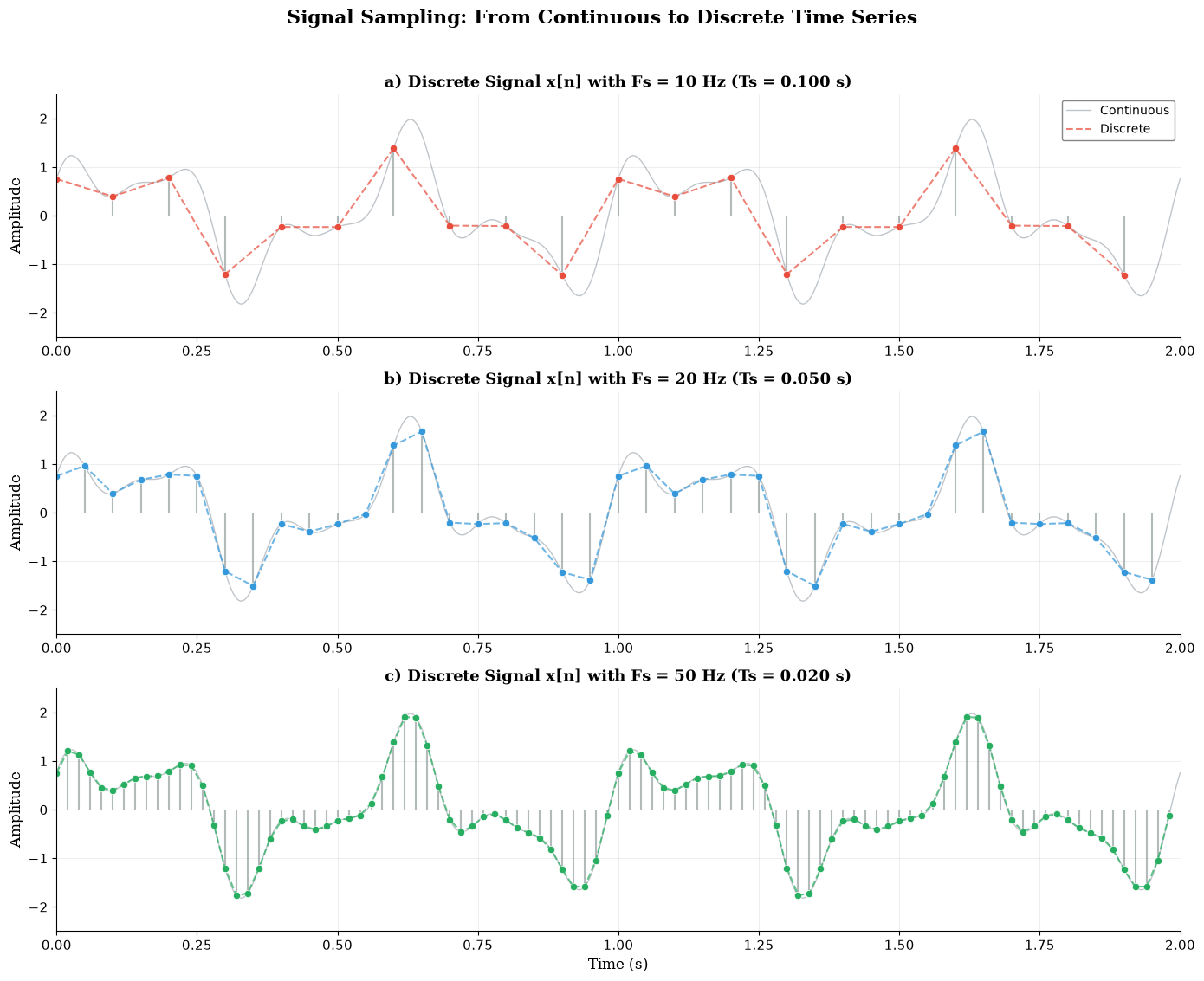
Signal sampling from continuous to discrete time series.
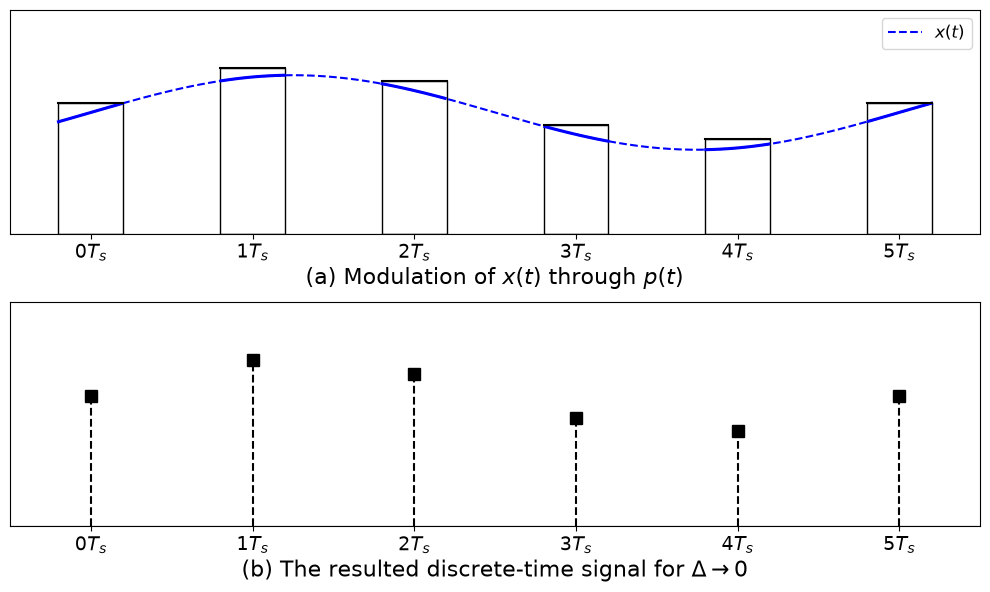
2.1Pulse amplitude modulation
The sampling operation can be represented in continuous time using an impulse (Dirac-comb) model. The sampled digital signal is
This idealizes pulse-amplitude modulation by infinitely short pulses whose areas equal the samples.
3Basic principles of sampling
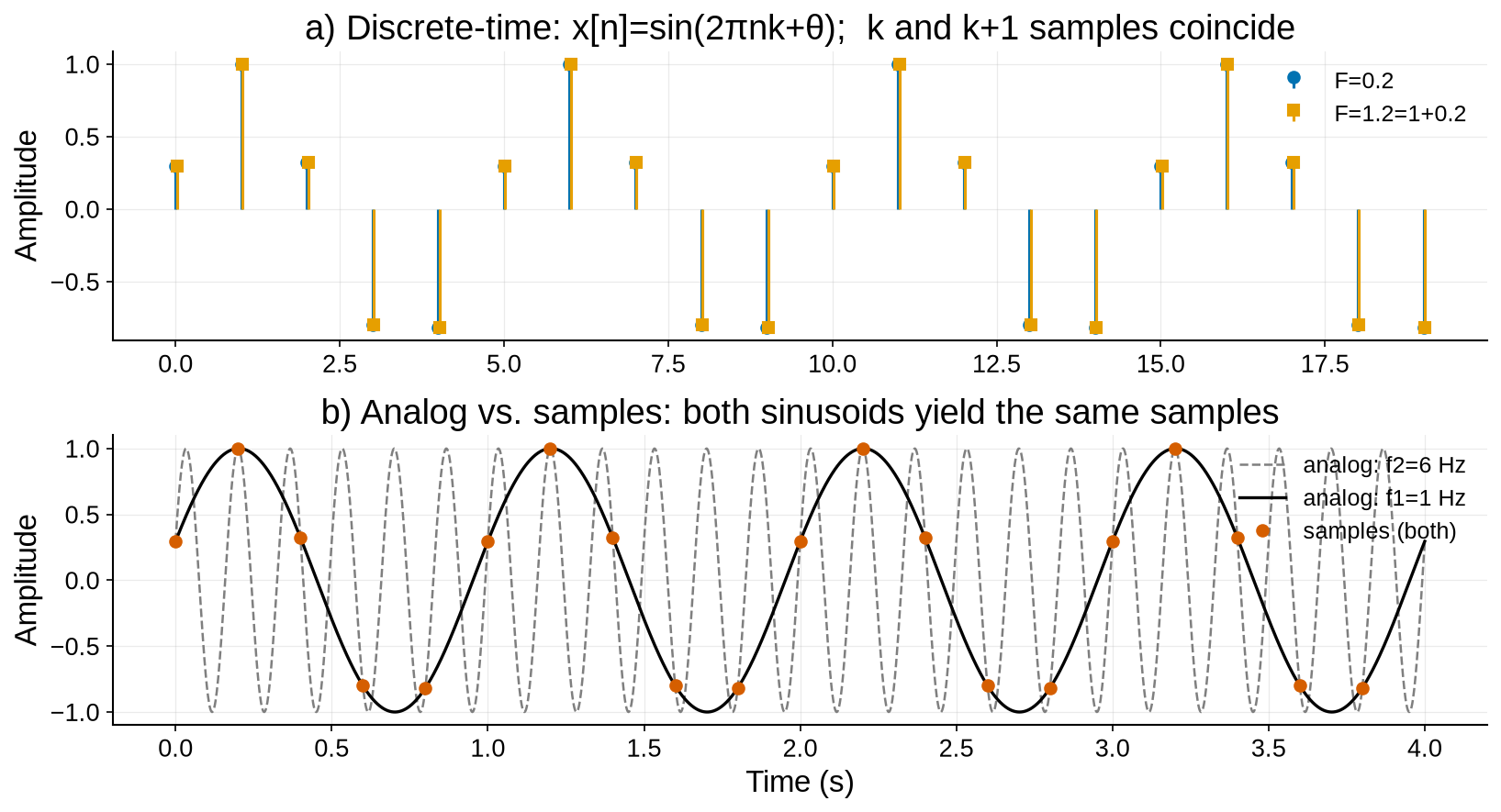
Discrete-time analysis uses two frequency units in parallel: analog frequency (Hz) with (rad/s), and digital (normalized) frequency (cycles/sample) with (rad/sample). Sampling the analog sinusoid at rate gives the digital sinusoid
Because for any integer , digital sinusoids whose frequencies differ by an integer multiple of (equivalently, whose differ by an integer) are identical. A unique digital frequency can therefore be restricted to the unit band
If the analog signal is bandlimited to , ideal alias-free sampling requires the sampling theorem
The boundary is the Nyquist frequency; sampling above this rate prevents the spectral replicas generated by sampling from overlapping.
3.1Aliasing
If (5) is violated, different analog sinusoids collapse to the same digital sinusoid: aliasing.
4Components of Time-Series Data
A time-series can be decomposed into underlying components: trend, seasonality, cyclic variations, and irregular (noise) components. Identifying these components aids preprocessing (e.g., removing trends or seasonal effects) and correct data interpretation. Consider a single foil strain gauge mounted along the girder axis at midspan on the bottom flange of a simply supported steel bridge. Under positive bending from traffic, this location is typically in tension. We express strain in microstrain (). For context, a common serviceability target is to keep peak service strains near or below about 0.12% ≈ 1200 ; “yield-level” strain depends on the steel grade: with GPa, so for MPa, (1250–1750 ). Thus, a generic 0.20% (2000 ) line is above yield for many steels and should be treated as an illustrative “do-not-exceed” proxy rather than a universal safety limit.
4.1Additive model
The measured strain is commonly treated as an additive sum of four components,
where is trend, is seasonal (regular, fixed-period patterns), is cyclic (repetitive but not strictly periodic), and is the residual. This additive model is appropriate because superposition is a good approximation for strain in linear elastic service.
4.1.1Trend, 
The trend is the slow, long-term movement of the baseline strain under comparable environmental and operational conditions. In a bridge application it may creep upward over months if average traffic grows, if stiffness is slowly lost (e.g., fatigue cracking or corrosion reducing section), or if supports settle. The trend evolves on the scale of weeks to years and is usually estimated by a smooth filter (e.g., long moving average or LOESS). Detrending prevents gradual, expected drift from confounding anomaly detection.
4.1.2Seasonality, 
Seasonality repeats with a known period and must not be mistaken for damage when its amplitude is within expected limits. Two drivers dominate for a midspan bottom-flange gauge:
Temperature: apparent/mechanical thermal strain follows with /°C for steel. A day–night swing of 30 °C therefore produces on the order of change, large enough to shift the baseline strain but still normal if combined peaks remain below service limits. Uniform temperature change mainly produces free expansion (little stress in an unconstrained member) but the gauge still reports apparent strain; through-depth thermal gradients add curvature and thus real bending strain at the flange.
Regular usage cycles: diurnal rush-hour loading and weekday/weekend differences repeat predictably (periods of 24 h and 7 d). For anomaly detection, these patterns should be modeled and removed (or conditioned on: |T, S$) so the SHM system does not alarm on normal daily or seasonal swings. For fatigue assessment, the magnitude and count of these seasonal cycles are directly relevant and should be retained for damage accumulation calculations (e.g., rainflow + S-N).
4.1.3Cyclic, 
Cyclic variations are repeatable but not locked to a fixed period. Think of school terms, harvest seasons, tourist waves, or medium-term detours that temporarily reroute trucks. Their amplitude and timing wander; forcing them into the seasonal template will distort and inflate residuals. Instead, capture them as a separate slow, quasi-periodic component (often via a broader-band smoother than ).
4.1.4Residual, 
After explaining , , and , the remainder contains high-frequency noise, unmodeled short events (single heavy-truck bursts, braking near the gauge), and truly unusual behavior. This is where sudden, non-recurring changes appear, so robust outlier detection and event logic are applied to . In contrast to trend shifts, residual spikes are brief and often sparse. Always guard against false alarms from sensor faults or temperature-induced zero-shifts by cross-checking with temperature channels and neighboring sensors.
The following figure shows the decomposition of midspan bottom-flange strain time-series data from a simply supported bridge girder into its underlying components.
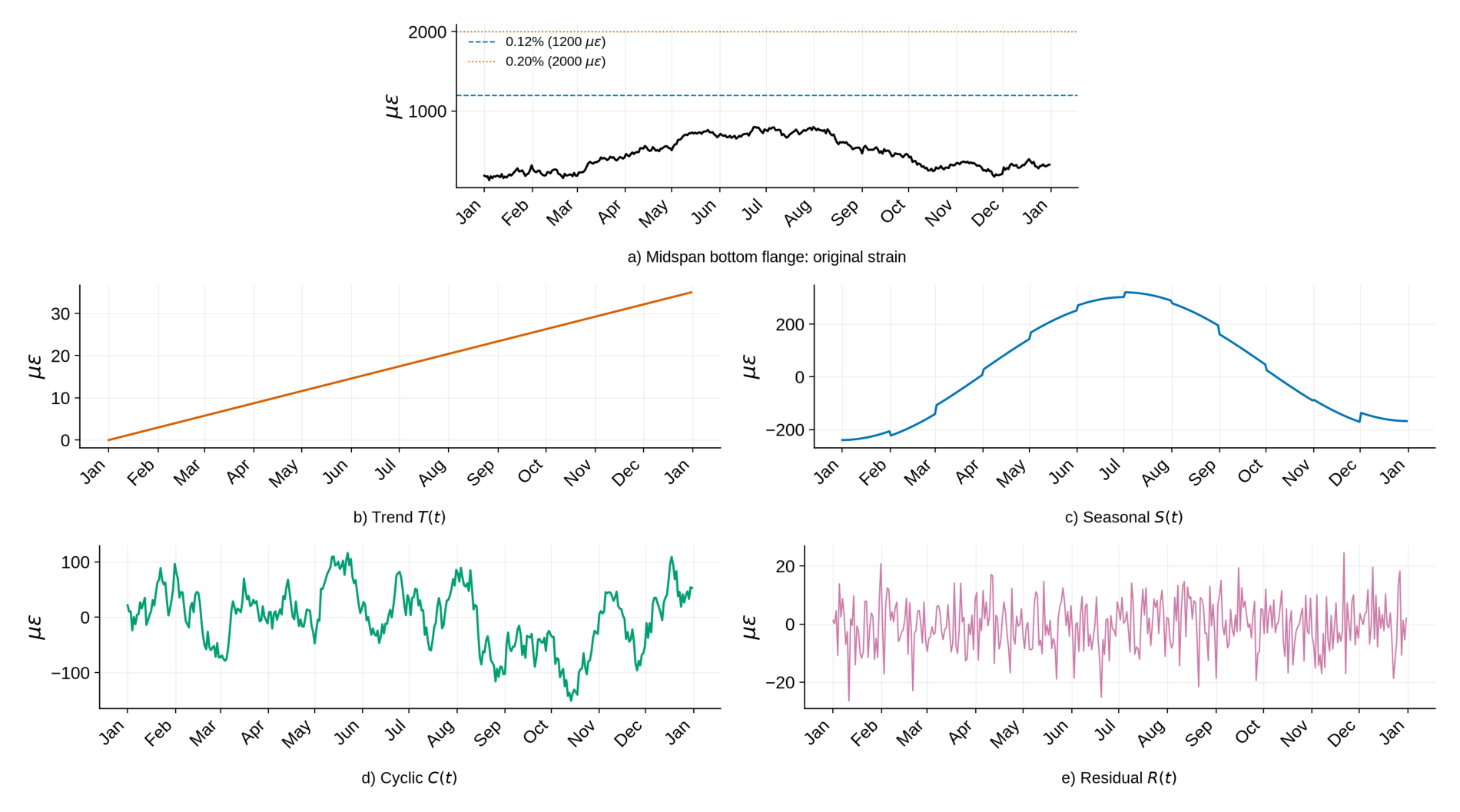
Figure 4:Decomposition of measured strain at the midspan bottom flange of a simply supported bridge girder.
4.2Multiplicative models
In some time-series, the amplitude of periodic variation grows or shrinks with the overall level. In those cases a multiplicative model gives a cleaner separation of structure and noise than an additive model:
When to prefer multiplicative over additive:
Heteroscedasticity is present (variance rises with the mean)
Effects are naturally proportional (e.g., “+15% summer uplift”)
Seasonality is stable in ratios after dividing out the level.
For midspan bottom-flange strain, the additive model is often adequate because elastic strains superpose linearly. The multiplicative view is useful when analyzing relative strain (percent of a baseline) or when operational influences scale the amplitude (e.g., warmer seasons and heavier traffic both raise the baseline and the size of daily swings). The multiplicative model is log-additive:
The same tools used for additive decomposition (moving averages, LOESS, STL, harmonic regression) apply in log space; exponentiate the components afterward (optionally with a small log-normal bias correction) for interpretation and alarm setting.
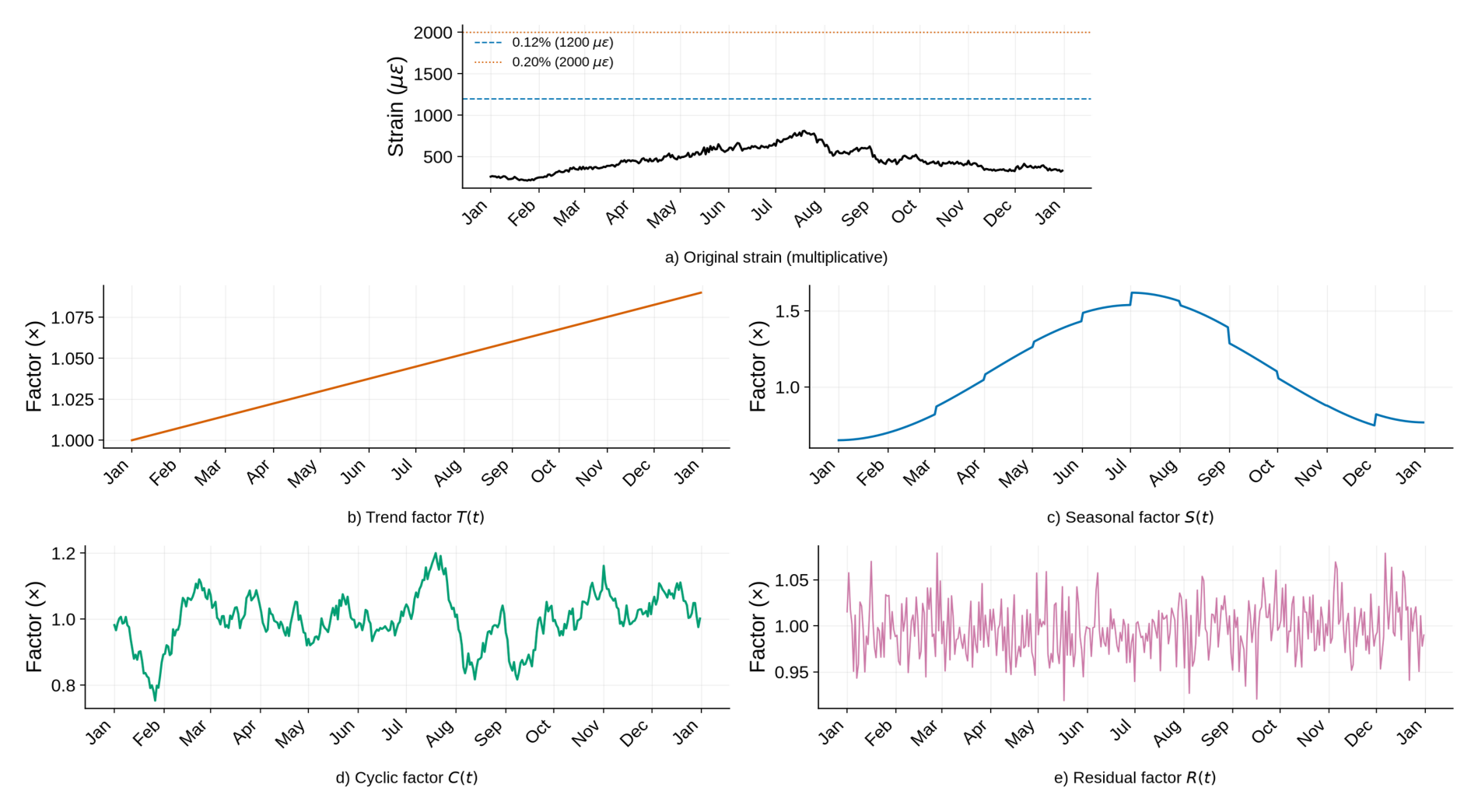
Figure 5:Multiplicative decomposition of measured strain at the midspan bottom flange of a simply supported bridge girder.
4.3Implementation of the methods
Decomposition proceeds as follows: estimate a smooth trend, remove it, extract the periodic component over the relevant cycle, and isolate the residual. The steps in Algorithm 1 specify when to choose additive vs. multiplicative models and how to validate the residual as noise.
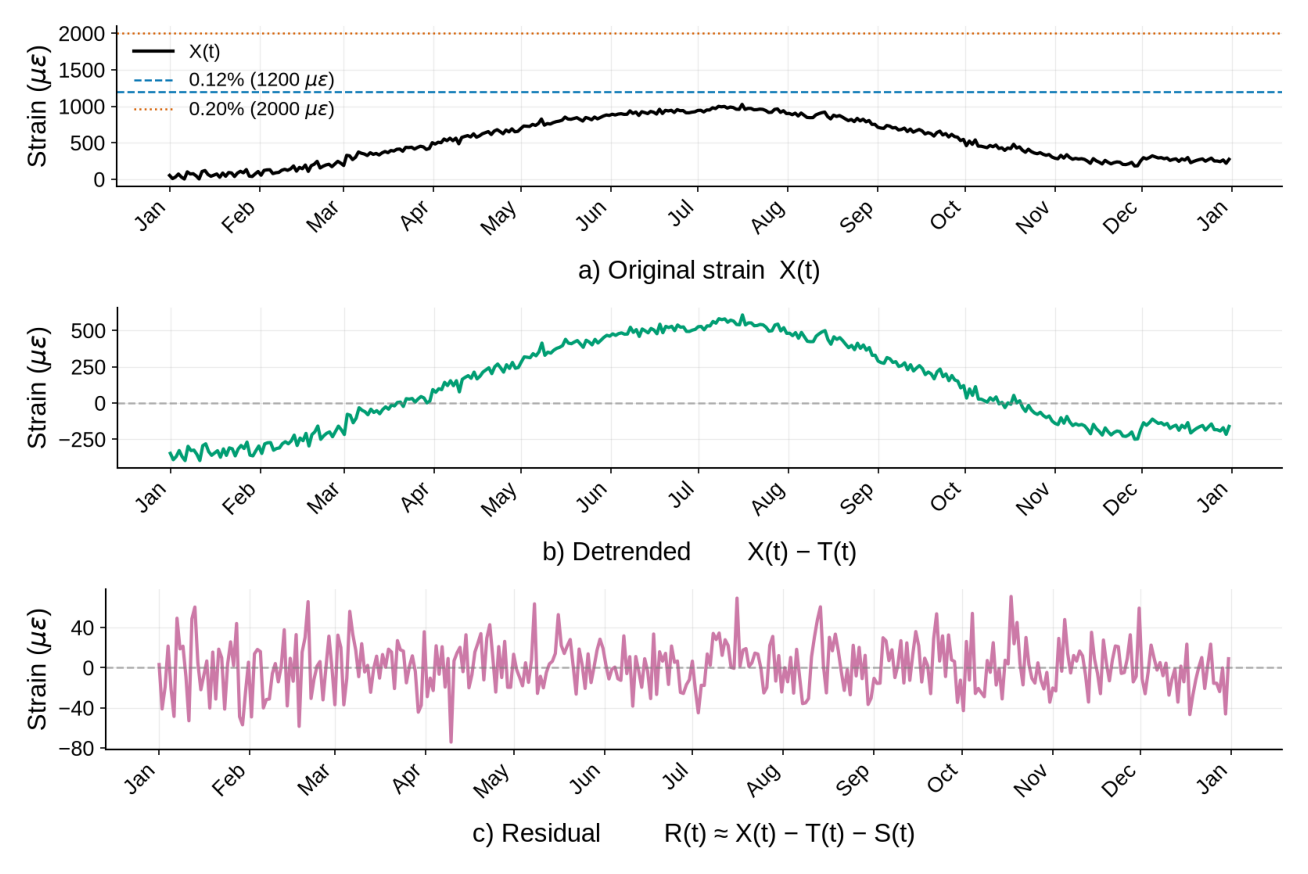
Figure 6:Additive decomposition of midspan bottom-flange strain (no cyclic): original X(t), detrended X(t)-T(t), and residual R(t).
5Detrending
Detrending removes a known or modeled trend from a time-series so that analysis can focus on the fluctuations of interest. In bridge SHM, trends may arise from environmental effects or long-term structural changes. When tracking slow deterioration the trend itself is of interest; otherwise, separating the slowly-varying component from the dynamic response is the goal.
5.1Subtracting the mean
The simplest detrend is removing the constant offset (mean). For many vibration signals this is done by default (AC coupling), since the analysis focuses on oscillations around zero. Subtracting the mean produces a zero-average time-series, which many downstream analyses require.
Source
import numpy as np, pandas as pd, matplotlib.pyplot as plt

# Load the saved data
data_dir = "chapters/ch03/ch03_data"
mean_data_file = os.path.join(data_dir, "mean_detrend_data.npy")
mean_time_file = os.path.join(data_dir, "mean_detrend_time.npy")

X = np.load(mean_data_file)
t = np.load(mean_time_file)

# =================== DETRENDING STEPS ==================
mu = np.mean(X)             # constant trend (the mean)
X_detr = X - mu

# =================== PLOT ==============================
fig, axs = plt.subplots(2, 1, figsize=(11, 6), sharex=True)

axs[0].plot(t, X, color=COL["black"], lw=2.0, label="X(t) original")
axs[0].hlines(mu, t[0], t[-1], color=COL["vermillion"], ls="--", lw=1.6, label="Mean (trend)")
axs[0].set_ylabel(r"Strain ($\mu\varepsilon$)")
axs[0].legend()
style_time_axes(axs[0])
axs[0].set_title("a) Original with mean trend")

axs[1].plot(t, X_detr, color=COL["blue"], lw=2.0)
axs[1].axhline(0, color=COL["grey"], ls="--", lw=1.2, alpha=0.6)
axs[1].set_ylabel(r"Strain ($\mu\varepsilon$)")
style_time_axes(axs[1])
axs[1].set_title("b) Detrended: X(t) − mean(X)")

plt.xlabel("Time")
plt.tight_layout()
plt.show()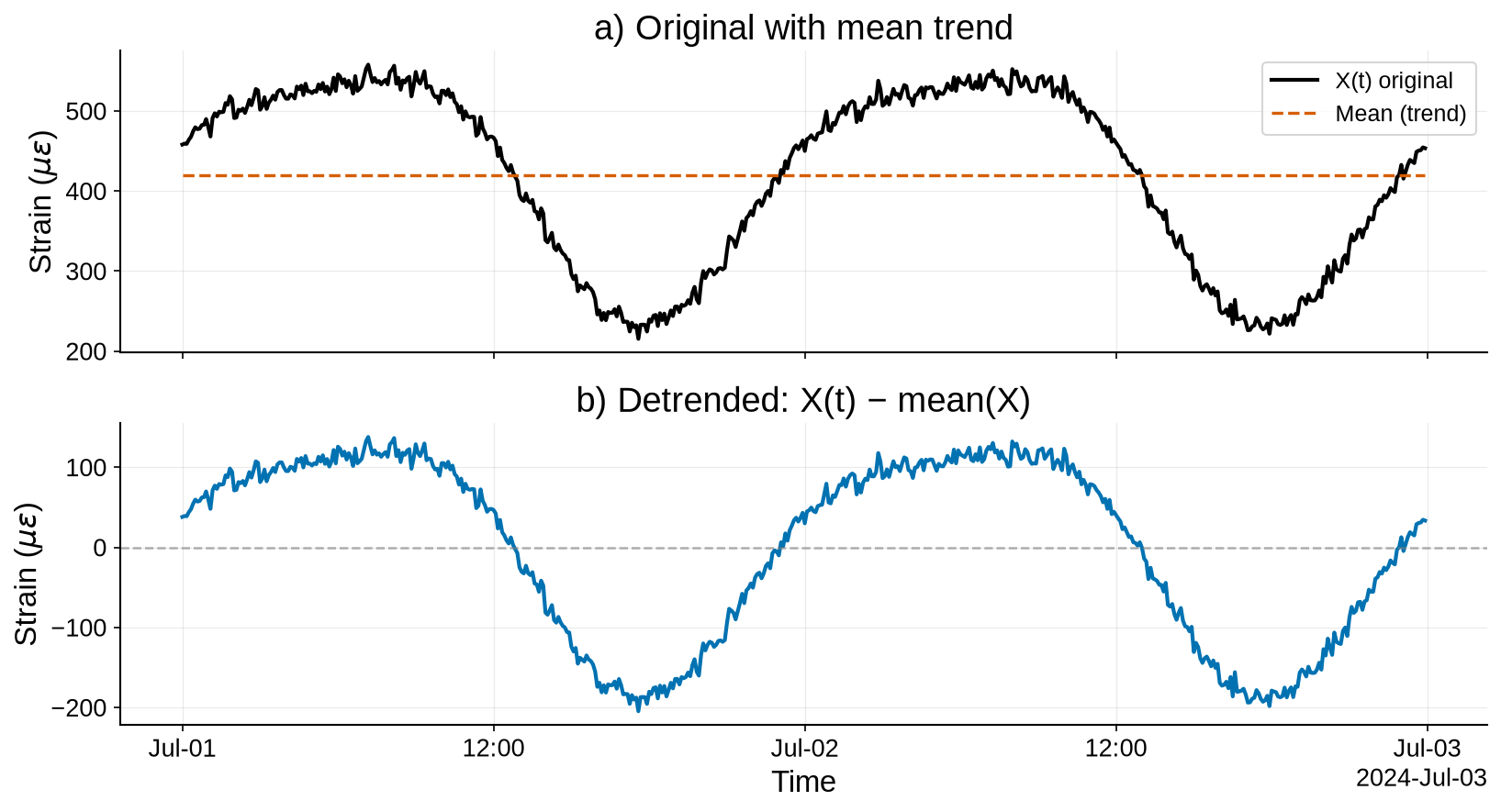
Figure 7:Detrending by subtracting the mean (constant offset) from a realistic 48-hour midspan bottom-flange strain record.
5.2Linear detrend
When the data has an approximately linear trend, fit a straight line (least squares) to the data and subtract it. This leaves the residual fluctuations around that line. For example, bridge strain data over a day may show a roughly linear increase due to a temperature rise from morning to afternoon; removing that linear component highlights other deviations.
Source
import numpy as np, pandas as pd, matplotlib.pyplot as plt

# Load the saved data
linear_data_file = os.path.join(data_dir, "linear_detrend_data.npy")
linear_time_file = os.path.join(data_dir, "linear_detrend_time.npy")

X = np.load(linear_data_file)
t = np.load(linear_time_file)
n = len(t)

# =================== DETRENDING STEPS ==================
x = np.arange(n)
coeff = np.polyfit(x, X, deg=1)                     # slope & intercept
trend = np.polyval(coeff, x)
X_detr = X - trend

# =================== PLOT ==============================
fig, axs = plt.subplots(2, 1, figsize=(11, 6), sharex=True)

axs[0].plot(t, X, color=COL["black"], lw=2.0, label="X(t) original")
axs[0].plot(t, trend, color=COL["orange"], lw=2.0, ls="--", label="Linear trend")
axs[0].set_ylabel(r"Strain ($\mu\varepsilon$)")
axs[0].legend()
style_time_axes(axs[0])
axs[0].set_title("a) Original with linear trend")

axs[1].plot(t, X_detr, color=COL["blue"], lw=2.0)
axs[1].axhline(0, color=COL["grey"], ls="--", lw=1.2, alpha=0.6)
axs[1].set_ylabel(r"Strain ($\mu\varepsilon$)")
style_time_axes(axs[1])
axs[1].set_title("b) Detrended: X(t) − linear_fit(t)")

plt.xlabel("Time")
plt.tight_layout()
plt.show()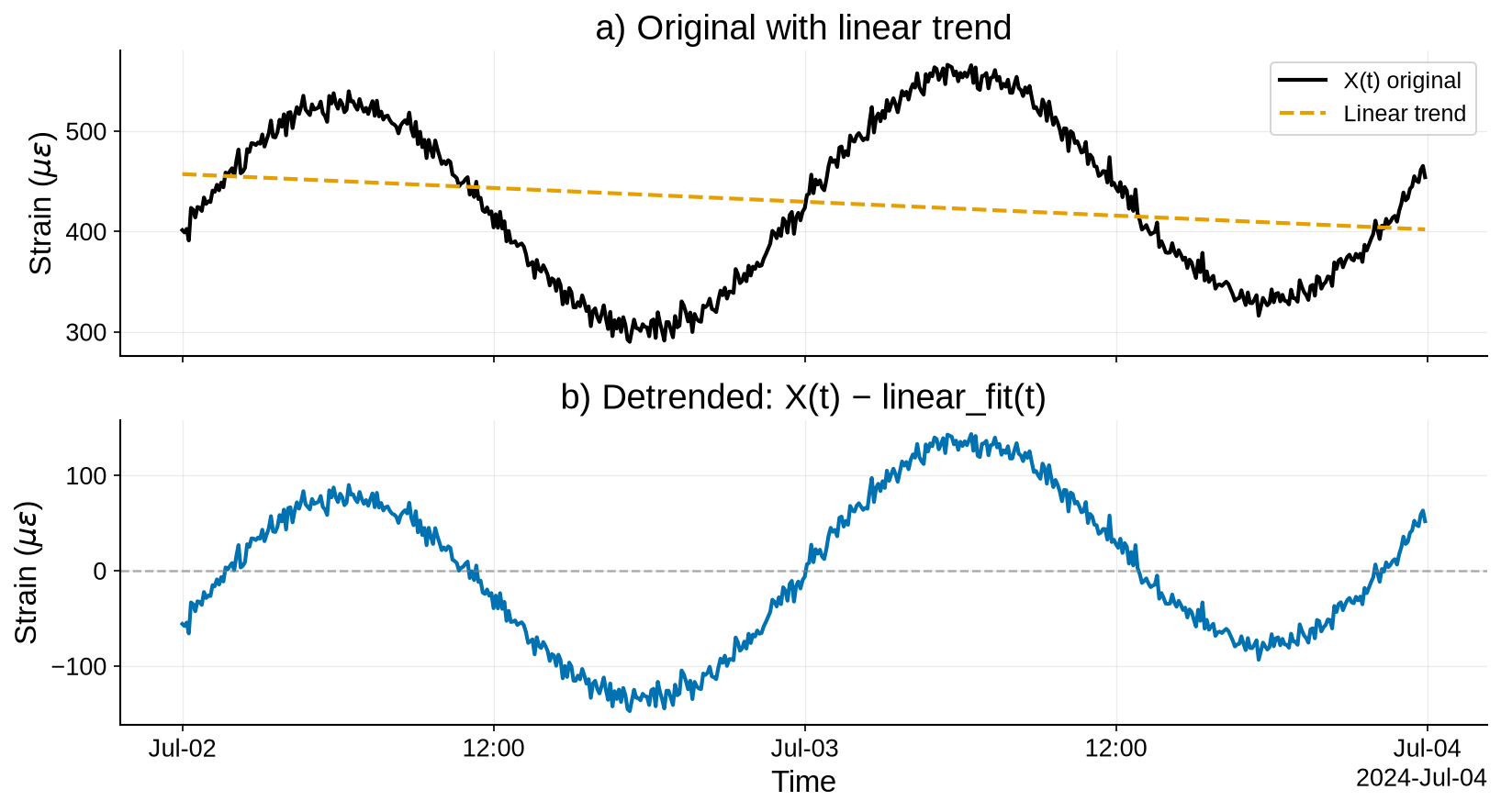
Figure 8:Linear detrending of a strain series with a slow temperature-driven rise across the day plus noise.
5.3Polynomial detrend
When the trend is nonlinear (e.g., a quadratic temperature curve over a day, or a logarithmic creep curve), fit higher-order polynomials or other nonlinear functions and subtract them to obtain stationary residuals.
Source
import numpy as np, pandas as pd, matplotlib.pyplot as plt

# Load the saved data
poly_data_file = os.path.join(data_dir, "poly_detrend_data.npy")
poly_time_file = os.path.join(data_dir, "poly_detrend_time.npy")

X = np.load(poly_data_file)
t = np.load(poly_time_file)
n = len(t)

# =================== DETRENDING STEPS ==================
x = np.arange(n)
coeff = np.polyfit(x, X, deg=2)                         # a*x^2 + b*x + c
trend = np.polyval(coeff, x)
X_detr = X - trend

# =================== PLOT ==============================
fig, axs = plt.subplots(2, 1, figsize=(11, 6), sharex=True)

axs[0].plot(t, X, color=COL["black"], lw=2.0, label="X(t) original")
axs[0].plot(t, trend, color=COL["vermillion"], lw=2.0, ls="--", label="Quadratic trend")
axs[0].set_ylabel(r"Strain ($\mu\varepsilon$)")
axs[0].legend()
style_time_axes(axs[0])
axs[0].set_title("a) Original with quadratic trend")

axs[1].plot(t, X_detr, color=COL["green"], lw=2.0)
axs[1].axhline(0, color=COL["grey"], ls="--", lw=1.2, alpha=0.6)
axs[1].set_ylabel(r"Strain ($\mu\varepsilon$)")
style_time_axes(axs[1])
axs[1].set_title("b) Detrended: X(t) − quadratic_fit(t)")

plt.xlabel("Time")
plt.tight_layout()
plt.show()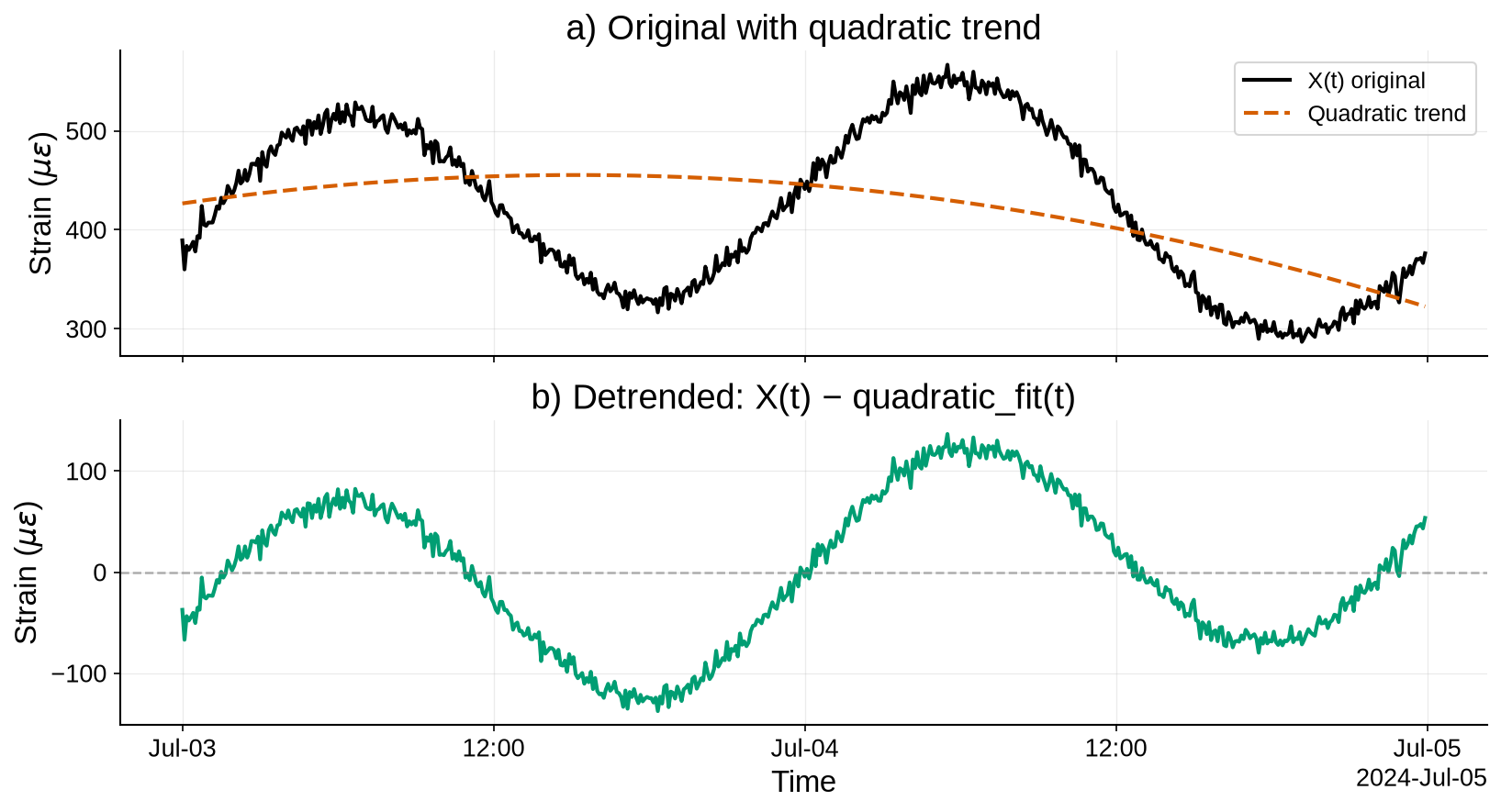
Figure 9:Quadratic (polynomial) detrending for a nonlinear drift mimicking daytime heating/cooling over 48 hours.
5.4Moving average (or moving median) baseline removal
A moving average with a large window captures slow changes (the trend); subtracting it from the signal acts as a high-pass filter. A moving median can be used similarly to reduce the influence of outliers.
Source
import numpy as np, pandas as pd, matplotlib.pyplot as plt

# Load the saved data
ma_data_file = os.path.join(data_dir, "ma_detrend_data.npy")
ma_time_file = os.path.join(data_dir, "ma_detrend_time.npy")

X = np.load(ma_data_file)
t = np.load(ma_time_file)
n = len(t)

# =================== DETRENDING STEPS ==================
# Rolling mean baseline (2 hours = 24 samples at 5-min)
win = 24
baseline_ma = pd.Series(X).rolling(window=win, center=True, min_periods=1).mean()
X_detr = X - baseline_ma.to_numpy()

# (Optional robust variant):
# baseline_med = pd.Series(X).rolling(window=win, center=True, min_periods=1).median()

# =================== PLOT ==============================
fig, axs = plt.subplots(2, 1, figsize=(11, 6), sharex=True)

axs[0].plot(t, X, color=COL["black"], lw=2.0, label="X(t) original")
axs[0].plot(t, baseline_ma, color=COL["sky"], lw=2.0, ls="--", label="Rolling-mean baseline (2 h)")
axs[0].set_ylabel(r"Strain ($\mu\varepsilon$)")
axs[0].legend()
style_time_axes(axs[0])
axs[0].set_title("a) Original with rolling-mean baseline")

axs[1].plot(t, X_detr, color=COL["purple"], lw=2.0)
axs[1].axhline(0, color=COL["grey"], ls="--", lw=1.2, alpha=0.6)
axs[1].set_ylabel(r"Strain ($\mu\varepsilon$)")
style_time_axes(axs[1])
axs[1].set_title("b) Detrended: X(t) − rolling_mean(t)")

plt.xlabel("Time")
plt.tight_layout()
plt.show()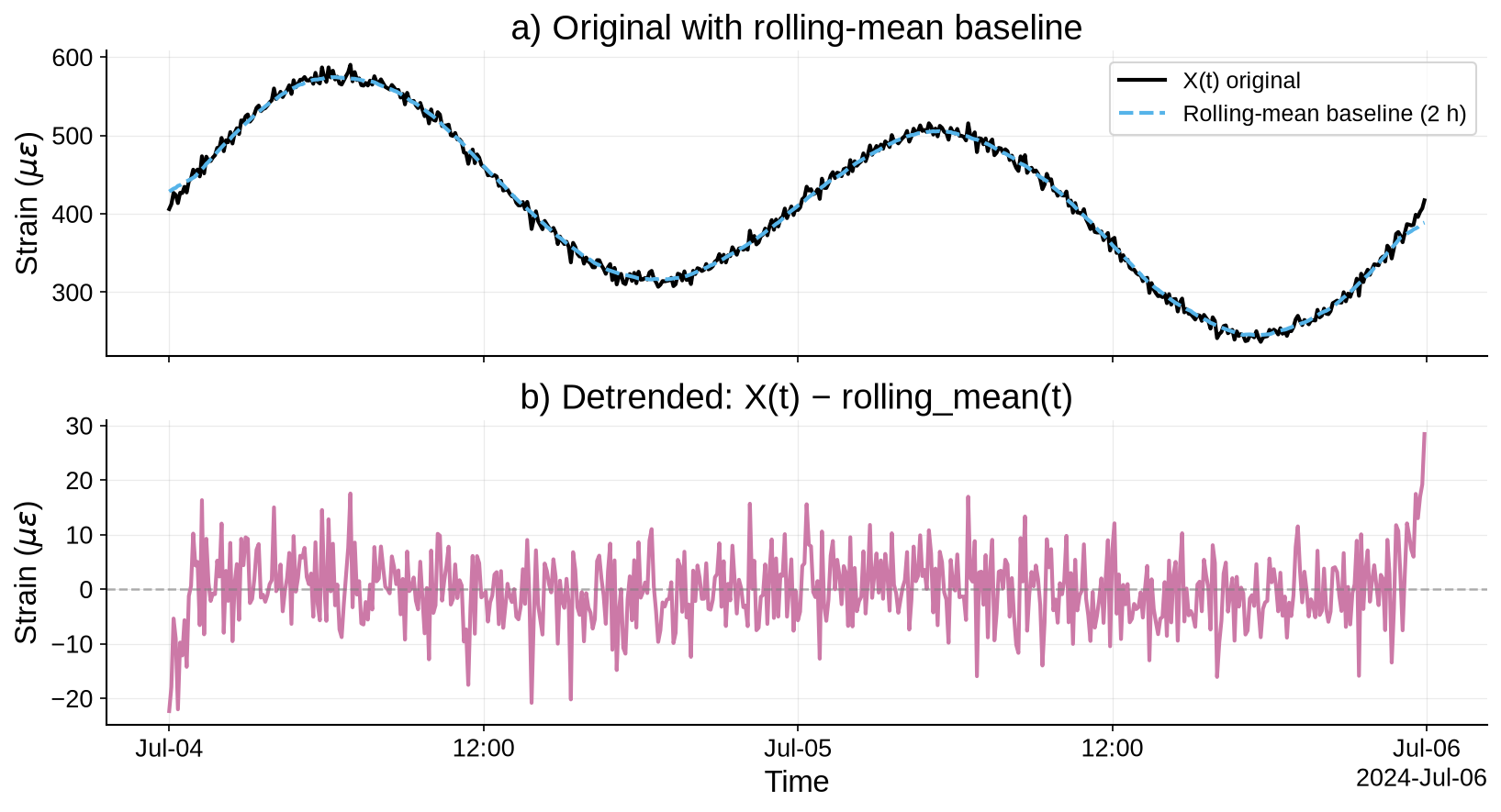
Figure 10:Moving-average baseline removal (2-hour window) to isolate higher-frequency fluctuations from thermal drift.
5.5Differencing
Taking the first difference () removes a constant trend (it becomes zero) or converts a linear trend to a constant. In SHM, differencing acceleration yields jerk, which is not typical, but for slowly varying strains differencing can highlight incremental changes.
Source
import numpy as np, pandas as pd, matplotlib.pyplot as plt

# Load the saved data
diff_data_file = os.path.join(data_dir, "diff_detrend_data.npy")
diff_time_file = os.path.join(data_dir, "diff_detrend_time.npy")

X = np.load(diff_data_file)
t = np.load(diff_time_file)
n = len(t)

# =================== DETRENDING STEPS ==================
# First difference (drops one sample)
X_diff = np.diff(X)
t_diff = t[1:]

# For context, also show fitted linear trend on the original
x = np.arange(n)
trend = np.polyval(np.polyfit(x, X, deg=1), x)

# =================== PLOT ==============================
fig, axs = plt.subplots(2, 1, figsize=(11, 6), sharex=False)

axs[0].plot(t, X, color=COL["black"], lw=2.0, label="X(t) original")
axs[0].plot(t, trend, color=COL["orange"], lw=2.0, ls="--", label="Linear trend (for reference)")
axs[0].set_ylabel(r"Strain ($\mu\varepsilon$)")
axs[0].legend()
style_time_axes(axs[0])
axs[0].set_title("a) Original with reference linear trend")

axs[1].plot(t_diff, X_diff, color=COL["green"], lw=2.0, label="ΔX(t) = X(t) − X(t−1)")
axs[1].axhline(0, color=COL["grey"], ls="--", lw=1.2, alpha=0.6)
axs[1].set_ylabel(r"ΔStrain ($\mu\varepsilon$)")
style_time_axes(axs[1])
axs[1].set_title("b) First difference ΔX(t)")

plt.xlabel("Time")
plt.tight_layout()
plt.show()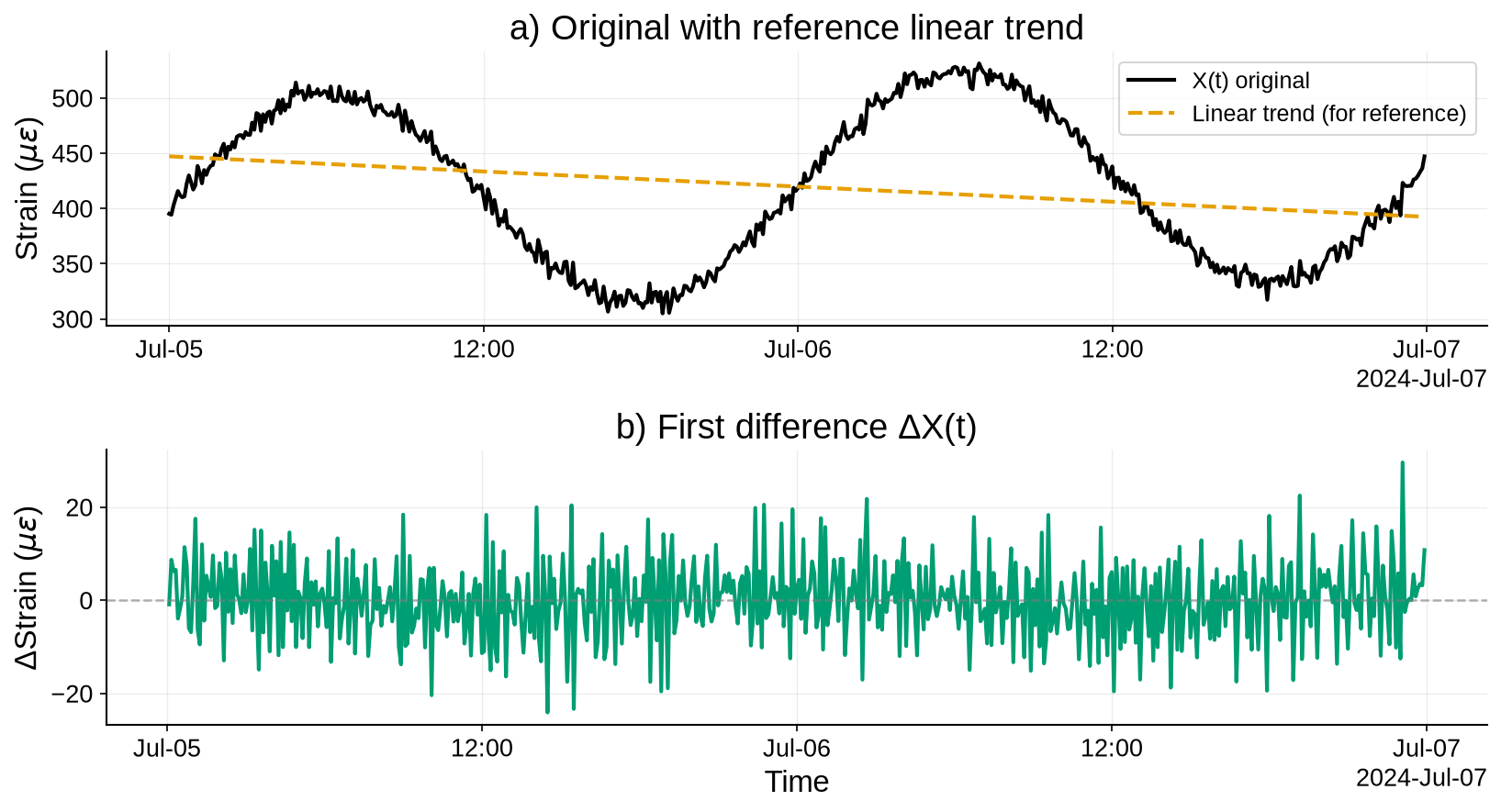
Figure 11:First differencing to remove low-frequency drift and emphasize changes between samples.
6Statistical Descriptors in the Time Domain
Statistical descriptors quantify the properties of time-domain signals and serve as damage-sensitive features that can indicate changes in structural condition. They capture characteristics of the signal’s distribution, energy content, and extreme values.
6.1Mean (Average)
The mean of a signal over a time window is defined as the arithmetic average of all values:
where are the sampled values of the random variable and is the number of samples. In acceleration signals the mean is often close to zero after removing any DC bias. For strain signals the mean represents a baseline due to static loads. Removing the mean (zero-centering) prevents a non-zero mean from distorting other statistics such as variance.
6.2Variance and standard deviation
The variance measures the spread of the data around the mean:
The standard deviation is simply the square root of variance:
These metrics quantify the energy or variability in the signal.
6.3Root Mean Square (RMS)
RMS quantifies the signal’s effective magnitude and is widely used in vibration analysis. It is defined as:
The relationship between RMS, mean, and standard deviation is:
6.4Crest Factor
The crest factor is the ratio of the peak amplitude (absolute peak) to the RMS value:
This dimensionless number indicates how “peaky” the signal is. A pure sinusoid has (peak = 1, RMS = ). Occasional spikes drive the crest factor high because the peak greatly exceeds the RMS. The crest factor combines peak and energy information and is less sensitive to absolute scaling than the peak alone.
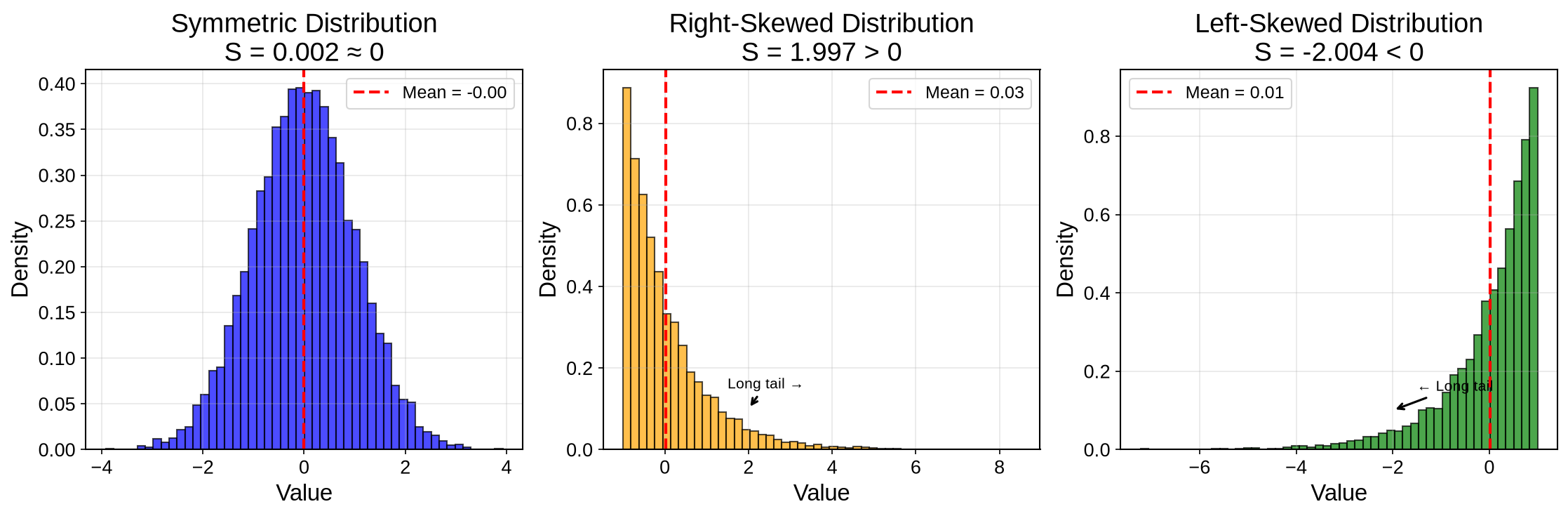
6.5Skewness (Third Moment)
Skewness measures the asymmetry of the signal value distribution. It is defined as:
: Symmetric distribution
: Right-skewed (tail extends toward positive values)
: Left-skewed (tail extends toward negative values)
When the distribution is symmetric around the mean. A positive skew indicates a longer right tail; a negative skew indicates a longer left tail.
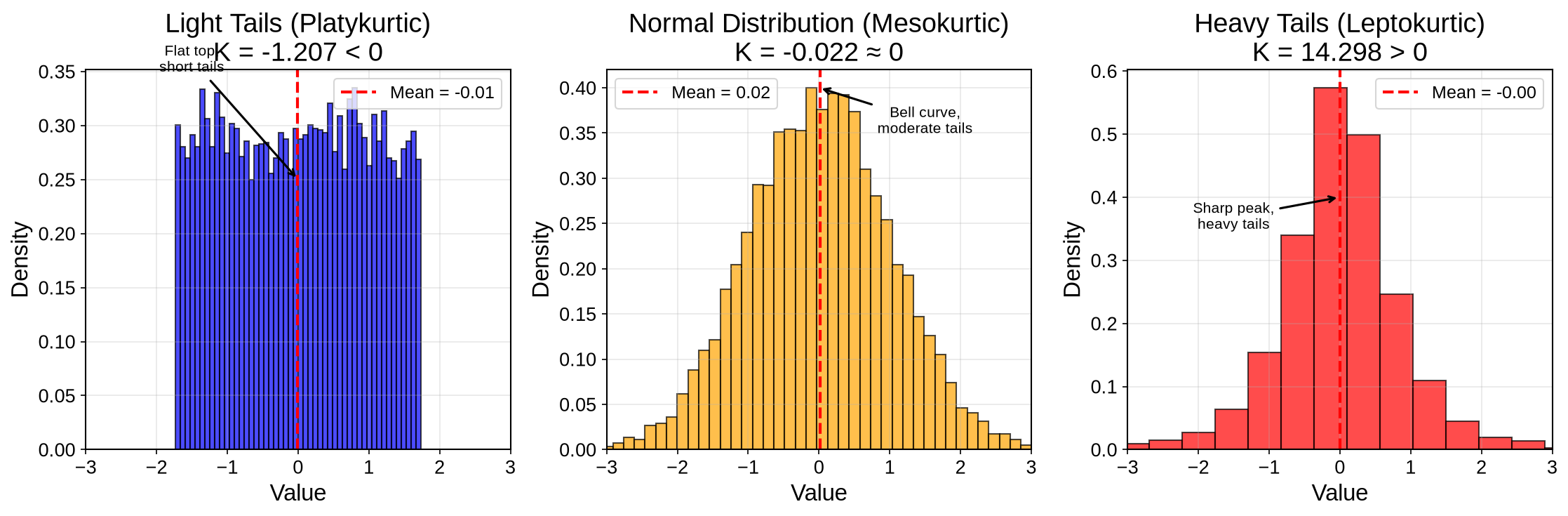
6.6Kurtosis (Fourth Moment)
Kurtosis measures the “tailedness” of the distribution, i.e., how heavy or light the tails are relative to a normal distribution. One definition (for excess kurtosis) is:
Subtracting 3 makes for a Gaussian (the Pearson definition does not subtract 3, giving a normal distribution kurtosis of 3). High kurtosis indicates frequent extreme deviations: a sharp peak and heavy tails. Low kurtosis indicates a flatter distribution with light tails. Because a single large spike can substantially raise kurtosis, tracking it over time can detect the onset of irregular events.
: Normal distribution
: Heavy tails (more extreme values)
: Light tails (fewer extreme values)
6.7Implementation example
The following example examines a realistic acceleration measurement from a highway bridge under ambient traffic loading.
Source
# Load the saved data ##
data_dir = "chapters/ch03/ch03_data"
acc_data_file = os.path.join(data_dir, "acceleration_data_v2.npy")
time_data_file = os.path.join(data_dir, "time_vector_v2.npy")

# Load the data ####
x = np.load(acc_data_file)
t = np.load(time_data_file)

# Plot the loaded data
plt.figure(figsize=(11,3))
plt.plot(t, x, color=COL["black"], lw=0.8)
plt.xlabel("Time (s)"); plt.ylabel("Acceleration (g)")
plt.title("A Sample Structural Acceleration Data")
plt.grid(True, alpha=0.25, lw=0.6); plt.tight_layout(); plt.show()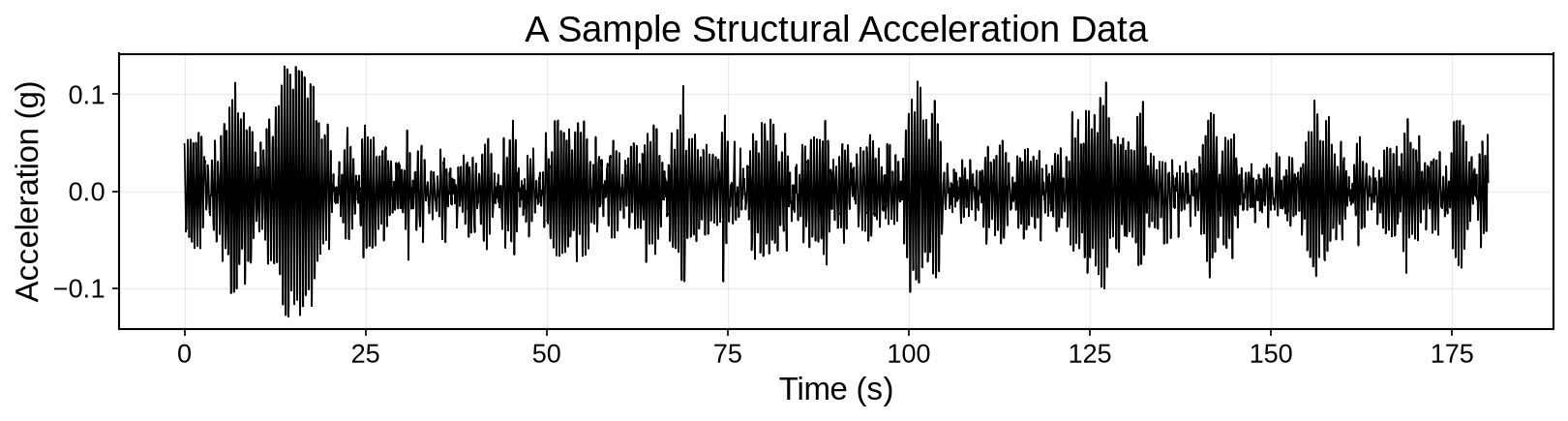
Figure 14:Loading and plotting a sample acceleration data with non-Gaussian characteristics.
Now let’s analyze this acceleration time series as a random variable and examine its probability distribution.
Source
# Statistical distribution analysis #
fig, axes = plt.subplots(1, 1, figsize=(8, 6))

# Histogram with fitted normal distribution
n_bins = 60
counts, bins, patches = axes.hist(x, bins=n_bins, density=True, alpha=0.7,
                                 color=COL["sky"], edgecolor=COL["black"], linewidth=0.5)

# Fit and overlay normal distribution
mu_fit, sigma_fit = np.mean(x), np.std(x, ddof=1)
x_norm = np.linspace(x.min(), x.max(), 200)
pdf_normal = stats.norm.pdf(x_norm, mu_fit, sigma_fit)
axes.plot(x_norm, pdf_normal, color=COL["vermillion"], linewidth=2.5,
          label=f'Normal fit\nμ = {mu_fit:.4f}\nσ = {sigma_fit:.4f}')
axes.axvline(mu_fit, color=COL["vermillion"], linestyle='--', alpha=0.8, linewidth=1.5)
axes.set_xlabel('Acceleration (g)')
axes.set_ylabel('Probability Density')
axes.set_title('Empirical Distribution vs Normal Fit')
axes.legend()
axes.grid(True, alpha=0.3)

plt.tight_layout()
plt.show()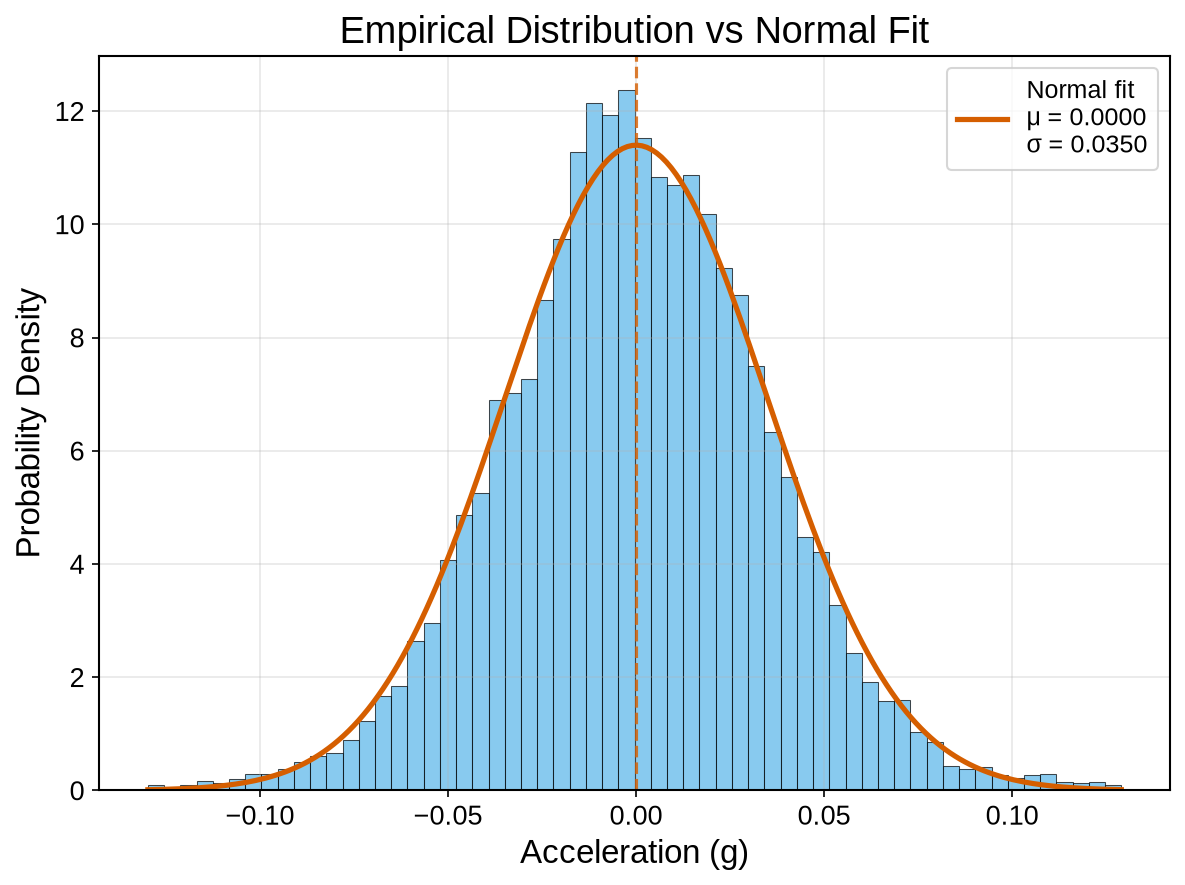
Figure 15:Statistical distribution of the reference singal.
import pandas as pd, numpy as np

x_series = pd.Series(x)
summary = pd.DataFrame({
    "μ̂ = mean(x)":           [x_series.mean()],
    "s² = var(x) (N−1)":      [x_series.var(ddof=1)],
    "s = std(x) (N−1)":       [x_series.std(ddof=1)],
    "x_RMS":                  [np.sqrt(np.mean(x**2))],
    "Peak |x|":               [np.max(np.abs(x))],
    "CF = Peak/RMS":          [np.max(np.abs(x))/np.sqrt(np.mean(x**2))],
    "Skewness (sample)":      [x_series.skew()],
    "Kurtosis (excess)":      [x_series.kurtosis()],
    "min(x)":                 [x_series.min()],
    "max(x)":                 [x_series.max()],
    "Range":                  [x_series.max()-x_series.min()],
}).T.rename(columns={0:"Value"}).round(6)

summary7Correlation Analysis
In signal processing, correlation analysis identifies similarities between sensor measurements, detects periodicities, and reduces noise effects.
7.1Similarity of Signals
Similarity between two zero-mean time-series can be formalized by the inner product (or covariance):
The induced norm yields a scale-invariant similarity (cosine similarity or Pearson’s correlation coefficient)
which measures how much aligns with . Large means the signals agree strongly in phase and shape at zero lag; indicates orthogonality (no linear similarity).
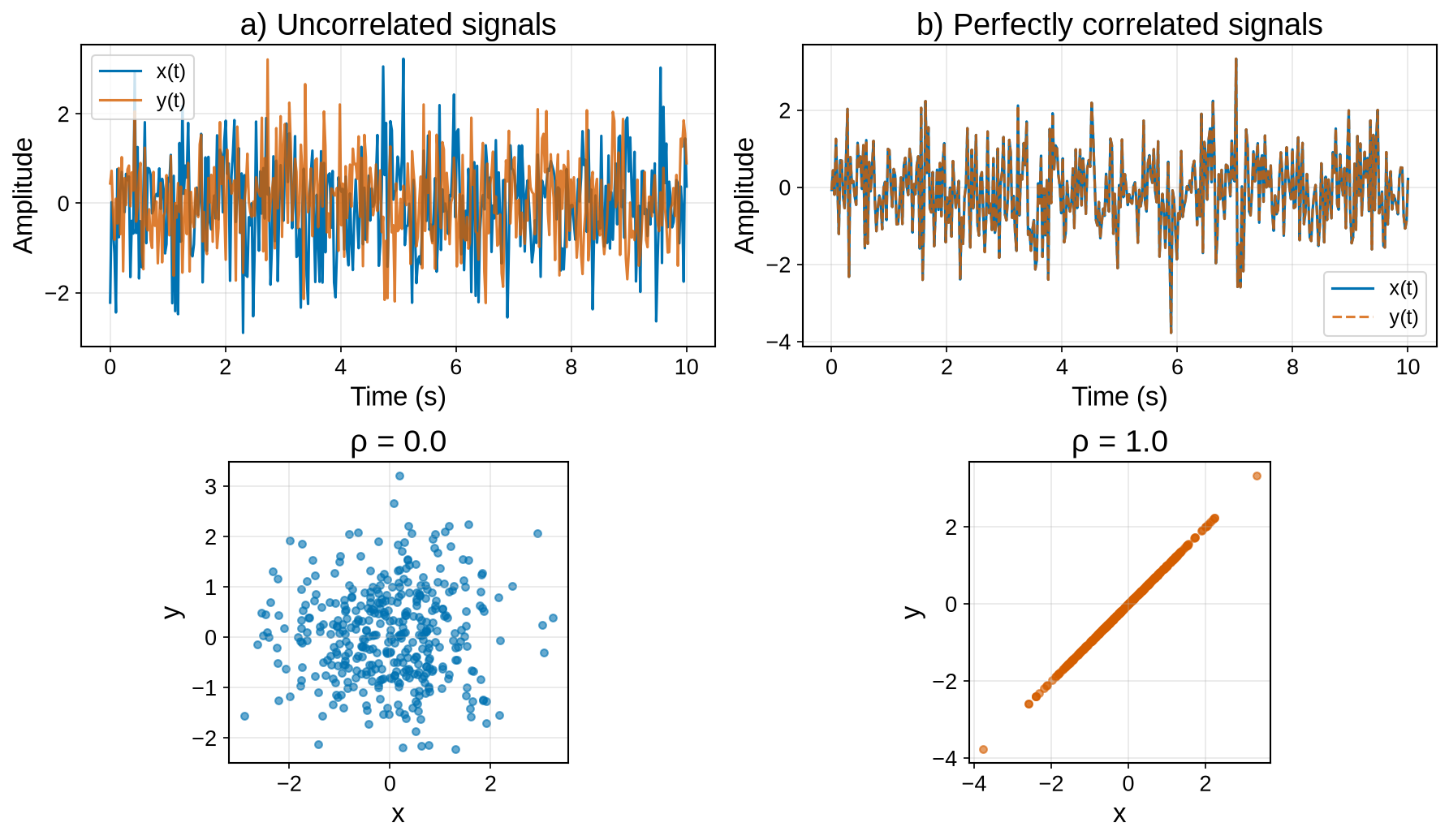
Figure 16:Illustrative scatter plots of correlation. (a) Two uncorrelated signals (ρ = 0). (b) Two perfectly correlated signals (ρ = 1).
7.2Auto/Cross-correlation
Cross-correlation measures the similarity between two signals as a function of time lag ():
slides by and computes the inner product at each shift; peaks indicate time alignments where the two signals share structure even when not synchronized at .
![Cross-correlation operation’s intuition [Source].](/SHM-Live-Book/build/cross_correlation_in-7f77f52370e1e915a6bec703f8900915.gif)
Figure 17:Cross-correlation operation’s intuition [Source].
A normalized measure that removes scale is:
1 2 3 4 5 6 7 8 9 10import numpy as np from scipy import signal # Method 1: Using np.correlate (most common) xcorr_np = np.correlate(x, y, mode='full') xcorr_norm = xcorr_np / np.sqrt(np.max(np.correlate(x,x,mode='full')) * np.max(np.correlate(y,y,mode='full'))) # Method 2: Using scipy.signal.correlate xcorr_scipy = signal.correlate(x, y, mode='full') xcorr_scipy_norm = xcorr_scipy / xcorr_scipy.max()
The autocorrelation is the special case . The autocorrelation function is symmetric; its value at zero lag equals the variance (), and it approaches zero for large lags.
The following figure demonstrates autocorrelation by comparing a signal with its time-lagged copies.
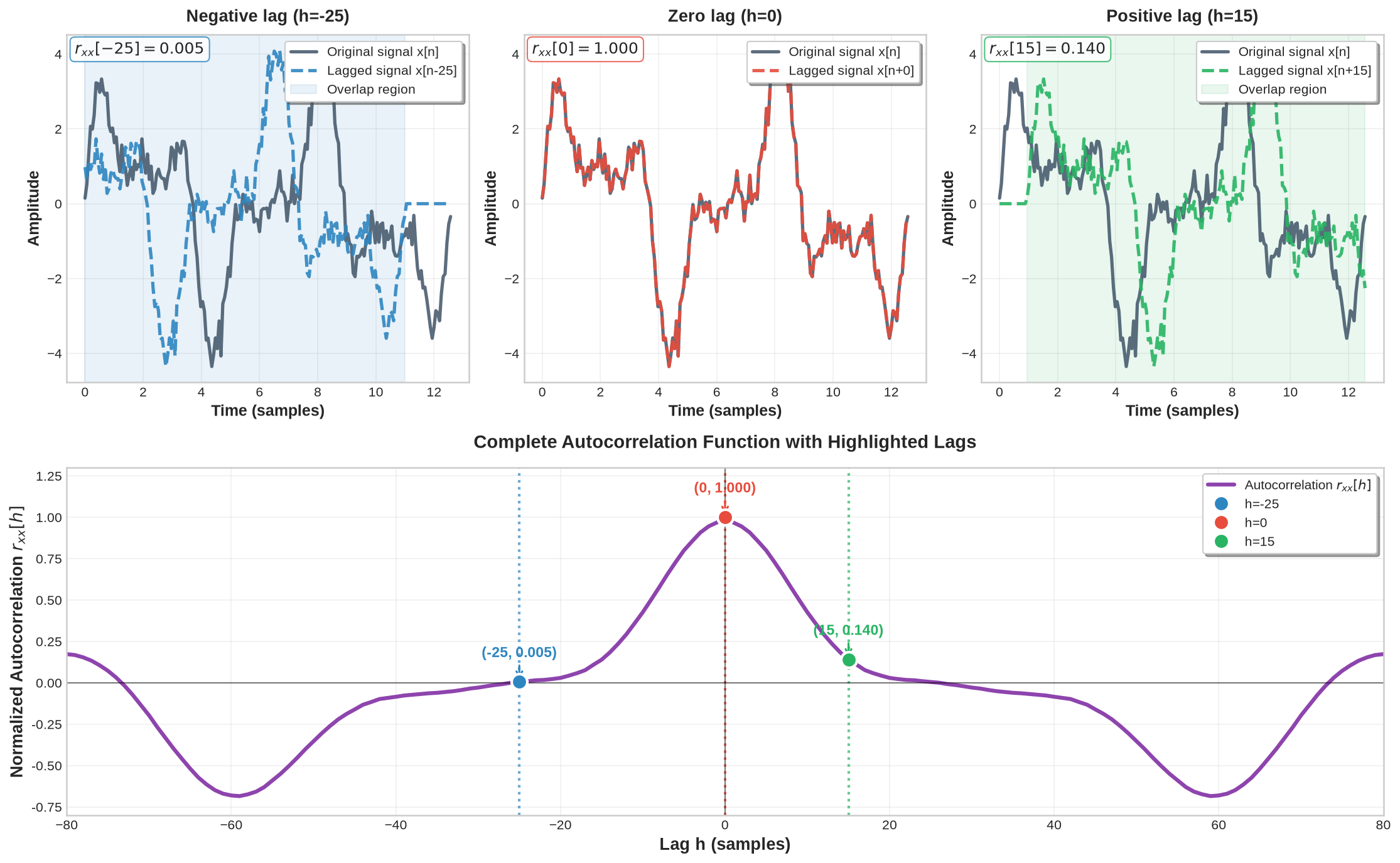
Figure 18:Demonstration of autocorrelation showing signal alignment at different lags and the complete autocorrelation function
7.3Period Detection Using Autocorrelation
Autocorrelation is useful for detecting the period of a signal when periodicity is not obvious from the time-domain waveform. When a signal contains periodic components, the autocorrelation function shows peaks at lags equal to the fundamental period and its multiples, because shifting a periodic signal by one complete period produces perfect alignment and maximum correlation. For a signal with period , peaks appear at lags for ; the spacing between consecutive peaks directly reveals , even in the presence of noise.
Source
import numpy as np
import matplotlib.pyplot as plt
from scipy import signal
import pandas as pd

# Create single periodic signal with noise
np.random.seed(123)
fs = 100  # Sampling frequency
t = np.linspace(0, 4, fs * 4)  # 4 seconds
f0 = 2.5  # Single frequency in Hz
period_true = 1/f0  # True period = 0.4 seconds

# Single sinusoidal signal
s_clean = 2*np.sin(2*np.pi*f0*t)

# Add significant white noise
sigma_noise = 1.2
noise = sigma_noise * np.random.randn(len(s_clean))
x = s_clean + noise  # Noisy signal

# Calculate SNR
signal_power = np.var(s_clean)
noise_power = np.var(noise)
snr_db = 10 * np.log10(signal_power / noise_power)

# Calculate autocorrelation
autocorr = np.correlate(x, x, mode='full')
autocorr = autocorr / autocorr.max()  # Normalize
lags = np.arange(-len(x)+1, len(x)) / fs  # Convert to time lags

# Find peaks in positive lag region (excluding zero lag)
pos_lags = lags[len(x)-1:]
pos_autocorr = autocorr[len(x)-1:]

# Detect peaks with appropriate parameters
peaks, properties = signal.find_peaks(pos_autocorr[1:], height=0.2, distance=25)
peaks += 1  # Adjust for excluded zero lag

# Create visualization
fig, (ax1, ax2) = plt.subplots(2, 1, figsize=(14, 10))

# Top: Clean signal vs noisy measurement
time_window = t[:300]  # Show first 3 seconds
ax1.plot(time_window, s_clean[:300], 'b--', linewidth=2.5, alpha=0.8,
         label=r'Clean signal $s[n]$')
ax1.plot(time_window, x[:300], 'r-', linewidth=1.5, alpha=0.9,
         label=r'Noisy measurement $x[n]$')
ax1.set_title(f'Periodic Signal with Noise (f = {f0} Hz, SNR = {snr_db:.1f} dB)',
              fontweight='bold', fontsize=14)
ax1.set_xlabel('Time (seconds)', fontweight='bold')
ax1.set_ylabel('Amplitude', fontweight='bold')
ax1.grid(True, alpha=0.3)
ax1.legend(loc='upper right')

# Highlight one period
ax1.axvspan(0, period_true, alpha=0.2, color='green',
           label=f'True period = {period_true:.3f}s')
ax1.legend(loc='upper right')

# Bottom: Autocorrelation with peak detection
ax2.plot(pos_lags[:400], pos_autocorr[:400], 'purple', linewidth=2.5,
         label=r'Autocorrelation $r_{xx}[h]$')
ax2.axhline(0, color='black', linewidth=1, alpha=0.5)

# Mark detected peaks
if len(peaks) > 0:
    peak_times = pos_lags[peaks]
    peak_values = pos_autocorr[peaks]
    ax2.plot(peak_times, peak_values, 'ro', markersize=10, markeredgewidth=2,
             markeredgecolor='white', label='Detected Peaks', zorder=5)

    # Annotate first few peaks with timing
    for i, (t_peak, val) in enumerate(zip(peak_times[:5], peak_values[:5])):
        ax2.annotate(f'{t_peak:.3f}s', xy=(t_peak, val),
                    xytext=(t_peak, val + 0.12), ha='center',
                    fontweight='bold', fontsize=10, color='red',
                    arrowprops=dict(arrowstyle='->', color='red', lw=1.5))

    # Draw vertical lines to show period intervals
    for peak_time in peak_times[:4]:
        ax2.axvline(peak_time, color='red', linestyle=':', alpha=0.6, linewidth=1.5)

ax2.set_title('Autocorrelation Function - Period Detection', fontweight='bold', fontsize=14)
ax2.set_xlabel('Lag (seconds)', fontweight='bold')
ax2.set_ylabel('Normalized Autocorrelation', fontweight='bold')
ax2.grid(True, alpha=0.3)
ax2.legend()
ax2.set_xlim(0, 2)

# Calculate and display period estimates using DataFrame
if len(peaks) >= 2:
    # Calculate intervals between consecutive peaks
    estimated_periods = np.diff(pos_lags[peaks[:4]])
    avg_period = np.mean(estimated_periods)
    std_period = np.std(estimated_periods)

    # Format arrays as strings properly
    peak_locations_str = ', '.join([f'{x:.3f}' for x in pos_lags[peaks[:5]]])
    period_estimates_str = ', '.join([f'{x:.3f}' for x in estimated_periods])

    # Create comprehensive analysis DataFrame
    analysis_data = {
        'Parameter': [
            'True Period',
            'Number of Peaks Detected',
            'Peak Locations',
            'Period Estimates',
            'Average Estimated Period',
            'Relative Error (%)'
        ],
        'Value': [
            f'{period_true:.3f} s',
            f'{len(peaks)}',
            f'{peak_locations_str} s',
            f'{period_estimates_str} s',
            f'{avg_period:.3f} s',
            f'{abs(avg_period - period_true)/period_true*100:.1f}%'
        ]
    }

    # Create and display DataFrame
    results_df = pd.DataFrame(analysis_data)

else:
    # No peaks detected case
    results_df = pd.DataFrame({
        'Parameter': ['Status', 'Recommendation'],
        'Value': ['No clear peaks detected', 'Try reducing noise or adjusting detection parameters']
    })
#
plt.tight_layout(rect=[0, 0.06, 1, 0.96])
plt.show()

display(results_df.style.hide(axis='index').set_properties(**{'text-align': 'left'}))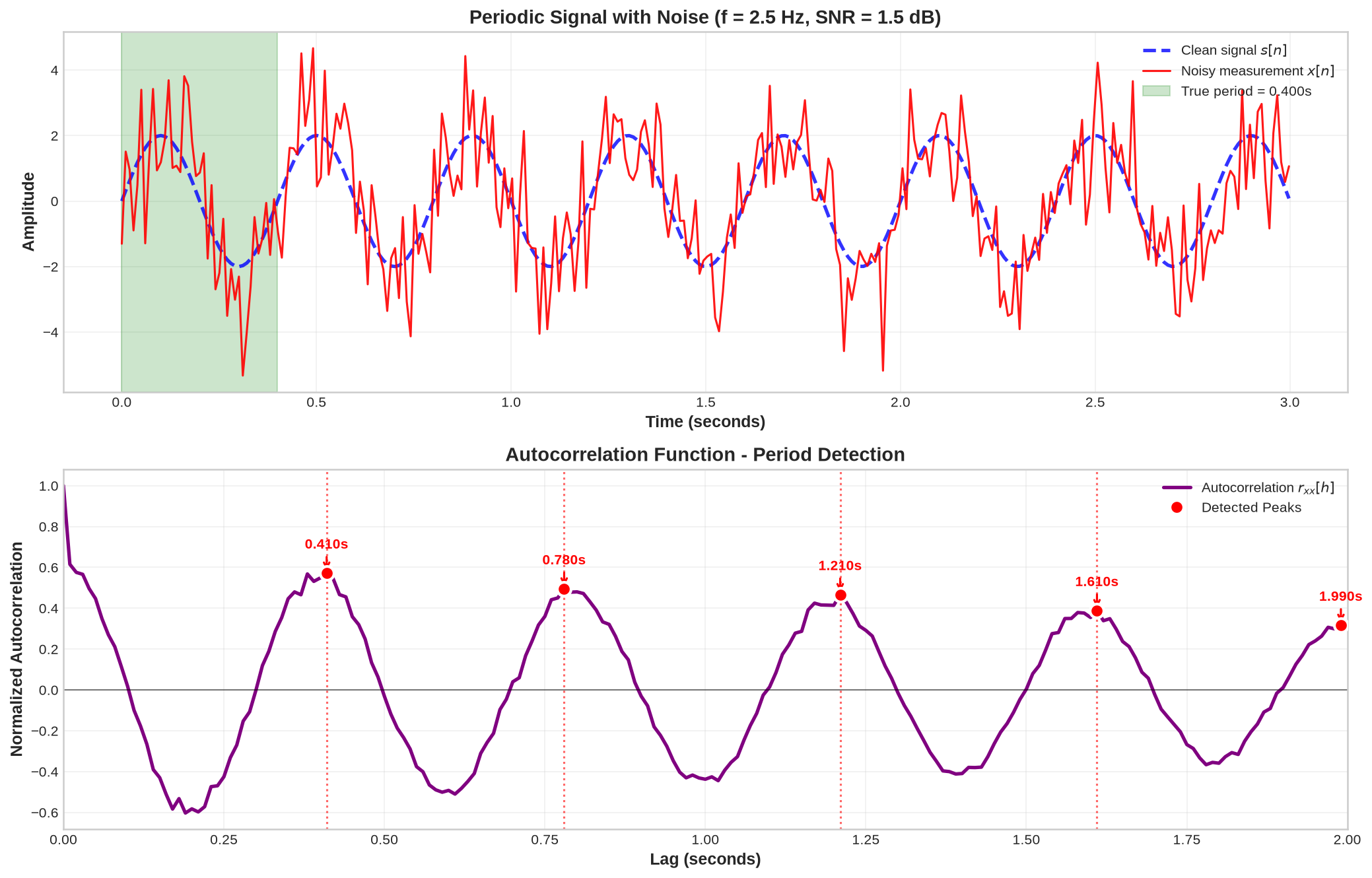
Figure 19:Period detection using autocorrelation analysis of a composite sinusoidal signal
8Noise Modeling and Rejection Techniques
Noise is inherent in sensor measurements due to electrical and environmental effects, thermal fluctuations, quantization errors, and electromagnetic interference. What we measure in practice is the corrupted signal:
where is the desired noise-free signal and is the additive noise component. Correlation analysis provides tools to reduce noise effects and recover information about the original signal structure.
8.1Signal-to-Noise Ratio (SNR)
Measurement quality is commonly quantified using the Signal-to-Noise Ratio (SNR), defined as the ratio of signal power to noise power:
The SNR is typically expressed in decibels (dB):
Higher SNR values indicate cleaner measurements; lower values indicate significant noise contamination.
8.2White noise
A zero-mean Gaussian white-noise process with variance is defined by a delta autocorrelation:
If and are independent white noises, then their cross-correlation is identically zero:
Likewise, if is any WSS process independent of , then
Source
import numpy as np
import matplotlib.pyplot as plt
from scipy import signal
import seaborn as sns

# Generate white noise signals
np.random.seed(123)
N = 500
sigma_n = 1.0  # Standard deviation
n1 = np.random.normal(0, sigma_n, N)  # White noise 1
n2 = np.random.normal(0, sigma_n, N)  # White noise 2 (independent)
t = np.arange(N)

# Calculate correlations
autocorr_n1 = np.correlate(n1, n1, mode='full')
autocorr_n1_norm = autocorr_n1 / N  # Normalize by N for unbiased estimate
cross_corr = np.correlate(n1, n2, mode='full')
cross_corr_norm = cross_corr / N

# Lag vectors
lags = np.arange(-N+1, N)

# Create 2x2 subplot layout
fig, ((ax1, ax2), (ax3, ax4)) = plt.subplots(2, 2, figsize=(15, 10))
fig.suptitle('White Noise: Autocorrelation and Cross-Correlation Properties',
             fontsize=16, fontweight='bold', y=0.95)

colors = ['#2E86C1', '#E74C3C']  # Blue and Red

# Top left: White noise signal 1
ax1.plot(t[:200], n1[:200], color=colors[0], linewidth=1.5, alpha=0.8)
ax1.set_title(r'White Noise $n_1[n]$ ($\sigma_n^2 = 1$)', fontweight='bold', pad=10)
ax1.set_xlabel('Sample n', fontweight='bold')
ax1.set_ylabel('Amplitude', fontweight='bold')
ax1.grid(True, alpha=0.3)
ax1.set_xlim(0, 199)

# Add statistics text
mean_n1 = np.mean(n1)
var_n1 = np.var(n1, ddof=1)
ax1.text(0.02, 0.98, f'Mean: {mean_n1:.3f}\nVariance: {var_n1:.3f}',
         transform=ax1.transAxes, fontsize=10, fontweight='bold',
         verticalalignment='top', bbox=dict(boxstyle='round',
         facecolor='white', alpha=0.8, edgecolor=colors[0]))

# Top right: White noise signal 2
ax2.plot(t[:200], n2[:200], color=colors[1], linewidth=1.5, alpha=0.8)
ax2.set_title(r'White Noise $n_2[n]$ ($\sigma_n^2 = 1$)', fontweight='bold', pad=10)
ax2.set_xlabel('Sample n', fontweight='bold')
ax2.set_ylabel('Amplitude', fontweight='bold')
ax2.grid(True, alpha=0.3)
ax2.set_xlim(0, 199)

# Add statistics text
mean_n2 = np.mean(n2)
var_n2 = np.var(n2, ddof=1)
ax2.text(0.02, 0.98, f'Mean: {mean_n2:.3f}\nVariance: {var_n2:.3f}',
         transform=ax2.transAxes, fontsize=10, fontweight='bold',
         verticalalignment='top', bbox=dict(boxstyle='round',
         facecolor='white', alpha=0.8, edgecolor=colors[1]))

# Bottom left: Autocorrelation of white noise
lag_range = 100  # Show limited range for clarity
center_idx = N - 1
lag_indices = slice(center_idx - lag_range, center_idx + lag_range + 1)
lags_limited = lags[lag_indices]
autocorr_limited = autocorr_n1_norm[lag_indices]

markerline, stemlines, baseline = ax3.stem(lags_limited, autocorr_limited,
                                          linefmt=colors[0], markerfmt='o', basefmt=' ')
markerline.set_markersize(4)
ax3.axhline(0, color='black', linewidth=1, alpha=0.5)
ax3.axvline(0, color='black', linewidth=1, alpha=0.5)

# Highlight the delta function property
zero_lag_val = autocorr_n1_norm[center_idx]
ax3.plot(0, zero_lag_val, 'o', color=colors[0], markersize=10,
         markeredgewidth=2, markeredgecolor='white', zorder=5)

ax3.set_title(r'Autocorrelation $r_{n_1n_1}[h] = \sigma_n^2 \delta[h]$',
              fontweight='bold', pad=10)
ax3.set_xlabel('Lag h', fontweight='bold')
ax3.set_ylabel('Autocorrelation', fontweight='bold')
ax3.grid(True, alpha=0.3)
ax3.set_ylim([-1.05, 1.05])
# Add theoretical annotation
ax3.text(0.02, 0.98, f'$r_{{n_sn_s}}[0] = {zero_lag_val:.3f}$ ≈ $\\sigma_{{n_s}}^2 = 1.0$\n' +
         r'$r_{nn}[h \neq 0] \approx 0$ (white noise property)',
         transform=ax3.transAxes, fontsize=10, fontweight='bold',
         verticalalignment='top', bbox=dict(boxstyle='round',
         facecolor='lightyellow', alpha=0.9, edgecolor='orange'))

# Bottom right: Cross-correlation between independent white noises
cross_corr_limited = cross_corr_norm[lag_indices]
markerline2, stemlines2, baseline2 = ax4.stem(lags_limited, cross_corr_limited,
                                               linefmt=colors[1], markerfmt='o', basefmt=' ')
markerline2.set_markersize(4)
ax4.axhline(0, color='black', linewidth=1, alpha=0.5)
ax4.axvline(0, color='black', linewidth=1, alpha=0.5)

ax4.set_title(r'Cross-Correlation $r_{n_1n_2}[h] = 0$ (Independent)',
              fontweight='bold', pad=10)
ax4.set_xlabel('Lag h', fontweight='bold')
ax4.set_ylabel('Cross-correlation', fontweight='bold')
ax4.grid(True, alpha=0.3)
ax4.set_ylim([-1.05, 1.05])

# Calculate RMS of cross-correlation to show it's near zero
rms_xcorr = np.sqrt(np.mean(cross_corr_norm**2))
max_xcorr = np.max(np.abs(cross_corr_norm))
ax4.text(0.02, 0.98, f'RMS cross-corr: {rms_xcorr:.4f}\n' +
         f'Max |$r_{{n_{{s1}}n_{{s2}}}}$|: {max_xcorr:.4f}\n' +
         r'≈ 0 (independence property)',
         transform=ax4.transAxes, fontsize=10, fontweight='bold',
         verticalalignment='top', bbox=dict(boxstyle='round',
         facecolor='lightgreen', alpha=0.9, edgecolor='green'))

# Adjust layout
plt.tight_layout(rect=[0, 0.06, 1, 0.93])
plt.subplots_adjust(hspace=0.3, wspace=0.3)
plt.show()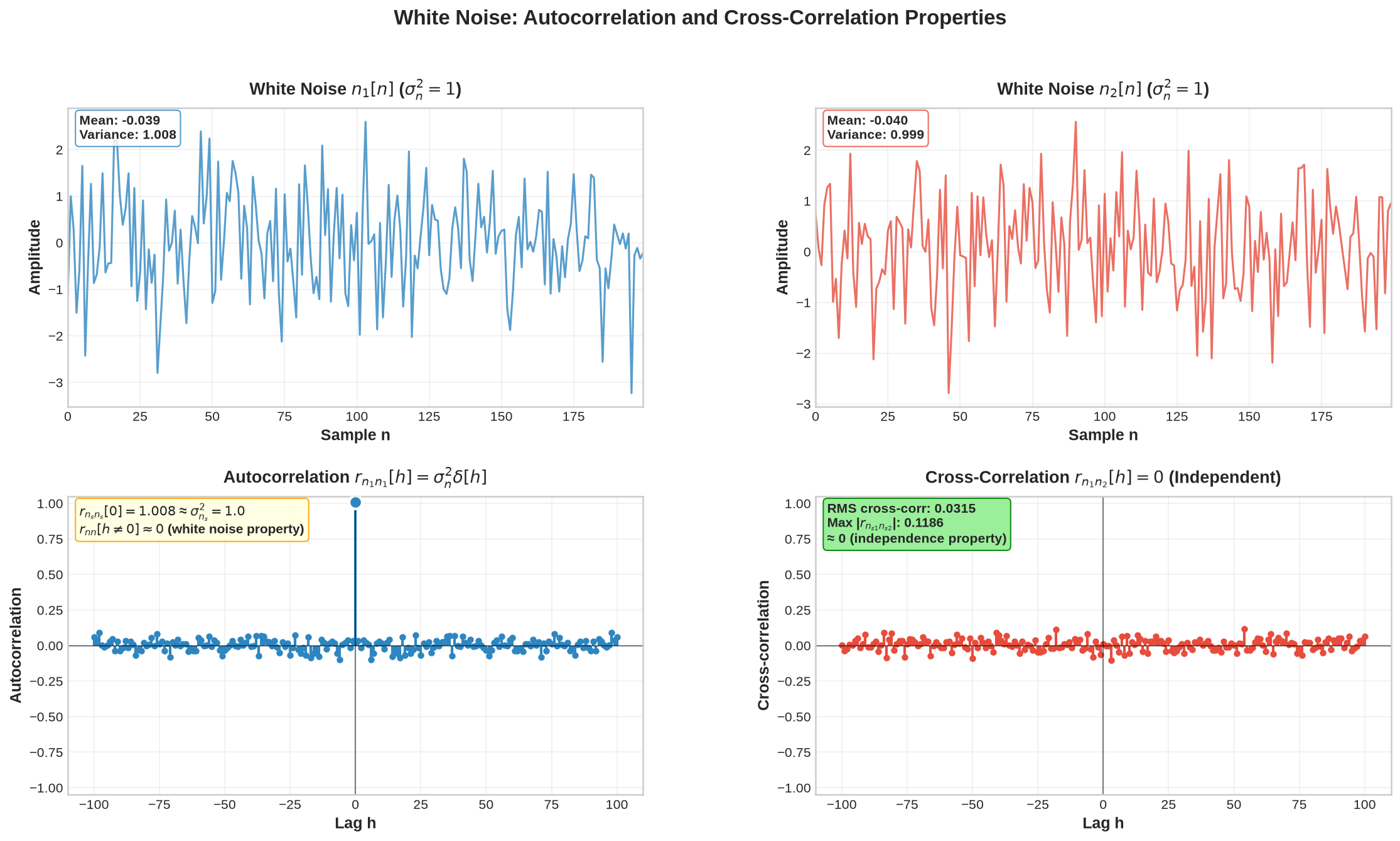
Figure 20:Demonstration of white noise autocorrelation and cross-correlation properties
8.3Other Common Noise Models
8.3.1Pink Noise (1/f Noise)
Unlike white noise, in which each sample is independent, pink noise exhibits temporal correlations that decay gradually with increasing lag following a power law. Distant samples retain a weak but measurable correlation. This slow decay means that power integrated over logarithmic frequency bands remains constant, hence the alternative name “equal-energy-per-octave” noise. In SHM, pink noise arises from environmental loading, temperature fluctuations, and electronic drift when multiple physical processes with different time constants contribute to the signal.
8.3.2Random Walk
Red noise (random walk) is the cumulative sum of white noise increments. Each sample equals the accumulated sum of all previous perturbations, creating a non-stationary process with unbounded variance. The generation mechanism is a simple recursion: the current value equals the previous value plus a white noise innovation. In structural monitoring, red noise models foundation settlement, long-term material creep, sensor baseline drift, and accumulated measurement errors. Nearby samples are highly correlated because they share most of their accumulated history; correlation decreases as lag grows and fewer common increments contribute to both samples.
Source
import numpy as np
import matplotlib.pyplot as plt
from scipy import signal

def generate_pink_noise_fft(n_samples):
    """Generate pink noise using frequency domain method"""
    white = np.random.randn(n_samples)
    fft = np.fft.rfft(white)
    freqs = np.fft.rfftfreq(n_samples)
    freqs[0] = 1e-6
    pink_filter = 1.0 / np.sqrt(freqs)
    pink_filter[0] = 0
    fft_filtered = fft * pink_filter
    pink = np.fft.irfft(fft_filtered, n=n_samples)
    return pink / np.std(pink)

def compute_autocorrelation_symmetric(x, max_lag):
    """Compute normalized autocorrelation function with symmetric lags"""
    x = x - np.mean(x)
    # Use biased estimate for better match with theoretical ACF
    c = np.correlate(x, x, mode='full') / len(x)
    c = c / c[len(c)//2]  # Normalize by variance at lag 0
    mid = len(c) // 2
    return c[mid-max_lag:mid+max_lag+1]

# Generate signals with more samples for extended lag analysis
np.random.seed(123)
n_samples = 5000  # Increased for better long-lag statistics
time_indices = np.arange(n_samples)

# Generate pink noise
pink = generate_pink_noise_fft(n_samples)

# Generate red noise (Brownian motion)
white = np.random.randn(n_samples)
red = np.cumsum(white)
red_scaled = red / np.std(red)

# Compute autocorrelations with tripled lag range
max_lag = 450  # Tripled from 150
lags = np.arange(-max_lag, max_lag + 1)
pink_acf = compute_autocorrelation_symmetric(pink, max_lag)
red_acf = compute_autocorrelation_symmetric(red, max_lag)

# Create figure
fig, axes = plt.subplots(2, 2, figsize=(14, 8))

# Color palette
pink_color = '#D4626D'
red_color = '#8B6331'

# Pink noise time series
axes[0,0].plot(time_indices[:1000], pink[:1000], color=pink_color, linewidth=0.8, alpha=0.9)
axes[0,0].set_xlabel('Time index $k$')
axes[0,0].set_ylabel('Amplitude')
axes[0,0].set_title('Pink Noise (1/f)', fontweight='semibold', pad=10)
axes[0,0].grid(True, alpha=0.25, linewidth=0.4)
axes[0,0].set_xlim([0, 1000])
axes[0,0].spines['top'].set_visible(False)
axes[0,0].spines['right'].set_visible(False)
axes[0,0].tick_params(direction='out', length=4, width=0.8)

# Red noise time series
axes[0,1].plot(time_indices[:1000], red_scaled[:1000], color=red_color, linewidth=0.8, alpha=0.9)
axes[0,1].set_xlabel('Time index $k$')
axes[0,1].set_ylabel('Amplitude')
axes[0,1].set_title('Red Noise (Random Walk)', fontweight='semibold', pad=10)
axes[0,1].grid(True, alpha=0.25, linewidth=0.4)
axes[0,1].set_xlim([0, 1000])
axes[0,1].spines['top'].set_visible(False)
axes[0,1].spines['right'].set_visible(False)
axes[0,1].tick_params(direction='out', length=4, width=0.8)

# Pink noise ACF - use line plot for extended lags
axes[1,0].plot(lags, pink_acf, color=pink_color, linewidth=1.0, alpha=0.8)
axes[1,0].fill_between(lags, 0, pink_acf, color=pink_color, alpha=0.15)

axes[1,0].axhline(y=0, color='gray', linestyle='-', linewidth=0.5, alpha=0.4)
axes[1,0].axvline(x=0, color='gray', linestyle='-', linewidth=0.5, alpha=0.4)
axes[1,0].set_xlabel('Lag $h$')
axes[1,0].set_ylabel('$r_{xx}[h]$')
axes[1,0].set_title('Pink Noise ACF', fontweight='semibold', pad=10)
axes[1,0].grid(True, alpha=0.25, linewidth=0.4)
axes[1,0].set_ylim([-0.15, 1.05])
axes[1,0].set_xlim([-460, 460])
axes[1,0].spines['top'].set_visible(False)
axes[1,0].spines['right'].set_visible(False)
axes[1,0].tick_params(direction='out', length=4, width=0.8)

# Red noise ACF - use line plot for extended lags
axes[1,1].plot(lags, red_acf, color=red_color, linewidth=1.0, alpha=0.8)
axes[1,1].fill_between(lags, 0, red_acf, color=red_color, alpha=0.15)

axes[1,1].axhline(y=0, color='gray', linestyle='-', linewidth=0.5, alpha=0.4)
axes[1,1].axvline(x=0, color='gray', linestyle='-', linewidth=0.5, alpha=0.4)
axes[1,1].set_xlabel('Lag $h$')
axes[1,1].set_ylabel('$r_{xx}[h]$')
axes[1,1].set_title('Red Noise ACF', fontweight='semibold', pad=10)
axes[1,1].grid(True, alpha=0.25, linewidth=0.4)
axes[1,1].set_ylim([-0.15, 1.05])
axes[1,1].set_xlim([-460, 460])
axes[1,1].spines['top'].set_visible(False)
axes[1,1].spines['right'].set_visible(False)
axes[1,1].tick_params(direction='out', length=4, width=0.8)

# Add annotations for key features
axes[1,0].annotate('Power-law decay', xy=(300, pink_acf[max_lag+300]),
                   xytext=(280, 0.35),
                   arrowprops=dict(arrowstyle='->', color='gray', lw=0.8, alpha=0.6),
                   fontsize=9, color='gray')

axes[1,1].annotate('Triangular decay', xy=(250, red_acf[max_lag+250]),
                   xytext=(220, 0.5),
                   arrowprops=dict(arrowstyle='->', color='gray', lw=0.8, alpha=0.6),
                   fontsize=9, color='gray')

plt.suptitle('Temporal Structure and Autocorrelation Functions of Colored Noise',
             fontsize=14, fontweight='semibold', y=0.98)

plt.subplots_adjust(hspace=0.35, wspace=0.3)
plt.show()
findfont: Failed to find font weight semibold for Liberation Sans, now using 700.
findfont: Failed to find font weight semibold for Liberation Sans, now using 700.
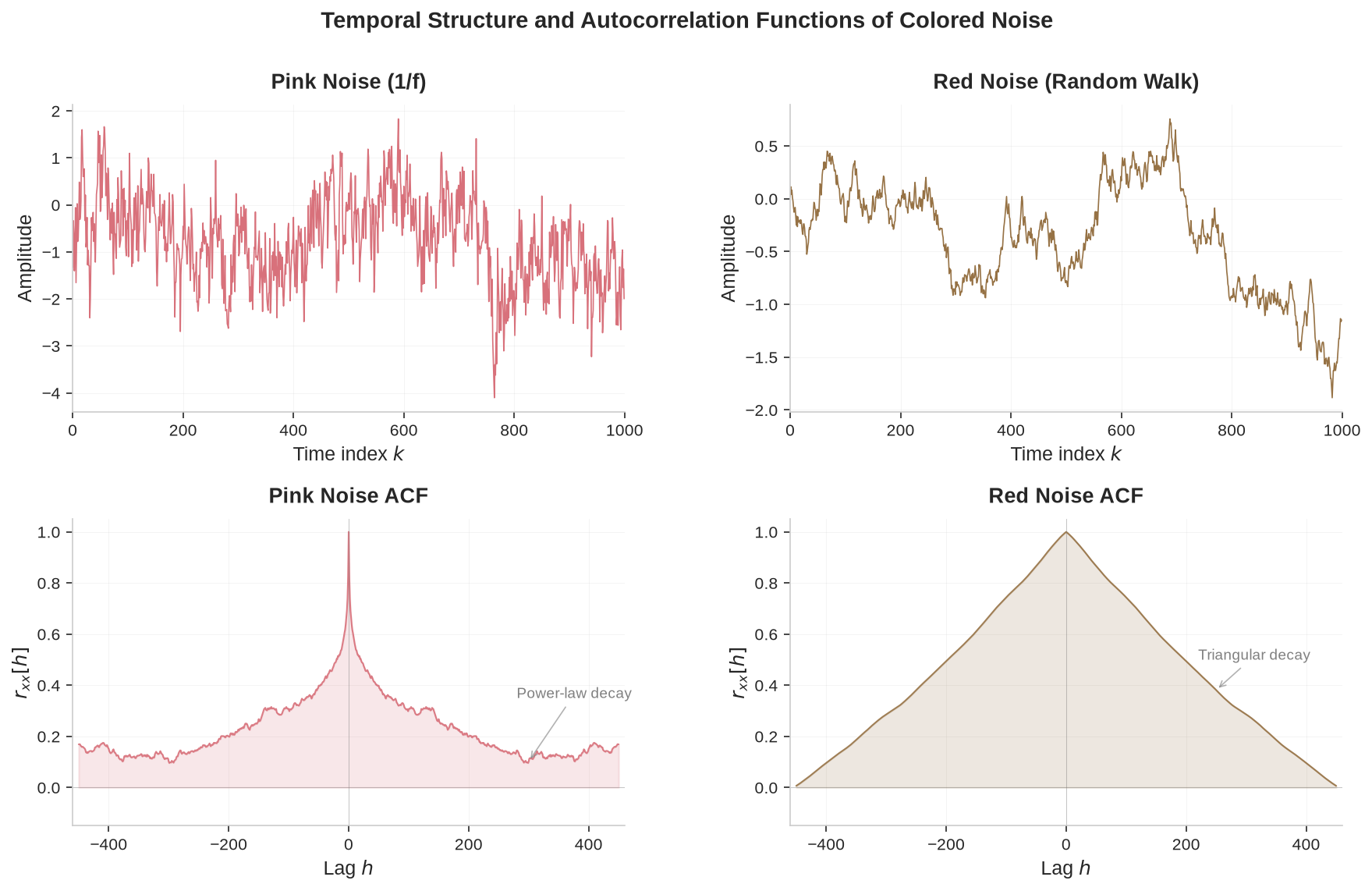
Figure 21:Time-domain signals and sample autocorrelation for pink noise and random walk noise.
8.4Using Autocorrelation for Noise Rejection
For autocorrelation analysis in the presence of white noise, assume that is statistically independent of (i.e., for all lags ). By linearity of correlation and the white noise property from (26):
This result has three consequences:
Zero-lag contribution: White noise adds only a delta spike at zero lag (), contributing to the autocorrelation.
Structure preservation: All non-zero-lag autocorrelation () comes exclusively from the underlying signal .
Noise immunity: The signal’s correlation structure remains intact despite time-domain corruption.
Even when is heavily corrupted by noise, analyzing reveals the underlying signal structure, because the noise contribution vanishes at non-zero lags.
Source
import numpy as np
import matplotlib.pyplot as plt
from scipy import signal
import seaborn as sns

# Generate original signal s[n] with clear structure
np.random.seed(42)
N = 400
t = np.linspace(0, 8*np.pi, N)
s = 3*np.sin(t) + 2*np.sin(1.5*t) + 1.5*np.sin(3*t)  # Multi-frequency signal

# Add white noise to create measured signal x[n] = s[n] + n[n]
sigma_n = 1.5  # Noise standard deviation
n = np.random.normal(0, sigma_n, N)  # White noise
x = s + n  # Measured signal (signal + noise)

# Calculate autocorrelations
autocorr_s = np.correlate(s, s, mode='full')
autocorr_x = np.correlate(x, x, mode='full')

# Normalize autocorrelations
autocorr_s_norm = autocorr_s / autocorr_s.max()
autocorr_x_norm = autocorr_x / autocorr_x.max()

# Create lag vector
lags = np.arange(-N+1, N)

# Create 1x2 subplot layout
fig, (ax1, ax2) = plt.subplots(1, 2, figsize=(15, 6))
fig.suptitle('Noise Rejection by Autocorrelation: Signal Structure Recovery',
             fontsize=16, fontweight='bold', y=0.95)

colors = ['#2E86C1', '#E74C3C', '#28B463', '#8E44AD']  # Blue, Red, Green, Purple

# Left: Original and measured signals on same plot
time_samples = t[:250]  # Show portion for clarity
ax1.plot(time_samples, s[:250], color=colors[0], linewidth=2.5,
         label='Original s[n]', linestyle='--', alpha=0.8)
ax1.plot(time_samples, x[:250], color=colors[1], linewidth=2, alpha=0.9,
         label='Measured x[n] = s[n] + n[n]')
ax1.set_title(r'Original vs Measured Signal', fontweight='bold', pad=12)
ax1.set_xlabel('Time (samples)', fontweight='bold')
ax1.set_ylabel('Amplitude', fontweight='bold')
ax1.grid(True, alpha=0.3)
ax1.legend(frameon=True, fancybox=True, shadow=True)

# Calculate and display SNR
signal_power = np.var(s)
noise_power = np.var(n)
snr_db = 10 * np.log10(signal_power / noise_power)
ax1.text(0.02, 0.98, f'Signal Power: {signal_power:.2f}\nNoise Power: {noise_power:.2f}\nSNR: {snr_db:.1f} dB',
         transform=ax1.transAxes, fontsize=10, fontweight='bold',
         verticalalignment='top', bbox=dict(boxstyle='round',
         facecolor='lightcoral', alpha=0.8, edgecolor=colors[1]))

# Right: Autocorrelation comparison
lag_range = 150  # Show limited range for clarity
center_idx = N - 1
lag_indices = slice(center_idx - lag_range, center_idx + lag_range + 1)
lags_limited = lags[lag_indices]
autocorr_s_limited = autocorr_s_norm[lag_indices]
autocorr_x_limited = autocorr_x_norm[lag_indices]

ax2.plot(lags_limited, autocorr_s_limited, color=colors[0], linewidth=2.5,
         alpha=0.8, label=r'$r_{ss}[h]$ (clean)', linestyle='--')
ax2.plot(lags_limited, autocorr_x_limited, color=colors[1], linewidth=2.5,
         label=r'$r_{xx}[h]$ (noisy)')
ax2.axhline(0, color='black', linewidth=1, alpha=0.5)
ax2.axvline(0, color='black', linewidth=1, alpha=0.5)

ax2.set_title(r'Autocorrelation Comparison: $r_{xx}[h] = r_{ss}[h] + \sigma_n^2\delta[h]$',
              fontweight='bold', pad=12)
ax2.set_xlabel('Lag h', fontweight='bold')
ax2.set_ylabel('Normalized Autocorrelation', fontweight='bold')
ax2.grid(True, alpha=0.3)
ax2.legend(frameon=True, fancybox=True, shadow=True)

# Highlight the noise spike at zero lag
zero_lag_clean = autocorr_s_limited[lag_range]
zero_lag_noisy = autocorr_x_limited[lag_range]
noise_contribution = zero_lag_noisy - zero_lag_clean

# Add annotation about noise effects
ax2.text(0.02, 0.98, f'Noise adds spike at h=0\n' +
         f'Zero-lag difference: {noise_contribution:.3f}\n' +
         r'Non-zero lags preserve $r_{ss}[h]$',
         transform=ax2.transAxes, fontsize=10, fontweight='bold',
         verticalalignment='top', bbox=dict(boxstyle='round',
         facecolor='lightyellow', alpha=0.9, edgecolor='orange'))

# Add arrow pointing to zero lag spike
ax2.annotate('Noise spike\nat h=0', xy=(0, zero_lag_noisy),
            xytext=(30, zero_lag_noisy-0.2), fontsize=10, fontweight='bold',
            color=colors[1], ha='center',
            arrowprops=dict(arrowstyle='->', color=colors[1], lw=2))

# Add mathematical equation as figure text
fig.text(0.02, 0.02,
         r'Noise rejection principle: $r_{xx}[h] = r_{ss}[h] + \sigma_n^2\delta[h]$ → ' +
         r'Signal structure preserved at non-zero lags',
         fontsize=12, bbox=dict(boxstyle='round', facecolor='lightgreen',
         alpha=0.8, edgecolor='green'), ha='left')

# Adjust layout
plt.tight_layout(rect=[0, 0.06, 1, 0.92])
plt.subplots_adjust(wspace=0.25)
plt.show()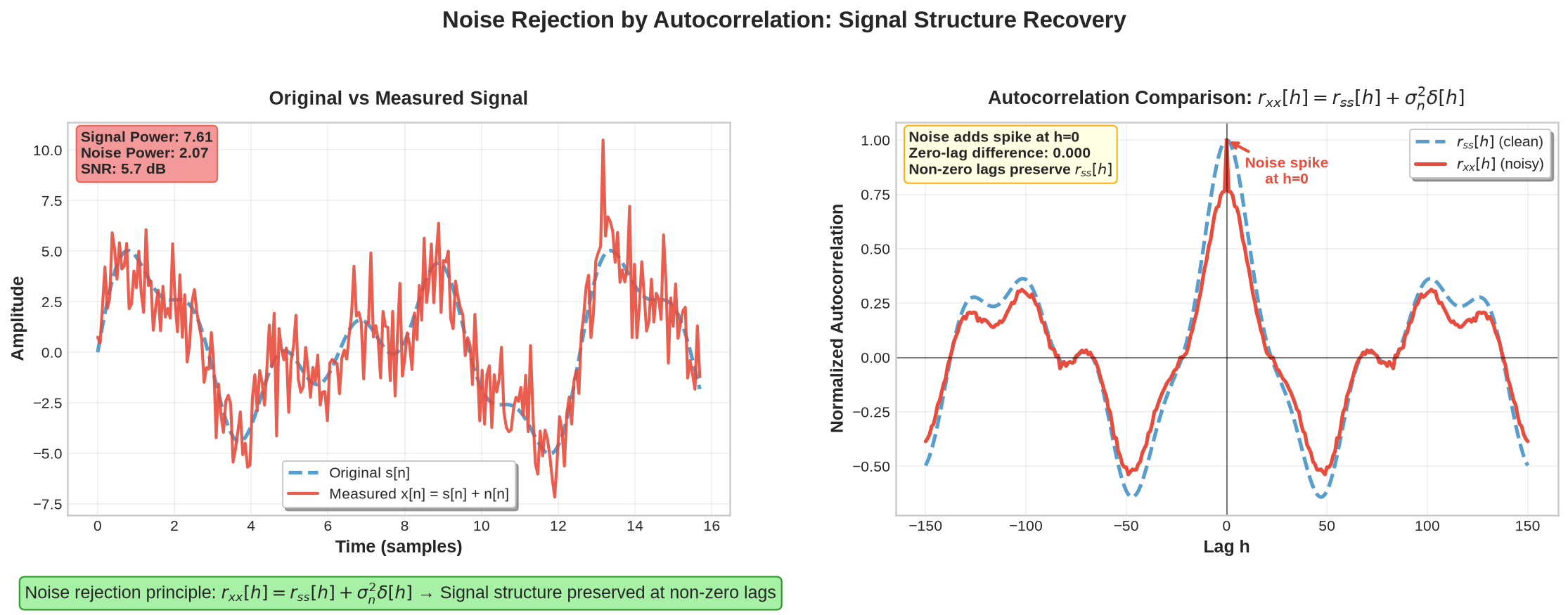
Figure 22:Demonstration of noise rejection using autocorrelation analysis
9Impulse Response and System Characterization
9.1Simulation of Dynamic Systems using Impulse Response
Consider a single-degree-of-freedom (SDOF) dynamic system subjected to an external force , with governing equation:
where is the mass, is the damping coefficient, and is the stiffness. The solution to this linear time-invariant system is expressed in terms of the impulse response function (IRF) : the output is the convolution of with :
is the displacement response to a unit impulse and fully characterizes the system by encoding its mass, damping, and stiffness properties. In discrete form:
For an underdamped SDOF system, can be obtained analytically:
with parameters:
, natural frequency,
, damping ratio,
, damped natural frequency.
is a decaying sinusoid: the oscillation period is set by and the envelope decay rate by .
Once the impulse response is known, the system response to any arbitrary input (wind, traffic, seismic excitation) is obtained by evaluating the convolution integral:
1 2 3 4 5 6 7 8 9 10 11 12 13 14 15 16 17 18 19import numpy as np # System parameters m, k, zeta = 1.0, (2*np.pi*2.0)**2, 0.02 # mass, stiffness, damping ratio wn = np.sqrt(k/m) wd = wn*np.sqrt(1-zeta**2) # Time vector dt, T = 0.01, 20 t = np.arange(0, T, dt) # Impulse response g(t) g = (1/(m*wd)) * np.exp(-zeta*wn*t) * np.sin(wd*t) # Arbitrary input u = 0.3*np.random.randn(len(t)) + np.sin(2*np.pi*1.5*t)*(t<5) # Output response via convolution x = np.convolve(u, g)[:N] * dt
Source
import numpy as np
import matplotlib.pyplot as plt
from matplotlib import rcParams
import matplotlib.patches as patches

# System parameters
m = 1.0  # mass (kg)
zeta = 0.05  # damping ratio
omega_n = 10.0  # natural frequency (rad/s)
omega_d = omega_n * np.sqrt(1 - zeta**2)  # damped frequency

# Time vector
t = np.linspace(0, 8.0, 1000)

# Impulse response function
g_t = (1/(m*omega_d)) * np.exp(-zeta*omega_n*t) * np.sin(omega_d*t)

# Exponential envelopes
upper_envelope = (1/(m*omega_d)) * np.exp(-zeta*omega_n*t)
lower_envelope = -(1/(m*omega_d)) * np.exp(-zeta*omega_n*t)

# Calculate damped period
T_d = 2*np.pi/omega_d

# Create the figure
fig, ax = plt.subplots(1, 1, figsize=(10, 6))

# Define colors
primary_color = '#2E5A87'  # Deep blue
envelope_color = '#8B0000'  # Dark red
fill_color = '#E6F3FF'     # Light blue
period_color = '#228B22'   # Forest green

# Plot the impulse response
ax.plot(t, g_t, color=primary_color, linewidth=2.0, label='$g(t)$')

# Plot exponential envelopes
ax.plot(t, upper_envelope, '--', color=envelope_color, linewidth=1.5,
        label='$\\pm\\frac{1}{m\\omega_d}e^{-\\zeta\\omega_n t}$')
ax.plot(t, lower_envelope, '--', color=envelope_color, linewidth=1.5)

# Fill area between envelopes for the first period
t_fill = t[t <= T_d]
upper_fill = upper_envelope[t <= T_d]
lower_fill = lower_envelope[t <= T_d]
ax.fill_between(t_fill, upper_fill, lower_fill, alpha=0.15, color=fill_color)

# Mark the damped period
peak_indices = []
for i in range(1, len(g_t)-1):
    if g_t[i] > g_t[i-1] and g_t[i] > g_t[i+1] and g_t[i] > 0:
        peak_indices.append(i)

if len(peak_indices) >= 2:
    t1, t2 = t[peak_indices[1]], t[peak_indices[2]]
    h1, h2 = g_t[peak_indices[1]], g_t[peak_indices[2]]

    # Draw period indication
    ax.annotate('', xy=(t2, h2*1.2), xytext=(t1, h2*1.2),
                arrowprops=dict(arrowstyle='<->', color=period_color, lw=1.5))
    ax.text(t2, h2*1.35, f'$T_d = \\frac{{2\\pi}}{{\\omega_d}} = {T_d:.3f}$ s',
            ha='center', va='bottom', fontsize=10, color=period_color, weight='bold')

# Add parameter values text box
param_text = f'$\\zeta = {zeta}$\n$\\omega_n = {omega_n}$ rad/s\n$\\omega_d = {omega_d:.2f}$ rad/s'
props2 = dict(boxstyle='round,pad=0.3', facecolor='#F5F5F5', edgecolor='gray', alpha=0.8)
ax.text(0.08, 0.95, param_text, transform=ax.transAxes, fontsize=9,
        verticalalignment='top', horizontalalignment='left', bbox=props2)

# Formatting
ax.set_xlabel('Time, $t$ (s)', fontsize=12, weight='bold')
ax.set_ylabel('Impulse Response, $g(t)$ (m·s/N)', fontsize=12, weight='bold')
ax.set_title('Impulse Response Characteristics of Underdamped SDOF System',
             fontsize=14, weight='bold', pad=20)

ax.grid(True, alpha=0.3, linestyle='-', linewidth=0.5)
ax.legend(loc='upper right', frameon=True, fancybox=True, shadow=True, fontsize=10)

# Set axis limits and ticks
ax.set_xlim(0, 8.0)
ax.set_ylim(-0.12, 0.25)
ax.tick_params(which='major', length=6)
ax.tick_params(which='minor', length=3)

# Add minor ticks
ax.minorticks_on()

plt.tight_layout()
plt.show()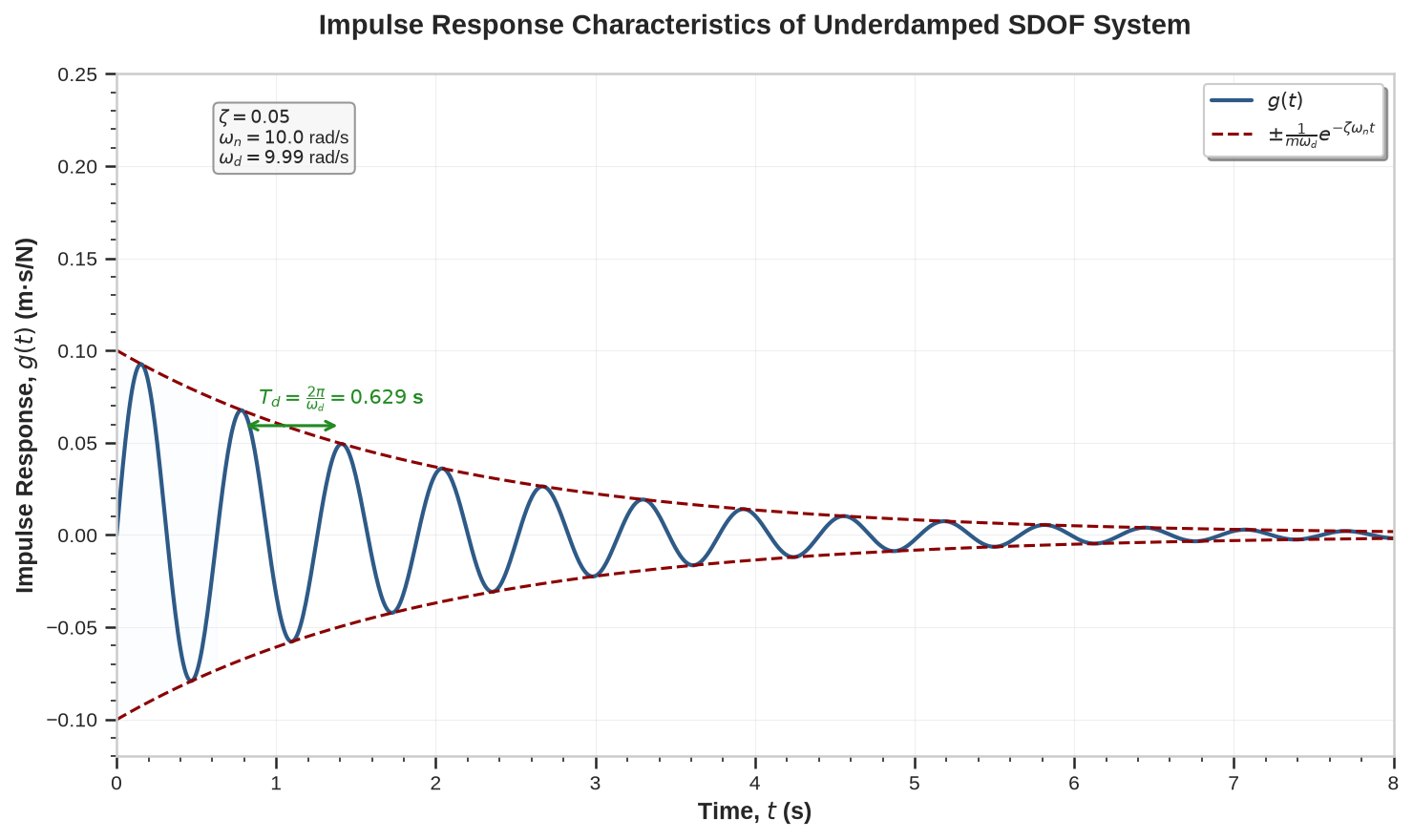
Figure 23:A mpulse Response for a typical underdamped SDOF system.
9.2Impulse Response Identification Techniques
9.2.1Impact Test
In practice, is obtained experimentally by applying an impulse (hammer impact), i.e., . Substituting into (34) and using the sifting property of the Dirac delta gives:
9.2.2Ambient Vibration Test
Suppose we measure only the output under ambient excitations. If the ambient input is modeled as zero-mean white Gaussian noise, the output autocorrelation contains the same information as the impulse response .
Starting from the autocorrelation of the output:
Substituting (34) gives a double convolution:
By linearity, and move outside the expectation:
The inner expectation is the autocorrelation of the input :
For zero-mean white Gaussian noise:
Substituting into (40) and applying the sifting property of collapses one integral:
This is the convolution of with its time-reversal :
Evaluating the convolution shows that retains the form of an exponentially decaying sinusoid: a constant scale factor times multiplied by a sinusoid at , possibly with a phase shift. Although the amplitude and shape differ from , the decay rate still reflects the damping ratio and the oscillation period is still governed by .
This result is the foundation of ambient vibration testing: exciting a structure with ambient white-like noise (traffic, wind) and measuring the output autocorrelation indirectly identifies the impulse response and hence the modal properties.
9.3Extracting Structure’s Parameters
Once (or its estimate) is obtained, key system parameters follow:
Natural period: The oscillation period is read from zero-crossings or the dominant frequency of .
Damping ratio: The exponential envelope decays as ; fitting an exponential to the peak amplitudes yields .
System characterization: With and known, the system’s response to arbitrary inputs follows by convolution.
The procedure is summarized below.
9.4Python Implementation
Source
import numpy as np
import matplotlib.pyplot as plt
import pandas as pd
from scipy.signal import correlate, windows, find_peaks

def simulate_sdof_response():
    """Generate SDOF system response to white noise with improved SNR."""
    np.random.seed(42)
    N = 8000
    dt = 0.01
    t = np.arange(N) * dt

    # System parameters
    Tn_true = 0.5
    zeta_true = 0.03
    wn = 2 * np.pi / Tn_true
    wd = wn * np.sqrt(1 - zeta_true**2)

    # Generate impulse response
    h = (1/wd) * np.exp(-zeta_true * wn * t) * np.sin(wd * t)

    # High-amplitude white noise for better SNR
    u = 1 * np.random.randn(N)
    x_full = np.convolve(u, h, mode='full') * dt
    x = x_full[:N]

    # Measurement noise
    noise_std = 0.3 * np.std(x)
    x += noise_std * np.random.randn(N)

    return t, x, h, {'Tn_true': Tn_true, 'zeta_true': zeta_true, 'wn': wn, 'wd': wd}

def compute_autocorrelation(x):
    """Compute primary autocorrelation with proper preprocessing."""
    N = len(x)

    # DC removal and windowing
    x_centered = x - np.mean(x)
    window = windows.hann(N)
    x_windowed = x_centered * window

    # Autocorrelation and unbiased, per-lag normalization using window overlap
    rxx_full = correlate(x_windowed, x_windowed, mode='full')
    # weights reflect number of overlapping, windowed samples at each lag
    weights_full = correlate(window, window, mode='full')
    # avoid division by zero
    weights_full[weights_full == 0] = 1.0
    rxx_full = rxx_full / weights_full

    # Extract positive lags
    mid = len(rxx_full) // 2
    rxx = rxx_full[mid:mid + N//2]

    return rxx

def estimate_modal_parameters(rxx, dt, start_time=0.1, max_time=5.0):
    """
    Estimate fn and zeta by fitting an exponential to the PEAK ENVELOPE of rxx.
    """
    t_rxx = dt * np.arange(len(rxx))

    # Define analysis window
    start_idx = int(start_time / dt)
    max_idx = min(int(max_time / dt), len(rxx))
    rxx_limited = rxx[start_idx:max_idx]
    t_rxx_limited = t_rxx[start_idx:max_idx]

    # Frequency estimation from positive peaks (avoid half-period from |.|)
    min_distance = max(1, int(0.45 / dt))
    pos_peaks, _ = find_peaks(rxx_limited, distance=min_distance,
                              prominence=0.05 * np.max(np.abs(rxx_limited)))
    if len(pos_peaks) >= 2:
        peak_times = t_rxx_limited[pos_peaks]
        Tn_est = np.median(np.diff(peak_times))
    else:
        Tn_est = np.nan

    # Fit exponential to peak envelope only
    fitted_exp = None
    t_fit_for_plot = None
    try:
        if len(pos_peaks) >= 3:
            peak_times = t_rxx_limited[pos_peaks]
            peak_vals = rxx_limited[pos_peaks]
            # guard against non-positive values for log
            valid = peak_vals > 0
            peak_times = peak_times[valid]
            peak_vals = peak_vals[valid]
            if len(peak_vals) >= 3:
                log_env = np.log(peak_vals)
                coeffs = np.polyfit(peak_times, log_env, 1)
                decay_rate = -coeffs[0]
                log_intercept = coeffs[1]
                # Create fitted exponential over the same fitting interval
                t_fit_for_plot = t_rxx_limited
                fitted_exp = np.exp(log_intercept - decay_rate * t_fit_for_plot)
                if not np.isnan(Tn_est) and Tn_est > 0:
                    omega_n_est = 2 * np.pi / Tn_est
                    zeta_est = decay_rate / omega_n_est
                else:
                    zeta_est = np.nan
            else:
                zeta_est = np.nan
        else:
            zeta_est = np.nan

    except Exception:
        zeta_est = np.nan

    return Tn_est, zeta_est, fitted_exp, t_fit_for_plot

def create_simple_plot(t, x, rxx, Tn_est, dt, fitted_exp=None, t_fit=None):
    """Create visualization with fitted exponential."""
    colors = {
        'response': '#2E5A87',
        'autocorr': '#D2691E',
        'fitted': '#8B0000',
        'period_line': '#4B0082'
    }

    fig, axes = plt.subplots(2, 1, figsize=(12, 8))

    t_rxx = dt * np.arange(len(rxx))

    # Plot 1: Response signal (first 20s)
    axes[0].plot(t[:2000], x[:2000], color=colors['response'], alpha=0.8)
    axes[0].set_ylabel('Response, $x(t)$', fontweight='bold')
    axes[0].set_title('Time-Domain System ID under Ambient Loading', fontweight='bold', pad=15)
    axes[0].set_xlabel('Time (s)', fontweight='bold')
    axes[0].grid(True, alpha=0.3)
    axes[0].set_xlim(t[0], t[2000])

    # Plot 2: Primary autocorrelation with fitted exponential
    axes[1].plot(t_rxx, rxx, color=colors['autocorr'], label='Primary Autocorrelation')

    # Add fitted exponential envelope
    if fitted_exp is not None:
        if t_fit is None:
            t_fit = t_rxx[:len(fitted_exp)]
        axes[1].plot(t_fit, fitted_exp, '--', color=colors['fitted'], linewidth=2,
                    label='Fitted Exponential')
        axes[1].plot(t_fit, -fitted_exp, '--', color=colors['fitted'], linewidth=2)

    axes[1].set_ylabel('$R_{xx}(\\tau)$', fontweight='bold')
    axes[1].set_xlabel('Lag, $\\tau$ (s)', fontweight='bold')
    axes[1].set_xlim(t_fit[0], t_fit[-1])
    axes[1].legend(frameon=True, fancybox=True, shadow=True)
    axes[1].grid(True, alpha=0.3)

    fig.tight_layout()
    return fig

# Main execution
t, x, h, params = simulate_sdof_response()
dt = t[1] - t[0]

rxx = compute_autocorrelation(x)

Tn_est, zeta_est, fitted_exp, t_fit = estimate_modal_parameters(rxx, dt, start_time=0.01, max_time=3.0)

fig = create_simple_plot(t, x, rxx, Tn_est, dt, fitted_exp, t_fit)

# Results
freq_error = abs(Tn_est - params['Tn_true']) / params['Tn_true'] * 100 if not np.isnan(Tn_est) else np.inf
zeta_error = abs(zeta_est - params['zeta_true']) / params['zeta_true'] * 100 if not np.isnan(zeta_est) else np.inf

results = pd.DataFrame({
    'Parameter': ['Natural Period (s)', 'Damping Ratio (%)'],
    'True Value': [params['Tn_true'], params['zeta_true']*100],
    'Estimated Value': [f"{Tn_est:.4f}" if not np.isnan(Tn_est) else 'Failed',
                       f"{zeta_est*100:.4f}" if not np.isnan(zeta_est) else 'Failed'],
    'Error (%)': [f"{freq_error:.2f}" if freq_error < 999 else 'N/A',
                 f"{zeta_error:.2f}" if zeta_error < 999 else 'N/A']
})

plt.show()
results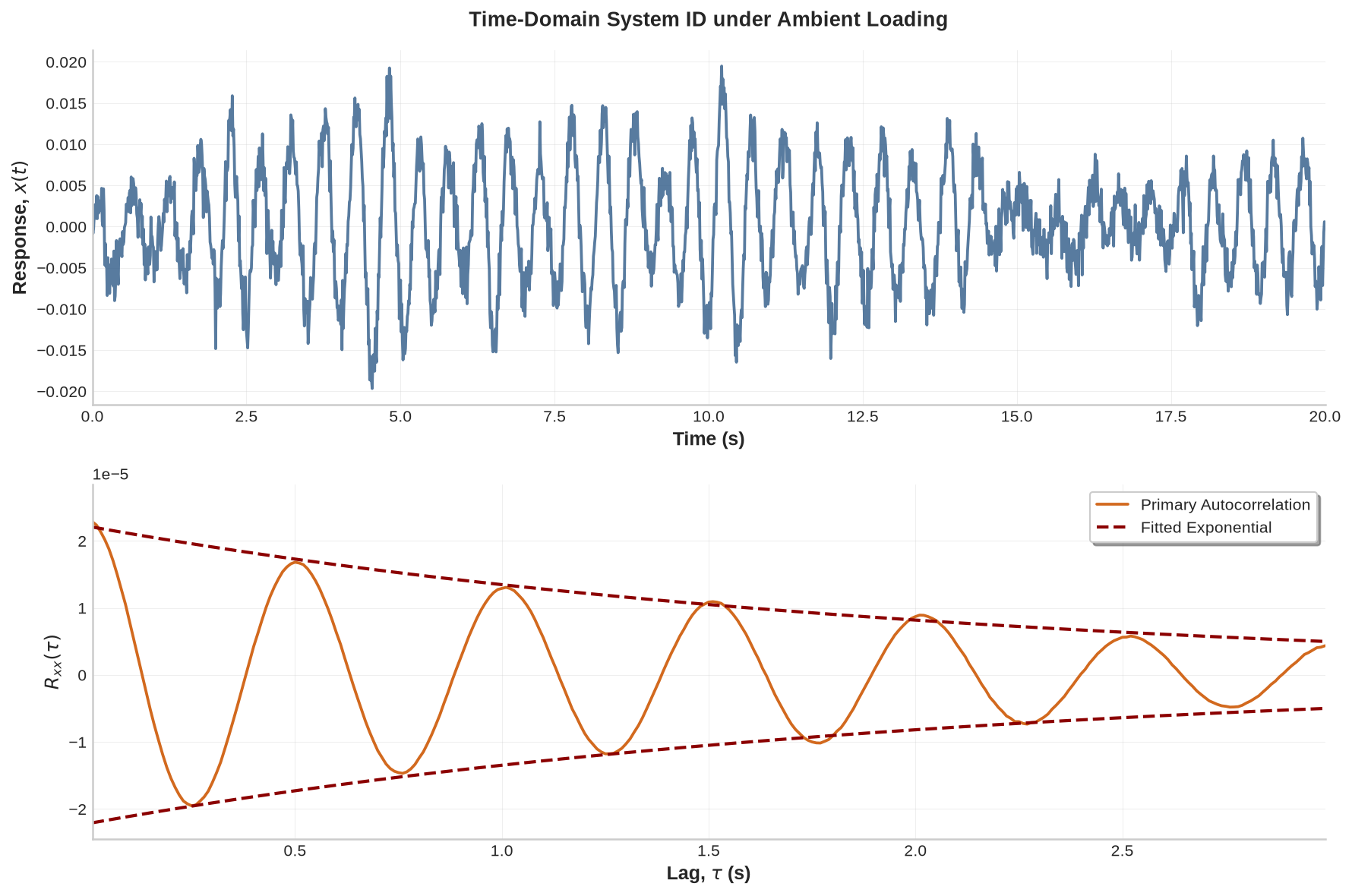
Figure 24:Impulse response identification of an SDOF system under ambient load condition.
This implementation identifies the damped period (hence natural frequency) from autocorrelation zero-crossings and estimates damping from the exponential decay of the envelope. The resulting impulse response then predicts future response under arbitrary inputs via convolution.
9.5Impulse Response Functions for MDOF Systems
Consider a bridge structure discretized into nodes along its span, each node representing a degree of freedom. The equation of motion has the same form as (33) but in matrix form. An impulse at node produces a displacement response at node characterized by , yielding an impulse response matrix that completely describes the structural dynamics.
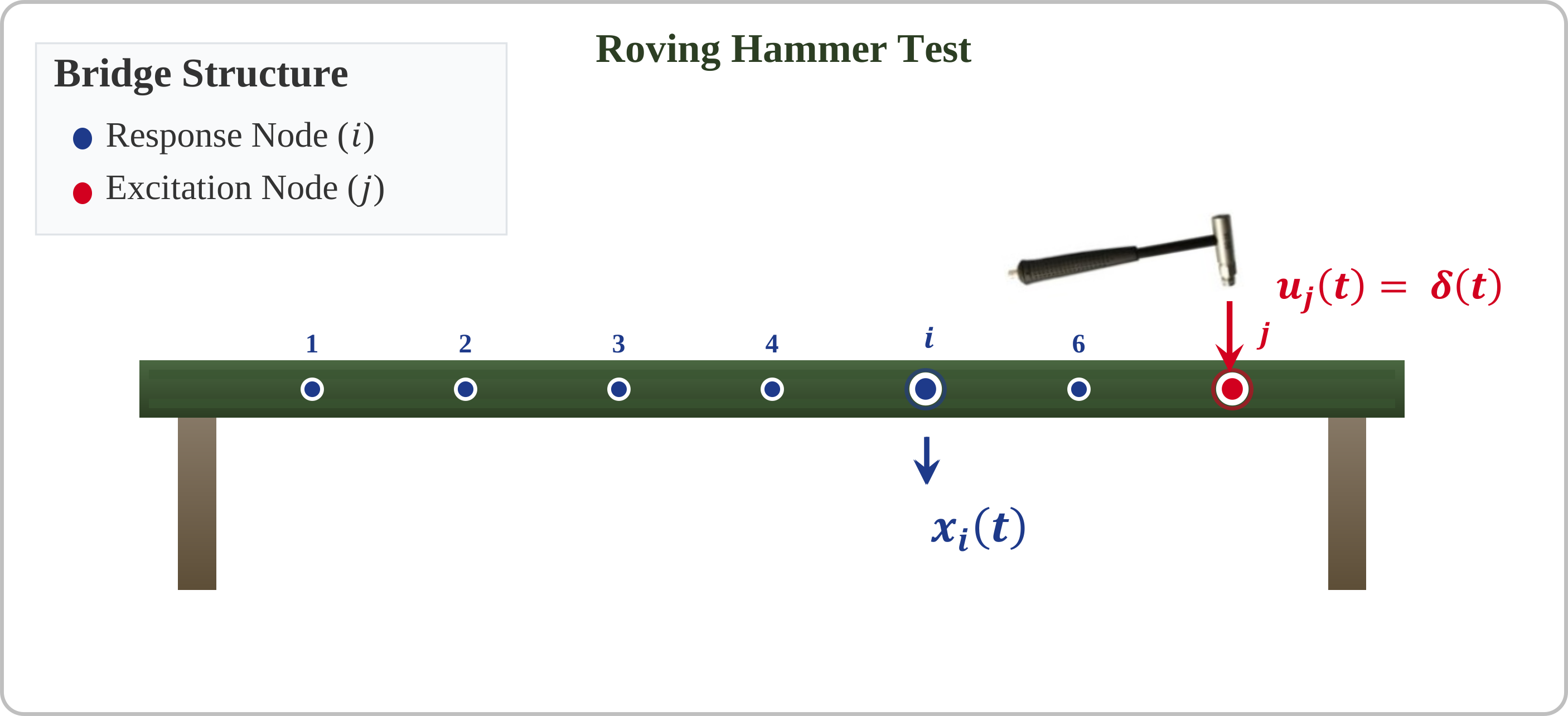
Figure 25:Multi-degree-of-freedom bridge structure showing impulse response function setup.
The complete impulse response matrix contains all possible input-output relationships:
Maxwell’s reciprocity theorem, arising from the symmetry of the mass and stiffness matrices, gives:
This reduces the number of independent impulse response functions from to , simplifying experimental characterization.
9.5.1Response to Arbitrary Loading
When the structure is subjected to arbitrary forces at nodes 1 through , the response at node is:
This superposition enables response prediction for complex loading scenarios from the impulse response matrix alone. The complete IRF for an MDOF system is:
where and are the -th mode shape ordinates at nodes and , is the modal mass, is the natural frequency, is the damping ratio, and is the damped natural frequency for mode . Each IRF is a superposition of modal contributions; each modal term contains:
Modal scaling factor: determines the relative contribution magnitude
Exponential decay: governs the rate of amplitude reduction
Oscillatory component: provides the frequency content
9.5.2Practical Implications
Experimental modal analysis: The expression provides the theoretical basis for extracting modal parameters (, , ) from measured impulse response functions by curve fitting.
Damage detection: Structural damage alters modal parameters and therefore the IRFs; comparing baseline and current IRFs reveals these changes.
Model reduction: For lightly damped structures, only the first few modes contribute substantially to the impulse response, permitting reduced-order modeling.
The following figure shows how multiple modes combine to form the complete impulse response function. Multi-modal superposition complicates parameter identification because the measured IRF at each node contains overlapping frequencies with varying amplitudes and decay rates. Frequency-domain analysis is generally required to extract individual modal parameters from the composite response.
Source
import numpy as np
import matplotlib.pyplot as plt

# System parameters for 5-DOF example
M_modes = 5  # Number of modes to consider
t = np.linspace(0, 3, 1500)

# Modal parameters (representative of a bridge structure)
omega_n = np.array([2*np.pi*2.1, 2*np.pi*6.8, 2*np.pi*13.2, 2*np.pi*21.5, 2*np.pi*32.1])  # rad/s
zeta = np.array([0.02, 0.015, 0.025, 0.03, 0.035])  # damping ratios
M_r = np.array([1000, 800, 600, 500, 400])  # modal masses (kg)

# Calculate damped frequencies
omega_d = omega_n * np.sqrt(1 - zeta**2)

# Mode shapes at two representative nodes (i=2, j=3)
phi_ir = np.array([0.45, 0.78, -0.65, 0.32, -0.58])  # mode shapes at node i
phi_jr = np.array([0.62, 0.85, -0.45, -0.48, 0.35])  # mode shapes at node j

# Calculate individual modal contributions
modal_contributions = np.zeros((M_modes, len(t)))
for r in range(M_modes):
    modal_contributions[r, :] = (phi_ir[r] * phi_jr[r] / (M_r[r] * omega_d[r])) * \
                               np.exp(-zeta[r] * omega_n[r] * t) * np.sin(omega_d[r] * t)

# Total impulse response function
h_ij = np.sum(modal_contributions, axis=0)

# Create visualization
fig, (ax1, ax2) = plt.subplots(2, 1, figsize=(12, 8))

# Color palette
colors = ['#2E5A87', '#D2691E', '#228B22', '#8B0000', '#4B0082']

# Plot individual modal contributions
ax1.set_title('Individual Modal Contributions to Impulse Response Function',
              fontsize=13, weight='bold', pad=15)

for r in range(M_modes):
    ax1.plot(t, modal_contributions[r, :], '--', color=colors[r], linewidth=1.5, alpha=0.8,
             label=f'Mode {r+1}: $f_{r+1}$ = {omega_n[r]/(2*np.pi):.1f} Hz, $\\zeta_{r+1}$ = {zeta[r]:.3f}')

ax1.set_ylabel('Modal Contribution Amplitude', fontweight='bold')
ax1.legend(bbox_to_anchor=(1.05, 1), loc='upper left', fontsize=9)
ax1.grid(True, alpha=0.3)
ax1.set_xlim(0, 3)

# Plot total impulse response function
ax2.plot(t, h_ij, color='#000080', linewidth=2.5,
         label='Total IRF $g_{ij}(t)$')

ax2.set_title('Total Multi-Mode Impulse Response Function',
              fontsize=13, weight='bold', pad=15)
ax2.set_xlabel('Time, $t$ (s)', fontweight='bold')
ax2.set_ylabel('$g_{ij}(t)$ (m/N)', fontweight='bold')
ax2.legend(fontsize=10)
ax2.grid(True, alpha=0.3)
ax2.set_xlim(0, 3)

# Add parameter information box
param_text = f'System: {M_modes}-DOF Bridge Model\nNodes: i = 2, j = 3\nFrequency Range: {omega_n[0]/(2*np.pi):.1f} - {omega_n[-1]/(2*np.pi):.1f} Hz'
props = dict(boxstyle='round,pad=0.5', facecolor='#F5F5F5', edgecolor='gray', alpha=0.9)
ax2.text(0.02, 0.98, param_text, transform=ax2.transAxes, fontsize=9,
         verticalalignment='top', horizontalalignment='left', bbox=props)

plt.tight_layout()
plt.show()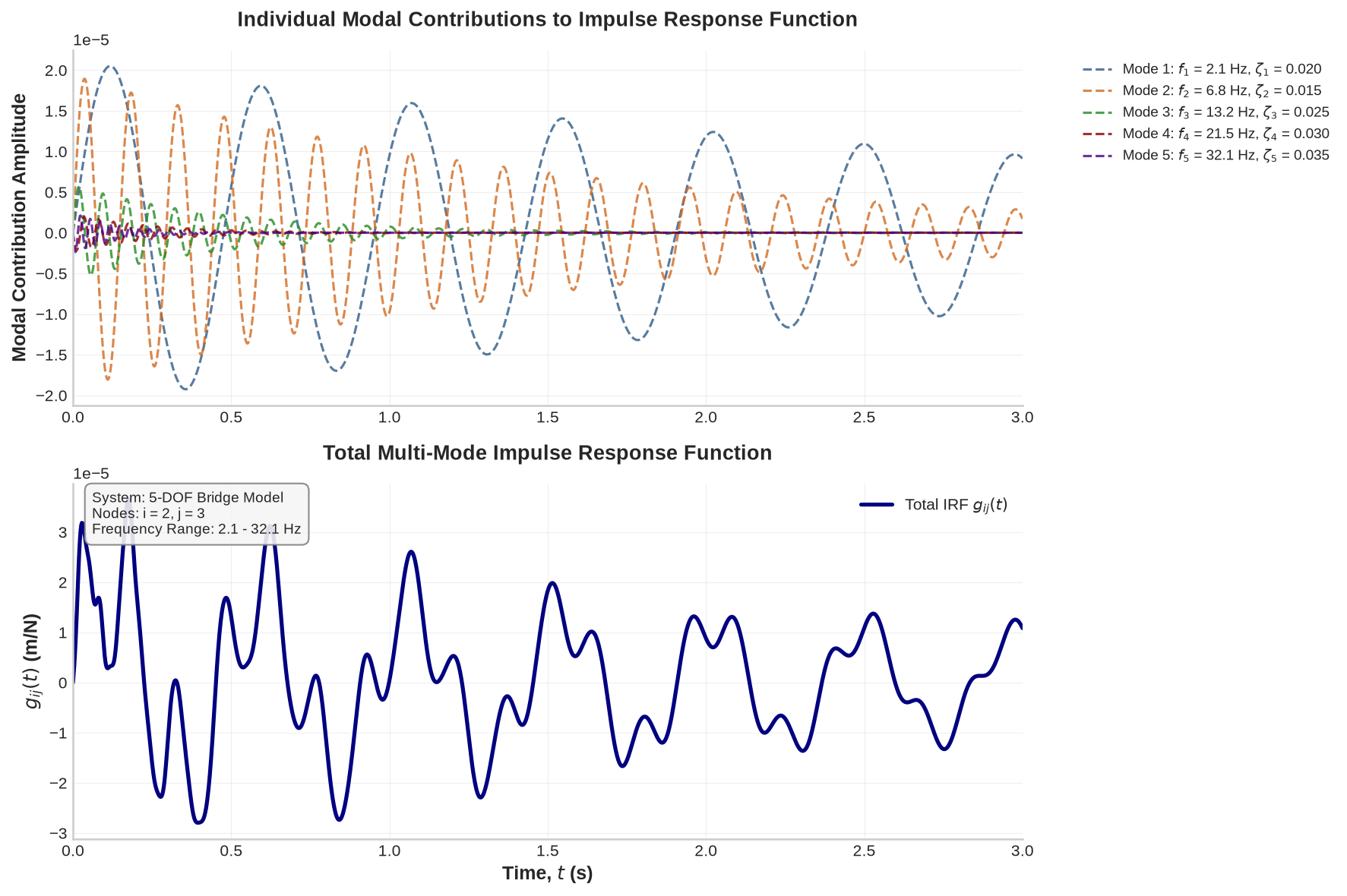
Figure 26:Multi-mode impulse response function showing the contribution of individual modes and their superposition for a 5-DOF system with varying modal parameters.
10Exercises
The following exercises reinforce the concepts covered in this chapter. They include both conceptual questions and coding tasks. (NumPy/Pandas are assumed available for coding exercises.)
Solution to Exercise 1 #
Subtract 0.5 from every data point (equivalent to mean removal when the mean equals 0.5). A non-zero offset inflates RMS and introduces a spurious 0 Hz component in frequency analysis. Removing the bias centers the data at zero, which many downstream analyses require.
Solution to Exercise 2 #
A 20% increase in RMS vibration over a year could be due to:
(a) Structural changes: Stiffness loss from a crack or material degradation makes the bridge respond with larger amplitude for the same excitation.
(b) Operational changes: Increased or heavier traffic naturally produces stronger vibrations.
(c) Sensor changes: A calibration drift could produce artificially elevated readings. Multiple sensors and corroborating evidence help distinguish this from structural causes.
In SHM, a systematic rise in RMS is a flag for potential damage or boundary condition changes (e.g., a settled support altering load paths).
Solution to Exercise 3 #
Spikes three times higher than the sine peak raise the crest factor substantially above 1.414, because the peak grows while the RMS increases only slightly (spikes are infrequent). The crest factor may reach 3 or 4 depending on spike frequency.
The crest factor is sensitive to rare transient events. An increasing crest factor can indicate that the signal is becoming “spikier,” possibly signaling cracks (which cause impacts) or loose components. A single transient event (e.g., a dropped tool) can also boost the crest factor without indicating damage, so it should be used alongside other metrics and repeated observations.
Solution to Exercise 4 #
import numpy as np
import matplotlib.pyplot as plt

# time vector
t = np.linspace(0, 100, 1001)
# components
trend = 0.1 * t  # linear trend
season = np.sin(2*np.pi*0.1 * t)  # sinusoid with period 10 time units (freq 0.1 Hz)
noise = 0.5 * np.random.randn(len(t))
x = trend + season + noise

# Detrend by removing linear fit:
coefs = np.polyfit(t, x, 1)        # fit a line (degree 1 polynomial)
trend_fit = np.polyval(coefs, t)   # evaluate the line
x_detrended = x - trend_fit

# Plot original and detrended
plt.figure()
plt.subplot(2,1,1)
plt.plot(t, x, label='Original')
plt.plot(t, trend_fit, label='Fitted Trend', linestyle='--')
plt.legend()
plt.subplot(2,1,2)
plt.plot(t, x_detrended, label='Detrended')
plt.legend()
plt.show()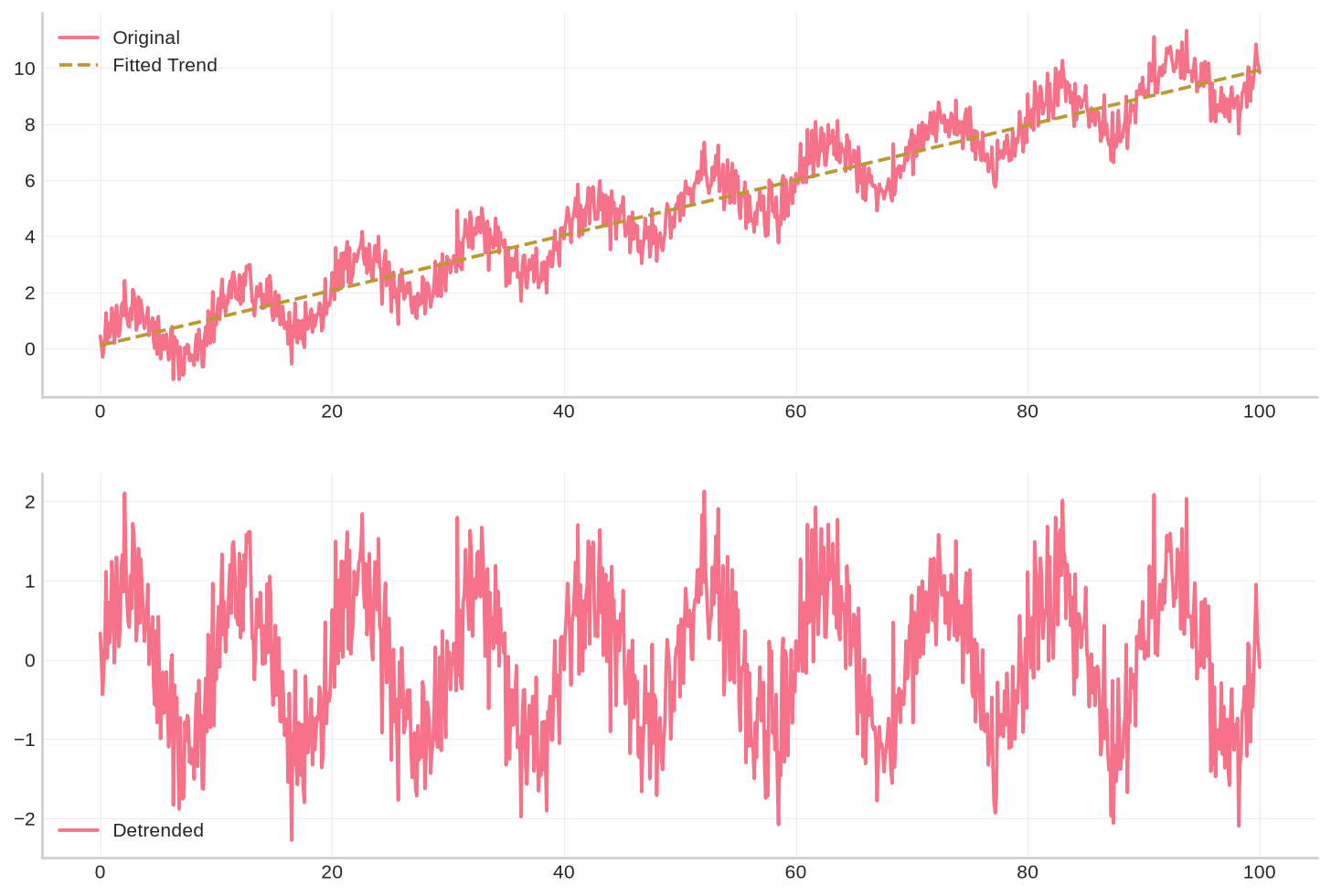
The original plot shows an upward trend with oscillation and noise; the detrended plot oscillates around zero with the linear growth removed. The sinusoidal component and noise remain.
Solution to Exercise 5 #
import numpy as np
import matplotlib.pyplot as plt

# generate noisy signal
t = np.linspace(0, 20, 201)
x = np.sin(0.5 * t) + 0.5 * np.random.randn(len(t))

# 5-point moving average filter
N = 5
kernel = np.ones(N) / N
x_smooth = np.convolve(x, kernel, mode='same')

plt.plot(t, x, label='Original')
plt.plot(t, x_smooth, label='5-pt Moving Avg', linewidth=2)
plt.legend(); plt.show()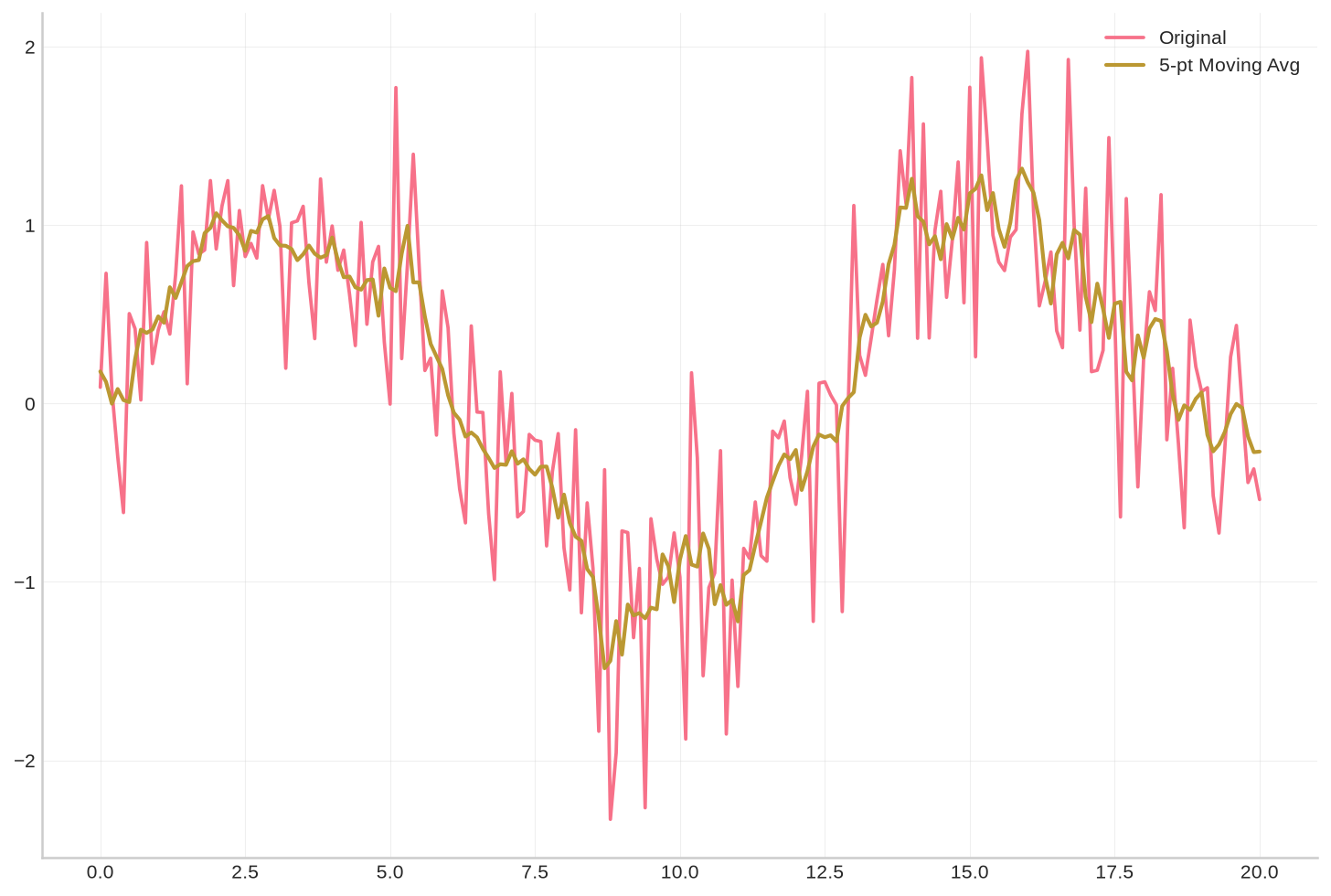
The output shows a jagged original curve and a smoother version. The moving average smooths rapid changes over approximately 5 data points. The mode='same' argument preserves the output length (with some boundary effects).
Solution to Exercise 6 #
Nyquist requires at least 10 Hz sampling to capture 5 Hz, but a margin of at least 2× is prudent, so 20 Hz or higher is appropriate. The 30 Hz component must not alias: at 20 Hz sampling, 30 Hz aliases to 10 Hz (30 − 20 = 10), contaminating the band of interest. Apply an anti-aliasing low-pass filter with a cutoff near 8–10 Hz before sampling at 20 Hz to suppress the 30 Hz content. Alternatively, sample at a higher rate (e.g., 60 Hz) and apply a digital low-pass filter, then decimate.
Solution to Exercise 7 #
Suggested procedure:
Import and initial check: Load the week-long acceleration series. Inspect summary statistics and a quick plot to detect obvious gaps or unrealistic values.
Missing data: Interpolate linearly for short gaps. For long gaps, split the analysis into contiguous segments.
Detrending: Estimate and subtract a slow trend (e.g., a daily moving average) to remove temperature-driven drift and obtain a near-stationary record.
Filtering: Apply a low-pass filter to reduce high-frequency sensor noise (e.g., cutoff at 20 Hz for a 100 Hz sensor). Avoid removing the peaks of interest.
Outlier removal: Reject physically implausible spikes (e.g., for normal traffic) caused by sensor glitches.
Daily peak extraction: Segment the data by day and record the maximum absolute acceleration in each segment.
Reporting: Present the seven daily peak values as a table or time series. An anomalously high peak on one day warrants investigation (heavy vehicle, minor seismic event, etc.).
Steps 1–5 ensure the data is clean before the feature is computed.