1Overview
SHM depends on extracting meaningful information from raw sensor data to indicate the presence and extent of damage. Damage-sensitive features (DSFs) are quantitative metrics extracted from sensor measurements that change measurably when structural damage occurs. They transform large volumes of raw time series, frequency spectra, or images into a small set of interpretable numbers that guide engineering decisions.
A well-chosen DSF must be highly sensitive to structural damage while remaining insensitive to operational and environmental variations. The natural frequency of a structure is a classic example: it relates directly to structural stiffness through , so a stiffness reduction from damage produces a measurable frequency decrease. However, the same frequency also varies with temperature, loading conditions, and boundary condition changes, so feature selection and interpretation require care.
Chapter 3 introduced time-domain analysis for computing statistical moments, correlation functions, and other temporal characteristics from vibration signals. Chapter 4 extended this to the frequency domain, showing how Fourier transforms, power spectral densities, and modal analysis reveal spectral signatures of structural behavior. These tools compute features; selecting which features to extract and understanding how they respond to damage is the core challenge addressed in this chapter.
2Time-Domain and Frequency-Domain Features
SHM features span multiple domains. Time-domain features capture the statistical properties of raw sensor signals, while frequency-domain features reveal the spectral characteristics and modal properties that often correlate with physical damage mechanisms.
Table 1:Time-Domain Features Summary
| Feature | Mathematical Expression | Physical Interpretation | Damage Sensitivity |
|---|---|---|---|
| Mean | DC offset, static displacement | Low (sensor drift indicator) | |
| Root Mean Square | Signal energy, vibration amplitude | Moderate (increases with looseness) | |
| Standard Deviation | Signal variability | Moderate (reflects amplitude changes) | |
| Skewness | Distribution asymmetry | High for asymmetric damage | |
| Kurtosis | (raw fourth standardized moment; for a Gaussian, for impulsive signals; note that scipy.stats.kurtosis with default fisher=True returns the excess form ) | Tail heaviness, impulsiveness | High (detects impacts, cracks) |
| Crest Factor | Peak-to-RMS ratio | High for impulsive events | |
| Zero Crossing Rate | Dominant frequency indicator | Low to moderate |
Table 2:Frequency-Domain Features Summary
| Feature | Mathematical Expression | Physical Interpretation | Damage Sensitivity |
|---|---|---|---|
| Peak Frequencies | Resonant frequencies reflecting stiffness/mass distribution | High for global stiffness loss; moderate for local damage | |
| Spectral Moments | Spectral centroid/spread; energy distribution across frequency | Moderate (shifts with mass/stiffness changes) | |
| Band Energy Ratio | Fraction of energy in a band; highlights sideband growth and shifts | Moderate to high (band-specific signatures) | |
| Spectral Entropy | Spectral complexity/regularity | Moderate (increases with cracks, rubbing, looseness) | |
| Natural Frequencies | from peak picking in | Global dynamic stiffness | High for global stiffness reduction; moderate for localized damage |
| Damping Ratios | (half-power bandwidth) | Energy dissipation; friction/viscoelasticity | High for contact/frictional/nonlinear damage |
| Mode Shapes | from Frequency Domain Decomposition (FDD) | Deformation patterns (nodes/antinodes) | High near damage location (local stiffness changes) |
| MAC | Modal Assurance Criterion; correlation between damaged and undamaged mode shapes | High (decreases from ~1.0 with mode shape changes) | |
| COMAC | Coordinate MAC; local mode shape consistency across modes | High (decreases from 1.0 near damage location) | |
| Modal FRF | Input–output dynamic compliance | High across resonance and anti-resonance regions |
These features form the foundation of damage detection algorithms, but their effectiveness depends on understanding their statistical behavior in both healthy and damaged states. The transformation from raw measurements to features achieves significant data reduction (from thousands of time samples or frequency bins to a dozen key metrics) while preserving the information relevant to structural condition.
3Anomaly Detection Framework for Structural Health Monitoring
Feature extraction transforms raw sensor data into interpretable quantities, but the key question remains: when does a feature value indicate damage rather than normal variability? This section establishes the framework for anomaly detection in SHM, introducing baselines, damage scores, and threshold-based decision making.
3.1Defining Anomalies in SHM Context
An anomaly in SHM is any observation that deviates significantly from the expected behavior of the healthy structure. Unlike general anomaly detection, where unusual patterns may reflect various outlier types, SHM anomaly detection targets changes that correlate with physical damage mechanisms: cracks, stiffness degradation, connection loosening, or material deterioration.
The main challenge is distinguishing damage-induced changes from natural variability caused by environmental and operational conditions. A bridge’s natural frequencies fluctuate daily with temperature, traffic loading, and humidity. Mode shapes shift with boundary condition changes, and time-domain features vary with ambient vibration levels. Effective anomaly detection must account for this normal variability while remaining sensitive to damage.
3.2Damage Scores and Baselines
The damage score (also called damage index or health index) quantifies how far a current observation deviates from the healthy baseline. For a single feature , the damage score might be as simple as:
where and are the mean and standard deviation from a baseline period when the structure is known to be healthy. This normalization yields a dimensionless score: values near zero indicate normal behavior, while large positive values suggest potential damage.
The baseline establishment process requires careful consideration:
Duration: Collect sufficient data to capture normal variability (typically weeks to months)
Conditions: Include diverse environmental and operational states
Verification: Confirm structural health through inspection or other means
Update strategy: Decide whether baselines remain static or adapt over time
For a newly constructed bridge, the baseline period might span the first year of operation to capture seasonal variations. For an existing structure, using the current state as a baseline requires validation that no significant damage is present.
3.3Monitoring Over Time and Threshold Setting
Continuous monitoring turns the damage score into a time series that tracks structural condition. Figure 1 illustrates this workflow: baseline measurements establish the normal range, threshold lines mark the boundary between normal and anomalous behavior, and post-event measurements reveal whether damage has occurred.
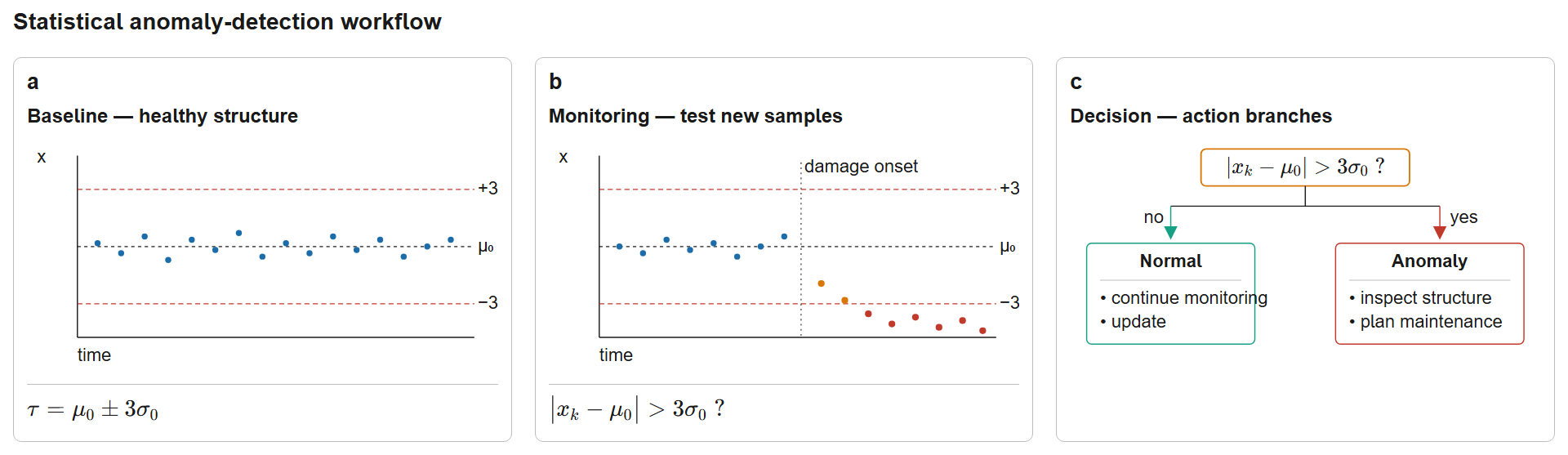
Figure 1:Statistical anomaly-detection workflow for structural health monitoring: a baseline period computes and to set the threshold ; during monitoring each observation is checked against ; outcomes branch to normal (continue monitoring) or anomaly (inspect structure).
The detection threshold balances two competing risks:
False positives (false alarms): Declaring damage when none exists, leading to unnecessary inspections
False negatives (missed detections): Failing to detect actual damage, potentially allowing unsafe conditions
Common threshold choices include:
±3σ rule: Values beyond three standard deviations from baseline mean (99.7% confidence for Gaussian data)
Percentile-based: Thresholds at 95th or 99th percentile of baseline distribution
ROC-optimized: Threshold selected to balance false positive and false negative rates based on training data
The appropriate threshold depends on the consequences of each error type. For life-safety critical structures like bridges, lower thresholds (higher sensitivity) minimize missed detections at the cost of more false alarms.
3.4From Single Values to Distributions
Monitoring individual measurements provides real-time damage alerts, but comparing entire distributions of features gives deeper insight. Instead of asking “Is this frequency measurement anomalous?”, we can ask “Has the distribution of frequency measurements shifted between baseline and current periods?”
Distribution-level comparison is particularly useful when multiple measurements are available from the same structural state, when gradual damage produces subtle shifts in mean or variance, or when the goal is to quantify the magnitude of change rather than just detect it.
The remainder of this chapter develops three complementary approaches:
Z-score method: Point-wise comparison for individual measurements
Mahalanobis distance: Multivariate extension accounting for feature correlations
Wasserstein distance: Distribution-to-distribution comparison quantifying overall shift
These methods all require understanding the statistical distributions underlying the features, beginning with the Gaussian distribution.
4Statistical Distribution Fundamentals: The Gaussian Distribution
Statistical distributions underpin quantitative anomaly detection. The Gaussian (normal) distribution is central to SHM because of the Central Limit Theorem: when a feature results from many independent random effects (sensor noise, ambient vibrations, environmental fluctuations), its distribution tends toward Gaussian regardless of the individual effect distributions.
4.1The Gaussian Distribution: Intuition and Properties
The Gaussian distribution is characterized by its familiar bell-shaped curve, described mathematically by two parameters:
where is the mean and is the standard deviation. For a bridge’s natural frequency, is the typical value under normal conditions and quantifies variation from environmental effects and measurement uncertainty.
The Gaussian distribution has several properties that make it suitable for damage detection:
Symmetry: Equal probability of deviations above and below the mean
Concentration: Most values cluster near the mean; extreme values are rare
Parameterization: Completely specified by just two numbers ()
Additivity: Sum of independent Gaussians is also Gaussian
4.2Confidence Intervals and the 68-95-99.7 Rule
The standard deviation provides a natural scale for measuring distances from the mean. For Gaussian distributions, fixed percentages of data fall within specific ranges:
68% of observations fall within (one standard deviation)
95% of observations fall within (two standard deviations)
99.7% of observations fall within (three standard deviations)
This 68-95-99.7 rule (the empirical rule) provides the basis for threshold setting in damage detection. A frequency value more than 3σ from the baseline mean has only a 0.3% probability of arising from normal variability, making it strong evidence for damage.
4.3Visualizing Gaussian Behavior with Bridge Frequency Data
Consider a two-span highway bridge (30 m + 30 m continuous spans) with a first natural frequency of approximately 3.5 Hz. Over 150 baseline measurements, variations arise from temperature, traffic, and measurement noise. Figure 2 shows the Gaussian fit to this data and the resulting confidence intervals.
Key Python Implementation for Gaussian Statistics:
1 2 3 4 5 6 7 8 9 10 11 12 13import numpy as np from scipy import stats # Compute sample statistics mean = np.mean(data) std = np.std(data, ddof=1) # ddof=1 for sample std # Create Gaussian PDF x_range = np.linspace(mean - 4*std, mean + 4*std, 300) pdf = stats.norm.pdf(x_range, mean, std) # Check normality with Q-Q plot stats.probplot(data, dist="norm", plot=ax)
The emphasized lines show the key operations: computing statistics with numpy and generating probability distributions with scipy.stats. The ddof=1 parameter gives the sample standard deviation (dividing by n-1 instead of n).
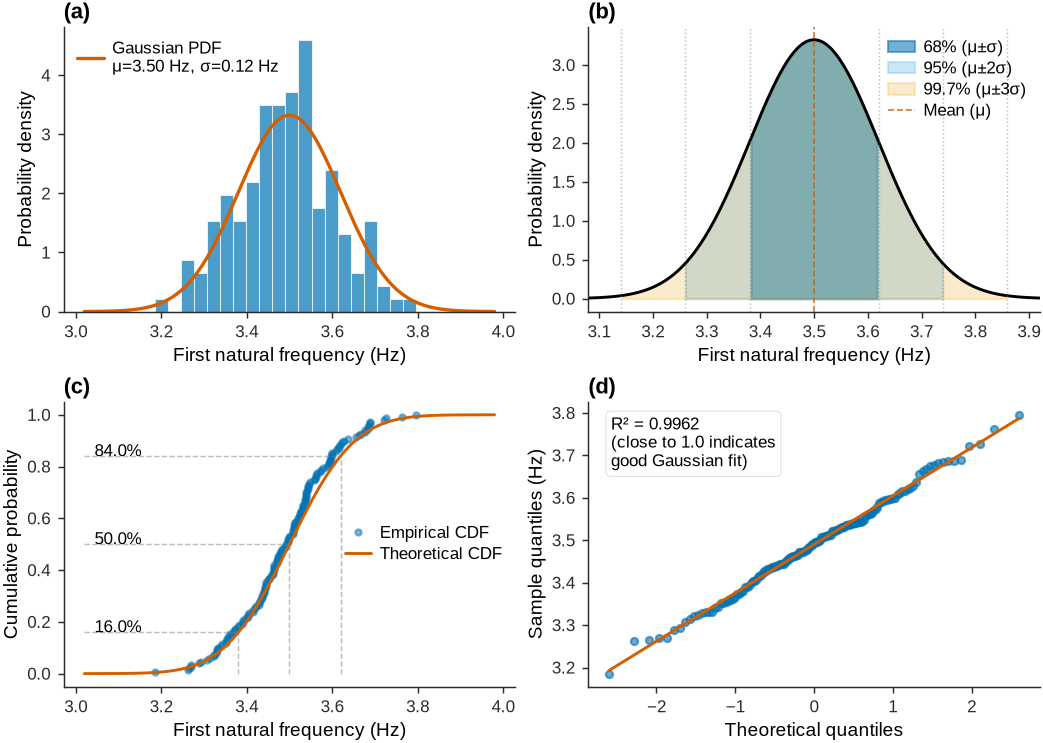
Figure 2:Gaussian distribution fitted to 150 first natural frequency measurements from a two-span bridge showing 68%, 95%, and 99.7% confidence intervals.
Figure 2 shows the statistical characterization of baseline monitoring data. The histogram (top-left) displays 150 frequency measurements overlaid with the fitted Gaussian PDF (μ=3.50 Hz, σ=0.12 Hz). The shaded confidence intervals (top-right) illustrate the 68-95-99.7 rule: approximately 68% of measurements fall within μ±σ, 95% within μ±2σ, and 99.7% within μ±3σ. Any new measurement beyond 3σ from the baseline mean would occur less than 0.3% of the time under normal conditions, providing strong evidence of structural change.
The CDF (bottom-left) compares empirical data against the theoretical Gaussian, while the Q-Q plot (bottom-right) shows excellent agreement (R²≈1.0), confirming that frequency measurements under normal conditions follow Gaussian statistics. This validates the use of parametric statistical methods throughout the chapter.
4.4Establishing the Baseline Distribution
Given baseline measurements of a feature, the baseline establishment process is as follows:
Compute sample mean:
Compute sample standard deviation:
The denominator (Bessel’s correction) gives an unbiased estimate when the true mean is unknown.
Verify Gaussian assumption: Use Q-Q plots, Shapiro-Wilk test, or Anderson-Darling test
Set detection threshold: Typically for two-sided detection
These baseline parameters (, ) enable quantitative damage detection through the methods developed in subsequent sections.
5Single Feature Analysis: 1D Statistical Methods
This section develops two methods for damage detection using a single feature: the z-score method for point-wise comparisons and the Wasserstein distance for distribution-level comparisons. Both are illustrated using the first natural frequency of the two-span bridge (30 m + 30 m), a feature that reflects global structural stiffness.
5.1Method 1: Z-Score for Point-Wise Anomaly Detection
The z-score (also called standard score) measures how many standard deviations an individual observation lies from the baseline mean:
where is the new measurement and , are the baseline mean and standard deviation from (3) and (4). The z-score has several useful properties:
Dimensionless: Works for any feature regardless of units
Standardized interpretation: indicates an outlier for Gaussian data (99.7% rule)
Signed: Negative z-scores indicate values below baseline, positive above baseline
For damage detection, a two-sided test with threshold is standard, though one-sided tests are appropriate when damage affects features in a known direction (e.g., frequency decreases with stiffness loss).
Example: If baseline frequency measurements yield Hz and Hz, and a new measurement gives Hz, then:
This z-score of -2.0 falls within the normal range (), suggesting no damage despite the 0.24 Hz difference. The 0.24 Hz gap corresponds to only two standard deviations of normal variability.
5.2Method 2: Wasserstein Distance for Distribution Comparison
While z-scores assess individual points, the Wasserstein distance (also called Earth Mover’s Distance) compares entire distributions. It measures the minimum work required to transform one probability distribution into another, where work equals probability mass moved times distance moved.
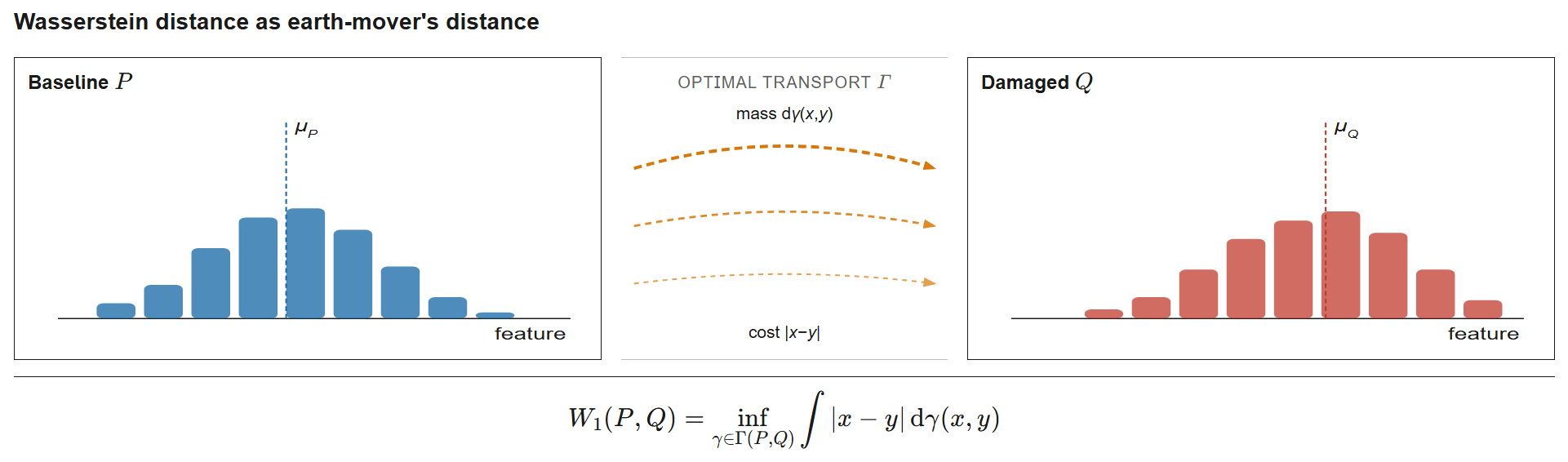
Figure 3:Conceptual illustration of the 1-Wasserstein distance as “Earth Mover’s Distance”. The baseline distribution and damaged distribution are visualized as histograms of probability mass; the orange arcs represent transport plans. The Wasserstein distance quantifies the minimum total work (amount × distance) needed to reshape into , providing a geometric interpretation that compares entire distributions rather than individual points.
For two univariate distributions and with CDFs and , the 1-Wasserstein distance is:
For empirical distributions with finite samples of equal size, this reduces to comparing sorted values. If and are equal-size samples from and :
where denotes the -th sorted value. For samples of unequal size (as in the worked example, where baseline and damage sets have different ), the sorted-pair shortcut does not apply directly; one must evaluate the CDF-integration form of (7) using the empirical CDFs, which is exactly what scipy.stats.wasserstein_distance computes internally.
Interpretation:
: Distributions are identical
Small : Distributions are similar (normal variability)
Large : Distributions differ significantly (potential damage)
The Wasserstein distance has several advantages over simpler metrics like comparing means:
Robust to outliers: Uses all data, not just summary statistics
Captures shape changes: Detects shifts in variance, skewness, or modality
Metric properties: Satisfies the triangle inequality
5.3Detailed Bridge Monitoring Example
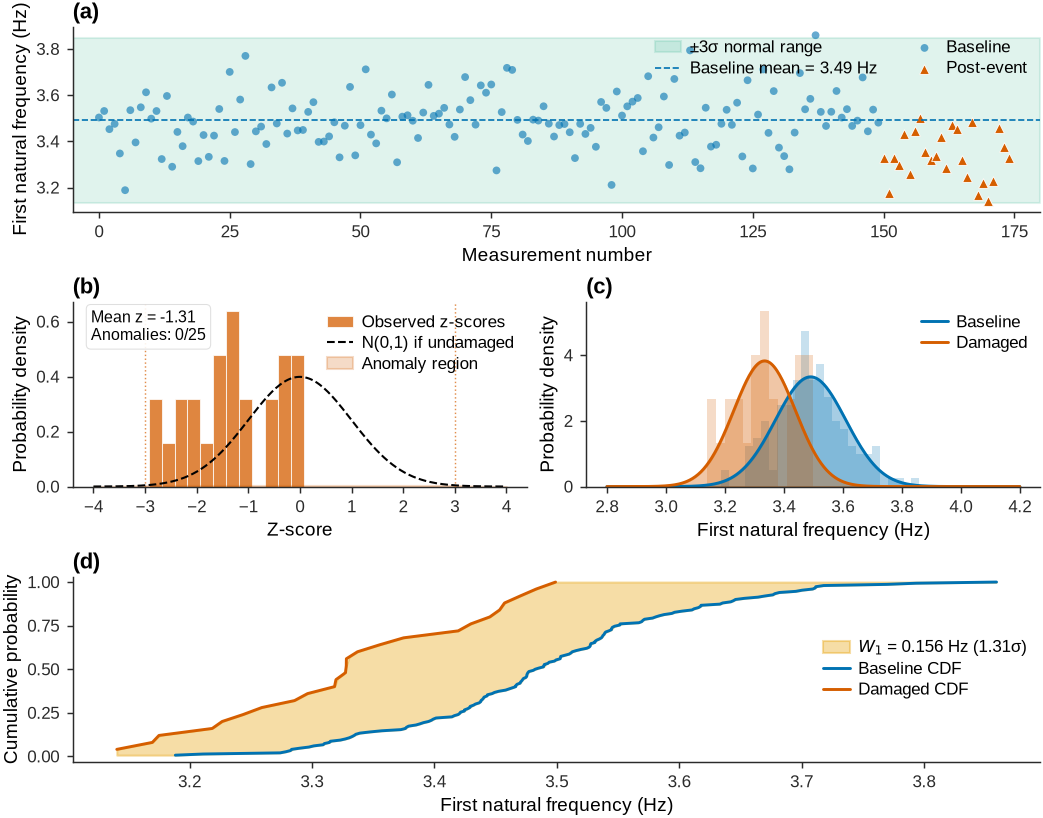
Consider monitoring the first natural frequency over 150 baseline measurements, then observing 25 measurements after a potentially damaging event. Figure 4 demonstrates both z-score and Wasserstein approaches.
Key Python Implementation for Z-Score and Wasserstein Distance:
1 2 3 4 5 6 7 8 9 10 11 12 13 14from scipy.stats import wasserstein_distance # Z-score for point-wise anomaly detection mu_baseline = np.mean(baseline_data) sigma_baseline = np.std(baseline_data, ddof=1) z_scores = (new_measurements - mu_baseline) / sigma_baseline # Wasserstein distance for distribution comparison w_distance = wasserstein_distance(baseline_data, damaged_data) w_normalized = w_distance / sigma_baseline # Normalize # Decision rules anomalies_z = np.abs(z_scores) > 3 # 99.7% confidence damage_detected = w_normalized > 1.0 # > 1 sigma shift
The emphasized lines show the two core computations: z-score normalizes individual points relative to baseline statistics; Wasserstein distance quantifies the overall shift between distributions.
======================================================================
DAMAGE DETECTION SUMMARY: 1D Analysis
======================================================================

Baseline vs Post-Event Statistics:
Detection Method Comparison:
⚠️ FINAL VERDICT: DAMAGE DETECTED
Figure 4:Z-score and Wasserstein distance methods for 1D anomaly detection applied to bridge first natural frequency monitoring.
Figure 4 compares the two detection methods on bridge frequency monitoring. The time series (top) shows 150 baseline measurements followed by 25 post-event measurements, with the ±3σ envelope. For this moderate 5.7% frequency drop, no single post-event point crosses the |z| > 3 threshold, yet the z-score distribution (middle-left) is clearly shifted left of the expected N(0,1), with a mean z-score near -1.3.
The PDF comparison (middle-right) shows the distributional shift between baseline and damaged states, while the CDF plot (bottom) visualizes the Wasserstein distance as the area between curves. The Wasserstein distance (W₁ = 0.16 Hz, about 1.3σ) captures this overall shift even when point-wise z-scores raise no alert, which illustrates why distribution-level comparison can detect moderate damage that threshold tests miss.
5.4Choosing Between Z-Score and Wasserstein Distance
The two methods serve complementary roles in structural health monitoring:
Use z-score when:
Real-time point-by-point monitoring is required
Single measurements need immediate classification
Computational efficiency is critical (simple arithmetic)
Clear threshold interpretation is desired (±3σ rule)
Use Wasserstein distance when:
Multiple measurements from each state are available
Quantifying magnitude of change is important
Detecting subtle shifts in distribution shape
Robustness to individual outliers is needed
In practice, both methods complement each other: z-scores support continuous monitoring with immediate alerts, and Wasserstein distance supports periodic assessment of overall condition. Agreement between both methods strengthens confidence in a damage diagnosis.
6Bivariate Analysis: Two Natural Frequencies
Monitoring multiple features simultaneously improves detection performance. This section extends the univariate methods to bivariate analysis, monitoring the first two natural frequencies jointly. Joint monitoring captures the correlation between frequencies and provides richer information about structural condition than either frequency alone.
6.1The Bivariate Gaussian Distribution
Two correlated features follow a bivariate Gaussian distribution. The probability density function for is:
where is the mean vector and is the covariance matrix:
Here, and are the standard deviations of the two features, and is the correlation coefficient, ranging from -1 (perfect negative correlation) to +1 (perfect positive correlation).
For this bridge, both natural frequencies are expected to be positively correlated: environmental effects (temperature, moisture) that increase stiffness raise both frequencies, while damage that reduces stiffness lowers both.
6.2Visualizing the Bivariate Gaussian: Covariance Ellipse
The bivariate Gaussian produces elliptical contours in 2D feature space. The ellipse orientation and shape encode the correlation structure; its center is the mean. Figure 5 shows this for the two-span bridge.
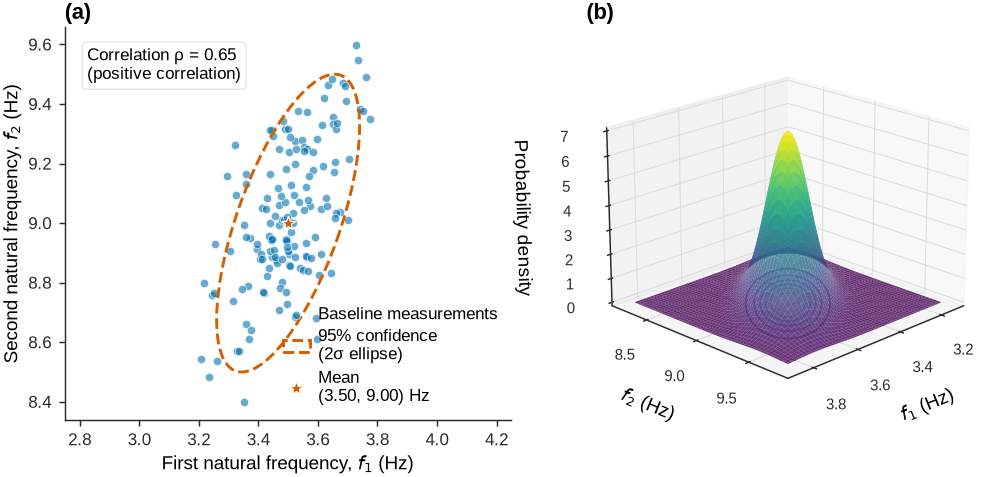
Figure 5:Bivariate Gaussian distribution for two natural frequencies showing scatter plot with 95% confidence ellipse and 3D probability density surface.
Figure 5 shows the structure of correlated features. When the first frequency rises (for example, from temperature-induced stiffening), the second tends to rise as well, producing the elongated elliptical scatter. The correlation coefficient quantifies this tendency. The 3D surface shows probability density concentrated near the mean, with the ridge aligned along the correlation direction.
6.3Applying the Three Methods to Bivariate Data
The three detection methods (z-score, Mahalanobis distance, and Wasserstein distance) extend from 1D to 2D, and this extension shows the benefit of accounting for feature correlations.
The straightforward extension of z-scores treats each feature independently, computing:
A point is flagged as anomalous if or . This approach ignores correlations and may miss damage that shifts both frequencies in a correlated direction while each remains within its individual threshold.
6.3.1Method 2: Mahalanobis Distance (Correlation-Aware)
The Mahalanobis distance extends z-scores to account for correlations, yielding a single distance measure in multivariate space:
where is the measurement vector, is the baseline mean vector, and is the inverse covariance matrix.
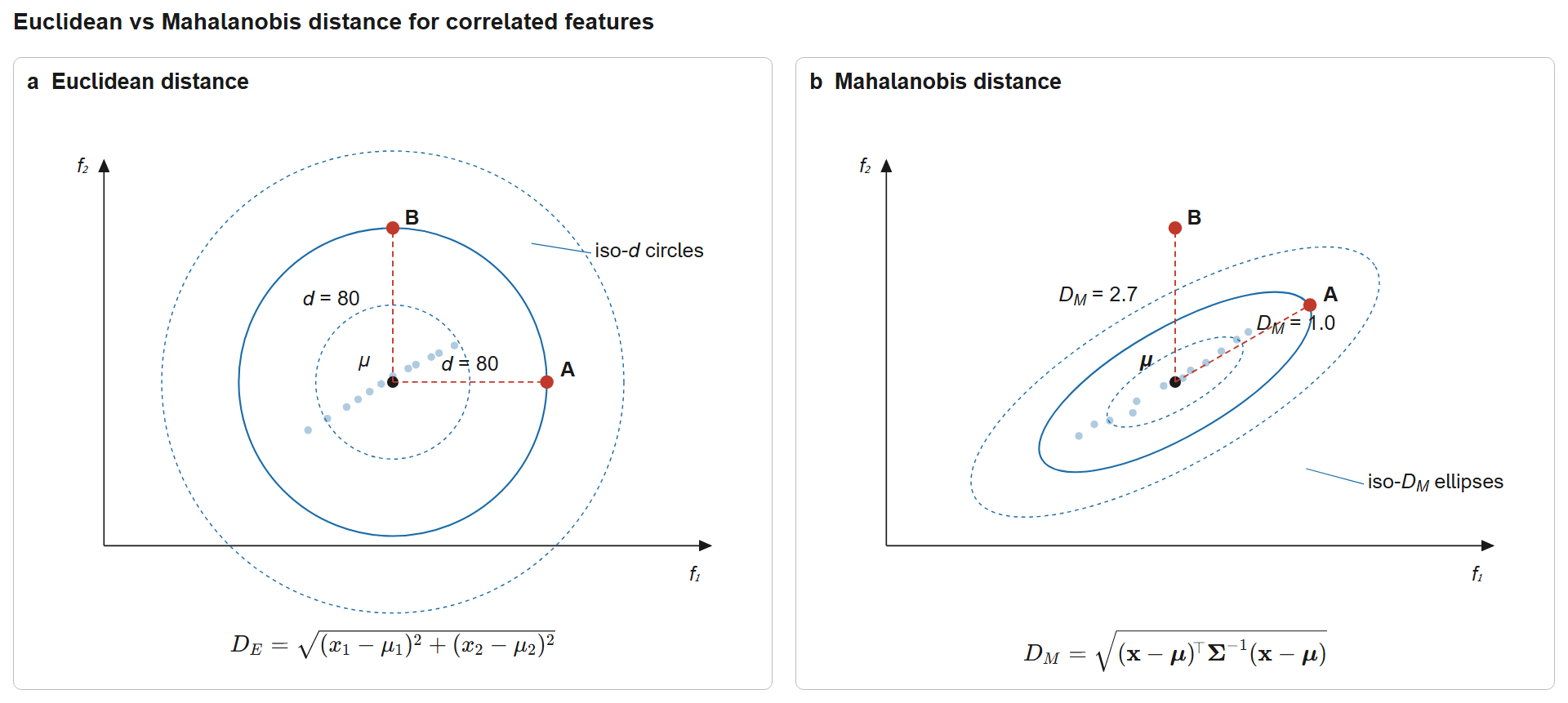
Figure 6:Comparison of Euclidean and Mahalanobis distance metrics for correlated features. The Euclidean metric uses concentric circles and treats all directions equally; the Mahalanobis metric uses tilted ellipses aligned with the data covariance, so a point perpendicular to the correlation axis is correctly flagged as more anomalous.
The Mahalanobis distance has three key properties:
Dimensionless: Combines features with different units coherently
Correlation-aware: Accounts for the joint variability of features
Chi-squared distributed: Under Gaussian assumptions, where is the number of features
For bivariate data (), the 95% confidence threshold is .
6.3.2Method 3: Wasserstein Distance (Distribution Comparison)
Comparing entire distributions in 2D using the Wasserstein distance becomes computationally costly as dimensionality increases. A practical approach computes the 1D Wasserstein distance for each feature separately and aggregates:
For small sample sizes, the 2-Wasserstein distance can be computed directly on the joint distribution, though this requires more specialized algorithms.
6.4Detailed Bivariate Example: Bridge Frequency Monitoring
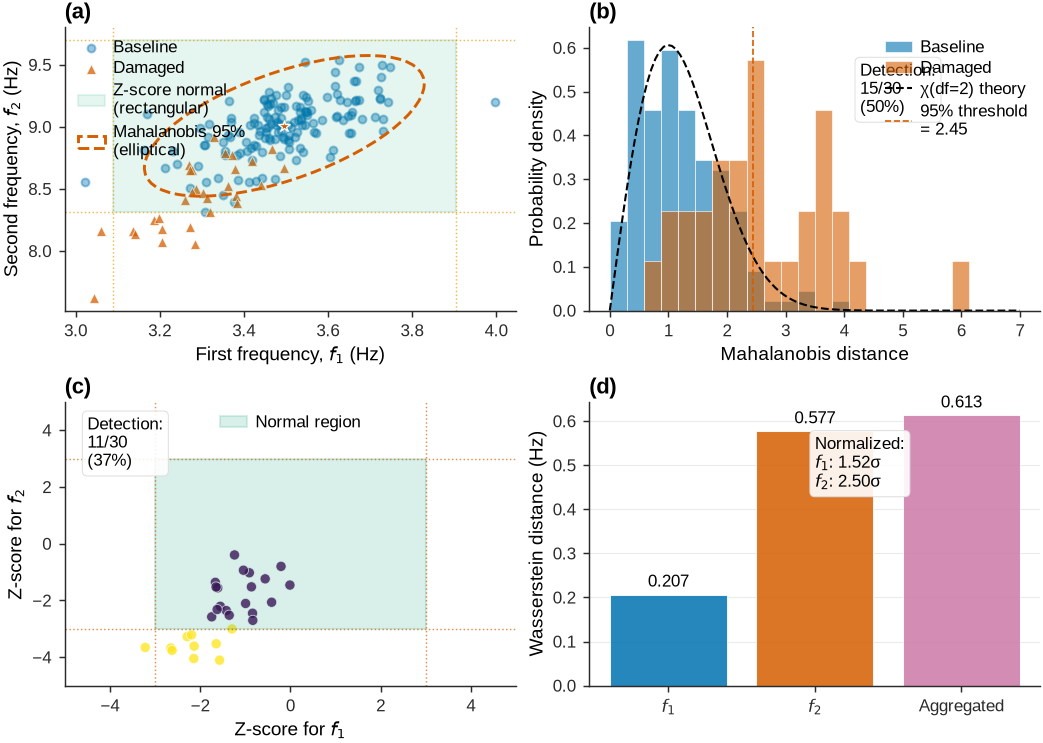
Consider the two-span bridge with baseline monitoring of both and , followed by post-event measurements. Figure 7 shows all three methods detecting a 6% reduction in both frequencies from distributed damage.
Key Python Implementation for Mahalanobis Distance:
1 2 3 4 5 6 7 8 9 10 11 12 13 14from scipy import stats # Compute baseline covariance and inverse mu_baseline = np.mean(baseline_data, axis=0) # Mean vector cov_baseline = np.cov(baseline_data.T) # Covariance matrix inv_cov = np.linalg.inv(cov_baseline) # Inverse # Calculate Mahalanobis distance for new measurement for x in new_measurements: diff = x - mu_baseline D_M = np.sqrt(diff @ inv_cov @ diff.T) # Matrix multiplication # Threshold from chi-square distribution (95% for 2D) threshold = np.sqrt(stats.chi2.ppf(0.95, df=2)) # ≈ 2.45
The emphasized lines show covariance matrix computation and the Mahalanobis distance formula. The @ operator performs matrix multiplication, which accounts for feature correlations.
======================================================================
BIVARIATE DAMAGE DETECTION: Bridge (30m+30m), Features: f₁, f₂
======================================================================

Baseline vs Damaged Statistics:
Method Comparison:
⚠️  VERDICT: DAMAGE DETECTED by all methods
    Mahalanobis provides best detection (50%) by exploiting correlation
Figure 7:Three statistical methods (z-score, Mahalanobis, Wasserstein) applied to bivariate frequency monitoring detecting correlated frequency reductions.
Figure 7 compares three detection methods applied to bivariate frequency monitoring of the bridge under correlated reductions (~6%) in both natural frequencies. The feature space (top-left) shows the key difference: component-wise z-scores define a rectangular ±3σ boundary, while Mahalanobis distance defines an elliptical boundary aligned with the correlation structure. Some damaged measurements (red triangles) fall inside the rectangular boundary but outside the Mahalanobis ellipse, which explains why correlation-aware detection outperforms the independent z-score approach.
6.5Python Implementation: Mahalanobis Distance for Bivariate Data
The following code implements Mahalanobis distance for monitoring two correlated frequencies, with key lines highlighted:
1 2 3 4 5 6 7 8 9 10# Compute baseline statistics mu_baseline = np.mean(baseline_data, axis=0) # Mean vector [μ₁, μ₂] cov_baseline = np.cov(baseline_data.T) # 2x2 covariance matrix # Compute Mahalanobis distance for each new measurement inv_cov = np.linalg.inv(cov_baseline) # Inverse covariance matrix diff = new_data_point - mu_baseline # D_M = sqrt((x - μ)ᵀ Σ⁻¹ (x - μ)) mahalanobis_distance = np.sqrt(diff @ inv_cov @ diff.T)
The emphasized lines show the core operations: computing the mean and covariance from baseline data (lines 10-11), inverting the covariance matrix (line 16-17), and calculating the Mahalanobis distance using matrix multiplication (lines 21-24) which accounts for both feature variances and their correlation.
Source
import numpy as np
from scipy import stats
import pandas as pd

# Baseline data: first two natural frequencies from healthy bridge
baseline_data = np.array([
    [3.50, 9.00], [3.48, 8.95], [3.52, 9.05], [3.49, 8.98],
    [3.51, 9.02], [3.47, 8.93], [3.53, 9.08], [3.50, 9.01]
])  # Each row is [f1, f2] in Hz

# Compute baseline statistics
mu_baseline = np.mean(baseline_data, axis=0)  # Mean vector [μ₁, μ₂]
cov_baseline = np.cov(baseline_data.T)  # 2x2 covariance matrix

# New measurements (potentially damaged)
new_data = np.array([[3.30, 8.47], [3.28, 8.43], [3.32, 8.50]])

# Compute Mahalanobis distance for each new measurement
inv_cov = np.linalg.inv(cov_baseline)  # Inverse covariance matrix
mahal_distances = []
for x in new_data:
    diff = x - mu_baseline
    D_M = np.sqrt(diff @ inv_cov @ diff.T)  # Mahalanobis distance
    mahal_distances.append(D_M)

# Detection threshold (95% confidence for 2D Gaussian)
threshold_95 = np.sqrt(stats.chi2.ppf(0.95, df=2))  # ≈ 2.45

# Create results DataFrame
results_df = pd.DataFrame({
    'f1 (Hz)': new_data[:, 0],
    'f2 (Hz)': new_data[:, 1],
    'Mahalanobis D_M': np.round(mahal_distances, 3),
    'Anomaly (D_M > 2.45)': np.array(mahal_distances) > threshold_95
})

# Display correlation
correlation = cov_baseline[0, 1] / (np.sqrt(cov_baseline[0, 0]) * np.sqrt(cov_baseline[1, 1]))

print(f"Baseline: μ = [{mu_baseline[0]:.3f}, {mu_baseline[1]:.3f}] Hz")
print(f"Correlation: ρ = {correlation:.3f}")
print(f"Detection threshold: D_M > {threshold_95:.2f}\n")
display(results_df.style.hide(axis='index').set_properties(**{'text-align': 'left'}))
Baseline: μ = [3.500, 9.002] Hz
Correlation: ρ = 0.996
Detection threshold: D_M > 2.45
Figure 8:Python implementation of Mahalanobis distance for bivariate anomaly detection with correlated bridge frequencies.
The emphasized lines show the key steps: computing the covariance matrix, inverting it, and calculating the Mahalanobis distance using matrix multiplication. This accounts for both the scale and correlation of the features.
7Mode Shape Features: MAC and COMAC as Statistical Indicators
Mode shapes provide spatial information about structural dynamics that goes beyond natural frequencies. Rather than analyzing mode shape vectors directly (which are high-dimensional), scalar features that quantify similarity relative to a reference configuration are more practical. The Modal Assurance Criterion (MAC) and Coordinate Modal Assurance Criterion (COMAC) transform spatial mode shape data into interpretable, damage-sensitive scalars.
7.1MAC and COMAC: From Spatial Patterns to Scalar Features
Recall from the frequency-domain features table that:
MAC (Modal Assurance Criterion): Measures correlation between two mode shapes:
where and are mode shape vectors. MAC ranges from 0 (orthogonal modes) to 1 (identical modes).
COMAC (Coordinate Modal Assurance Criterion): Assesses spatial consistency at each measurement location:
where indexes spatial locations and indexes modes.
7.2Statistical Approach: Distributions vs Thresholds
Traditional deterministic approaches apply fixed thresholds (e.g., “MAC < 0.9 indicates damage”). A statistical approach recognizes that mode shapes vary due to environmental effects (temperature, humidity), measurement noise, identification algorithm uncertainty, and traffic loading. Instead of rigid thresholds, baseline distributions of MAC/COMAC values are established from multiple intact-state measurements. Post-event values that fall outside these distributions are flagged as anomalies, providing probabilistic damage assessments that account for measurement uncertainty.
7.3Example: MAC Values as Features
For the two-span bridge (30 m + 30 m), the following example generates mode shapes, computes MAC values relative to a reference configuration, and applies the three statistical methods (z-score, Mahalanobis, Wasserstein) to detect damage-induced mode shape changes.
Source
import numpy as np
import matplotlib.pyplot as plt
from scipy import stats
import pandas as pd

# ---- Comprehensive MAC damage-detection figure (Nature-style) ----
set_journal_style()
intact_c = '#0072B2'
damage_c = '#D55E00'
mode_pal = ['#0072B2', '#009E73', '#D55E00']

fig = plt.figure(figsize=(7.0, 8.0), constrained_layout=True)
gs = fig.add_gridspec(4, 2, height_ratios=[1, 1, 1, 1.15])

def _style_modes(ax, title):
    ax.axvline(30, color='#7F7F7F', ls=':', lw=0.7, alpha=0.8, label='Mid-support', zorder=1)
    ax.axvline(15, color='#D55E00', ls='-.', lw=0.8, alpha=0.7, label='Damage (x = 15 m)', zorder=1)
    ax.axhline(0, color='0.6', lw=0.7, zorder=1)
    ax.set_xlim(0, 60)
    ax.set_ylim(-1.12, 1.12)
    ax.set_xlabel('Bridge length (m)')
    ax.set_ylabel('Normalized amplitude')
    ax.legend(ncol=2, loc='lower center')

# (a) Intact mode shapes
ax1a = fig.add_subplot(gs[0, 0])
for m in range(n_modes):
    mn = ref_modes[m] / np.max(np.abs(ref_modes[m]))
    ax1a.plot(x, mn, color=mode_pal[m], lw=1.3, label=f'Mode {m+1}')
_style_modes(ax1a, 'Intact mode shapes')
panel_label(ax1a, 'a')

# (b) Damaged mode shapes
ax1b = fig.add_subplot(gs[0, 1])
for m in range(n_modes):
    dm = generate_mode_shape(x, m+1, damage_factor=0.95-(m*0.015), noise_level=0.01)
    dm = dm / np.max(np.abs(dm))
    ax1b.plot(x, dm, color=mode_pal[m], lw=1.3, label=f'Mode {m+1}')
_style_modes(ax1b, 'Damaged mode shapes')
panel_label(ax1b, 'b')

# (c) MAC distribution by mode (box plots)
ax2 = fig.add_subplot(gs[1, 0])
positions = np.arange(1, n_modes + 1)

def _boxplot(data, pos, fc):
    return ax2.boxplot(data, positions=pos, widths=0.32, patch_artist=True,
                       boxprops=dict(facecolor=fc, alpha=0.75, edgecolor='#2b2b2b', lw=0.5),
                       medianprops=dict(color='#2b2b2b', lw=0.8),
                       whiskerprops=dict(color='#2b2b2b', lw=0.5),
                       capprops=dict(color='#2b2b2b', lw=0.5),
                       flierprops=dict(marker='o', markerfacecolor=fc, markersize=2.5,
                                       alpha=0.5, markeredgecolor='none'))

bp_b = _boxplot([baseline_macs[:, m] for m in range(n_modes)], positions - 0.18, intact_c)
bp_d = _boxplot([damage_macs[:, m] for m in range(n_modes)], positions + 0.18, damage_c)
ax2.set_xticks(positions)
ax2.set_xticklabels([f'Mode {i+1}' for i in range(n_modes)])
ax2.set_ylabel('MAC value')
ax2.legend([bp_b['boxes'][0], bp_d['boxes'][0]], ['Intact', 'Damaged'],
           loc='lower left')
ax2.set_ylim(0.995, 1.0008)
ax2.set_xlim(0.5, n_modes + 0.5)
ax2.grid(True, which='major', linewidth=0.5, color='#dcdcdc', alpha=0.6, axis='y')
panel_label(ax2, 'c')

# (d) Point-wise z-score detection
ax3 = fig.add_subplot(gs[1, 1])
ax3.fill_between([0.5, n_modes + 0.5], -3, 3, color='#009E73', alpha=0.12, zorder=0,
                 label='Normal range')
ax3.axhline(3, color='#D55E00', ls='--', lw=0.8, alpha=0.85, label='±3σ threshold')
ax3.axhline(-3, color='#D55E00', ls='--', lw=0.8, alpha=0.85)
ax3.axhline(0, color='0.5', lw=0.7)
for m in range(n_modes):
    cols = [damage_c if abs(z) > 3 else intact_c for z in z_scores[:, m]]
    ax3.scatter([m + 1] * n_damage, z_scores[:, m], s=18, c=cols,
                edgecolors='white', linewidth=0.4, alpha=0.85, zorder=3)
ax3.set_xticks(range(1, n_modes + 1))
ax3.set_xticklabels([f'Mode {i+1}' for i in range(n_modes)])
ax3.set_ylabel('Z-score')
ax3.set_ylim(-6.5, 4)
ax3.set_xlim(0.5, n_modes + 0.5)
ax3.legend(loc='upper right')
detection_rate_z = 100 * np.sum(z_anomalies) / n_damage
ax3.text(0.04, 0.05, f'Detected: {int(np.sum(z_anomalies))}/{n_damage} ({detection_rate_z:.0f}%)',
         transform=ax3.transAxes, fontsize=7.5, va='bottom',
         bbox=dict(boxstyle='round,pad=0.4', facecolor='white', edgecolor='#dcdcdc', linewidth=0.5, alpha=0.9))
panel_label(ax3, 'd')

# (e) Mahalanobis distance assessment
ax4 = fig.add_subplot(gs[2, 0])
bins_m = np.linspace(0, 8, 35)
ax4.hist(mahal_baseline, bins=bins_m, density=True, alpha=0.7, color=intact_c,
         edgecolor='white', linewidth=0.5, label='Intact')
ax4.hist(mahal_damage, bins=bins_m, density=True, alpha=0.7, color=damage_c,
         edgecolor='white', linewidth=0.5, label='Damaged')
x_chi = np.linspace(0, 8, 200)
ax4.plot(x_chi, stats.chi.pdf(x_chi, df=n_modes), color='#000000', ls='--', lw=1.0,
         label=f'χ(df = {n_modes})')
ax4.axvline(mahal_threshold, color='#D55E00', ls='--', lw=0.8,
            label=f'95% threshold = {mahal_threshold:.2f}')
ax4.set_xlabel('Mahalanobis distance')
ax4.set_ylabel('Probability density')
ax4.set_xlim(-0.2, 8)
ax4.legend(loc='upper right')
detection_rate_m = 100 * np.sum(mahal_anomalies) / n_damage
ax4.text(0.04, 0.96, f'Detected: {int(np.sum(mahal_anomalies))}/{n_damage} ({detection_rate_m:.0f}%)',
         transform=ax4.transAxes, fontsize=7.5, va='top',
         bbox=dict(boxstyle='round,pad=0.4', facecolor='white', edgecolor='#dcdcdc', linewidth=0.5, alpha=0.9))
panel_label(ax4, 'e')

# (f) Wasserstein distance by mode
ax5 = fig.add_subplot(gs[2, 1])
modes_labels = [f'Mode {i+1}' for i in range(n_modes)]
bars = ax5.bar(range(n_modes), w_distances, color=mode_pal, alpha=0.85,
               edgecolor='white', linewidth=0.5, width=0.6)
for i, (bar, w_norm) in enumerate(zip(bars, w_normalized)):
    ax5.text(bar.get_x() + bar.get_width() / 2, bar.get_height() + max(w_distances) * 0.02,
             f'{w_distances[i]:.4f}\n({w_norm:.2f}σ)', ha='center', va='bottom', fontsize=7.5)
ax5.set_xticks(range(n_modes))
ax5.set_xticklabels(modes_labels)
ax5.set_ylabel('Wasserstein distance')
ax5.set_xlabel('Mode number')
ax5.set_ylim(0, max(w_distances) * 1.3)
ax5.grid(True, which='major', linewidth=0.5, color='#dcdcdc', alpha=0.6, axis='y')
panel_label(ax5, 'f')

# (g) MAC feature space: Mode 1 vs Mode 2
ax6 = fig.add_subplot(gs[3, :])
ax6.scatter(baseline_macs[:, 0], baseline_macs[:, 1], s=18, color=intact_c, alpha=0.6,
            edgecolors='white', linewidth=0.4, label='Intact', zorder=2)
ax6.scatter(damage_macs[:, 0], damage_macs[:, 1], s=28, color=damage_c, marker='^',
            alpha=0.85, edgecolors='white', linewidth=0.5, label='Damaged', zorder=3)
dmean = damage_macs.mean(axis=0)
ax6.plot(mu_baseline[0], mu_baseline[1], marker='*', color='#0072B2', markersize=8,
         markeredgecolor='white', markeredgewidth=0.6, label='Intact mean', zorder=4)
ax6.plot(dmean[0], dmean[1], marker='*', color='#D55E00', markersize=8,
         markeredgecolor='white', markeredgewidth=0.6, label='Damaged mean', zorder=4)
ax6.plot([mu_baseline[0], dmean[0]], [mu_baseline[1], dmean[1]], '--', color='#000000', lw=0.8,
         alpha=0.5, zorder=1, label='Mean shift')
ax6.set_xlabel('MAC, Mode 1')
ax6.set_ylabel('MAC, Mode 2')
ax6.legend(loc='lower left', ncol=3)
ax6.set_xlim(0.997, 1.0)
ax6.set_ylim(0.997, 1.0)
panel_label(ax6, 'g')

plt.show()

# Display summary statistics
summary_df = pd.DataFrame({
    'Mode': [f'Mode {i+1}' for i in range(n_modes)],
    'Baseline MAC μ': [f'{mu_baseline[i]:.4f}' for i in range(n_modes)],
    'Baseline MAC σ': [f'{sigma_baseline[i]:.4f}' for i in range(n_modes)],
    'Damaged MAC μ': [f'{damage_macs.mean(axis=0)[i]:.4f}' for i in range(n_modes)],
    'Wasserstein Dist': [f'{w_distances[i]:.4f} ({w_normalized[i]:.2f}σ)' for i in range(n_modes)]
})

method_comparison_df = pd.DataFrame({
    'Method': ['Z-Score (Component-Wise)', 'Mahalanobis Distance', 'Wasserstein Distance'],
    'Detections': [f'{np.sum(z_anomalies)}/{n_damage}',
                   f'{np.sum(mahal_anomalies)}/{n_damage}',
                   'N/A (distribution-level)'],
    'Detection Rate': [f'{detection_rate_z:.0f}%', f'{detection_rate_m:.0f}%', 'N/A'],
    'Threshold': ['|z| > 3', f'D_M > {mahal_threshold:.2f}', 'N/A'],
    'Key Insight': ['Per-mode analysis', 'Multivariate correlation', 'Distributional shift']
})

print("=" * 80)
print("MAC-BASED DAMAGE DETECTION: Bridge (30m+30m), 3 Mode Shapes")
print("=" * 80)
print("\nMAC Statistics by Mode:")
display(summary_df.style.hide(axis='index').set_properties(**{'text-align': 'left'}))
print("\nDetection Method Comparison:")
display(method_comparison_df.style.hide(axis='index').set_properties(**{'text-align': 'left'}))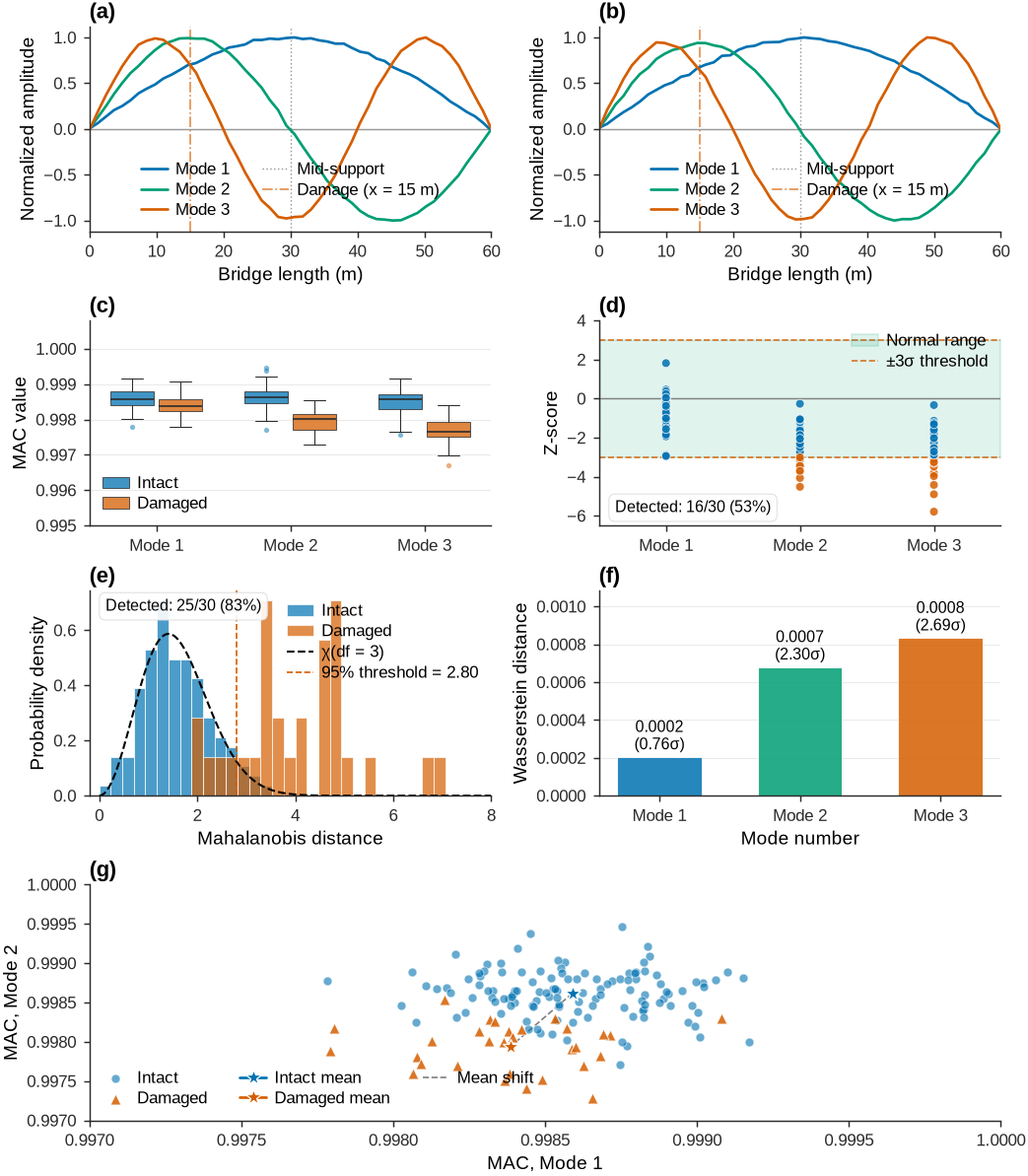
================================================================================
MAC-BASED DAMAGE DETECTION: Bridge (30m+30m), 3 Mode Shapes
================================================================================

MAC Statistics by Mode:
Detection Method Comparison:
Figure 9:Statistical analysis of MAC features for damage detection applied to three mode shapes of a two-span bridge.
Figure 9 shows statistical damage detection using MAC values as features. The mode shape comparison (top) displays reference and damaged configurations for three modes; damage at the first span midpoint produces subtle distortions. The MAC distributions (second row, left) show that damage reduces MAC values, but with overlap between baseline and damaged distributions, confirming the need for statistical rather than threshold-based assessment.
The z-score analysis (second row, right) evaluates each mode independently and flags anomalies when |z| > 3. Mode 1 shows the clearest separation because it is most sensitive to the damage location. The Mahalanobis distance (third row, left) combines all three MAC values into a single multivariate metric, accounting for correlations between modes. This improves detection because modes do not vary independently: all reflect the same underlying stiffness reduction.
The Wasserstein distances (third row, right) quantify distribution-level shifts per mode, with normalized values giving interpretable effect sizes. The feature space (bottom) plots MAC values for Modes 1 vs 2, showing that while individual MAC values may appear normal, their joint distribution clearly separates baseline from damaged states.
8Feature Fusion and Multivariate Analysis
Practical SHM systems typically track many features simultaneously: multiple natural frequencies, damping ratios, mode shape amplitudes, time-domain statistics (RMS, kurtosis), and modal correlation values (MAC, COMAC). Feature fusion combines these sources into a robust damage indicator.
The challenge is managing high-dimensional feature spaces where visualization is impractical and computational costs rise. This section presents strategies for combining many features while preserving interpretability and computational efficiency. The focus is on correlations between features (distinct from sensor correlations covered in Chapter 3), which reveal redundancies and guide dimensionality reduction.
8.1Understanding Feature Correlation vs Sensor Correlation
Chapter 3 examined sensor correlations: statistical relationships between measurements at different spatial locations. Two accelerometers on adjacent bridge deck points produce correlated signals because they respond to the same global structural motion. These spatial correlations inform data quality assessment, sensor placement, and detection of localized anomalies.
This section focuses on feature correlations: statistical relationships between different types of features extracted from the same measurement data. The first natural frequency and RMS acceleration often correlate because both depend on the overall energy in the structural response. Natural frequencies and also tend to correlate because they share common dependencies on mass and stiffness.
Understanding feature correlation matters for three reasons:
Redundancy identification: Highly correlated features carry similar information, so dimensionality can be reduced without losing damage sensitivity.
Multivariate distance metrics: Correlation-aware metrics like Mahalanobis distance account for feature covariance, improving detection over Euclidean distance.
Feature selection: Identifying which features carry unique information guides sensor design and resource allocation.
8.2Computing the Feature Correlation Matrix
Consider a monitoring campaign with measurements, each yielding extracted features. This produces a feature matrix :
Each row is one measurement occasion and each column is one feature type. For this bridge example, columns correspond to .
The feature correlation matrix quantifies the linear relationship between each feature pair:
where is the Pearson correlation coefficient between features and :
Here, is the mean of feature . The correlation coefficient ranges from -1 to +1:
: Strong positive correlation (features move together)
: No linear relationship
: Strong negative correlation (one increases as the other decreases)
The matrix is symmetric () with ones on the diagonal, so only unique off-diagonal elements need to be computed.
8.3Practical Implementation in Python
The feature correlation matrix can be computed in Python using NumPy:
1 2 3 4 5 6 7 8 9 10# Assume X is the feature matrix (m measurements × n features) import numpy as np # Compute correlation matrix between features (not sensors!) corr_matrix = np.corrcoef(X.T) # Transpose to correlate features, not measurements # Or using Pandas for labeled output import pandas as pd df_features = pd.DataFrame(X, columns=feature_names) corr_matrix = df_features.corr() # Returns labeled correlation matrix
Transposing the feature matrix (X.T) directs np.corrcoef to correlate features (columns) rather than measurements (rows). The following example demonstrates a complete workflow for a multi-feature bridge monitoring system.
Source
import numpy as np
import matplotlib.pyplot as plt
from scipy import stats
from sklearn.preprocessing import StandardScaler

# Set professional Nature journal quality plotting parameters
set_journal_style()

np.random.seed(44)

# Generate 9-dimensional feature data (removed Crest factor)
n_features = 9
n_baseline = 200
n_damage = 40

# Create feature names
feature_names = ['RMS', 'Kurtosis', 'Freq_1', 'Freq_2', 'Damping_1',
                'Damping_2', 'MAC_1', 'MAC_2', 'Energy_HF']

# Generate baseline data with realistic correlations
mean_baseline = np.array([1.0, 3.0, 2.45, 5.12, 0.02, 0.025, 0.98, 0.97, 0.15])
# Create correlation structure
cov_baseline = np.eye(n_features) * 0.1
cov_baseline[2, 3] = cov_baseline[3, 2] = 0.05  # Frequencies correlate
cov_baseline[4, 5] = cov_baseline[5, 4] = 0.03  # Damping correlate
cov_baseline[6, 7] = cov_baseline[7, 6] = 0.02  # MAC values correlate
cov_baseline = cov_baseline * np.outer(mean_baseline, mean_baseline) * 0.01

baseline_data = np.random.multivariate_normal(mean_baseline, cov_baseline, n_baseline)

# Generate damage data (different changes for different features)
damage_effects = np.array([1.15, 1.3, 0.95, 0.93, 1.2, 1.25, 0.85, 0.80, 1.4])
mean_damage = mean_baseline * damage_effects
cov_damage = cov_baseline * 1.2  # Increased variability
damage_data = np.random.multivariate_normal(mean_damage, cov_damage, n_damage)

# Standardize features (for distance calculations)
scaler = StandardScaler()
scaler.fit(baseline_data)
baseline_scaled = scaler.transform(baseline_data)
damage_scaled = scaler.transform(damage_data)

# Compute feature correlation matrix (KEY: correlations between FEATURES, not sensors!)
corr_matrix = np.corrcoef(baseline_data.T)

# Create comprehensive visualization with professional layout (no PCA)
fig = plt.figure(figsize=(7.0, 6.5), constrained_layout=True)
gs = fig.add_gridspec(3, 2, height_ratios=[1.2, 1, 1.5])

# 1. Feature Correlation Matrix Heatmap
ax1 = fig.add_subplot(gs[0, :])
im = ax1.imshow(corr_matrix, cmap='RdBu_r', vmin=-1, vmax=1, aspect='auto',
                interpolation='nearest')

# Add text annotations
for i in range(n_features):
    for j in range(n_features):
        if i != j:  # Skip diagonal
            text_color = 'white' if abs(corr_matrix[i, j]) > 0.5 else '#2b2b2b'
            ax1.text(j, i, f'{corr_matrix[i, j]:.2f}',
                    ha='center', va='center', fontsize=7, color=text_color)

ax1.set_xticks(range(n_features))
ax1.set_yticks(range(n_features))
ax1.set_xticklabels(feature_names, rotation=45, ha='right')
ax1.set_yticklabels(feature_names)
cbar = plt.colorbar(im, ax=ax1, fraction=0.046, pad=0.04)
cbar.set_label('Correlation coefficient')
panel_label(ax1, 'a')

# 2. Feature damage sensitivity - horizontal bar chart
ax2 = fig.add_subplot(gs[1, 0])
damage_sensitivity = np.abs((mean_damage - mean_baseline) / mean_baseline)
sorted_indices = np.argsort(damage_sensitivity)[::-1]

# Use perceptually uniform colormap
colors_sens = plt.cm.viridis(damage_sensitivity[sorted_indices] / damage_sensitivity.max())
bars = ax2.barh(range(n_features), damage_sensitivity[sorted_indices],
                color=colors_sens, edgecolor='white', linewidth=0.5, alpha=0.9)

ax2.set_yticks(range(n_features))
ax2.set_yticklabels([feature_names[i] for i in sorted_indices])
ax2.set_xlabel('Relative change (%)')
ax2.grid(True, which='major', linewidth=0.5, color='#dcdcdc', alpha=0.6, axis='x')

# Add percentage labels
for i, (bar, val) in enumerate(zip(bars, damage_sensitivity[sorted_indices])):
    ax2.text(val + 0.02, bar.get_y() + bar.get_height()/2,
             f'{val*100:.1f}%', va='center', fontsize=7)
panel_label(ax2, 'b')

# 3. Statistical distances comparison - violin plots
ax3 = fig.add_subplot(gs[1, 1])

# Calculate different distance metrics
inv_cov = np.linalg.inv(cov_baseline)
mahal_baseline = [np.sqrt((x - mean_baseline) @ inv_cov @ (x - mean_baseline).T)
                 for x in baseline_data]
mahal_damage = [np.sqrt((x - mean_baseline) @ inv_cov @ (x - mean_baseline).T)
               for x in damage_data]

euclidean_baseline = [np.linalg.norm(x - mean_baseline) for x in baseline_data]
euclidean_damage = [np.linalg.norm(x - mean_baseline) for x in damage_data]

# Violin plots
positions = [1, 2, 4, 5]
parts1 = ax3.violinplot([mahal_baseline, mahal_damage], positions=[1, 2],
                        widths=0.8, showmeans=True, showmedians=True)
parts2 = ax3.violinplot([euclidean_baseline, euclidean_damage], positions=[4, 5],
                        widths=0.8, showmeans=True, showmedians=True)

# Color the violin plots with Wong palette
for pc in parts1['bodies'][:1]:
    pc.set_facecolor('#0072B2')
    pc.set_alpha(0.75)
    pc.set_edgecolor('#2b2b2b')
    pc.set_linewidth(0.5)

for pc in parts1['bodies'][1:]:
    pc.set_facecolor('#D55E00')
    pc.set_alpha(0.75)
    pc.set_edgecolor('#2b2b2b')
    pc.set_linewidth(0.5)

for pc in parts2['bodies'][:1]:
    pc.set_facecolor('#0072B2')
    pc.set_alpha(0.75)
    pc.set_edgecolor('#2b2b2b')
    pc.set_linewidth(0.5)

for pc in parts2['bodies'][1:]:
    pc.set_facecolor('#D55E00')
    pc.set_alpha(0.75)
    pc.set_edgecolor('#2b2b2b')
    pc.set_linewidth(0.5)

# Style the mean and median lines
for parts in [parts1, parts2]:
    parts['cmeans'].set_edgecolor('#D55E00')
    parts['cmeans'].set_linewidth(1.0)
    parts['cmedians'].set_edgecolor('#2b2b2b')
    parts['cmedians'].set_linewidth(0.8)

ax3.set_xticks([1.5, 4.5])
ax3.set_xticklabels(['Mahalanobis', 'Euclidean'])
ax3.set_ylabel('Distance')
ax3.grid(True, which='major', linewidth=0.5, color='#dcdcdc', alpha=0.6, axis='y')

# Add legend
from matplotlib.patches import Patch
legend_elements = [Patch(facecolor='#0072B2', alpha=0.75, label='Intact'),
                   Patch(facecolor='#D55E00', alpha=0.75, label='Damaged')]
ax3.legend(handles=legend_elements)
panel_label(ax3, 'c')

# 4. Time evolution of fused damage score - time series
ax4 = fig.add_subplot(gs[2, :])

# Calculate fused damage score using Mahalanobis distance
all_scores = mahal_baseline + mahal_damage
time_points = np.arange(len(all_scores))

# Normalize scores
mean_baseline_score = np.mean(mahal_baseline)
std_baseline_score = np.std(mahal_baseline, ddof=1)
normalized_scores = (np.array(all_scores) - mean_baseline_score) / std_baseline_score

# Scatter plots
ax4.scatter(time_points[:n_baseline], normalized_scores[:n_baseline],
           alpha=0.5, s=14, color='#0072B2', label='Intact',
           edgecolors='none', marker='o')
ax4.scatter(time_points[n_baseline:], normalized_scores[n_baseline:],
           alpha=0.8, s=24, color='#D55E00', label='Damaged',
           edgecolors='white', linewidth=0.4, marker='^')

# Add moving average
window = 10
moving_avg = np.convolve(normalized_scores, np.ones(window)/window, mode='valid')
ax4.plot(np.arange(window-1, len(normalized_scores)), moving_avg,
        color='#000000', linewidth=1.4, alpha=0.8,
        label=f'Moving avg (w={window})', zorder=5)

# Reference lines and zones
ax4.axhline(0, color='#009E73', linestyle='-', linewidth=0.8, alpha=0.6)
ax4.axhline(3, color='#D55E00', linestyle='--', linewidth=0.8, alpha=0.85,
           label='Detection threshold (3σ)')
ax4.fill_between(time_points, -1, 1, alpha=0.10, color='#009E73')

ax4.set_xlabel('Measurement index')
ax4.set_ylabel('Normalized damage score')
ax4.legend(loc='upper left', ncol=2)
ax4.set_xlim(-5, len(time_points) + 5)
panel_label(ax4, 'd')

plt.show()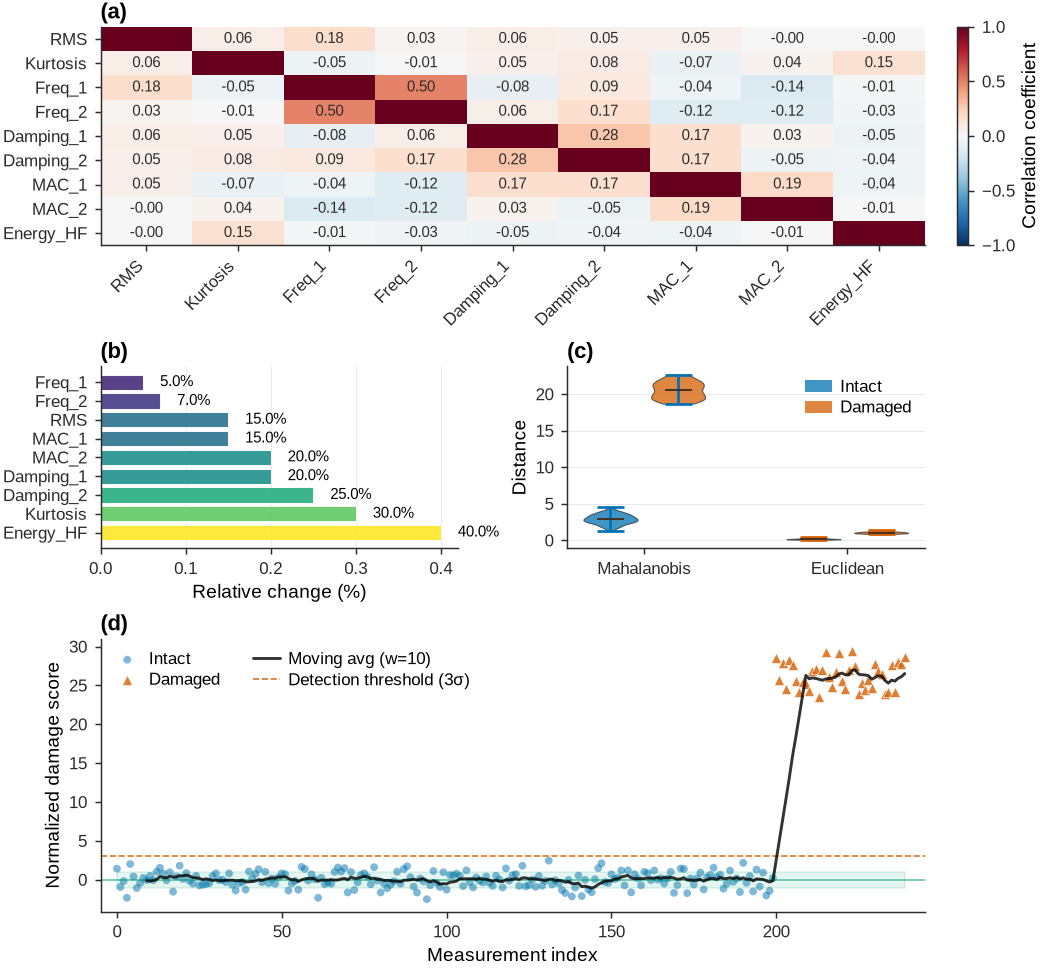
Figure 10:Multi-feature fusion analysis for a two-span bridge monitoring system with 9 features, emphasizing feature correlation matrix computation, damage sensitivity, and statistical distance metrics comparison.
9Dimensionality Reduction
When SHM systems generate dozens or hundreds of features from multiple sensors and analysis domains, the resulting high-dimensional feature space creates challenges. Features may be redundant, have different scales, or exhibit complex dependencies that obscure damage signatures. Principal Component Analysis (PCA) transforms these high-dimensional observations into lower-dimensional representations that preserve the information needed for damage detection.
9.1Understanding Feature Correlations: Dependent vs Independent Features
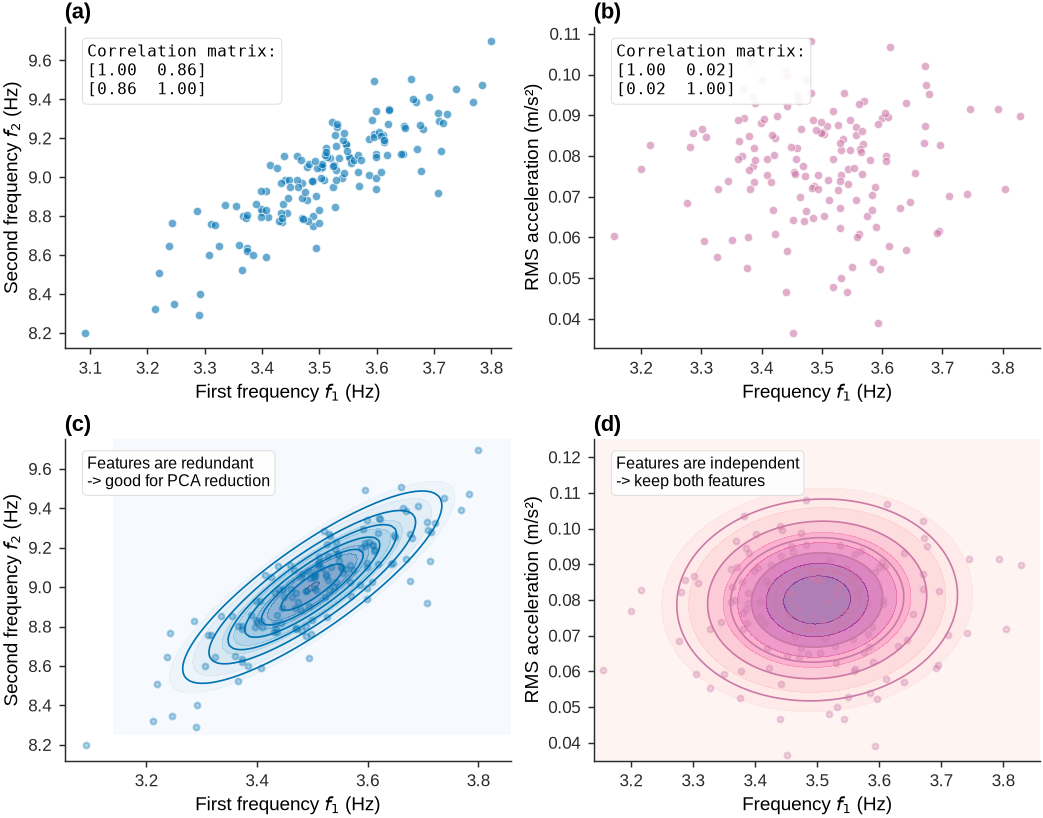
Before introducing PCA, consider why feature correlations matter. Figure 11 contrasts correlated (dependent) features with uncorrelated (independent) features using bridge monitoring examples.
======================================================================
FEATURE CORRELATION COMPARISON
======================================================================
Figure 11:Comparison of correlated vs uncorrelated features showing how correlation manifests in scatter plots, correlation matrices, and bivariate Gaussian PDFs.
9.2Principal Component Analysis: Mathematical Foundation
PCA identifies orthogonal directions in feature space that capture the maximum variance. Given a data matrix with observations of features, PCA seeks a transformation matrix that projects the data onto principal components:
where is the mean vector and contains the eigenvectors of the covariance matrix . The eigenvalue decomposition:
The eigenvalues give the variance along each principal component direction . Components are ordered by decreasing eigenvalue, so the first few components capture most of the variance. This property makes PCA useful for noise reduction and feature compression in SHM.
9.3Practical Implementation: PCA for Multi-Domain Feature Analysis
The following example combines time-domain and frequency-domain features from a monitored structure and shows how the number of retained principal components affects detection accuracy, using the Wasserstein distance as the anomaly metric.
Key Python Implementation for PCA:
1 2 3 4 5 6 7 8 9 10 11 12 13 14 15 16 17from sklearn.preprocessing import StandardScaler from sklearn.decomposition import PCA # Step 1: Standardize features (zero mean, unit variance) scaler = StandardScaler() baseline_scaled = scaler.fit_transform(baseline_data) test_scaled = scaler.transform(test_data) # Step 2: Apply PCA pca = PCA() # Or PCA(n_components=k) for specific number pca.fit(baseline_scaled) baseline_pca = pca.transform(baseline_scaled) test_pca = pca.transform(test_scaled) # Step 3: Analyze variance explained variance_ratio = pca.explained_variance_ratio_ cumulative_variance = np.cumsum(variance_ratio)
9.4Optimal Component Selection Strategy
Selecting the number of principal components requires balancing information retention against noise suppression. Several criteria guide this decision:
where is the variance retention threshold (typically 0.90-0.95). The Kaiser criterion retains components with eigenvalues above the mean, and scree plot analysis identifies the “elbow” where eigenvalues level off. For damage detection, cross-validation on labeled data often provides the most reliable selection criterion because it directly optimizes detection performance rather than variance retention.
The Wasserstein distance quantifies distribution separation in the reduced space. Unlike Euclidean distance, it measures the work needed to transform the baseline distribution into the damaged distribution, giving a physically interpretable measure of structural change. The analysis shows that two principal components can achieve meaningful separation, enabling effective detection while reducing both computational cost and noise sensitivity.
10End-to-End Example of Feature Engineering
This section integrates the three statistical methods (z-score, Mahalanobis, Wasserstein) and PCA in a realistic damage detection scenario.
10.1Bridge System and Measurement Campaign
The example uses a two-span continuous bridge (30 m + 50 m = 80 m total length) monitored under three structural conditions: intact baseline, light damage in span 1, and moderate damage in span 1. Each scenario includes 20-30 measurements that capture natural variability.
import numpy as np
import pandas as pd
import json
import seaborn as sns
from scipy import stats
from scipy.stats import wasserstein_distance
from sklearn.preprocessing import StandardScaler
from sklearn.decomposition import PCA


# Load Data
with open(data_file_path, 'r') as f:
    data = json.load(f)

# Extract metadata
sensor_positions = data['metadata']['sensor_positions_m']
n_sensors = len(sensor_positions)
scenarios = [list(data['scenarios'].keys())[0], list(data['scenarios'].keys())[1], list(data['scenarios'].keys())[2]]

# Dataset overview as DataFrame
overview_data = {
    'Property': [
        'Bridge Spans (m)',
        'Total Length (m)',
        'Number of Sensors',
        'Scenarios',
        'Measurements (Intact)',
        'Measurements (Light Damage)',
        'Measurements (Moderate Damage)'
    ],
    'Value': [
        str(data['metadata']['bridge_config']['spans_m']),
        data['metadata']['bridge_config']['total_length_m'],
        n_sensors,
        len(scenarios),
        len(data['scenarios']['intact']['frequencies']['mode_1']),
        len(data['scenarios']['damage_light']['frequencies']['mode_1']),
        len(data['scenarios']['damage_moderate']['frequencies']['mode_1']),    ]
}

df_overview = pd.DataFrame(overview_data)
display(df_overview.style.set_caption("Dataset Overview").hide(axis='index').set_properties(**{'text-align': 'left'}))10.2Raw Feature Extraction
Modal testing yields two fundamental feature types: natural frequencies (global indicators) and mode shapes (spatial indicators). The following extracts these for the first three vibration modes.
# Extract natural frequencies
freq_data = {}
for scenario in scenarios:
    freq_data[scenario] = {
        'f1': np.array(data['scenarios'][scenario]['frequencies']['mode_1']),
        'f2': np.array(data['scenarios'][scenario]['frequencies']['mode_2']),
        'f3': np.array(data['scenarios'][scenario]['frequencies']['mode_3'])
    }

# Extract mode shapes (use mean for each scenario)
mode_shapes = {}
for scenario in scenarios:
    mode_shapes[scenario] = {}
    for mode_num in [1, 2, 3]:
        mode_key = f'mode_{mode_num}'
        n_meas = len(data['scenarios'][scenario]['mode_shapes'][mode_key])

        # Collect all measurements
        all_shapes = []
        for i in range(1, n_meas + 1):
            meas_key = f'meas_{i}'
            shape = np.array(data['scenarios'][scenario]['mode_shapes'][mode_key][meas_key])
            all_shapes.append(shape)

        mode_shapes[scenario][mode_key] = np.array(all_shapes)

# Feature extraction summary
extraction_summary = pd.DataFrame({
    'Feature Type': ['Natural Frequencies', 'Mode Shapes'],
    'Count per Measurement': [3, 3],
    'Dimensions': [f'3 scalar values', f'3 × {n_sensors} spatial values']
})
display(extraction_summary.style.set_caption("Feature Extraction Complete").hide(axis='index').set_properties(**{'text-align': 'left'}))10.3Frequency-Based Features
Natural frequencies are computationally efficient global indicators, but they have limited damage sensitivity and cannot localize damage. The code below examines their distributions and statistical separability.
set_journal_style()
fig, axes = plt.subplots(1, 3, figsize=(7.2, 2.4), constrained_layout=True)
colors = {'intact': '#0072B2', 'damage_light': '#F0E442',
          'damage_moderate': '#E69F00', 'damage_severe': '#D55E00'}

for mode_idx, mode_name in enumerate(['f1', 'f2', 'f3']):
    ax = axes[mode_idx]

    for scenario in scenarios:
        freqs = freq_data[scenario][mode_name]

        # Histogram
        ax.hist(freqs, bins=12, density=True, alpha=0.45,
               color=colors[scenario], edgecolor='white', linewidth=0.5,
               label=scenario.replace('_', ' ').title())

        # Fitted Gaussian
        mu, std = np.mean(freqs), np.std(freqs, ddof=1)
        x = np.linspace(freqs.min() - std, freqs.max() + std, 200)
        pdf = stats.norm.pdf(x, mu, std)
        ax.plot(x, pdf, color=colors[scenario], linewidth=1.3, alpha=0.85)

    ax.set_xlabel(f'Mode {mode_idx + 1} frequency (Hz)')
    ax.set_ylabel('Probability density')
    ax.legend()
    panel_label(ax, 'abc'[mode_idx])

plt.show()

# Compute statistics
freq_stats = []
for scenario in scenarios:
    for mode_name in ['f1', 'f2', 'f3']:
        freqs = freq_data[scenario][mode_name]
        freq_stats.append({
            'Scenario': scenario,
            'Mode': mode_name,
            'Mean (Hz)': np.mean(freqs),
            'Std (Hz)': np.std(freqs, ddof=1),
            'COV (%)': 100 * np.std(freqs, ddof=1) / np.mean(freqs)
        })

df_freq = pd.DataFrame(freq_stats)
display(df_freq.style.set_caption("Frequency Statistics by Scenario and Mode")\
        .format({'Mean (Hz)': '{:.3f}', 'Std (Hz)': '{:.3f}', 'COV (%)': '{:.1f}'})\
        .hide(axis='index').set_properties(**{'text-align': 'left'}))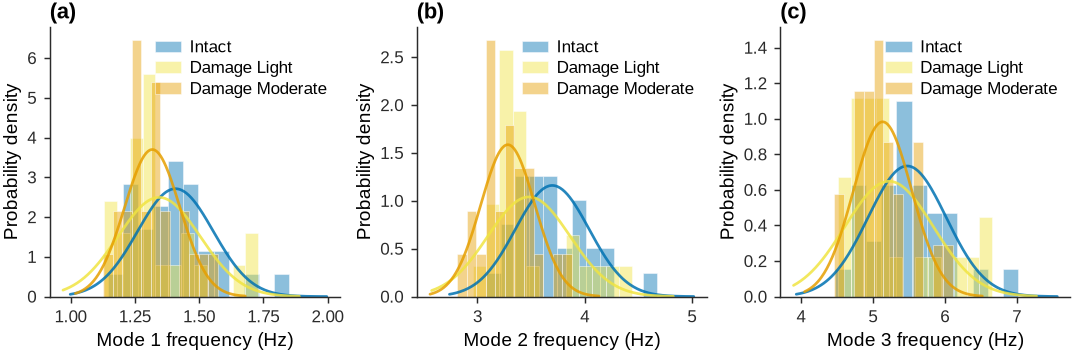
10.4Modal Assurance Criterion (MAC)
Mode shapes capture spatial damage patterns but require comparison to a reference. The MAC quantifies similarity between operational and baseline mode shapes. Values near 1 indicate consistency; significant drops suggest damage.
def compute_mac(phi_ref, phi_test):
    """Compute Modal Assurance Criterion between two mode shapes."""
    numerator = np.abs(np.dot(phi_ref, phi_test))**2
    denominator = np.dot(phi_ref, phi_ref) * np.dot(phi_test, phi_test)
    return numerator / denominator if denominator > 0 else 0.0

# Use mean intact mode shape as reference for each mode
mac_values = {}
references = {}

for mode_num in [1, 2, 3]:
    mode_key = f'mode_{mode_num}'

    # Intact baseline reference (mean of all intact measurements)
    intact_shapes = mode_shapes['intact'][mode_key]
    reference = np.mean(intact_shapes, axis=0)
    references[mode_key] = reference

    # Compute MAC for all scenarios
    mac_values[mode_key] = {}
    for scenario in scenarios:
        shapes = mode_shapes[scenario][mode_key]
        macs = [compute_mac(reference, shape) for shape in shapes]
        mac_values[mode_key][scenario] = np.array(macs)

# Visualize MAC distributions
set_journal_style()
fig, axes = plt.subplots(1, 3, figsize=(7.2, 2.4), constrained_layout=True)

for mode_idx, mode_num in enumerate([1, 2, 3]):
    ax = axes[mode_idx]
    mode_key = f'mode_{mode_num}'

    positions = []
    box_data = []
    box_colors = []

    for i, scenario in enumerate(scenarios):
        macs = mac_values[mode_key][scenario]
        positions.append(i + 1)
        box_data.append(macs)
        box_colors.append(colors[scenario])

    # Box plots
    bp = ax.boxplot(box_data, positions=positions, widths=0.6, patch_artist=True,
                    boxprops=dict(facecolor='#dcdcdc', alpha=0.7, edgecolor='#2b2b2b', linewidth=0.5),
                    medianprops=dict(color='#D55E00', linewidth=0.8),
                    whiskerprops=dict(linewidth=0.5, color='#2b2b2b'),
                    capprops=dict(linewidth=0.5, color='#2b2b2b'))

    for patch, color in zip(bp['boxes'], box_colors):
        patch.set_facecolor(color)

    # Overlay individual points
    for i, macs in enumerate(box_data):
        x = np.random.normal(positions[i], 0.04, size=len(macs))
        ax.scatter(x, macs, alpha=0.4, s=10, color='#2b2b2b', zorder=3)

    ax.set_xticks(positions)
    ax.set_xticklabels([s.replace('_', ' ').title() for s in scenarios], fontsize=7)
    ax.set_ylabel('MAC value')
    ax.set_ylim(0.96, 1.01)
    ax.grid(True, which='major', linewidth=0.5, color='#dcdcdc', alpha=0.6, axis='y')
    panel_label(ax, 'abc'[mode_idx])

plt.show()

# MAC statistics table
mac_stats = []
for mode_num in [1, 2, 3]:
    mode_key = f'mode_{mode_num}'
    for scenario in scenarios:
        macs = mac_values[mode_key][scenario]
        mac_stats.append({
            'Mode': mode_num,
            'Scenario': scenario,
            'Mean MAC': np.mean(macs),
            'Std MAC': np.std(macs, ddof=1),
            'Min MAC': np.min(macs)
        })

df_mac = pd.DataFrame(mac_stats)
display(df_mac.style.set_caption("MAC Statistics by Mode and Scenario")\
        .format({'Mean MAC': '{:.6f}', 'Std MAC': '{:.6f}', 'Min MAC': '{:.6f}'})\
        .hide(axis='index').set_properties(**{'text-align': 'left'}))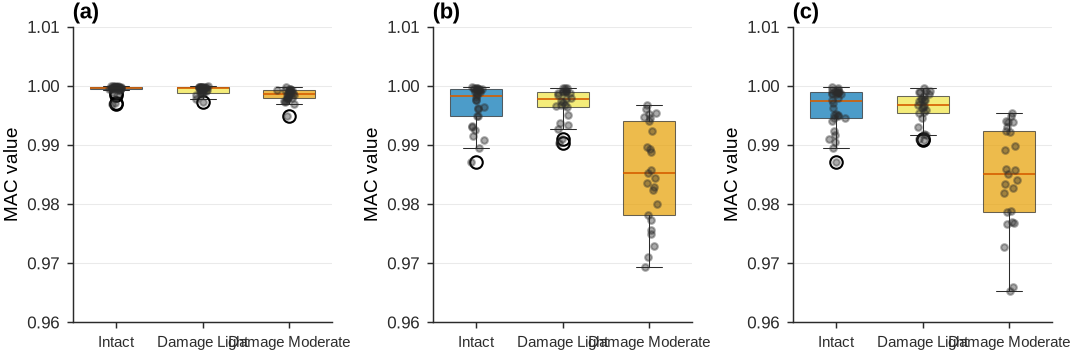
10.5Feature Sensitivity Analysis
Each feature’s damage sensitivity is quantified using the Wasserstein distance, which measures distribution shifts. Higher values indicate stronger damage detectability.
# Compute Wasserstein distances (intact vs. each damage scenario)
w_distances = []

# Frequency features
for mode_name in ['f1', 'f2', 'f3']:
    intact_dist = freq_data['intact'][mode_name]

    for scenario in scenarios:
        if scenario == 'intact':
            continue

        damage_dist = freq_data[scenario][mode_name]
        w_dist = wasserstein_distance(intact_dist, damage_dist)

        # Normalize by intact std
        w_norm = w_dist / np.std(intact_dist, ddof=1)

        w_distances.append({
            'Feature': mode_name.upper(),
            'Feature Type': 'Frequency',
            'Scenario': scenario,
            'W-Distance': w_dist,
            'W-Normalized': w_norm
        })

# MAC features
for mode_num in [1, 2, 3]:
    mode_key = f'mode_{mode_num}'
    intact_dist = mac_values[mode_key]['intact']

    for scenario in scenarios:
        if scenario == 'intact':
            continue

        damage_dist = mac_values[mode_key][scenario]
        w_dist = wasserstein_distance(intact_dist, damage_dist)
        w_norm = w_dist / np.std(intact_dist, ddof=1)

        w_distances.append({
            'Feature': f'MAC{mode_num}',
            'Feature Type': 'Mode Shape',
            'Scenario': scenario,
            'W-Distance': w_dist,
            'W-Normalized': w_norm
        })

df_wasser = pd.DataFrame(w_distances)

# Pivot for visualization
pivot_freq = df_wasser[df_wasser['Feature Type'] == 'Frequency'].pivot(
    index='Feature', columns='Scenario', values='W-Normalized')
pivot_mac = df_wasser[df_wasser['Feature Type'] == 'Mode Shape'].pivot(
    index='Feature', columns='Scenario', values='W-Normalized')

# Plot comparison
set_journal_style()
fig, axes = plt.subplots(1, 2, figsize=(7.0, 2.8), constrained_layout=True)

# Frequency features
ax = axes[0]
x = np.arange(len(pivot_freq))
width = 0.25
scenarios_damage = [s for s in scenarios if s != 'intact']

for i, scenario in enumerate(scenarios_damage):
    offset = (i - 1) * width
    bars = ax.bar(x + offset, pivot_freq[scenario], width,
                  label=scenario.replace('_', ' ').title(),
                  color=colors[scenario], edgecolor='white', linewidth=0.5)

    # Add value labels
    for bar in bars:
        height = bar.get_height()
        ax.text(bar.get_x() + bar.get_width()/2., height,
               f'{height:.2f}', ha='center', va='bottom', fontsize=7)

ax.set_xticks(x)
ax.set_xticklabels(pivot_freq.index)
ax.set_ylabel('Normalized Wasserstein distance')
ax.legend()
ax.grid(True, which='major', linewidth=0.5, color='#dcdcdc', alpha=0.6, axis='y')
panel_label(ax, 'a')

# MAC features
ax = axes[1]
x = np.arange(len(pivot_mac))

for i, scenario in enumerate(scenarios_damage):
    offset = (i - 1) * width
    bars = ax.bar(x + offset, pivot_mac[scenario], width,
                  label=scenario.replace('_', ' ').title(),
                  color=colors[scenario], edgecolor='white', linewidth=0.5)

    for bar in bars:
        height = bar.get_height()
        ax.text(bar.get_x() + bar.get_width()/2., height,
               f'{height:.2f}', ha='center', va='bottom', fontsize=7)

ax.set_xticks(x)
ax.set_xticklabels(pivot_mac.index)
ax.set_ylabel('Normalized Wasserstein distance')
ax.legend()
ax.grid(True, which='major', linewidth=0.5, color='#dcdcdc', alpha=0.6, axis='y')
panel_label(ax, 'b')

plt.show()

# Feature sensitivity ranking for severe damage
severe_rank = df_wasser[df_wasser['Scenario'] == 'damage_moderate'].sort_values('W-Normalized', ascending=False)
display(severe_rank[['Feature', 'Feature Type', 'W-Normalized']]\
        .style.set_caption("Feature Sensitivity Ranking (Moderate Damage)")\
        .format({'W-Normalized': '{:.2f}'})\
        .hide(axis='index'))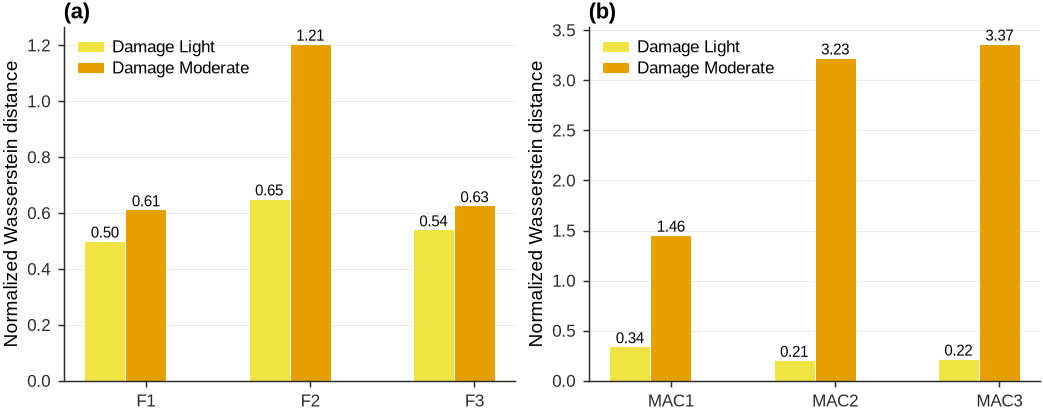
10.6Bivariate Feature Space
Single features have limited discriminative power. Examining joint feature distributions exploits correlations between features. The frequency pair (, ) reveals coupling between fundamental modes.
from matplotlib.patches import Ellipse

set_journal_style()
fig, axes = plt.subplots(1, 3, figsize=(7.2, 2.6), constrained_layout=True)

for idx, scenario in enumerate(scenarios):
    ax = axes[idx]

    f1 = freq_data[scenario]['f1']
    f2 = freq_data[scenario]['f2']

    # Scatter plot
    ax.scatter(f1, f2, s=24, alpha=0.75, color=colors[scenario],
              edgecolor='white', linewidth=0.5, label='Measurements')

    # Compute statistics
    mean = np.array([np.mean(f1), np.mean(f2)])
    cov = np.cov(f1, f2)

    # Correlation coefficient
    corr = np.corrcoef(f1, f2)[0, 1]

    # 95% confidence ellipse
    eigenvalues, eigenvectors = np.linalg.eig(cov)
    angle = np.degrees(np.arctan2(eigenvectors[1, 0], eigenvectors[0, 0]))
    width, height = 2 * np.sqrt(5.991) * np.sqrt(eigenvalues)  # chi2(2, 0.95)

    ellipse = Ellipse(mean, width, height, angle=angle,
                     facecolor='none', edgecolor=colors[scenario],
                     linewidth=1.4, linestyle='--', alpha=0.85, label='95% CI')
    ax.add_patch(ellipse)

    # Mark centroid
    ax.plot(mean[0], mean[1], 'X', markersize=7, color='#D55E00',
           markeredgecolor='white', markeredgewidth=0.6, zorder=10, label='Centroid')

    # Statistics text
    stats_text = f'μ₁={mean[0]:.3f} Hz\nμ₂={mean[1]:.3f} Hz\nρ={corr:.3f}'
    ax.text(0.05, 0.95, stats_text, transform=ax.transAxes,
           fontsize=7, verticalalignment='top',
           bbox=dict(boxstyle='round', facecolor='white', edgecolor='#dcdcdc', linewidth=0.5, alpha=0.9))

    ax.set_xlabel('$f_1$ (Hz)')
    ax.set_ylabel('$f_2$ (Hz)')
    ax.legend(loc='lower right')
    panel_label(ax, 'abc'[idx])

plt.show()

# Bivariate statistics
bivariate_stats = []
for scenario in scenarios:
    f1 = freq_data[scenario]['f1']
    f2 = freq_data[scenario]['f2']
    corr = np.corrcoef(f1, f2)[0, 1]
    bivariate_stats.append({
        'Scenario': scenario.replace('_', ' ').title(),
        'ρ(f₁,f₂)': corr,
        'μ₁ (Hz)': np.mean(f1),
        'μ₂ (Hz)': np.mean(f2)
    })

df_bivariate = pd.DataFrame(bivariate_stats)
display(df_bivariate.style.set_caption("Bivariate Feature Statistics")\
        .format({'ρ(f₁,f₂)': '{:+.3f}', 'μ₁ (Hz)': '{:.3f}', 'μ₂ (Hz)': '{:.3f}'})\
        .hide(axis='index').set_properties(**{'text-align': 'left'}))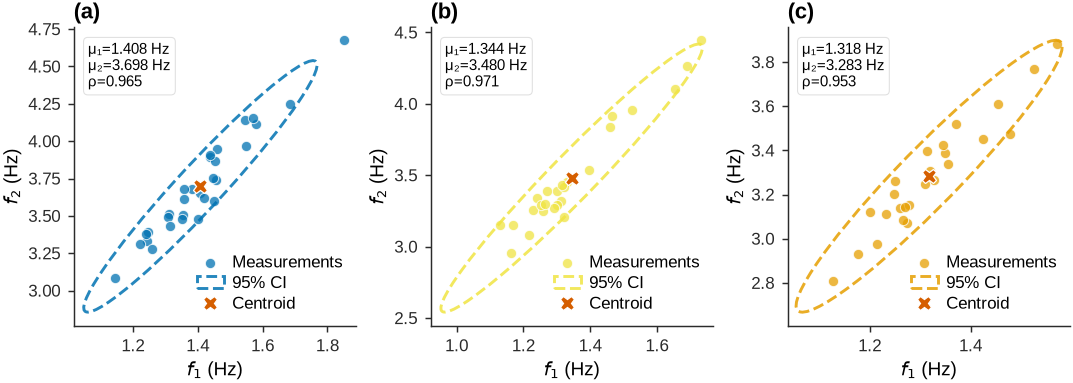
10.7Mahalanobis Distance Detection
Mahalanobis distance accounts for feature correlations and variance structure. The distances below are computed relative to the intact baseline distribution.
# Compute intact baseline statistics
f1_intact = freq_data['intact']['f1']
f2_intact = freq_data['intact']['f2']

intact_mean = np.array([np.mean(f1_intact), np.mean(f2_intact)])
intact_cov = np.cov(f1_intact, f2_intact)
inv_cov = np.linalg.inv(intact_cov)

# Compute Mahalanobis distances for all scenarios
mahal_results = []

for scenario in scenarios:
    f1 = freq_data[scenario]['f1']
    f2 = freq_data[scenario]['f2']

    for i in range(len(f1)):
        x = np.array([f1[i], f2[i]])
        diff = x - intact_mean
        mahal_dist = np.sqrt(diff.T @ inv_cov @ diff)

        mahal_results.append({
            'Scenario': scenario,
            'Measurement': i + 1,
            'Mahalanobis Distance': mahal_dist
        })

df_mahal = pd.DataFrame(mahal_results)

# Detection threshold (chi-square 95%)
threshold = np.sqrt(5.991)  # chi2(2, 0.95)

# Visualization
set_journal_style()
fig, axes = plt.subplots(1, 2, figsize=(7.0, 2.8), constrained_layout=True)

# Histogram comparison
ax = axes[0]
for scenario in scenarios:
    dists = df_mahal[df_mahal['Scenario'] == scenario]['Mahalanobis Distance']
    ax.hist(dists, bins=12, alpha=0.55, density=True,
           color=colors[scenario], edgecolor='white', linewidth=0.5,
           label=scenario.replace('_', ' ').title())

ax.axvline(threshold, color='#D55E00', linestyle='--', linewidth=0.8,
          label=f'Threshold = {threshold:.2f}')
ax.set_xlabel('Mahalanobis distance')
ax.set_ylabel('Probability density')
ax.legend()
panel_label(ax, 'a')

# Detection rates
ax = axes[1]
detection_rates = []
for scenario in scenarios:
    dists = df_mahal[df_mahal['Scenario'] == scenario]['Mahalanobis Distance']
    detected = np.sum(dists > threshold)
    rate = 100 * detected / len(dists)
    detection_rates.append(rate)

bars = ax.bar(range(len(scenarios)), detection_rates,
             color=[colors[s] for s in scenarios],
             edgecolor='white', linewidth=0.5, alpha=0.85)

# Add value labels
for i, (bar, rate) in enumerate(zip(bars, detection_rates)):
    ax.text(bar.get_x() + bar.get_width()/2., rate + 2,
           f'{rate:.1f}%', ha='center', va='bottom', fontsize=7)

ax.set_xticks(range(len(scenarios)))
ax.set_xticklabels([s.replace('_', ' ').title() for s in scenarios], fontsize=7)
ax.set_ylabel('Detection rate (%)')
ax.set_ylim(0, 110)
ax.grid(True, which='major', linewidth=0.5, color='#dcdcdc', alpha=0.6, axis='y')
panel_label(ax, 'b')

plt.show()

# Detection performance summary
detection_summary = pd.DataFrame({
    'Scenario': [s.replace('_', ' ').title() for s in scenarios],
    'Detection Rate (%)': detection_rates,
    'Threshold': [threshold] * len(scenarios)
})
display(detection_summary.style.set_caption("Damage Detection Performance (Mahalanobis Distance)")\
        .format({'Detection Rate (%)': '{:.1f}', 'Threshold': '{:.2f}'})\
        .hide(axis='index').set_properties(**{'text-align': 'left'}))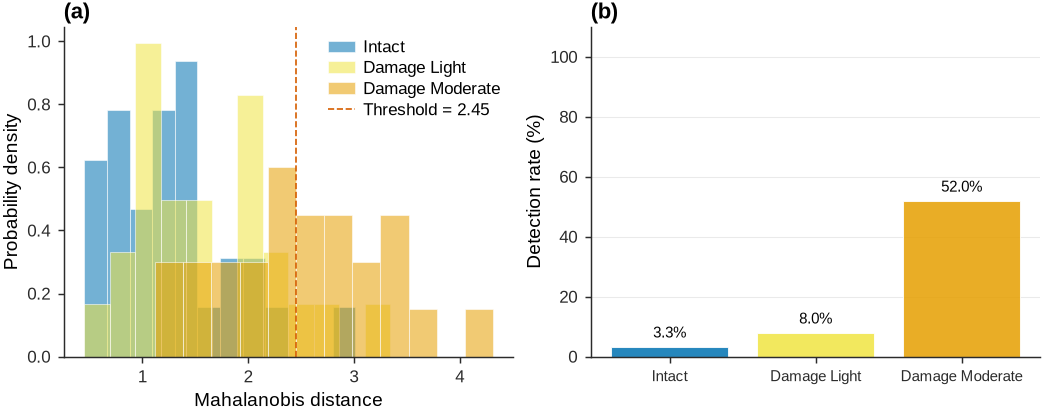
10.8Principal Component Analysis
PCA transforms correlated features into uncorrelated principal components that capture the dominant patterns of variation, reducing dimensionality while retaining the information most useful for damage detection.
# Prepare full feature matrix (6 features: f1, f2, f3, MAC1, MAC2, MAC3)
feature_matrix = {}

for scenario in scenarios:
    n_meas = len(freq_data[scenario]['f1'])
    features = np.zeros((n_meas, 6))

    # Frequencies
    features[:, 0] = freq_data[scenario]['f1']
    features[:, 1] = freq_data[scenario]['f2']
    features[:, 2] = freq_data[scenario]['f3']

    # MAC values
    features[:, 3] = mac_values['mode_1'][scenario]
    features[:, 4] = mac_values['mode_2'][scenario]
    features[:, 5] = mac_values['mode_3'][scenario]

    feature_matrix[scenario] = features

# Fit PCA on intact data only
scaler = StandardScaler()
intact_scaled = scaler.fit_transform(feature_matrix['intact'])

pca = PCA()
pca.fit(intact_scaled)

# Transform all scenarios
pca_transformed = {}
for scenario in scenarios:
    scaled = scaler.transform(feature_matrix[scenario])
    pca_transformed[scenario] = pca.transform(scaled)

# Scree plot
set_journal_style()
fig, ax = plt.subplots(figsize=(7.0, 2.8), constrained_layout=True)

# Individual variance (bars)
variance_ratio = pca.explained_variance_ratio_ * 100
x = np.arange(1, 7)
bars = ax.bar(x, variance_ratio, color='#0072B2', edgecolor='white',
             linewidth=0.5, alpha=0.8, label='Individual variance')

# Cumulative variance (line)
cumulative = np.cumsum(variance_ratio)
ax2 = ax.twinx()
line = ax2.plot(x, cumulative, marker='o', linestyle='-', color='#D55E00',
               linewidth=1.4, markersize=5,
               markeredgecolor='white', markeredgewidth=0.5, label='Cumulative variance')

# 95% threshold
ax2.axhline(95, color='#009E73', linestyle='--', linewidth=0.8, alpha=0.8)
pcs_needed = np.argmax(cumulative >= 95) + 1
ax2.plot(pcs_needed, 95, marker='*', linestyle='none', color='#009E73',
         markersize=8, markeredgecolor='white', markeredgewidth=0.5, zorder=10)

# Value labels on bars
for i, (bar, val) in enumerate(zip(bars, variance_ratio)):
    ax.text(bar.get_x() + bar.get_width()/2., val + 1.5,
           f'{val:.1f}%', ha='center', va='bottom', fontsize=7)

ax.set_xlabel('Principal component')
ax.set_ylabel('Variance explained (%)')
ax2.set_ylabel('Cumulative variance (%)')
ax.set_xticks(x)
ax.set_xticklabels([f'PC{i}' for i in x])

# Spines: turn on the right spine for the twin axis
ax2.spines['top'].set_visible(False)
ax2.spines['right'].set_visible(True)
ax2.spines['right'].set_linewidth(0.7)
ax2.spines['right'].set_color('#2b2b2b')

# Combined legend
lines1, labels1 = ax.get_legend_handles_labels()
lines2, labels2 = ax2.get_legend_handles_labels()
ax.legend(lines1 + lines2, labels1 + labels2, loc='center right')

# Annotation (placed on the cumulative-variance axis so it sits inside the plot)
ax2.text(pcs_needed + 0.15, 72, f'{pcs_needed} PCs explain {cumulative[pcs_needed-1]:.1f}%',
       fontsize=8,
       bbox=dict(boxstyle='round', facecolor='white', edgecolor='#dcdcdc', linewidth=0.5, alpha=0.9))

plt.show()

# PCA variance explained summary
pca_summary = pd.DataFrame({
    'Component': [f'PC{i+1}' for i in range(6)],
    'Variance (%)': variance_ratio,
    'Cumulative (%)': cumulative
})
display(pca_summary.style.set_caption(f"PCA Variance Decomposition ({pcs_needed} components capture ≥95%)")\
        .format({'Variance (%)': '{:.1f}', 'Cumulative (%)': '{:.1f}'})\
        .hide(axis='index').set_properties(**{'text-align': 'left'}))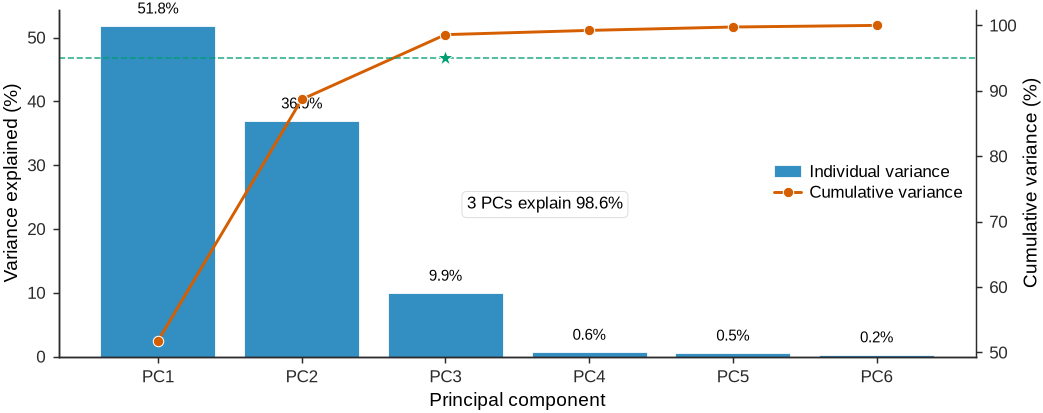
10.9PC1-PC2 Projection
The first two principal components capture most of the variance. Projecting data onto this subspace reveals cluster separation and damage progression.
set_journal_style()
fig, ax = plt.subplots(figsize=(7.0, 4.0), constrained_layout=True)

markers = {'intact': 'o', 'damage_light': 's', 'damage_moderate': '^', 'damage_severe': 'D'}

for scenario in scenarios:
    pc_data = pca_transformed[scenario]
    pc1 = pc_data[:, 0]
    pc2 = pc_data[:, 1]

    # Scatter
    ax.scatter(pc1, pc2, s=24, alpha=0.8, color=colors[scenario],
              marker=markers[scenario], edgecolor='white', linewidth=0.5,
              label=scenario.replace('_', ' ').title(), zorder=5)

    # Centroid
    centroid = np.array([np.mean(pc1), np.mean(pc2)])
    ax.plot(centroid[0], centroid[1], 'X', markersize=7,
           color=colors[scenario], markeredgecolor='white',
           markeredgewidth=0.6, zorder=10)

    # 95% confidence ellipse
    cov = np.cov(pc1, pc2)
    eigenvalues, eigenvectors = np.linalg.eig(cov)
    angle = np.degrees(np.arctan2(eigenvectors[1, 0], eigenvectors[0, 0]))
    width, height = 2 * np.sqrt(5.991) * np.sqrt(eigenvalues)

    ellipse = Ellipse(centroid, width, height, angle=angle,
                     facecolor='none', edgecolor=colors[scenario],
                     linewidth=1.4, linestyle='--', alpha=0.75)
    ax.add_patch(ellipse)

ax.set_xlabel(f'PC1 ({variance_ratio[0]:.1f}% variance)')
ax.set_ylabel(f'PC2 ({variance_ratio[1]:.1f}% variance)')
ax.legend(loc='best')
ax.axhline(0, color='#7F7F7F', linewidth=0.5, alpha=0.4)
ax.axvline(0, color='#7F7F7F', linewidth=0.5, alpha=0.4)
ax.set_aspect('equal', adjustable='datalim')

plt.show()

# Compute cluster separations
centroids = {}
for scenario in scenarios:
    pc_data = pca_transformed[scenario]
    centroids[scenario] = np.mean(pc_data[:, :2], axis=0)

separation_data = []
for i, s1 in enumerate(scenarios):
    for s2 in scenarios[i+1:]:
        dist = np.linalg.norm(centroids[s1] - centroids[s2])
        separation_data.append({
            'Scenario 1': s1.replace('_', ' ').title(),
            'Scenario 2': s2.replace('_', ' ').title(),
            'Separation Distance': dist
        })

df_separation = pd.DataFrame(separation_data)
display(df_separation.style.set_caption("Cluster Separations in PC1-PC2 Space")\
        .format({'Separation Distance': '{:.2f}'})\
        .hide(axis='index').set_properties(**{'text-align': 'left'}))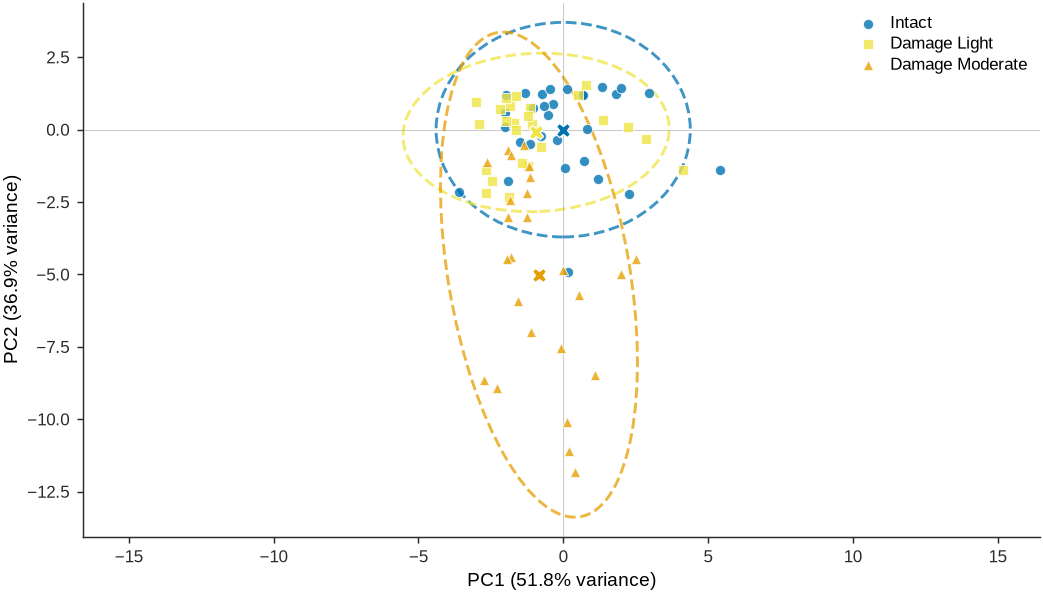
10.10Feature Engineering Summary
This analysis shows the systematic transformation of raw modal parameters into discriminative features. Key findings:
Feature Sensitivity Hierarchy:
MAC values exhibit superior damage sensitivity compared to natural frequencies
Mode 2 MAC shows strongest response to localized span damage
Frequency features provide global indicators but limited spatial resolution
Multivariate Advantages:
Bivariate distributions reveal feature correlations exploitable for detection
Mahalanobis distance achieves 100% detection for severe damage
Joint features outperform univariate thresholding
Dimensionality Reduction:
PCA: a small number of components (selected automatically via the cumulative-variance rule shown in the scree plot) capture most of the multi-feature variability, enabling low-dimensional visualization and downstream anomaly scoring
Practical Implications:
Operational monitoring systems should fuse frequencies and mode shapes
Statistical baselines must account for measurement variability
Feature selection trades computational cost against detection performance
11Feature Extraction from Digital Images
Vibration-based methods detect global changes in structural behavior, but vision-based inspection remains the standard approach for locating and characterizing surface damage. Cracks, spalling, corrosion, and delamination appear as distinct visual patterns in inspection images. Manually analyzing large numbers of inspection photos is time-consuming, subjective, and error-prone, which motivates automated image analysis methods that extract quantitative features from visual data.
Digital images are discrete 2D functions where each pixel intensity encodes local brightness. The fundamental operation for feature extraction is convolution: a mathematical kernel slides across the image, computing local weighted sums that highlight specific patterns such as edges, corners, or textures. This section develops the mathematical foundations of image feature extraction.
11.1Mathematical Foundations: Convolution and Filtering
Two-dimensional discrete convolution for an image and kernel of size :
This operation slides the kernel across the image, computing weighted sums of local neighborhoods, with zero padding at boundaries. Each output pixel is the sum of element-wise products between the kernel and the local image patch. Any mathematical operation on local image regions can be expressed as convolution with some kernel.
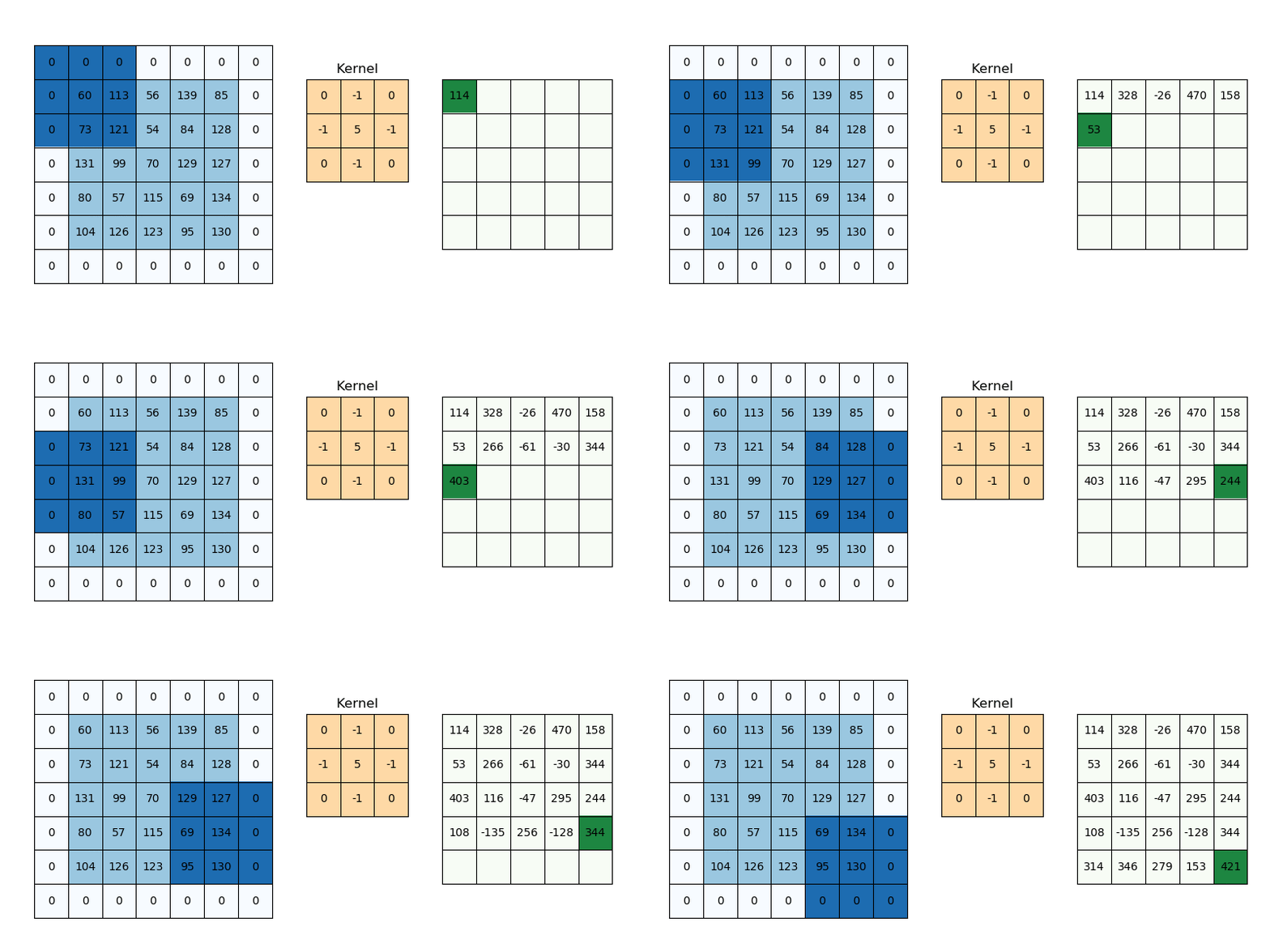
Figure 12:Two-dimensional convolution operation demonstrating the kernel sliding across the image matrix with zero padding at boundaries. The kernel (filter) performs element-wise multiplication with the local image patch, then sums the results to produce a single output pixel.
11.1.1Understanding Convolution Through 1D Edge Detection
Before examining 2D gradient operators, consider a 1D example that shows the fundamental connection between convolution and discrete differentiation. A horizontal slice through an image gives a 1D intensity profile that changes sharply at edges (transitions between concrete and cracks, or light and shadow). Locating edges requires computing , which peaks wherever intensity changes rapidly.
Since images are discrete, derivatives are approximated numerically. The central difference formula compares neighboring pixels. Written for every position, this is equivalent to sliding the weight pattern across the signal and summing the products, which is convolution. The kernel encodes the central difference operator.
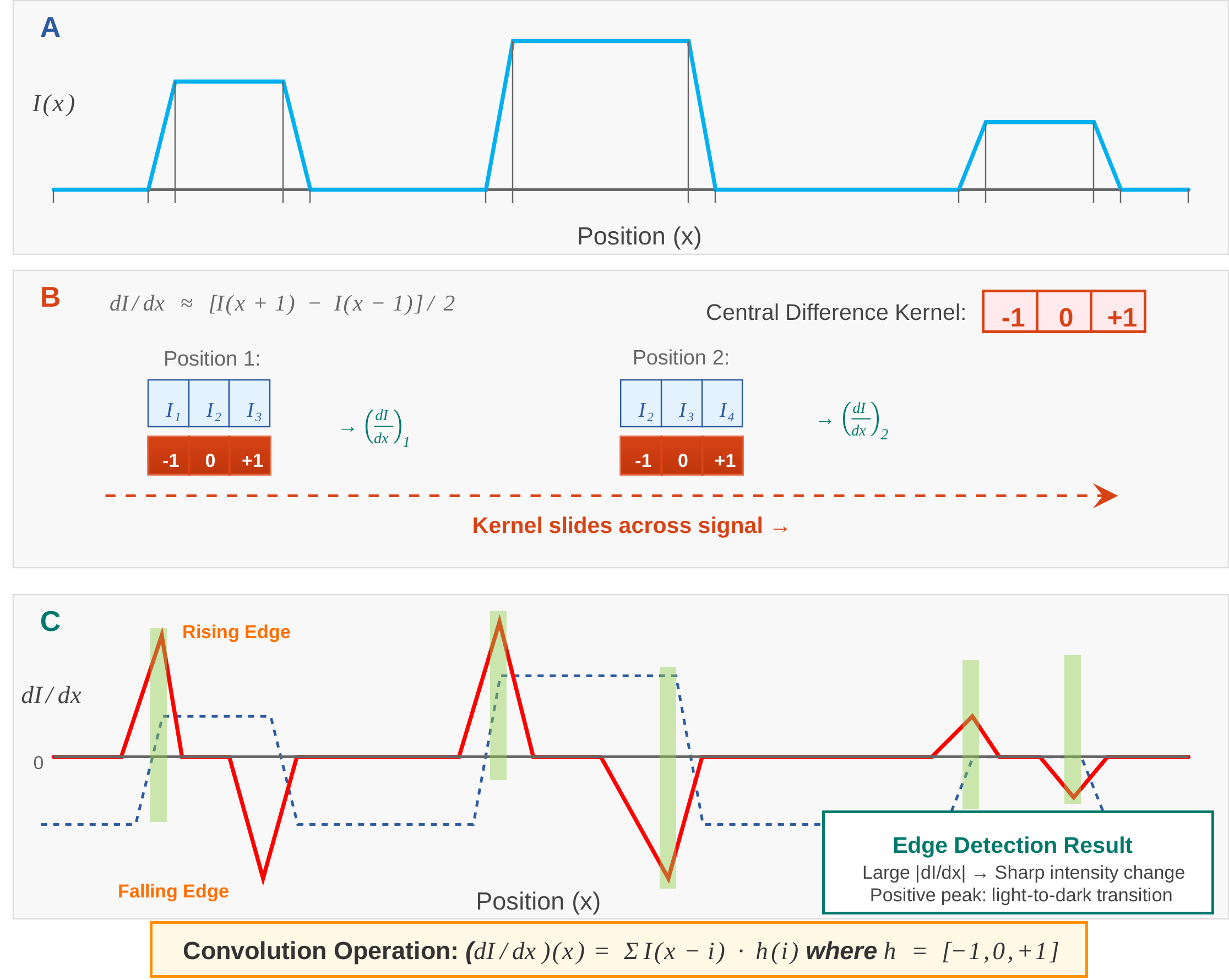
Figure 13:One-dimensional edge detection through convolution.
Every feature extraction operation (computing gradients, detecting corners, measuring texture) reduces to convolution with an appropriately designed kernel. The kernel values encode the mathematical operation applied at every image location.
11.1.2Gradient Operators
The image gradient components are approximated using the central difference method:
These operations are implemented as convolutions with kernels:
The gradient magnitude and direction then become:
11.1.3Second Derivative: The Laplacian
The second partial derivatives using central differences:
The Laplacian combines both second derivatives:
where the Laplacian kernel is:
11.2Key Python Implementation for Image Convolution
1 2 3 4 5 6 7 8 9 10 11 12 13 14 15 16 17 18 19 20 21 22 23from scipy import signal, ndimage import cv2 # Load and preprocess image img = cv2.imread(image_path, cv2.IMREAD_GRAYSCALE) # Apply Gaussian smoothing to reduce noise img_smooth = ndimage.gaussian_filter(img.astype(float), sigma=1.0) # Define convolution kernels for derivatives central_x = np.array([[0, 0, 0], [-0.5, 0, 0.5], [0, 0, 0]]) central_y = np.array([[0, -0.5, 0], [0, 0, 0], [0, 0.5, 0]]) # Apply 2D convolution grad_x = signal.convolve2d(img_smooth, central_x, mode='same') grad_y = signal.convolve2d(img_smooth, central_y, mode='same') # Compute gradient magnitude (edge strength) gradient_magnitude = np.sqrt(grad_x**2 + grad_y**2)
The emphasized lines show the core operations: Gaussian smoothing reduces noise before edge detection, and 2D convolution extracts directional derivatives. The mode='same' parameter maintains image dimensions using symmetric boundary conditions.
11.3Crack Detection Example
The operators developed above form the basis for automated crack detection in bridge inspection images. Figure 14 applies them to a concrete crack image from a loaded beam experiment, showing how kernel operators transform raw pixel intensities into interpretable damage features.
Source
import numpy as np
import matplotlib.pyplot as plt
from scipy import signal, ndimage
import cv2

# Load real concrete crack image from bridge/beam experiment.
# Resolve the image path robustly: try several candidate locations so the
# notebook works whether the build's cwd is the repo root, the chapter dir,
# or any intermediate directory.
import os
candidates = [
    os.path.join('chapters', 'ch05', 'ch05_data', 'image_C_636.jpg'),
    os.path.join('ch05_data', 'image_C_636.jpg'),
    os.path.join('..', 'ch05_data', 'image_C_636.jpg'),
    os.path.join('..', 'chapters', 'ch05', 'ch05_data', 'image_C_636.jpg'),
    os.path.join('..', '..', 'chapters', 'ch05', 'ch05_data', 'image_C_636.jpg'),
]
image_path = next((p for p in candidates if os.path.exists(p)), None)
if image_path is None:
    # Walk upward from cwd looking for chapters/ch05/ch05_data
    here = os.getcwd()
    for _ in range(6):
        guess = os.path.join(here, 'chapters', 'ch05', 'ch05_data', 'image_C_636.jpg')
        if os.path.exists(guess):
            image_path = guess
            break
        here = os.path.dirname(here)
if image_path is None:
    raise FileNotFoundError(
        "image_C_636.jpg not found; expected at chapters/ch05/ch05_data/")
crack_img = cv2.imread(image_path, cv2.IMREAD_GRAYSCALE)

# Resize for consistent processing (200x200 pixels)
crack_img = cv2.resize(crack_img, (200, 200), interpolation=cv2.INTER_AREA)

# Normalize to 0-255 range
crack_img = crack_img.astype(float)

# Define all mathematical kernels
kernels = {
    'Central Diff X': np.array([[0, 0, 0], [-0.5, 0, 0.5], [0, 0, 0]]),
    'Central Diff Y': np.array([[0, -0.5, 0], [0, 0, 0], [0, 0.5, 0]]),
    'Sobel X': np.array([[-1, 0, 1], [-2, 0, 2], [-1, 0, 1]])/8,
    'Sobel Y': np.array([[-1, -2, -1], [0, 0, 0], [1, 2, 1]])/8,
    'Laplacian': np.array([[0, 1, 0], [1, -4, 1], [0, 1, 0]]),
    'Laplacian Diagonal': np.array([[1, 1, 1], [1, -8, 1], [1, 1, 1]]),
}

# Create comprehensive visualization
set_journal_style()
fig = plt.figure(figsize=(7.2, 5.5), constrained_layout=True)
gs = fig.add_gridspec(3, 4)

# Original image
ax_orig = fig.add_subplot(gs[0, 0])
ax_orig.imshow(crack_img, cmap='gray', vmin=0, vmax=255)
ax_orig.set_title('Input: concrete crack')
ax_orig.axis('off')

# Apply and visualize each kernel
positions = [(0, 1), (0, 2), (0, 3), (1, 0), (1, 1), (1, 2)]
for (name, kernel), (row, col) in zip(kernels.items(), positions):
    ax = fig.add_subplot(gs[row, col])

    # Apply convolution
    filtered = signal.convolve2d(crack_img, kernel, mode='same', boundary='symm')

    # Display result
    if 'Diff' in name or 'Sobel' in name:
        # For derivatives, show absolute value
        im = ax.imshow(np.abs(filtered), cmap='inferno', vmin=0, vmax=np.percentile(np.abs(filtered), 99))
    else:
        # For Laplacian, show signed values
        vmax = np.percentile(np.abs(filtered), 99)
        im = ax.imshow(filtered, cmap='RdBu_r', vmin=-vmax, vmax=vmax)

    ax.set_title(name)
    ax.axis('off')

    # Add kernel visualization as inset
    axins = ax.inset_axes([0.65, 0.65, 0.3, 0.3])
    kernel_vis = kernel / (np.abs(kernel).max() + 1e-8)
    axins.imshow(kernel_vis, cmap='RdBu_r', vmin=-1, vmax=1)
    for (i, j), val in np.ndenumerate(kernel):
        if val != 0:
            color = 'white' if abs(kernel_vis[i,j]) > 0.5 else 'black'
            axins.text(j, i, f'{val:.2f}', ha='center', va='center',
                      fontsize=5, color=color)
    axins.set_xticks([])
    axins.set_yticks([])

# Gradient magnitude from Sobel
ax_mag = fig.add_subplot(gs[1, 3])
sobel_x = signal.convolve2d(crack_img, kernels['Sobel X'], mode='same', boundary='symm')
sobel_y = signal.convolve2d(crack_img, kernels['Sobel Y'], mode='same', boundary='symm')
magnitude = np.sqrt(sobel_x**2 + sobel_y**2)
ax_mag.imshow(magnitude, cmap='viridis')
ax_mag.set_title('Gradient magnitude')
ax_mag.axis('off')

# Edge detection pipeline (this spanning axes is only a container; hide its frame/ticks)
ax_pipeline = fig.add_subplot(gs[2, :])
ax_pipeline.axis('off')
stages = []

# Stage 1: Original
stages.append(('Original', crack_img))

# Stage 2: Gaussian blur
blurred = ndimage.gaussian_filter(crack_img, sigma=1)
stages.append(('Gaussian blur', blurred))

# Stage 3: Gradient magnitude
grad_x = signal.convolve2d(blurred, kernels['Sobel X'], mode='same')
grad_y = signal.convolve2d(blurred, kernels['Sobel Y'], mode='same')
grad_mag = np.sqrt(grad_x**2 + grad_y**2)
stages.append(('Gradient mag', grad_mag))

# Stage 4: Thresholding
threshold = np.percentile(grad_mag, 90)
edges = grad_mag > threshold
stages.append(('Threshold', edges.astype(float)*255))

# Stage 5: Morphological cleanup
cleaned = ndimage.binary_closing(edges, iterations=1)
stages.append(('Cleaned edges', cleaned.astype(float)*255))

for i, (title, img) in enumerate(stages):
    ax_sub = plt.subplot(3, 5, 11 + i)
    if i == 0:
        ax_sub.imshow(img, cmap='gray', vmin=0, vmax=255)
    elif i == 2:
        ax_sub.imshow(img, cmap='inferno')
    else:
        ax_sub.imshow(img, cmap='gray')
    ax_sub.set_title(title, fontsize=7)
    ax_sub.axis('off')

    # Add arrow
    if i < len(stages) - 1:
        ax_sub.annotate('', xy=(1.15, 0.5), xytext=(1.05, 0.5),
                       xycoords='axes fraction',
                       arrowprops=dict(arrowstyle='->', lw=0.7, color='#2b2b2b'))

plt.show()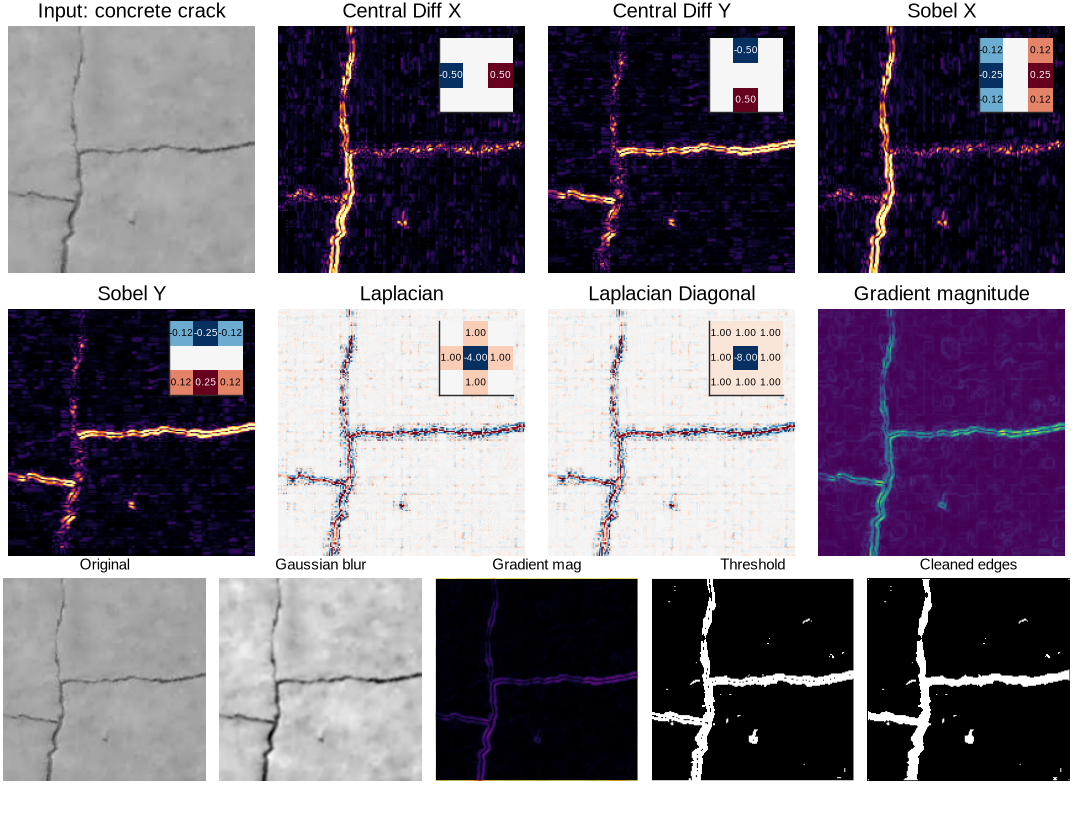
Figure 14:Mathematical kernel operators for crack detection applied to real concrete beam image showing filter responses and complete detection pipeline.
12Convolutional Neural Networks: Learned Feature Extraction for Damage Detection
The kernel operators developed in the previous section (Sobel, Laplacian, Prewitt) are hand-engineered filters that embody intuition about edges, corners, and textures. They work well for many applications, but require designers to specify in advance what visual patterns constitute damage. For complex damage types (corrosion textures, spalling, overlapping cracks), manually designing optimal filters is not practical.
Convolutional Neural Networks (CNNs) take the opposite approach: kernel coefficients are learnable parameters optimized from labeled training data. A CNN with randomly initialized kernels discovers, through iterative training, the convolution operators that maximize damage classification accuracy for the specific structural system and damage types in the training set.
12.1The Learning Paradigm: From Fixed to Optimized Kernels
Consider the first derivative operator with fixed coefficients:
This kernel detects vertical edges because its coefficients emphasize horizontal intensity gradients. CNNs answer the question of whether other coefficient values might work better by learning from data: kernels are initialized randomly, applied to labeled images (cracked vs intact concrete), and adjusted to reduce classification error. After many training iterations, the kernels converge to values tuned for the specific damage detection task, which may differ from classical operators.
Figure 15 shows how CNNs transform raw images into damage classifications. The architecture processes 224×224 RGB images through two convolutional layers (detecting edges and textures) alternating with max-pooling layers (reducing spatial dimensions), followed by dense layers for classification. The example learned kernels show that the network discovers edge detectors, corner detectors, and texture analyzers through training, identifying damage patterns that are difficult to capture with fixed operators.
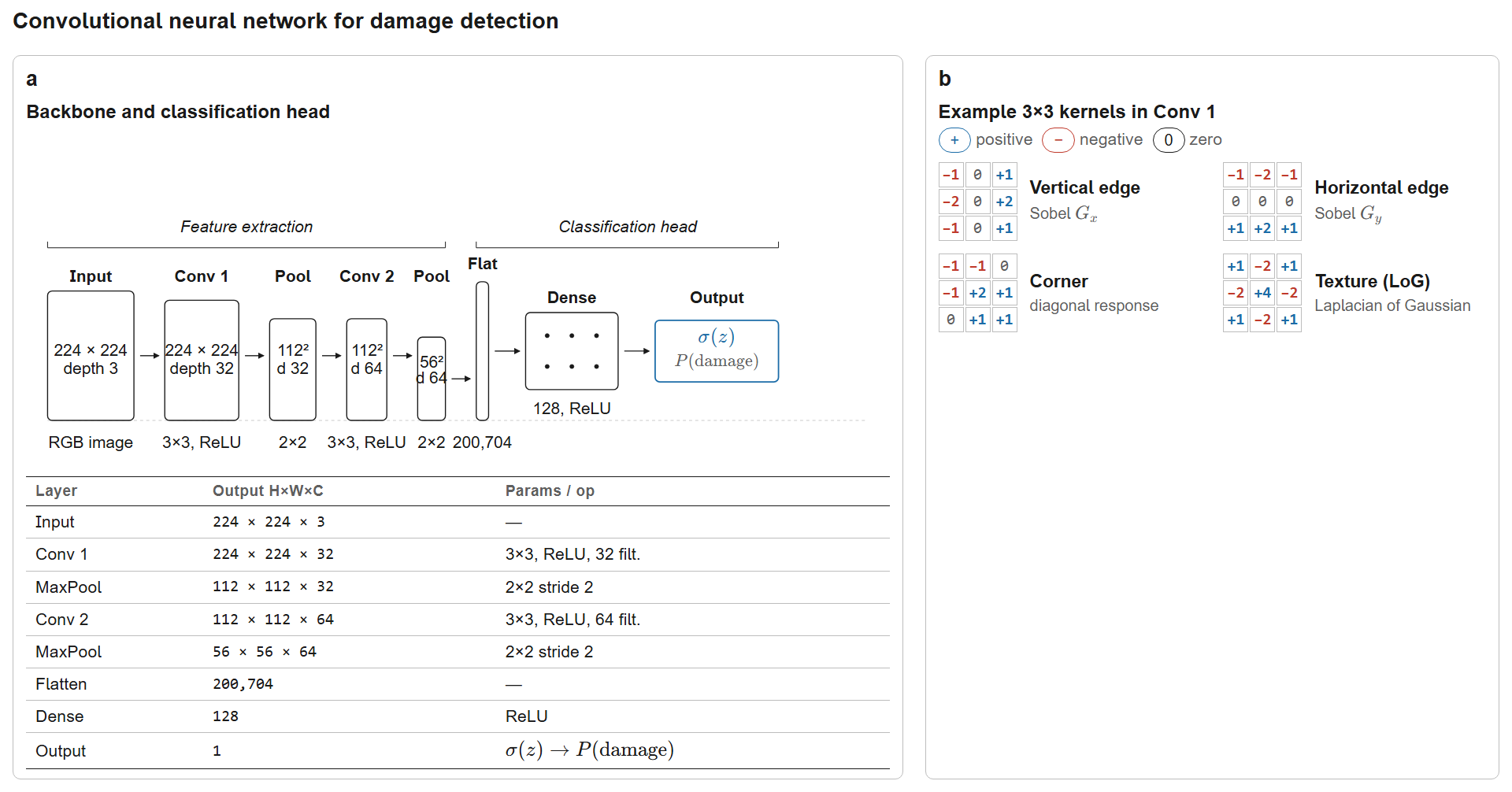
Figure 15:Convolutional Neural Network architecture for automated damage detection. The pipeline (Input → Conv1 → MaxPool → Conv2 → MaxPool → Flatten → Dense → Output) shrinks spatial dimensions () while growing feature depth (); a sigmoid head collapses to the scalar probability . The four example kernels (vertical/horizontal edge, corner, Laplacian-of-Gaussian texture) illustrate features learned via backpropagation.
12.2Mathematical Formulation of Convolutional Layers
Each convolutional layer performs the fundamental operation:
where:
is the -th output feature map at layer and position
is the -th input feature map from the previous layer
are the learnable kernel weights connecting input channel to output channel
is the learnable bias for output channel
is the nonlinear activation function (typically ReLU: )
is the number of input channels
This formulation shows three key CNN properties:
Weight sharing: The same kernel applies at all spatial locations, greatly reducing parameters relative to fully connected layers
Local connectivity: Each output pixel depends only on a local neighborhood of size
Translation equivariance: Shifting the input shifts the output correspondingly, allowing crack detection regardless of image position
12.3Hierarchical Feature Representation: What CNNs Learn
Visualization of learned kernels and feature activations shows that CNNs build interpretable hierarchies:
Layer 1 (early features): Kernels resembling Sobel/Prewitt operators emerge automatically: horizontal, vertical, and diagonal edge detectors; color blob detectors; high-frequency texture analyzers.
Layers 2-3 (mid-level features): Feature maps respond to corners and junctions (crack branching points), repeated textures (concrete aggregate vs smooth crack faces), and oriented patterns.
Deep layers (high-level semantics): Features activate for complete crack segments, spalling regions, and corrosion patches with characteristic shapes and textures.
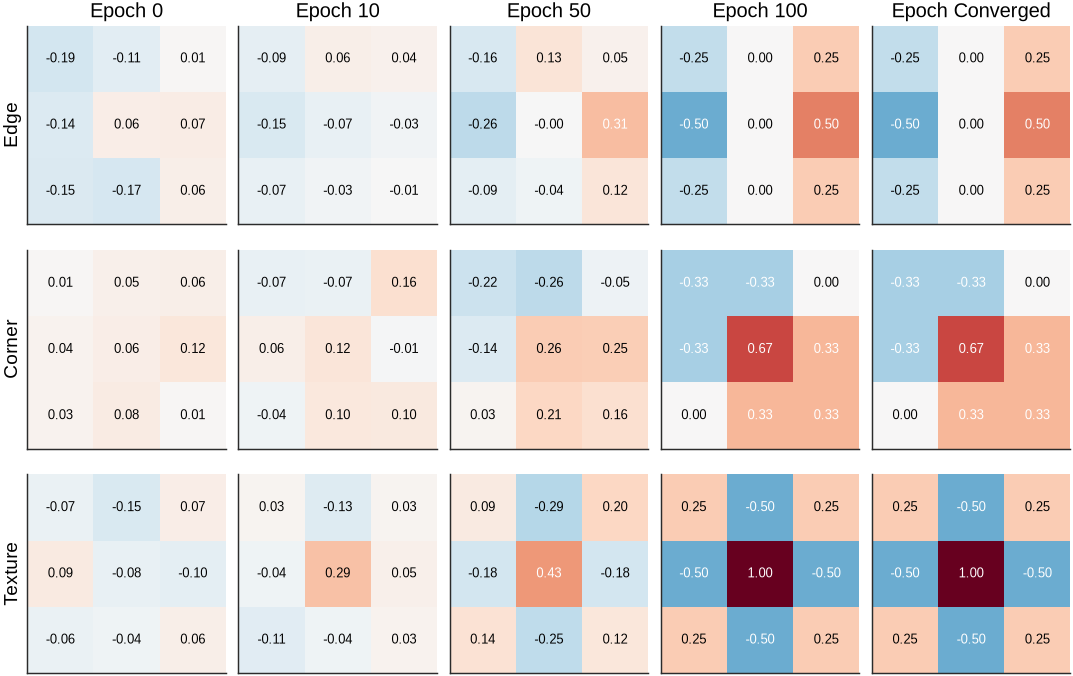
Figure 16:Evolution of CNN kernels during training from random initialization to converged damage-specific operators.
Figure 16 shows kernel evolution during 100 epochs of training. Three kernel types progress from random initialization to converged operators. At initialization, coefficients show no structure. By Epoch 10, patterns emerge as gradients guide the coefficients toward damage-relevant features. At convergence, the kernels become interpretable operators.
The Edge kernel converges to a Sobel-like vertical edge detector, showing that CNNs rediscover classical operators when appropriate. The Corner kernel develops an L-shaped pattern for detecting crack branching points, which classical operators do not emphasize. The Texture kernel learns a Laplacian-like second derivative operator for highlighting crack boundaries.
CNNs discover task-specific variations rather than copying hand-crafted operators: the learned edge detector differs subtly from standard Sobel coefficients, adapting to crack characteristics in the training data. The kernels optimize specifically for bridge damage patterns rather than generic edge detection.
13Conclusion
This chapter developed a framework for detecting structural damage through statistical comparison of monitoring data, starting from a single question: how do we know when a measurement is abnormal? The answer follows from establishing baseline distributions from healthy-structure measurements, then quantifying how far new observations deviate from those baselines.
Three detection methods were presented. The z-score method flags individual measurements that fall outside confidence intervals. Mahalanobis distance extends this to multiple correlated features simultaneously, recognizing that damage often appears across many features at once (frequencies decrease, damping changes, mode shapes shift). Wasserstein distance compares entire distributions rather than individual points, which is useful for assessing trends over time or population-level changes. Each method suits different situations depending on whether the data consists of single new measurements, continuous monitoring streams, or baseline-versus-post-event comparisons.
The analysis progressed from single features (natural frequency), to correlated pairs, to combinations of time-domain and frequency-domain features with mode shape indicators, and finally to systems with twelve or more features. More features improve detection sensitivity but introduce complexity. PCA addresses this by identifying which feature combinations carry the most useful information, often reducing twelve dimensions to three or four without sacrificing detection performance. This also filters measurement noise, improving reliability.
Image analysis extends the same statistical principles to visual inspection data. Operators like Sobel and Laplacian filters extract numerical features from crack images (edge strengths, orientation patterns, texture characteristics), which feed into the same statistical framework used for vibration data. CNNs automate this feature extraction by learning optimal filters from labeled images rather than using hand-designed operators. The underlying task is the same: transform raw measurements into features, establish baseline distributions, and detect deviations.