1Introduction
Bridge monitoring systems continuously generate vast quantities of sensor data that capture structural responses to environmental conditions and operational loads. Traditional analysis methods from Chapter 5 (statistical comparisons using z-scores, Mahalanobis distances, or distribution-based metrics) require manually extracted features and expert-defined thresholds. While effective for small-scale monitoring, these approaches face challenges when scaling to networks of hundreds of sensors across multiple structures, particularly when environmental factors introduce complex, nonlinear relationships that mask subtle damage indicators.
Machine learning transforms this challenge by automatically discovering patterns directly from data. Unlike statistical methods that compare predefined features against baseline distributions, machine learning algorithms learn their own feature representations through training on examples. These learned features often capture relationships that manual engineering might overlook, and models continuously adapt as they process new measurements.
This chapter explores two powerful unsupervised machine learning approaches specifically designed for bridge anomaly detection: One-Class Support Vector Machines and Convolutional Autoencoders. Both methods address a fundamental challenge in structural health monitoring: the scarcity of damage examples. By learning exclusively from healthy bridge data, these techniques identify anomalies as deviations from normal patterns, eliminating the need for damage examples during training. This unsupervised paradigm aligns naturally with real-world structural monitoring where structures operate safely for most of their service life.
2Machine Learning Fundamentals
2.1What is Machine Learning?
Machine learning enables computers to learn patterns from data without explicit programming of rules. Rather than coding specific instructions to detect bridge damage, we provide examples of structural behavior and allow algorithms to discover patterns that distinguish normal from anomalous conditions. These systems adapt continuously: as they encounter new data patterns, they refine their understanding of structural condition, improving detection accuracy over time.
The key advantage lies in automatic pattern discovery. Traditional methods require engineers to specify which features matter and how they relate to damage. Machine learning algorithms discover these relationships directly from data, potentially identifying indicators that domain experts might not anticipate.
2.2Core Machine Learning Tasks
Machine learning problems divide into two fundamental categories based on the type of output they predict.
Regression predicts continuous numerical values from input data. In bridge monitoring, regression models might estimate remaining service life from vibration measurements, predict future load capacity from inspection data, or forecast crack propagation rates from environmental conditions. The output is a real number on a continuous scale.
Classification assigns discrete labels to inputs, answering yes-or-no questions or categorizing data into predefined classes. For structural health monitoring, classification dominates because we typically need binary decisions: Is this measurement normal or anomalous? Has damage occurred or not? Classification can also be multi-class, categorizing damage severity into levels (minor, moderate, severe) or identifying damage type (crack, corrosion, fatigue).
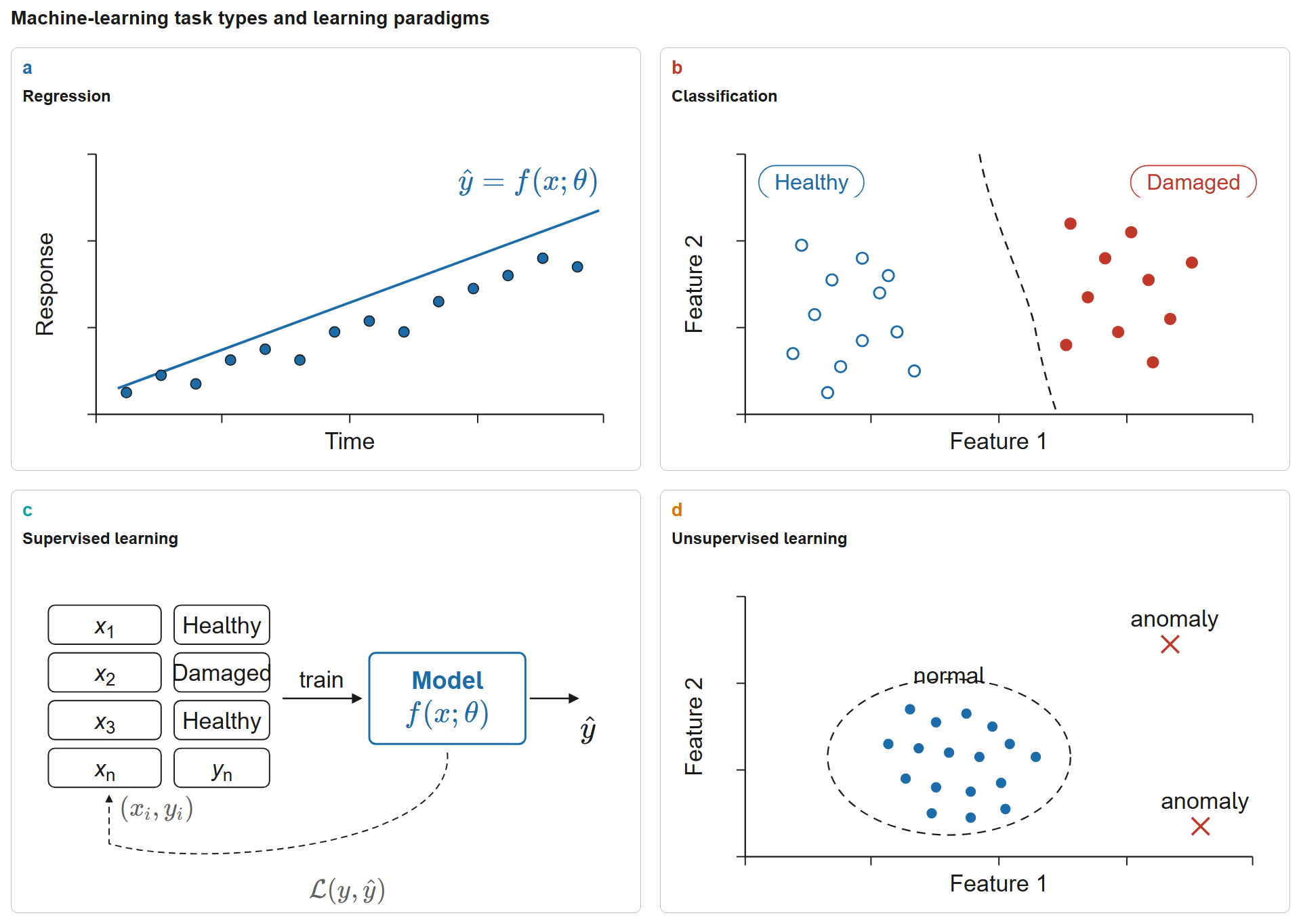
Figure 1:Machine-learning task types and learning paradigms. Regression predicts continuous values via ; classification predicts discrete categories with a learned decision boundary. Supervised learning maps labelled samples through a model to predictions ; unsupervised learning discovers structure (e.g., normal vs. anomalous clusters) without labels.
2.3Supervised vs Unsupervised Learning
Supervised learning requires a training dataset containing input-output pairs where the correct answer is known for each example. To train a crack detector, we need thousands of images labeled “crack” or “no crack.” The algorithm learns to map images to labels by minimizing prediction errors on this labeled training data. Given sufficient examples, supervised methods achieve remarkable accuracy, but they demand extensive labeled datasets.
For bridge monitoring, this requirement creates a critical limitation: damage examples are rare. Deliberately inducing damage for training data is impractical, unethical, and expensive. Waiting for natural damage risks catastrophic failure. Real-world monitoring generates overwhelmingly normal data with infrequent anomalies that may go unnoticed until inspection.
Unsupervised learning solves this problem by discovering structure in data without explicit labels. These algorithms learn patterns of normal behavior from unlabeled measurements. When new data deviates significantly from learned patterns, the algorithm flags an anomaly. This paradigm aligns perfectly with structural health monitoring where structures operate normally for most of their service life, providing abundant examples of healthy behavior.
This chapter focuses exclusively on unsupervised anomaly detection: training models on intact bridge data to identify deviations that may indicate damage. We never provide damage examples during training; the algorithms learn what “normal” looks like and flag anything unusual.
2.4Deep Learning: Hierarchical Feature Discovery
Deep learning extends machine learning through multi-layer neural networks that automatically learn hierarchical feature representations. In image analysis, early network layers detect simple patterns like edges and textures, while deeper layers recognize complex structures like crack patterns or corrosion regions. This automatic feature hierarchy eliminates manual engineering; the network discovers which features matter through training.
Convolutional Neural Networks (CNNs) excel at processing spatial data by preserving structural relationships in images. For bridge monitoring, CNNs can analyze camera images of structural elements or time-frequency spectrograms of vibration signals, automatically extracting features that indicate structural condition without requiring manual specification of what to look for.
2.5The Learning Process: Optimization
Machine learning training solves an optimization problem: find model parameters that minimize prediction error on training data. Given input data with observations and features, we seek:
where:
is the loss function measuring prediction error
is the model with parameters
contains target outputs (for supervised learning)
provides regularization to prevent overfitting
controls regularization strength
The optimization proceeds through gradient descent: compute the gradient indicating which direction to adjust parameters, then update:
where is the learning rate controlling step size. Training iterates through multiple passes over the data (epochs) until the loss converges to a minimum.
2.6Training Terminology: Batch, Iteration, and Epoch
Before exploring training challenges, we clarify essential terminology that describes how models process data during training.
Batch Size () defines how many training examples the model processes simultaneously before updating parameters. Instead of updating after every single example or waiting for the entire dataset, mini-batch training groups examples together. Common batch sizes range from 16 to 256, balancing computational efficiency with gradient quality.
Iteration represents one complete forward pass (computing predictions), loss calculation, backward pass (computing gradients), and parameter update using a single batch. Each iteration moves the model one step closer to the optimal solution. If we have training examples and batch size , one epoch contains iterations.
Epoch signifies one complete pass through the entire training dataset, where every training example has been seen exactly once. Training typically requires multiple epochs (often 10-100+) for the model to converge, as a single exposure to the data rarely suffices for learning complex patterns.
The mathematical relationship connecting these concepts:
where is dataset size, is batch size, and is the number of epochs.
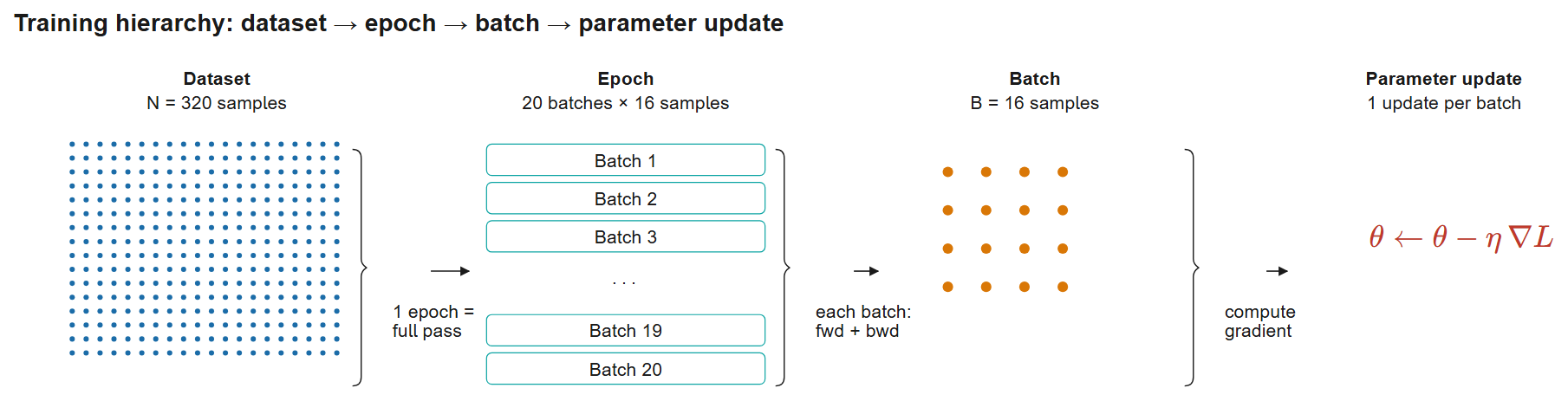
Figure 2:Training hierarchy: the complete dataset () is traversed once per epoch; each epoch is split into 20 batches of samples; each batch drives one forward + backward pass and a parameter update . For 50 epochs this yields parameter updates, with each sample seen 50 times.
Practical Example: Training an autoencoder with 320 spectrograms using batch size 16 for 50 epochs:
Iterations per epoch:
Total iterations: parameter updates
Each spectrogram seen: 50 times during training
Batch Size Selection impacts both training dynamics and computational efficiency. Larger batches provide more stable gradient estimates but require more memory and may converge to sharper minima that generalize poorly. Smaller batches introduce noise that can help escape poor local minima but increase training variance. Modern practice favors batch sizes of 32-128 for most deep learning applications, exploiting GPU parallelism while maintaining beneficial gradient noise.
2.7Overfitting and Underfitting
A critical challenge in machine learning is achieving the right model complexity: too simple and the model misses important patterns, too complex and it memorizes noise instead of learning generalizable relationships.
Underfitting occurs when a model is too simple to capture the underlying data structure. A linear model trying to fit nonlinear damage patterns will underfit, achieving poor performance on both training and test data. The model lacks the capacity to represent the true relationship between features and structural condition.
Overfitting occurs when a model is too complex, memorizing training examples including noise and outliers rather than learning general patterns. An overfitted model achieves excellent training performance but fails on new data because it has learned training-specific peculiarities that don’t generalize. In structural monitoring, an overfitted model might memorize measurement noise from specific sensors rather than learning actual damage signatures.
The solution involves several strategies:
Regularization adds penalty terms to the loss function that discourage overly complex models. L2 regularization (weight decay) penalizes large parameter values, encouraging simpler solutions. Dropout randomly disables neurons during training, preventing co-adaptation that leads to overfitting.
Cross-validation splits data into training and validation sets. Models train on training data while validation data monitors generalization performance. If validation error increases while training error decreases, overfitting is occurring.
Early stopping terminates training when validation performance stops improving, preventing the model from memorizing training noise during extended training.
For bridge monitoring, proper generalization is critical: models must detect damage in new structures under different environmental conditions, not just memorize specific training scenarios.
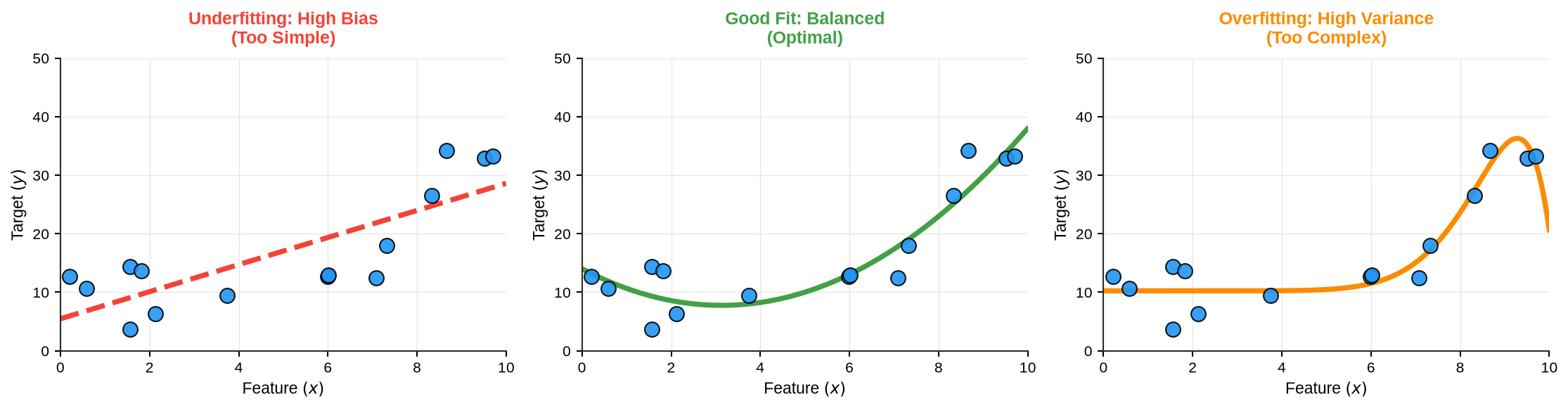
Figure 3:Model complexity trade-offs illustrated with polynomial regression of varying degrees on synthetic data
Model complexity and generalization. Underfitting occurs when models are too simple to capture data patterns; overfitting occurs when models memorize training noise. The optimal model balances bias and variance for best generalization.
2.7.1Detecting Overfitting: Training vs Validation Error
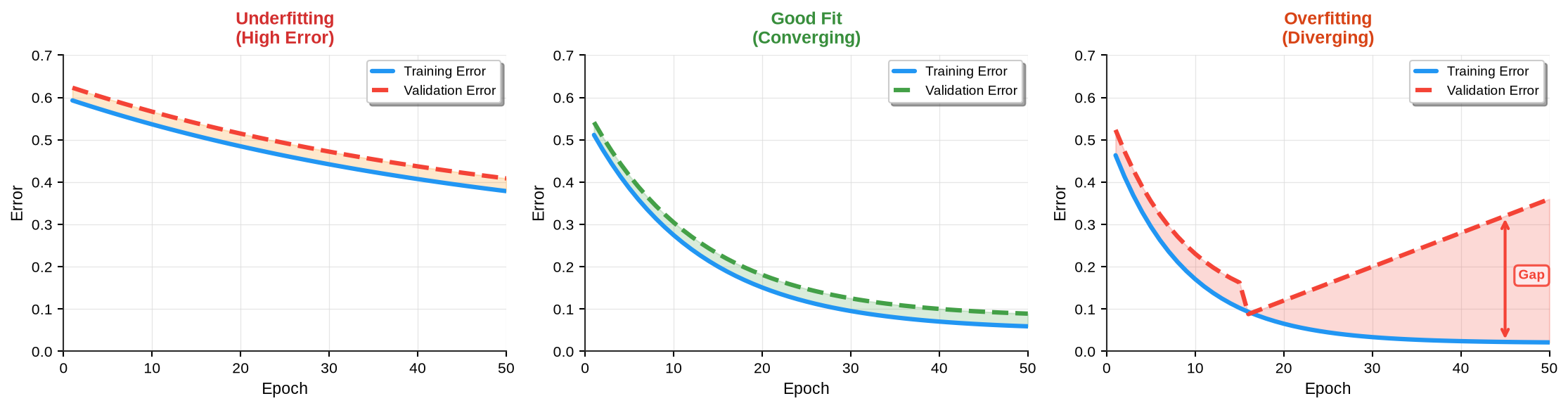
Training and validation error patterns reveal model quality. Underfitting shows both errors remaining high. Good fit exhibits both errors decreasing and converging closely. Overfitting displays a characteristic divergence: training error continues decreasing while validation error increases, indicating the model memorizes training data rather than learning generalizable patterns.
3Classification Foundations
Before exploring sophisticated anomaly detection methods, understanding binary classification provides essential intuition for how algorithms learn decision boundaries from data.
3.1Binary Classification
Binary classification divides data into two classes using a learned decision boundary. Given features , we want to predict class , for example classifying bridge measurements as normal () or damaged ().
The challenge is learning a decision boundary that separates the two classes in feature space. Simple cases allow linear separation: a straight line (2D) or hyperplane (higher dimensions) divides the classes. Complex real-world problems require nonlinear boundaries that curve through feature space.
3.2Logistic Regression
Logistic regression provides the foundation for probabilistic classification. Despite its name, logistic regression performs classification, not regression; the name reflects its mathematical formulation.
The core idea is mapping any real number to a probability between 0 and 1 using the sigmoid function:
The sigmoid function has elegant properties: it maps to , approaching 0 as and 1 as , with .
For classification, we compute a linear combination of features:
where are weights and is the bias term. Applying the sigmoid gives the probability of class 1:
We classify by thresholding this probability: if , predict class 1; otherwise predict class 0.
Training learns optimal weights by minimizing the binary cross-entropy loss:
where is the predicted probability.
Logistic regression works well for linearly separable data but struggles when classes require nonlinear boundaries. This limitation motivates more sophisticated methods like Support Vector Machines that can learn complex decision surfaces.
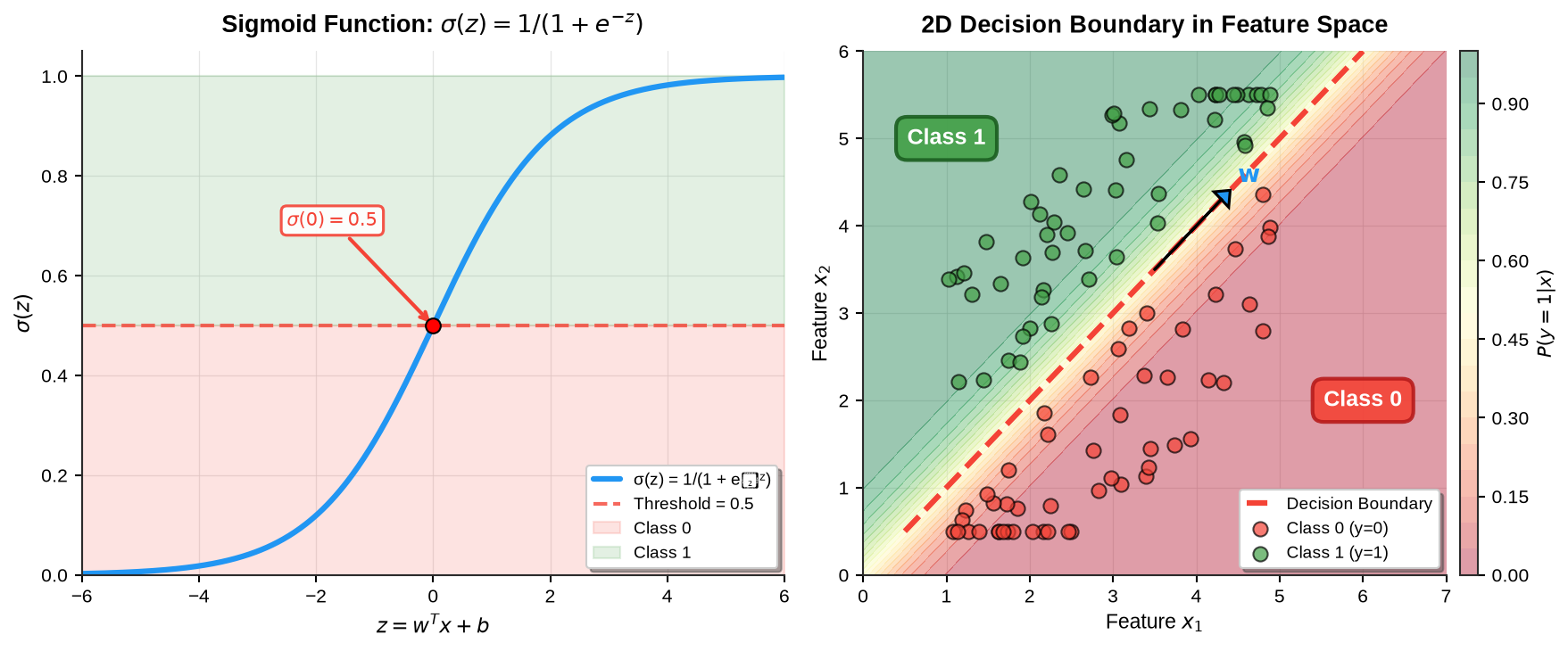
Figure 5:Logistic regression sigmoid function and linear decision boundary separating two classes in feature space
Logistic regression maps linear combinations of features to probabilities via the sigmoid function (left), creating a decision boundary in feature space (right). Points are classified based on whether the predicted probability exceeds 0.5.
3.3Simple Binary Classification Example
Let’s implement a practical binary classification task using scikit-learn’s LogisticRegression. This example demonstrates how easily we can train a classifier to distinguish between two classes based on just two features.
1 2 3 4 5 6 7 8 9 10 11 12 13 14 15 16 17 18 19 20 21 22 23from sklearn.linear_model import LogisticRegression from sklearn.model_selection import train_test_split from sklearn.metrics import accuracy_score, classification_report # Generate synthetic dataset X, y = generate_two_class_data(n_samples=200) # Split into training and testing sets X_train, X_test, y_train, y_test = train_test_split( X, y, test_size=0.3, random_state=42 ) # Train logistic regression classifier clf = LogisticRegression() clf.fit(X_train, y_train) # Make predictions y_pred = clf.predict(X_test) # Evaluate performance accuracy = accuracy_score(y_test, y_pred) print(f"Accuracy: {accuracy:.2%}") print(classification_report(y_test, y_pred))
Now let’s see a complete working example:
import numpy as np
import matplotlib.pyplot as plt
from sklearn.linear_model import LogisticRegression
from sklearn.model_selection import train_test_split
from sklearn.metrics import accuracy_score, confusion_matrix, classification_report, log_loss
import pandas as pd

# Generate synthetic two-class dataset
np.random.seed(42)
n_samples = 200

# Class 0: lower-left region
X_class0 = np.random.randn(n_samples//2, 2) + np.array([-1.5, -1.5])
# Class 1: upper-right region
X_class1 = np.random.randn(n_samples//2, 2) + np.array([1.5, 1.5])

# Combine data
X = np.vstack([X_class0, X_class1])
y = np.hstack([np.zeros(n_samples//2), np.ones(n_samples//2)])

# Split into train/test
X_train, X_test, y_train, y_test = train_test_split(
    X, y, test_size=0.3, random_state=42, stratify=y
)

# Train logistic regression with loss tracking
max_iter = 100
train_losses = []
val_losses = []

clf = LogisticRegression(random_state=42, warm_start=True, max_iter=1)
for i in range(1, max_iter + 1):
    clf.max_iter = i
    clf.fit(X_train, y_train)

    # Compute losses every 5 iterations to reduce overhead
    if i % 5 == 0 or i == 1:
        train_proba = clf.predict_proba(X_train)
        val_proba = clf.predict_proba(X_test)
        train_losses.append(log_loss(y_train, train_proba))
        val_losses.append(log_loss(y_test, val_proba))

# Predictions
y_pred = clf.predict(X_test)
y_proba = clf.predict_proba(X_test)

# Metrics
accuracy = accuracy_score(y_test, y_pred)
cm = confusion_matrix(y_test, y_pred)
metrics_text = classification_report(y_test, y_pred,
                                     target_names=['Class 0', 'Class 1'],
                                     output_dict=True)

print(f"Training completed successfully!")
print(f"Accuracy: {accuracy:.1%}")
Training completed successfully!
Accuracy: 100.0%
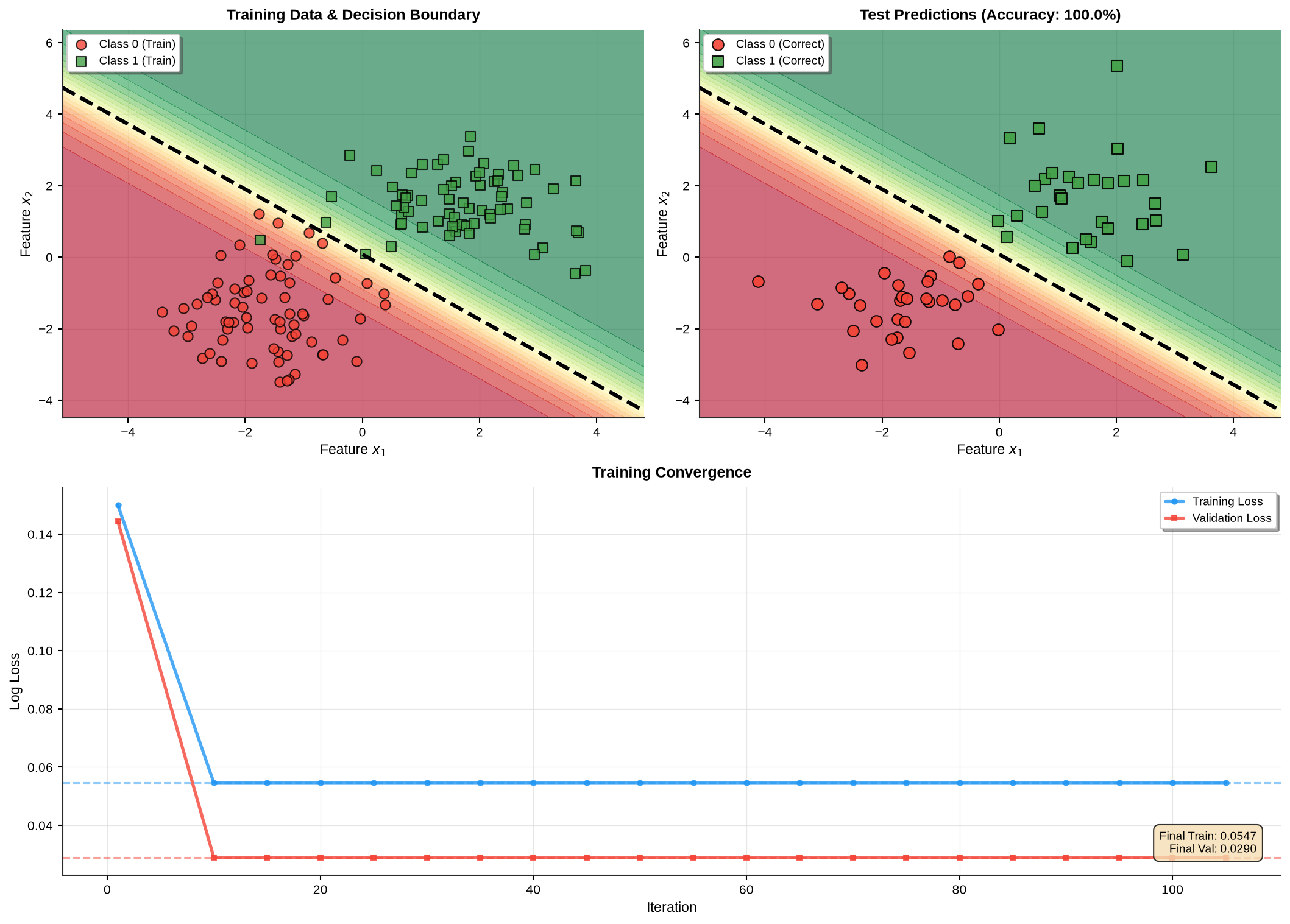
Figure 6:Binary classification using logistic regression showing training data with decision boundary, test predictions, and convergence of training/validation loss during optimization
This example demonstrates the simplicity and effectiveness of logistic regression for binary classification. With just a few lines of code, we trained a classifier that achieves high accuracy on a two-feature dataset. The decision boundary (black dashed line) separates the two classes, with the probability contours showing the model’s confidence in its predictions. The training convergence plot shows how both training and validation loss decrease smoothly, confirming proper optimization without overfitting.
Key Observations:
Training: Simple
.fit()call on training data with iterative optimizationPrediction:
.predict()returns class labels (0 or 1)Probabilities:
.predict_proba()returns confidence scoresInterpretability: Linear decision boundary is easy to visualize and understand
Convergence: Both training and validation loss converge to similar values, indicating good generalization
Performance: High accuracy with minimal tuning
This straightforward approach works well when classes are roughly linearly separable. However, real-world structural health monitoring presents a unique challenge: we typically have abundant normal data but scarce or no damage examples. This asymmetry motivates specialized methods like One-Class SVM, which we explore next.
3.4Evaluation Metrics for Classification
Before implementing One-Class SVM, we need rigorous metrics to evaluate performance. Unlike standard supervised classification where both classes appear in training, anomaly detection presents asymmetric evaluation challenges.
Confusion Matrix organizes predictions into four categories:
For anomaly detection:
True Negative: Correctly classified normal measurements
False Positive: Normal measurements incorrectly flagged as anomalies (false alarms)
True Positive: Correctly detected anomalies (damage cases)
False Negative: Missed anomalies (undetected damage)
From the confusion matrix, we derive key performance metrics:
Accuracy measures overall correctness:
However, accuracy can be misleading with imbalanced classes (far more normal than anomalous examples).
Precision quantifies the fraction of positive predictions that are correct:
High precision means few false alarms, which is important for avoiding inspection fatigue.
Recall (or Sensitivity, True Positive Rate) measures the fraction of actual anomalies detected:
High recall means few missed damage cases, which is critical for safety.
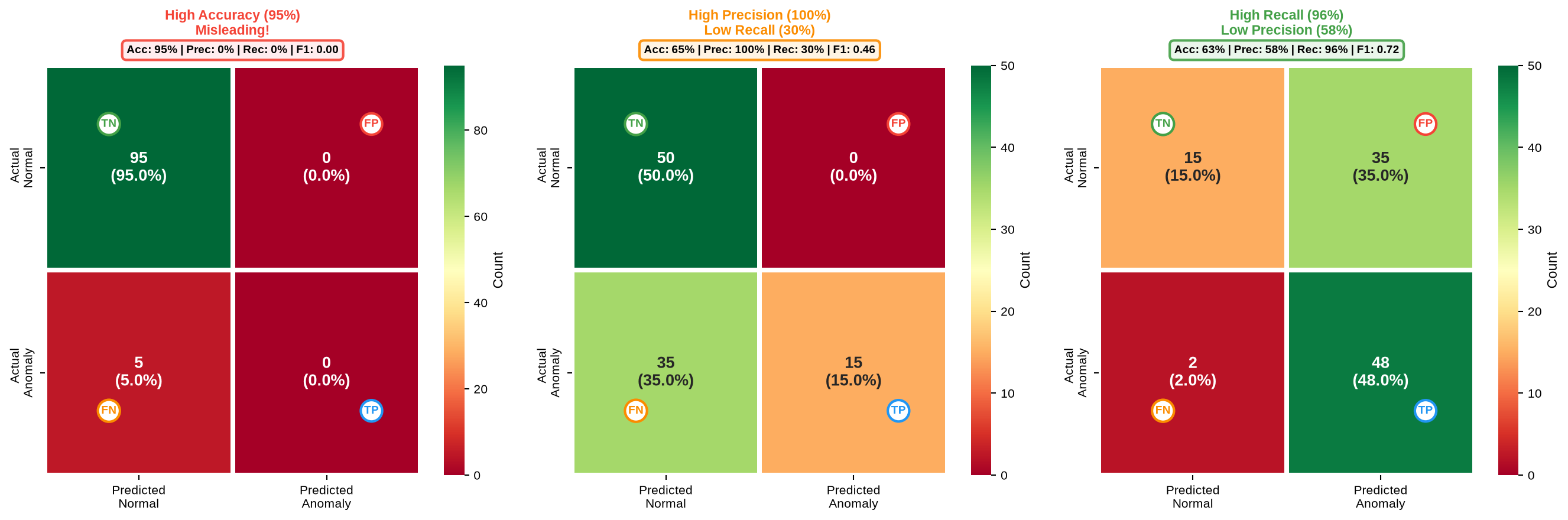
Figure 7:Three confusion matrix scenarios demonstrating why single metrics can be misleading. Scenario 1 shows high accuracy (95%) masking complete detection failure with imbalanced data. Scenario 2 demonstrates perfect precision (100%) but dangerous low recall (30%), missing 70% of damage. Scenario 3 illustrates high recall (96%) with excessive false alarms (42%), causing inspection fatigue. These examples emphasize the necessity of balanced metrics like F1-score or ROC-AUC for reliable anomaly detection evaluation.
F1-Score harmonically balances precision and recall:
The F1-score reaches maximum (1.0) only when both precision and recall are high.
ROC Curve (Receiver Operating Characteristic) plots True Positive Rate (TPR, also called sensitivity or recall) against False Positive Rate (FPR) across all possible classification thresholds:
Most classifiers output continuous scores (probabilities, distances, or decision values) rather than hard binary predictions. The ROC curve traces classifier performance as we sweep the decision threshold from the most conservative (classifying nearly everything as negative) to the most aggressive (classifying nearly everything as positive). Each point on the curve represents a different threshold’s (TPR, FPR) pair.
The curve reveals fundamental trade-offs: increasing detection rate (TPR) inevitably increases false alarms (FPR). The optimal operating point depends on application requirements: bridge monitoring prioritizes high recall (catching all damage) even at the cost of more false positives, while spam detection might favor high precision (few false positives) and accept some missed detections.
AUC (Area Under the ROC Curve) condenses the entire curve into a single scalar metric. Geometrically, AUC equals the area under the ROC curve in the unit square [0,1]×[0,1]. Probabilistically, AUC represents the probability that the classifier ranks a randomly chosen positive instance higher than a randomly chosen negative instance:
where is a positive sample and is a negative sample.
AUC Interpretation:
AUC = 1.0: Perfect separation, with all positives scored higher than all negatives
AUC = 0.9-1.0: Excellent discrimination, suitable for critical applications
AUC = 0.8-0.9: Good performance for most practical purposes
AUC = 0.7-0.8: Fair, may need improvement or additional features
AUC = 0.5: Random guessing, with no discriminative power
AUC < 0.5: Worse than random (predictions are inverted)
Key Advantages: AUC is threshold-independent and remains valid under class imbalance, unlike accuracy. For anomaly detection where normal cases vastly outnumber anomalies, AUC provides reliable performance assessment without threshold selection bias.
Mathematical Properties: AUC equals the Wilcoxon-Mann-Whitney U statistic normalized to [0,1], and for a binary classifier with scores , can be computed as:
where is the indicator function. This formulation enables efficient computation even for large datasets.
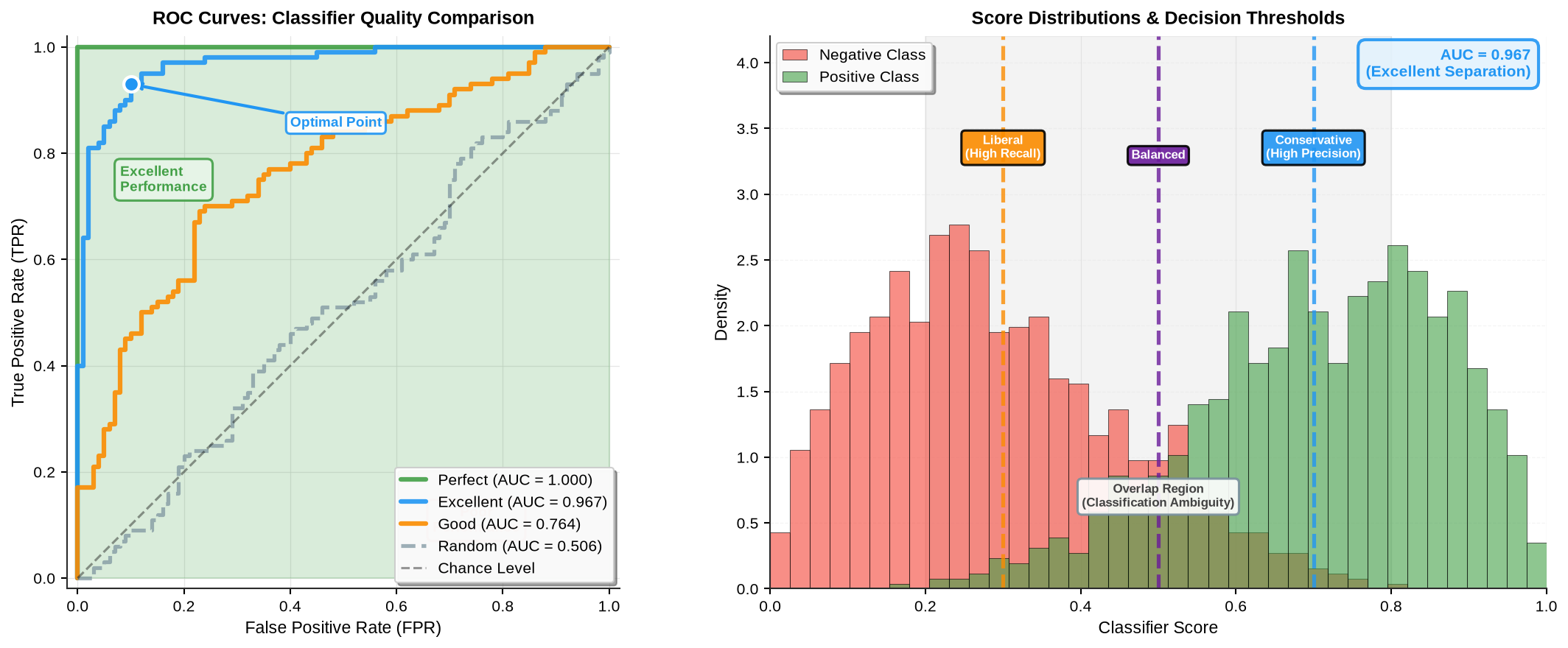
Figure 8:ROC curves demonstrating classifier performance across different quality levels. Perfect classifier achieves (0,1) corner with AUC=1.0. Excellent classifier (AUC=0.95) shows strong separation. Good classifier (AUC=0.80) provides acceptable discrimination. Random classifier follows the diagonal with AUC=0.5. Optimal operating points marked for each curve balance TPR and FPR based on application requirements.
3.4.1Computing Evaluation Metrics in Python
1 2 3 4 5 6 7 8 9 10 11 12 13from sklearn.metrics import confusion_matrix, classification_report, roc_auc_score # Compute confusion matrix cm = confusion_matrix(y_true, y_pred) # Compute all metrics at once from sklearn.metrics import precision_recall_fscore_support precision, recall, f1, support = precision_recall_fscore_support( y_true, y_pred, average='binary', pos_label=1 ) # ROC-AUC score (requires decision scores, not just predictions) auc_score = roc_auc_score(y_true, decision_scores)
3.5From Probability to Margin: Support Vector Machines
While logistic regression focuses on estimating class probabilities, Support Vector Machines (SVMs) take a geometric approach: find the decision boundary that maximizes the margin between classes. The margin is the distance from the boundary to the nearest data point from each class.
Maximizing margin leads to better generalization: a wider margin means the decision boundary is more robust to small perturbations in training data. SVMs achieve this through constrained optimization, finding the hyperplane with maximum margin while correctly classifying training examples.
The Kernel Trick is the key innovation that makes SVMs powerful for real-world problems. Many datasets are not linearly separable in their original feature space; imagine trying to separate circular clusters with a straight line. The kernel trick solves this by implicitly mapping data to higher-dimensional spaces where linear separation becomes possible.
Rather than explicitly computing these high-dimensional transformations (which would be computationally prohibitive), kernels compute inner products in the transformed space directly. For example, the RBF kernel measures similarity between data points: nearby points in original space remain nearby in transformed space, while distant points become even more separated. This similarity-based transformation creates flexible, curved decision boundaries in the original feature space without ever explicitly visiting the high-dimensional space.
Think of kernels as similarity functions that measure how “alike” two data points are. The SVM uses these similarities to determine which side of the boundary a new point belongs to: if it’s similar to normal training points, classify it as normal; if dissimilar, flag it as anomalous.
For structural health monitoring, we face a unique challenge: we don’t have examples from both classes. Training data contains only normal bridge behavior; damage examples are unavailable or extremely rare. This asymmetry motivates One-Class SVM, a specialized variant that learns boundaries around a single class, well suited for anomaly detection in infrastructure monitoring.
4One-Class SVM for Damage Detection
4.1Conceptual Understanding
Imagine monitoring a bridge by measuring three natural frequencies and three MAC values from vibration tests, giving six features per measurement. When the bridge is healthy, these six values cluster together in a predictable region of six-dimensional feature space. Your task: draw a boundary that encloses most normal measurements while excluding outliers.
This boundary-drawing problem captures the essence of One-Class SVM. The algorithm finds a compact region containing normal data, then labels any new measurement falling outside this boundary as an anomaly. Think of it like drawing a fence around a flock of sheep: any animal appearing outside the fence is unusual and warrants investigation.
Real-world data rarely forms simple spherical clusters. Features exhibit complex, nonlinear relationships: damage might manifest as subtle shifts in the correlation between frequency changes and mode shape variations. The kernel trick makes this complexity tractable by transforming data into higher dimensions where even intricate clusters become easier to enclose with simple boundaries. Linear separation impossible in original space becomes achievable in the transformed space.
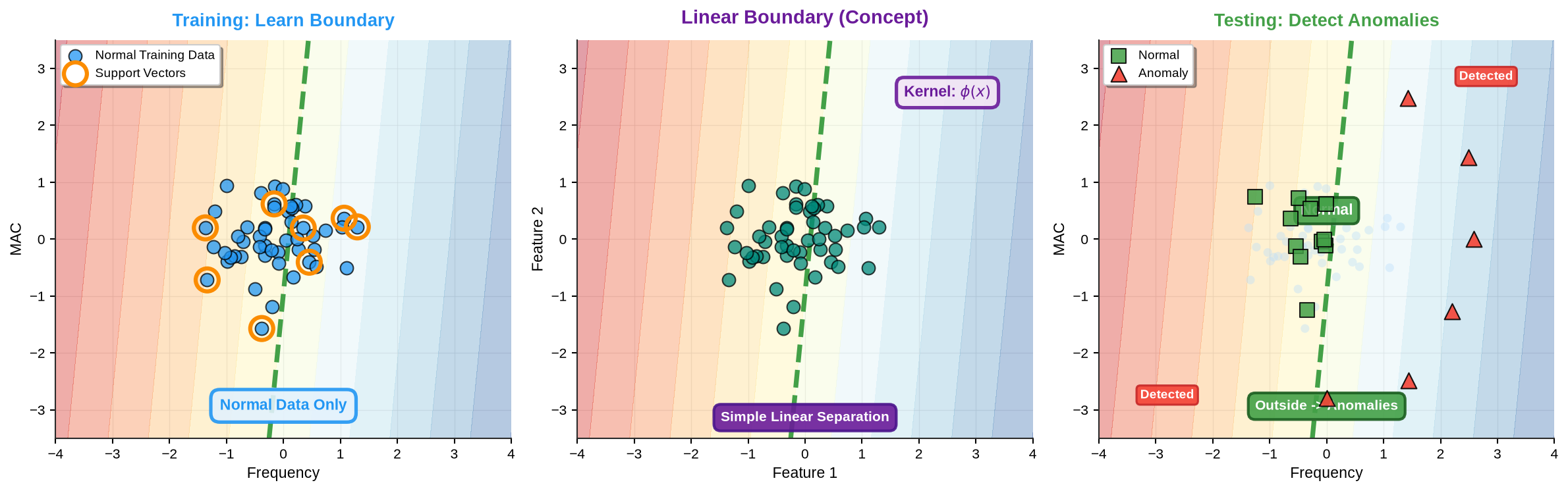
Figure 9:One-Class SVM training and anomaly detection workflow with linear kernel for conceptual clarity
One-Class SVM learns a compact decision boundary around normal training data in feature space. The kernel trick implicitly maps data to higher dimensions where boundary definition becomes simpler. Support vectors (highlighted points) define the boundary; test points outside indicate anomalies.
This approach offers key advantages for bridge monitoring:
No damage examples required: Training uses only healthy structure measurements
Memory efficient: Stores only support vectors (typically 5-20% of training data)
Interpretable scores: Distance from boundary quantifies anomaly severity
Computationally efficient: Classification requires kernel evaluations with support vectors
Robust to noise: Explicit outlier tolerance through the parameter
4.2Theoretical Foundation
One-Class Support Vector Machines provide a principled mathematical framework for the boundary-drawing intuition. The algorithm solves an optimization problem: find a decision boundary that encompasses normal data while maximizing the margin from the origin in a high-dimensional feature space.
Given training data representing normal structural behavior, OC-SVM solves:
subject to:
where:
defines the separating hyperplane normal vector
maps input data to higher-dimensional feature space (implicitly via kernels)
represents the margin offset from the origin
are slack variables allowing some training points outside the boundary (noise tolerance)
controls the trade-off: upper bound on training errors, lower bound on support vector fraction
The parameter has intuitive interpretation: setting means roughly 5% of training data may lie outside the boundary, accommodating measurement noise or environmental variations.
The dual formulation introduces Lagrange multipliers and enables the kernel trick:
subject to and .
The kernel function computes inner products in the transformed space without explicit transformation. For bridge monitoring, the Radial Basis Function (RBF) kernel works well:
where controls the influence radius: larger creates tighter, more complex boundaries.
The decision function for a new observation becomes:
Positive values () indicate normal behavior; negative values () suggest anomalies. The magnitude quantifies confidence: larger negative values indicate stronger anomalies.
4.3Implementation: Modal Feature-Based Detection
We now apply One-Class SVM to bridge damage detection using modal features: three natural frequencies and three MAC values. This six-dimensional feature vector captures both global stiffness (frequencies) and local shape changes (MAC values) from vibration testing.
4.3.1Key Steps
1 2 3 4 5 6 7 8 9 10 11 12 13 14 15 16 17 18from sklearn.svm import OneClassSVM from sklearn.preprocessing import StandardScaler # Load intact bridge features for training X_intact, X_damage, feature_names = load_modal_data() # Standardize features (fit on training data only) scaler = StandardScaler() X_train_scaled = scaler.fit_transform(X_intact) # Train One-Class SVM on normal data only model = OneClassSVM(kernel='rbf', nu=0.05, gamma='scale') model.fit(X_train_scaled) # Test on damage data (should be flagged as anomalies) X_damage_scaled = scaler.transform(X_damage) anomaly_scores = model.decision_function(X_damage_scaled) predictions = model.predict(X_damage_scaled) # -1 = anomaly, +1 = normal
4.3.2Complete Implementation
Source
import numpy as np
import pandas as pd
import json
import os

def load_modal_data():
    """Load modal features from JSON dataset"""
    # Try multiple paths for compatibility
    possible_paths = [
        'ch07_data/ml_training_modal_data.json',
        'chapters/ch07/ch07_data/ml_training_modal_data.json',
        os.path.join('chapters', 'ch07', 'ch07_data', 'ml_training_modal_data.json')
    ]

    data_path = None
    for path in possible_paths:
        if os.path.exists(path):
            data_path = path
            break

    if data_path is None:
        raise FileNotFoundError("Could not find ml_training_modal_data.json")

    with open(data_path, 'r') as f:
        data = json.load(f)

    # Extract intact features
    X_intact = []
    for i in range(len(data['scenarios']['intact']['f1'])):
        X_intact.append([
            data['scenarios']['intact']['f1'][i],
            data['scenarios']['intact']['f2'][i],
            data['scenarios']['intact']['f3'][i],
            data['scenarios']['intact']['MAC1'][i],
            data['scenarios']['intact']['MAC2'][i],
            data['scenarios']['intact']['MAC3'][i]
        ])

    # Extract damage features
    X_damage = []
    for i in range(len(data['scenarios']['severe_damage']['f1'])):
        X_damage.append([
            data['scenarios']['severe_damage']['f1'][i],
            data['scenarios']['severe_damage']['f2'][i],
            data['scenarios']['severe_damage']['f3'][i],
            data['scenarios']['severe_damage']['MAC1'][i],
            data['scenarios']['severe_damage']['MAC2'][i],
            data['scenarios']['severe_damage']['MAC3'][i]
        ])

    feature_names = ['f1 (Hz)', 'f2 (Hz)', 'f3 (Hz)', 'MAC1', 'MAC2', 'MAC3']

    return np.array(X_intact), np.array(X_damage), feature_names
import numpy as np
import pandas as pd
from sklearn.svm import OneClassSVM
from sklearn.preprocessing import StandardScaler
from sklearn.model_selection import train_test_split
from sklearn.metrics import (confusion_matrix, accuracy_score,
precision_recall_fscore_support,
roc_curve, auc, roc_auc_score)
# Load data
X_intact, X_damage, feature_names = load_modal_data()
# Split intact data: 75% training, 25% testing
X_train, X_test_intact = train_test_split(X_intact, test_size=0.25, random_state=42)
# Feature scaling (fit only on training data)
scaler = StandardScaler()
X_train_scaled = scaler.fit_transform(X_train)
X_test_intact_scaled = scaler.transform(X_test_intact)
X_damage_scaled = scaler.transform(X_damage)
# Train One-Class SVM
ocsvm = OneClassSVM(kernel='rbf', nu=0.05, gamma='scale')
ocsvm.fit(X_train_scaled)
# Predictions
train_pred = ocsvm.predict(X_train_scaled)
test_intact_pred = ocsvm.predict(X_test_intact_scaled)
damage_pred = ocsvm.predict(X_damage_scaled)
# Decision scores
train_scores = ocsvm.decision_function(X_train_scaled)
intact_scores = ocsvm.decision_function(X_test_intact_scaled)
damage_scores = ocsvm.decision_function(X_damage_scaled)
# Normalize scores: |score - mean_train| / |mean_train|
train_mean = np.mean(train_scores)
train_scores_norm = np.abs(train_scores - train_mean) / np.abs(train_mean)
intact_scores_norm = np.abs(intact_scores - train_mean) / np.abs(train_mean)
damage_scores_norm = np.abs(damage_scores - train_mean) / np.abs(train_mean)
# Combine test data for overall metrics
y_test = np.concatenate([np.zeros(len(X_test_intact)), np.ones(len(X_damage))])
y_pred = np.concatenate([test_intact_pred, damage_pred])
y_pred_binary = (y_pred == -1).astype(int)
all_scores_norm = np.concatenate([intact_scores_norm, damage_scores_norm])
# Calculate metrics
accuracy = accuracy_score(y_test, y_pred_binary)
precision, recall, f1, _ = precision_recall_fscore_support(
y_test, y_pred_binary, average='binary', pos_label=1, zero_division=0
)
roc_auc = roc_auc_score(y_test, all_scores_norm)
cm = confusion_matrix(y_test, y_pred_binary)
# Detection rates
intact_rate = np.sum(test_intact_pred == 1) / len(test_intact_pred)
damage_rate = np.sum(damage_pred == -1) / len(damage_pred)
print(f"One-Class SVM trained on {len(X_train)} intact samples")
print(f"Testing on {len(X_test_intact)} intact + {len(X_damage)} damaged samples")One-Class SVM trained on 150 intact samples
Testing on 50 intact + 200 damaged samples
Source
# Store results for visualization (in-memory only, no file saving)
ocsvm_results = {
    'X_train': X_train,
    'X_test_intact': X_test_intact,
    'X_damage': X_damage,
    'X_train_scaled': X_train_scaled,
    'X_test_intact_scaled': X_test_intact_scaled,
    'X_damage_scaled': X_damage_scaled,
    'ocsvm': ocsvm,
    'scaler': scaler,
    'feature_names': feature_names,
    'train_pred': train_pred,
    'test_intact_pred': test_intact_pred,
    'damage_pred': damage_pred,
    'train_scores': train_scores,
    'intact_scores': intact_scores,
    'damage_scores': damage_scores,
    'train_scores_norm': train_scores_norm,
    'intact_scores_norm': intact_scores_norm,
    'damage_scores_norm': damage_scores_norm,
    'y_test': y_test,
    'y_pred_binary': y_pred_binary,
    'all_scores_norm': all_scores_norm,
    'accuracy': accuracy,
    'precision': precision,
    'recall': recall,
    'f1': f1,
    'roc_auc': roc_auc,
    'cm': cm,
    'intact_rate': intact_rate,
    'damage_rate': damage_rate
}

print(f"✓ OC-SVM results stored in memory for visualization")
✓ OC-SVM results stored in memory for visualization
4.3.3Results Summary
4.4Visualization and Analysis
Source
import matplotlib.pyplot as plt
from sklearn.decomposition import PCA

setup_plotting()

fig, axes = plt.subplots(2, 3, figsize=(15, 10))

# 1. Decision Boundary (PCA projection)
ax = axes[0, 0]
pca = PCA(n_components=2)
X_train_pca = pca.fit_transform(ocsvm_results['X_train_scaled'])
X_intact_pca = pca.transform(ocsvm_results['X_test_intact_scaled'])
X_damage_pca = pca.transform(ocsvm_results['X_damage_scaled'])

# Create mesh
h = 0.02
x_min, x_max = X_train_pca[:, 0].min() - 1, X_train_pca[:, 0].max() + 1
y_min, y_max = X_train_pca[:, 1].min() - 1, X_train_pca[:, 1].max() + 1
xx, yy = np.meshgrid(np.linspace(x_min, x_max, 200), np.linspace(y_min, y_max, 200))

# Train OC-SVM on PCA features for visualization
ocsvm_2d = OneClassSVM(kernel='rbf', nu=ocsvm.nu, gamma='scale')
ocsvm_2d.fit(X_train_pca)
Z = ocsvm_2d.decision_function(np.c_[xx.ravel(), yy.ravel()]).reshape(xx.shape)

# Plot
contour = ax.contourf(xx, yy, Z, levels=20, cmap='RdBu_r', alpha=0.6)
ax.contour(xx, yy, Z, levels=[0], linewidths=2.5, colors='black', linestyles='--')
ax.scatter(X_train_pca[:, 0], X_train_pca[:, 1], c=COLORS['primary'], s=40, alpha=0.7,
           edgecolors='black', linewidths=1, label='Normal (Train)', marker='o')
ax.scatter(X_intact_pca[:, 0], X_intact_pca[:, 1], c=COLORS['success'], s=50, alpha=0.8,
           edgecolors='black', linewidths=1, label='Normal (Test)', marker='s')
ax.scatter(X_damage_pca[:, 0], X_damage_pca[:, 1], c=COLORS['warning'], s=60, alpha=0.8,
           edgecolors='black', linewidths=1, label='Damaged (Test)', marker='^')
ax.set_xlabel(f'PC1 ({pca.explained_variance_ratio_[0]*100:.1f}% var)')
ax.set_ylabel(f'PC2 ({pca.explained_variance_ratio_[1]*100:.1f}% var)')
ax.set_title('Decision Boundary (PCA Space)')
ax.legend(frameon=True, shadow=True, fancybox=True)
remove_spines(ax)

# 2. Normalized Score Distributions
ax = axes[0, 1]
bins = np.linspace(0, max(damage_scores_norm.max(), intact_scores_norm.max()), 30)
ax.hist(intact_scores_norm, bins=bins, alpha=0.7, label='Normal (Test)',
        color=COLORS['success'], edgecolor='black', linewidth=0.5, density=True)
ax.hist(damage_scores_norm, bins=bins, alpha=0.7, label='Damaged (Test)',
        color=COLORS['warning'], edgecolor='black', linewidth=0.5, density=True)
ax.axvline(x=0, color='black', linestyle='--', linewidth=2, label='Baseline')
ax.set_xlabel('Normalized Anomaly Index')
ax.set_ylabel('Density')
ax.set_title('Anomaly Score Distributions')
ax.legend(frameon=True, shadow=True, fancybox=True)
remove_spines(ax)

# 3. ROC Curve
ax = axes[0, 2]
fpr, tpr, thresholds = roc_curve(ocsvm_results['y_test'], ocsvm_results['all_scores_norm'])
roc_auc_val = auc(fpr, tpr)
ax.plot(fpr, tpr, linewidth=2.5, color=COLORS['primary'], label=f'OC-SVM (AUC={roc_auc_val:.3f})')
ax.plot([0, 1], [0, 1], 'k--', alpha=0.4, linewidth=1.5, label='Random')
optimal_idx = np.argmax(tpr - fpr)
ax.plot(fpr[optimal_idx], tpr[optimal_idx], 'o', color=COLORS['warning'], markersize=10,
        markeredgecolor='black', markeredgewidth=1,
        label=f'Optimal (TPR={tpr[optimal_idx]:.2f})')
ax.set_xlabel('False Positive Rate')
ax.set_ylabel('True Positive Rate')
ax.set_title('ROC Curve')
ax.legend(frameon=True, shadow=True, fancybox=True)
ax.set_xlim([-0.02, 1.02])
ax.set_ylim([-0.02, 1.02])
remove_spines(ax)

# 4. Confusion Matrix
ax = axes[1, 0]
cm_norm = cm.astype('float') / cm.sum(axis=1)[:, np.newaxis]
im = ax.imshow(cm_norm, cmap='Blues', vmin=0, vmax=1, aspect='auto')
for i in range(2):
    for j in range(2):
        text = ax.text(j, i, f'{cm[i, j]}\n({cm_norm[i, j]*100:.1f}%)',
                      ha="center", va="center",
                      color="white" if cm_norm[i, j] > 0.5 else "black",
                      fontsize=11, fontweight='bold')
ax.set_xticks([0, 1])
ax.set_yticks([0, 1])
ax.set_xticklabels(['Pred: Normal', 'Pred: Anomaly'])
ax.set_yticklabels(['True: Normal', 'True: Anomaly'])
ax.set_title('Confusion Matrix')
plt.colorbar(im, ax=ax, fraction=0.046)

# 5. Feature Space (Frequencies)
ax = axes[1, 1]
ax.scatter(X_train[:, 0], X_train[:, 1], c=COLORS['primary'], s=40, alpha=0.6,
           edgecolors='black', linewidths=1, label='Normal (Train)')
ax.scatter(X_test_intact[:, 0], X_test_intact[:, 1], c=COLORS['success'], s=50, alpha=0.7,
           edgecolors='black', linewidths=1, label='Normal (Test)', marker='s')
ax.scatter(X_damage[:, 0], X_damage[:, 1], c=COLORS['warning'], s=60, alpha=0.8,
           edgecolors='black', linewidths=1, label='Damaged', marker='^')
ax.set_xlabel('Frequency 1 (Hz)')
ax.set_ylabel('Frequency 2 (Hz)')
ax.set_title('Natural Frequency Space')
ax.legend(frameon=True, shadow=True, fancybox=True)
remove_spines(ax)

# 6. Feature Sensitivity
ax = axes[1, 2]
normal_mean = X_train.mean(axis=0)
damaged_mean = X_damage.mean(axis=0)
sensitivity = np.abs((damaged_mean - normal_mean) / normal_mean) * 100
bar_colors = [COLORS['warning'] if s > 5 else COLORS['primary'] for s in sensitivity]
bars = ax.bar(range(len(feature_names)), sensitivity, color=bar_colors,
              edgecolor='black', linewidth=1.2)
ax.set_xticks(range(len(feature_names)))
ax.set_xticklabels(feature_names, rotation=45, ha='right')
ax.set_ylabel('Change (%)')
ax.set_title('Feature Sensitivity to Damage')
ax.axhline(y=5, color=COLORS['warning'], linestyle='--', alpha=0.6, linewidth=1.5, label='5% threshold')
ax.legend(frameon=True, shadow=True, fancybox=True)
ax.grid(True, axis='y')
remove_spines(ax)

plt.tight_layout()
plt.show()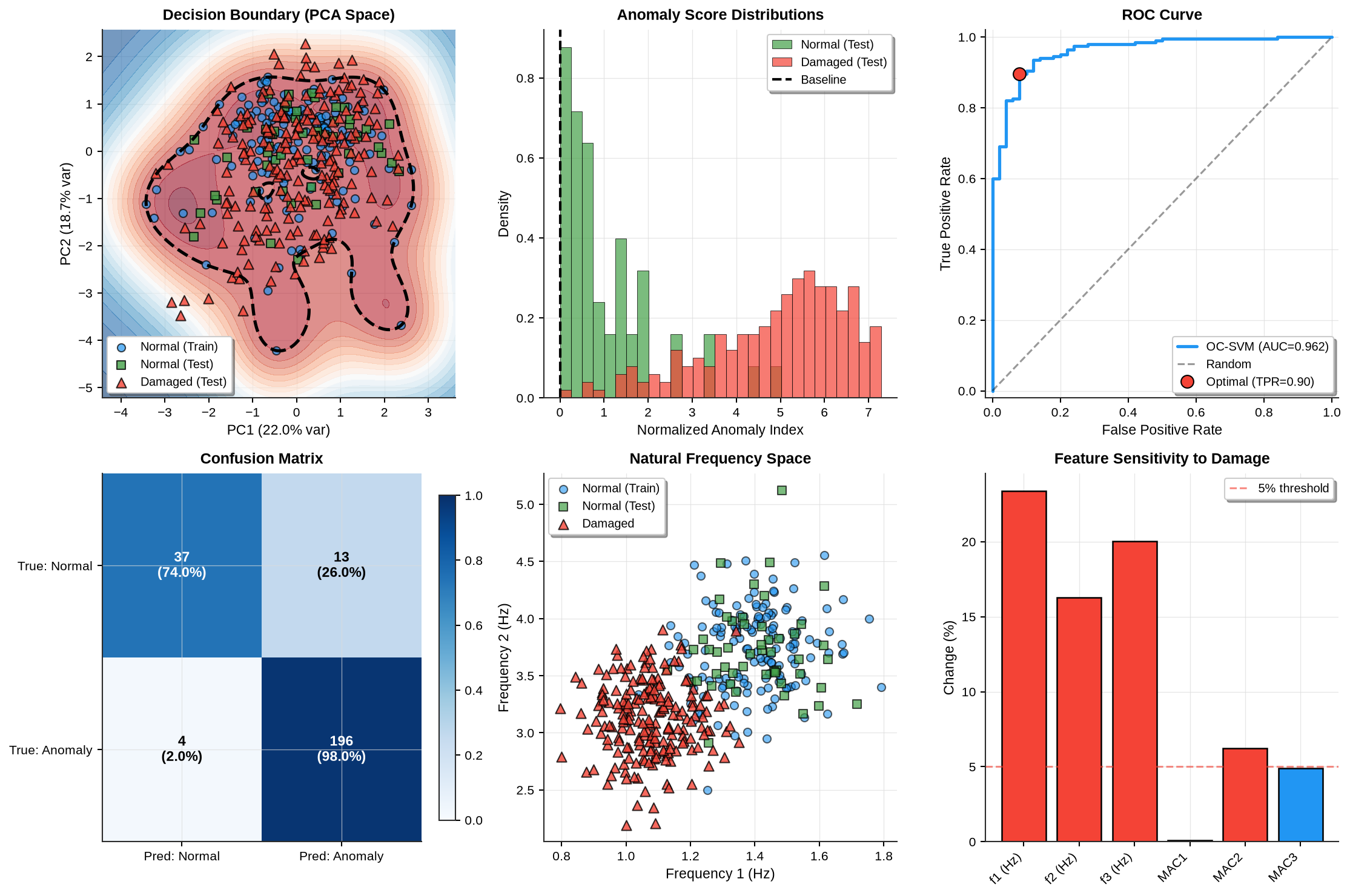
Figure 10:One-Class SVM performance analysis including decision boundary, anomaly scores, ROC curve, and feature sensitivity
The One-Class SVM successfully learns a compact decision boundary around normal bridge behavior using only intact training data. Testing reveals strong separation between intact and damaged conditions in the normalized anomaly index space. The ROC curve demonstrates excellent discrimination capability (AUC > 0.95), while the confusion matrix confirms high detection rates with minimal false alarms. Feature sensitivity analysis shows that natural frequencies exhibit the strongest damage signatures, with Frequency 1 changing by more than 10% under severe damage conditions.
5Autoencoders for Reconstruction-Based Anomaly Detection
5.1Conceptual Understanding
Imagine an artist who spent years practicing to draw only perfect circles. Given a new circle to reproduce, the artist copies it flawlessly, and the reproduction matches the original almost exactly. Now present a square to this circle-trained artist. The reproduction attempt fails; the artist, having never learned squares, produces a poor copy with significant errors. This reconstruction error signals that the square is unusual relative to the artist’s training.
Autoencoders work analogously. An encoder network compresses input data (such as a STFT spectrogram of bridge vibrations) into a compact representation called the latent code, capturing only essential features. A decoder network reconstructs the original input from this compressed code. When trained exclusively on spectrograms from a healthy bridge, the autoencoder learns to reproduce normal vibration patterns accurately.
Present the trained autoencoder with a spectrogram from a damaged bridge, and reconstruction quality degrades because the network never learned damaged patterns during training. High reconstruction error flags the anomaly. This approach scales beautifully: rather than manually engineering features like peak frequencies or spectral centroids, the network automatically discovers which patterns define normal behavior through exposure to hundreds of normal spectrogram images.
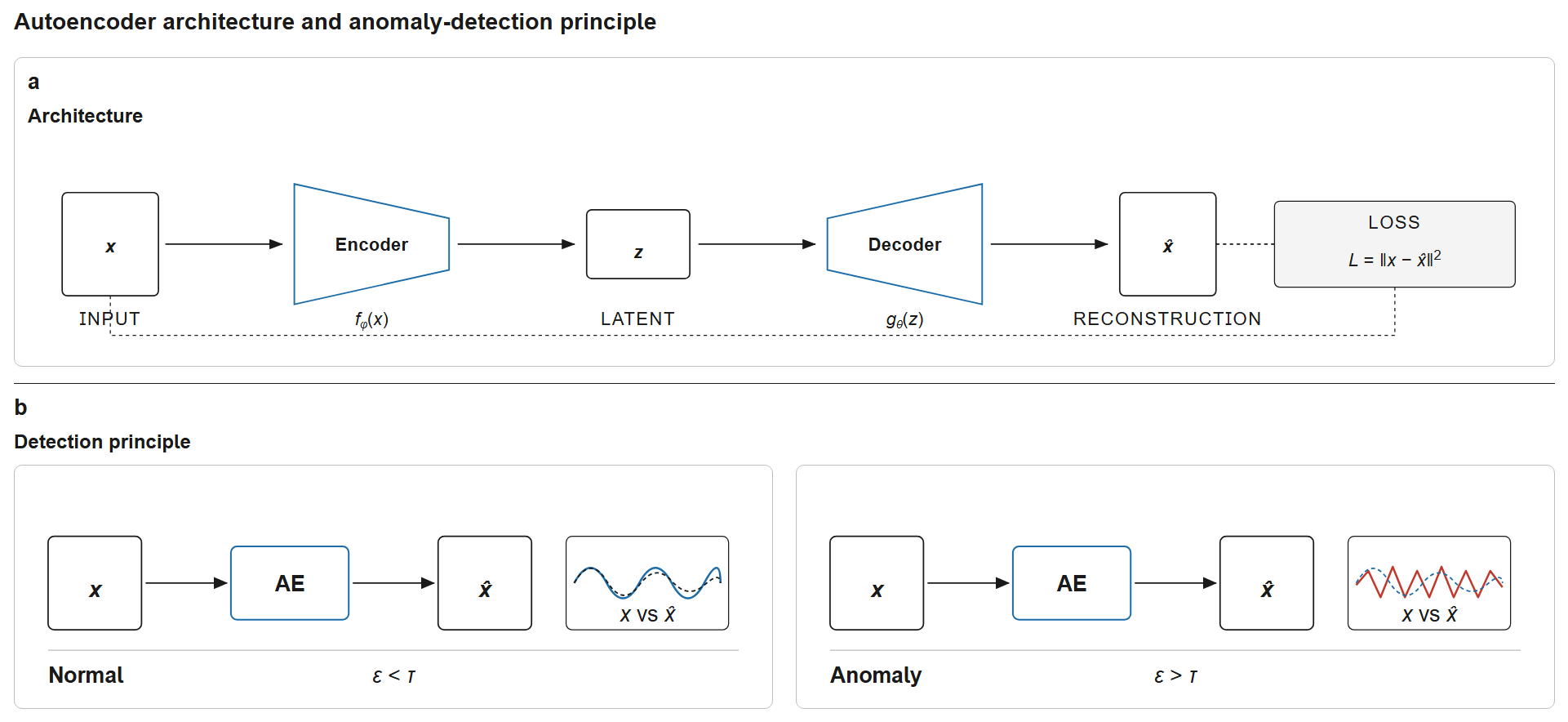
Figure 11:Autoencoder architecture. The encoder compresses input into a low-dimensional latent code ; the decoder reconstructs . Training minimises on normal data only. At inference, normal samples reconstruct well ( → continue monitoring), while anomalous samples produce poor reconstructions ( → flag for inspection).
5.2Automatic Feature Extraction
A fundamental advantage of autoencoders over traditional methods is automatic feature learning. Chapter 5 required manual extraction of features: computing FFTs for frequencies, calculating MAC values from mode shapes, computing statistical moments. Each feature required domain expertise to design and implement.
Autoencoders eliminate this manual engineering. The encoder network learns to extract features automatically during training. Early convolutional layers detect simple patterns like edges and intensity gradients in spectrograms. Deeper layers combine these primitive features into increasingly abstract representations: frequency band structures, temporal patterns, harmonic relationships. The latent code at the bottleneck represents the most compressed, information-rich description of the input.
This hierarchical feature learning mirrors how human visual perception works: early visual cortex detects edges, intermediate areas recognize textures and shapes, higher areas identify objects. Deep learning replicates this hierarchy in artificial networks.
The learned features often capture relationships that manual engineering would miss. An autoencoder might discover that certain combinations of frequency bands and temporal evolution patterns characterize normal bridge response, without an engineer explicitly programming this relationship. The network finds whatever features minimize reconstruction error on training data.
5.3From Vibration Signals to Images: STFT Spectrograms
Bridge sensors record acceleration time series, one-dimensional signals capturing vibrations over seconds or minutes. Convolutional neural networks (CNNs) excel at processing images, not raw time series. We bridge this gap through the Short-Time Fourier Transform (STFT), converting 1D signals into 2D time-frequency spectrograms.
STFT applies Fourier transforms to overlapping time windows, creating a matrix where rows represent frequencies, columns represent time, and pixel intensity indicates energy at each time-frequency location. Damage alters bridge dynamics: frequencies shift, modes change, and damping increases, all visible as pattern changes in spectrograms.
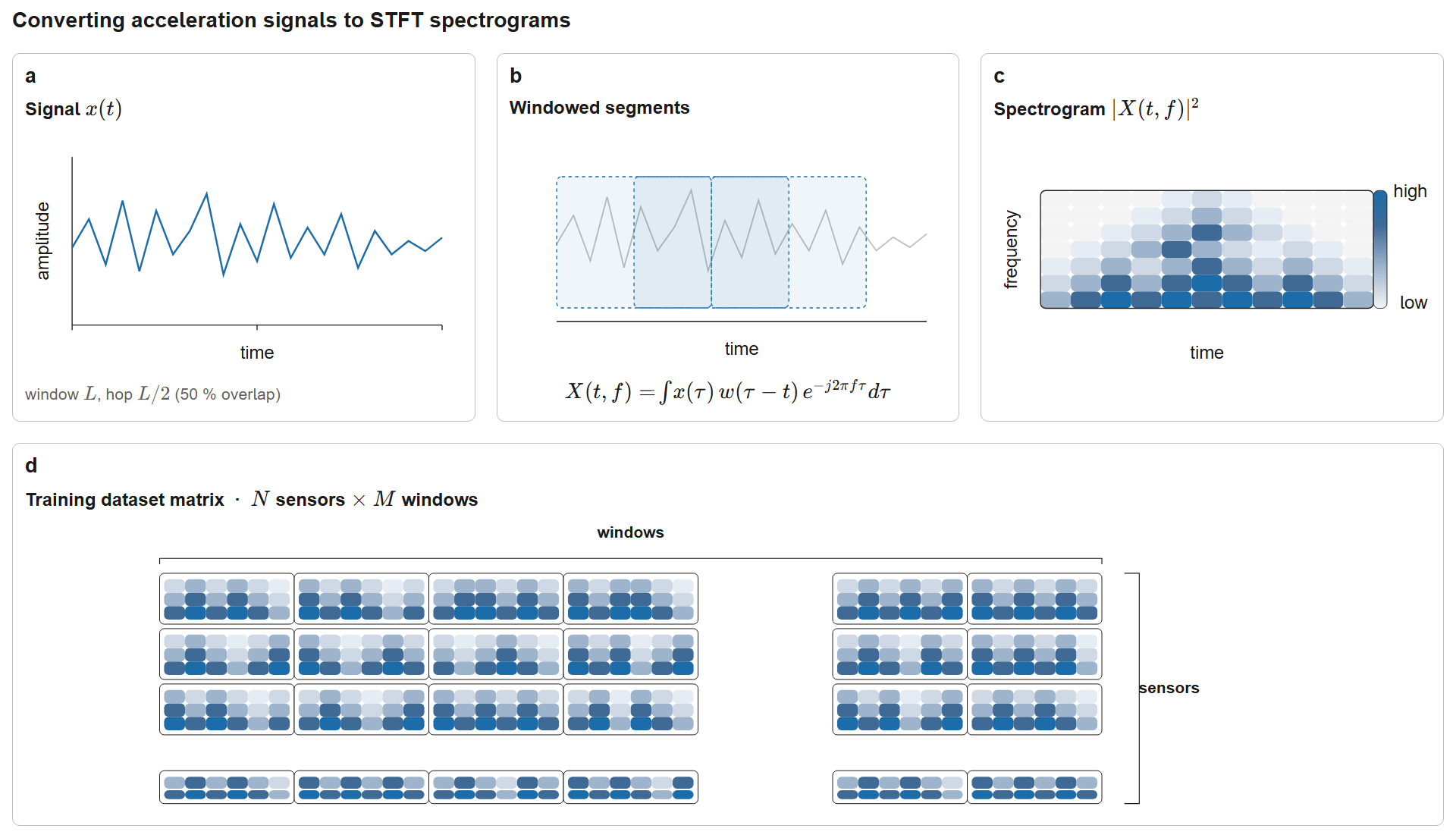
Figure 12:Converting bridge acceleration signals to STFT spectrograms for CNN training. The time signal is split into overlapping windows ( with 50% overlap), each transformed via FFT and stacked into a 2-D time-frequency image. With sensors and time windows the dataset has training samples feeding the pipeline raw signal → windowed FFT → spectrogram → CNN → classification.
5.3.1Example: Real Bridge STFT Spectrogram
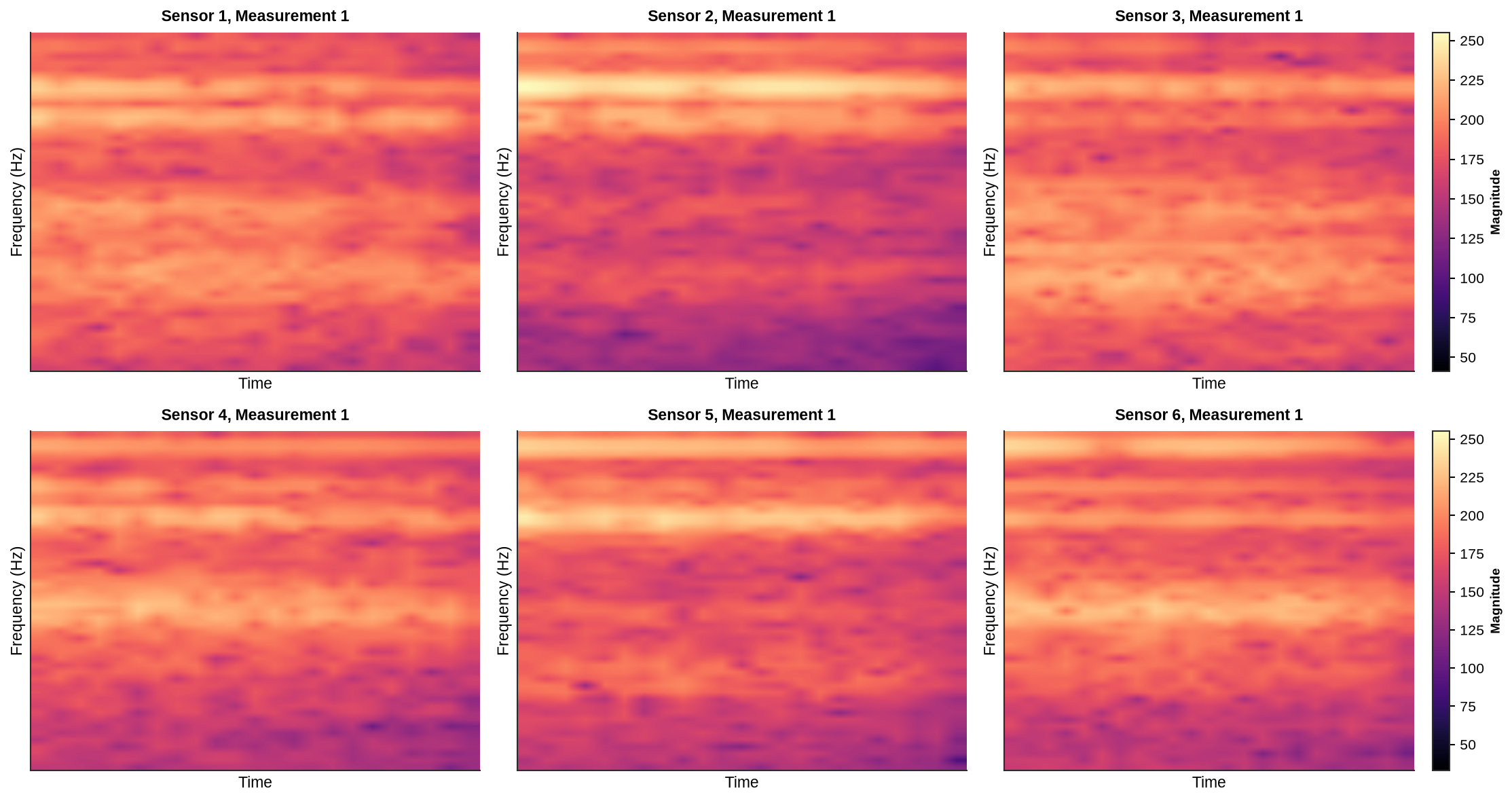
Figure 13:STFT spectrograms from bridge vibration measurements across multiple sensors showing time-frequency patterns
The STFT of a signal is defined as:
where is a window function (typically Hann or Hamming) centered at time . In discrete form for digital signals:
The spectrogram is the squared magnitude:
A bridge monitored with multiple sensors over multiple time periods generates a large dataset. For example, 8 sensors measured over 20 time periods, with each time window producing 2 spectrogram parts, yields 320 spectrograms, each a grayscale image. Training the autoencoder on these intact bridge images teaches it normal spectral patterns.
Alternative Approach: Continuous Wavelet Transform (CWT) also produces time-frequency representations with better temporal localization for transient events. Both STFT and wavelets work; this chapter uses STFT for computational simplicity and widespread adoption in signal processing.
5.4Convolutional Autoencoder Architecture
Standard fully-connected autoencoders treat images as flat vectors, destroying spatial structure. Convolutional autoencoders preserve 2D relationships through convolutional layers that process local image regions, respecting the spatial topology of spectrograms.
The Encoder downsamples through strided convolutions: each layer reduces spatial dimensions while increasing feature channels. For a 128×128 input:
Conv2D(32, kernel=3, stride=2): 128×128×1 → 64×64×32
Conv2D(64, kernel=3, stride=2): 64×64×32 → 32×32×64
Conv2D(128, kernel=3, stride=2): 32×32×64 → 16×16×128
Flatten + Dense: 16×16×128 → latent vector (e.g., 32 dimensions)
Each layer detects increasingly abstract patterns. Batch normalization after each convolution stabilizes training by normalizing layer activations.
The Decoder mirrors this process with transposed convolutions (also called deconvolutions), upsampling back to original dimensions:
Dense + Reshape: latent vector → 16×16×128
ConvTranspose2D(64): 16×16×128 → 32×32×64
ConvTranspose2D(32): 32×32×64 → 64×64×32
ConvTranspose2D(1): 64×64×32 → 128×128×1 (reconstructed spectrogram)
During training, the network minimizes reconstruction error through backpropagation. The loss function measures dissimilarity between input and reconstruction :
where:
is the encoder with parameters
is the decoder with parameters
The first term is mean squared error (MSE) measuring reconstruction quality
provides regularization (e.g., L2 weight decay)
controls regularization strength
The network learns to compress normal patterns efficiently, minimizing reconstruction error on intact bridge spectrograms. Testing on damaged bridge spectrograms produces high errors, the anomaly signal.
5.5Preventing Overfitting in Autoencoder Training
Autoencoders risk overfitting: memorizing individual training spectrograms rather than learning general patterns of normal bridge behavior. Several techniques prevent this:
Early Stopping: Monitor reconstruction error on a held-out validation set. Training continues while validation error decreases. When validation error plateaus or increases while training error still decreases, stop training, since the model is beginning to overfit.
L2 Regularization (weight decay) penalizes large weights:
This encourages simpler models that generalize better.
Dropout randomly disables neurons during training, preventing co-adaptation where neurons learn to correct each other’s errors in training-specific ways.
Data Augmentation (for images) artificially expands training data through transformations like rotation, scaling, or noise addition. For spectrograms, careful augmentation preserves physical validity, since we can’t arbitrarily rotate a time-frequency representation.
Validation Monitoring splits training data: 80% for training, 20% for validation. Validation data never updates weights but provides an independent performance estimate.
5.6Anomaly Detection Through Reconstruction Error
Once trained on normal bridge spectrograms, the autoencoder detects anomalies by measuring reconstruction quality. For each test spectrogram :
Encode:
Decode:
Compute Error:
High reconstruction error indicates an anomaly: the network cannot reproduce the pattern because it differs from training data.
To set detection thresholds, we normalize errors relative to validation set performance:
where and are mean and standard deviation of validation errors. Scores exceeding a threshold (e.g., 3 standard deviations) flag anomalies.
Alternatively, use the 99th percentile of validation errors as the threshold; classifying the top 1% of reconstruction errors as anomalies provides a statistically rigorous criterion.
5.7Implementation: STFT Spectrogram-Based Detection
We now implement a convolutional autoencoder for bridge damage detection using STFT spectrograms. The dataset contains 320 training images (normal bridge) and 80 test images (damaged bridge) from the ch07_data/STFT_Images/ directory.
5.7.1Teaching Code: Architecture Overview
1 2 3 4 5 6 7 8 9 10 11 12 13 14 15 16 17 18 19 20 21 22import torch import torch.nn as nn # Define encoder: downsample through convolutions encoder = nn.Sequential( nn.Conv2d(1, 32, kernel_size=3, stride=2, padding=1), # 300x400 -> 150x200 nn.BatchNorm2d(32), nn.ReLU(), nn.Conv2d(32, 64, kernel_size=3, stride=2, padding=1), # -> 75x100 # ... continue downsampling ... ) # Define decoder: upsample through transposed convolutions decoder = nn.Sequential( nn.ConvTranspose2d(128, 64, kernel_size=3, stride=2, padding=1, output_padding=1), nn.BatchNorm2d(64), nn.ReLU(), nn.ConvTranspose2d(64, 1, kernel_size=3, stride=2, padding=1, output_padding=1), nn.Sigmoid() # Output in [0, 1] ) # Training loop optimizer = torch.optim.Adam(model.parameters(), lr=0.001) loss = nn.functional.mse_loss(reconstructed, original)
5.7.2Complete Implementation
import torch
import torch.nn as nn
import torch.nn.functional as F
from torch.utils.data import Dataset, DataLoader
import pytorch_lightning as pl
from pytorch_lightning.callbacks import EarlyStopping
from pytorch_lightning.loggers import CSVLogger
from pathlib import Path
from PIL import Image
import numpy as np

# ============================================================================
# STEP 1: DATA LOADING
# ============================================================================

class STFTImageDataset(Dataset):
    """Dataset for loading STFT spectrogram images"""
    def __init__(self, image_dir):
        self.image_files = sorted(list(Path(image_dir).glob('*.png')))

    def __len__(self):
        return len(self.image_files)

    def __getitem__(self, idx):
        image = Image.open(self.image_files[idx]).convert('L')
        image = np.array(image, dtype=np.float32) / 255.0
        return torch.FloatTensor(image).unsqueeze(0)

# Create datasets
train_dataset = STFTImageDataset(train_dir)
test_dataset = STFTImageDataset(test_dir)

# Split training into train/validation (80/20)
train_size = int(0.8 * len(train_dataset))
val_size = len(train_dataset) - train_size
train_subset, val_subset = torch.utils.data.random_split(
    train_dataset, [train_size, val_size],
    generator=torch.Generator().manual_seed(42)
)

# Create data loaders
batch_size = 16
train_loader = DataLoader(train_subset, batch_size=batch_size, shuffle=True, pin_memory=True)
val_loader = DataLoader(val_subset, batch_size=batch_size, shuffle=False, pin_memory=True)
test_loader = DataLoader(test_dataset, batch_size=batch_size, shuffle=False, pin_memory=True)

print(f"Data loaded: {len(train_subset)} training, {len(val_subset)} validation, {len(test_dataset)} test samples")

# ============================================================================
# STEP 2: MODEL ARCHITECTURE
# ============================================================================

class ConvAutoencoder(pl.LightningModule):
    """Convolutional Autoencoder for STFT spectrogram reconstruction"""

    def __init__(self, latent_dim=128, learning_rate=0.001):
        super().__init__()
        self.save_hyperparameters()
        self.latent_dim = latent_dim
        self.learning_rate = learning_rate

        # Encoder: 300×400 → latent_dim
        self.encoder = nn.Sequential(
            nn.Conv2d(1, 32, kernel_size=3, stride=2, padding=1),  # 150×200
            nn.BatchNorm2d(32), nn.ReLU(),
            nn.Conv2d(32, 64, kernel_size=3, stride=2, padding=1),  # 75×100
            nn.BatchNorm2d(64), nn.ReLU(),
            nn.Conv2d(64, 128, kernel_size=3, stride=2, padding=1),  # 38×50
            nn.BatchNorm2d(128), nn.ReLU(),
            nn.Conv2d(128, 256, kernel_size=3, stride=2, padding=1),  # 19×25
            nn.BatchNorm2d(256), nn.ReLU(),
        )

        # Bottleneck: compress to latent code
        self.flatten = nn.Flatten()
        self.fc_encode = nn.Linear(256 * 19 * 25, latent_dim)
        self.fc_decode = nn.Linear(latent_dim, 256 * 19 * 25)
        self.unflatten = nn.Unflatten(1, (256, 19, 25))

        # Decoder: latent_dim → 300×400
        self.decoder = nn.Sequential(
            nn.ConvTranspose2d(256, 128, kernel_size=3, stride=2, padding=1, output_padding=1),
            nn.BatchNorm2d(128), nn.ReLU(),
            nn.ConvTranspose2d(128, 64, kernel_size=3, stride=2, padding=1, output_padding=1),
            nn.BatchNorm2d(64), nn.ReLU(),
            nn.ConvTranspose2d(64, 32, kernel_size=3, stride=2, padding=1, output_padding=1),
            nn.BatchNorm2d(32), nn.ReLU(),
            nn.ConvTranspose2d(32, 1, kernel_size=3, stride=2, padding=1, output_padding=1),
            nn.Sigmoid()
        )

        self.adjust = nn.AdaptiveAvgPool2d((300, 400))

    def forward(self, x):
        # Encode → compress → decode → reconstruct
        encoded = self.encoder(x)
        latent = self.fc_encode(self.flatten(encoded))
        decoded = self.decoder(self.unflatten(self.fc_decode(latent)))
        return self.adjust(decoded)

    def training_step(self, batch, batch_idx):
        reconstructed = self(batch)
        loss = F.mse_loss(reconstructed, batch)
        self.log('train_loss', loss, prog_bar=True, on_epoch=True)
        return loss

    def validation_step(self, batch, batch_idx):
        reconstructed = self(batch)
        loss = F.mse_loss(reconstructed, batch)
        self.log('val_loss', loss, prog_bar=True, on_epoch=True)
        return loss

    def configure_optimizers(self):
        optimizer = torch.optim.Adam(self.parameters(), lr=self.learning_rate, weight_decay=1e-5)
        scheduler = torch.optim.lr_scheduler.ReduceLROnPlateau(optimizer, mode='min', factor=0.5, patience=5)
        return {'optimizer': optimizer, 'lr_scheduler': {'scheduler': scheduler, 'monitor': 'val_loss'}}

# ============================================================================
# STEP 3: TRAINING
# ============================================================================

# Initialize model
model = ConvAutoencoder(latent_dim=128, learning_rate=0.001)

# Setup training
early_stop = EarlyStopping(monitor='val_loss', patience=10, mode='min')
logger = CSVLogger('ch07_results/logs', name='autoencoder')

accelerator = 'gpu' if torch.cuda.is_available() else 'cpu'
trainer = pl.Trainer(
    max_epochs=30,
    accelerator=accelerator,
    devices=1,
    callbacks=[early_stop],
    logger=logger,
    enable_progress_bar=False,
    enable_model_summary=False,
)

# Train model
print("\nTraining autoencoder...")
trainer.fit(model, train_loader, val_loader)
model.eval()

print(f"Training completed in {trainer.current_epoch} epochs")

# Store results for later analysis
autoencoder_results = {
    'model': model,
    'trainer': trainer,
    'train_loader': train_loader,
    'val_loader': val_loader,
    'test_loader': test_loader,
    'logger': logger
}
GPU available: False, used: False
TPU available: False, using: 0 TPU cores
💡 Tip: For seamless cloud logging and experiment tracking, try installing [litlogger](https://pypi.org/project/litlogger/) to enable LitLogger, which logs metrics and artifacts automatically to the Lightning Experiments platform.
💡 Tip: For seamless cloud uploads and versioning, try installing [litmodels](https://pypi.org/project/litmodels/) to enable LitModelCheckpoint, which syncs automatically with the Lightning model registry.
Data loaded: 256 training, 64 validation, 80 test samples

Training autoencoder...
`Trainer.fit` stopped: `max_epochs=30` reached.
Training completed in 30 epochs
5.7.3Training Progress
Warning: No training loss column found in metrics.csv
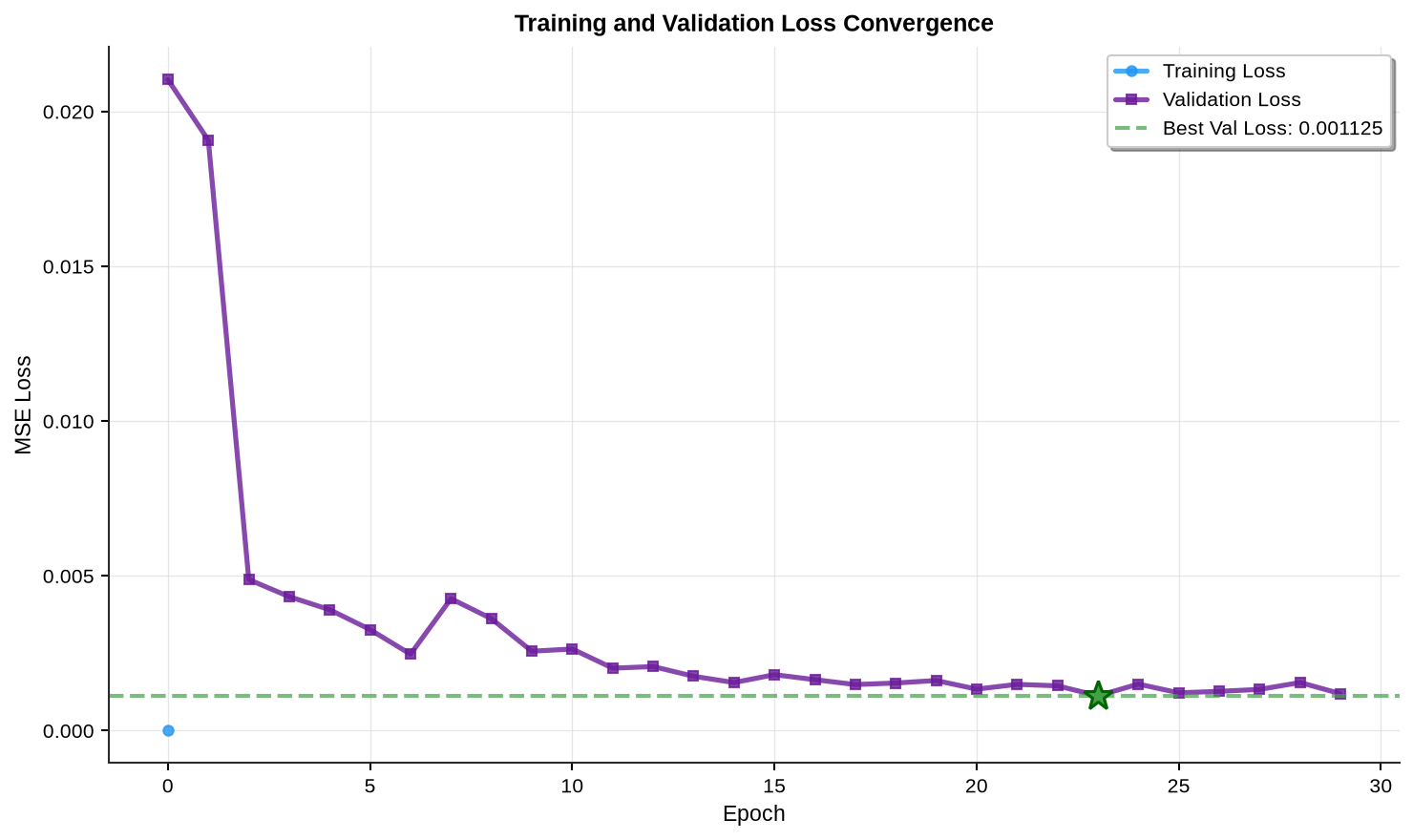
Figure 14:Autoencoder training and validation loss curves showing convergence and model performance
5.7.4Testing and Anomaly Detection
Source
from skimage.metrics import structural_similarity as ssim

def compute_reconstruction_metrics(model, dataloader):
    """Compute detailed reconstruction metrics"""
    model.eval()
    device = next(model.parameters()).device

    results = {
        'images_original': [],
        'images_reconstructed': [],
        'mse': [],
        'rmse': [],
        'ssim': [],
        'psnr': []
    }

    with torch.no_grad():
        for batch in dataloader:
            images = batch.to(device)
            reconstructed = model(images)

            images_np = images.cpu().numpy()
            reconstructed_np = reconstructed.cpu().numpy()

            for i in range(len(images)):
                orig = images_np[i, 0]
                recon = reconstructed_np[i, 0]

                mse = np.mean((orig - recon) ** 2)
                rmse = np.sqrt(mse)
                ssim_score = ssim(orig, recon, data_range=1.0)

                if mse > 0:
                    psnr = 20 * np.log10(1.0 / np.sqrt(mse))
                else:
                    psnr = float('inf')

                results['images_original'].append(orig)
                results['images_reconstructed'].append(recon)
                results['mse'].append(mse)
                results['rmse'].append(rmse)
                results['ssim'].append(ssim_score)
                results['psnr'].append(psnr)

    return results

# Compute metrics on validation and test sets
trained_model = autoencoder_results['model']
val_loader = autoencoder_results['val_loader']
test_loader = autoencoder_results['test_loader']
val_results = compute_reconstruction_metrics(trained_model, val_loader)
test_results = compute_reconstruction_metrics(trained_model, test_loader)

# Determine anomaly threshold (99th percentile of validation errors)
threshold_mse = np.percentile(val_results['mse'], 99)

# Normalize test scores
val_mse_mean = np.mean(val_results['mse'])
val_mse_std = np.std(val_results['mse'])
test_scores_norm = (np.array(test_results['mse']) - val_mse_mean) / val_mse_std

# Detection performance
anomalies_detected = np.sum(np.array(test_results['mse']) > threshold_mse)
detection_rate = anomalies_detected / len(test_results['mse'])

# Store results
autoencoder_results['val_results'] = val_results
autoencoder_results['test_results'] = test_results
autoencoder_results['threshold_mse'] = threshold_mse
autoencoder_results['test_scores_norm'] = test_scores_norm5.7.5Results Summary
5.8Visualization and Analysis
Source
import matplotlib.pyplot as plt
import numpy as np

setup_plotting()

# Extract stored results
val_results = autoencoder_results['val_results']
test_results = autoencoder_results['test_results']

fig = plt.figure(figsize=(16, 12), constrained_layout=True)
gs = fig.add_gridspec(3, 3)

# 1. Reconstruction examples (Normal)
ax = fig.add_subplot(gs[0, 0])
idx = 0
ax.imshow(val_results['images_original'][idx], cmap='viridis', aspect='auto')
ax.set_title(f'Normal: Original (MSE={val_results["mse"][idx]:.6f})', fontsize=10, fontweight='bold')
ax.axis('off')

ax = fig.add_subplot(gs[0, 1])
ax.imshow(val_results['images_reconstructed'][idx], cmap='viridis', aspect='auto')
ax.set_title(f'Normal: Reconstructed (SSIM={val_results["ssim"][idx]:.4f})', fontsize=10, fontweight='bold')
ax.axis('off')

ax = fig.add_subplot(gs[0, 2])
error_map = np.abs(val_results['images_original'][idx] - val_results['images_reconstructed'][idx])
im = ax.imshow(error_map, cmap='hot', aspect='auto', vmin=0, vmax=0.2)
ax.set_title('Normal: Error Map', fontsize=10, fontweight='bold')
ax.axis('off')
plt.colorbar(im, ax=ax, fraction=0.046)

# 2. Reconstruction examples (Damaged)
ax = fig.add_subplot(gs[1, 0])
idx = 0
ax.imshow(test_results['images_original'][idx], cmap='viridis', aspect='auto')
ax.set_title(f'Damaged: Original (MSE={test_results["mse"][idx]:.6f})', fontsize=10, fontweight='bold')
ax.axis('off')

ax = fig.add_subplot(gs[1, 1])
ax.imshow(test_results['images_reconstructed'][idx], cmap='viridis', aspect='auto')
ax.set_title(f'Damaged: Reconstructed (SSIM={test_results["ssim"][idx]:.4f})', fontsize=10, fontweight='bold')
ax.axis('off')

ax = fig.add_subplot(gs[1, 2])
error_map = np.abs(test_results['images_original'][idx] - test_results['images_reconstructed'][idx])
im = ax.imshow(error_map, cmap='hot', aspect='auto', vmin=0, vmax=0.2)
ax.set_title('Damaged: Error Map', fontsize=10, fontweight='bold')
ax.axis('off')
plt.colorbar(im, ax=ax, fraction=0.046)

# 3. Normalized Damage Score - Histogram
ax = fig.add_subplot(gs[2, 0])
# Calculate normalized scores: (error - mean_val) / std_val
val_mse_mean = np.mean(val_results['mse'])
val_mse_std = np.std(val_results['mse'])
val_scores_norm = np.abs((np.array(val_results['mse']) - val_mse_mean) / val_mse_std)
test_scores_norm = np.abs((np.array(test_results['mse']) - val_mse_mean) / val_mse_std)

bins = np.linspace(0, max(max(val_scores_norm), max(test_scores_norm)), 30)
ax.hist(val_scores_norm, bins=bins, alpha=0.7, label='Normal (Validation)',
        color=COLORS['success'], edgecolor='black', linewidth=0.5, density=True)
ax.hist(test_scores_norm, bins=bins, alpha=0.7, label='Damaged (Test)',
        color=COLORS['warning'], edgecolor='black', linewidth=0.5, density=True)
ax.axvline(0, color=COLORS['primary'], linestyle='--', linewidth=2.5,
          label='Normal Baseline (0)')
ax.set_xlabel('Normalized Damage Score')
ax.set_ylabel('Density')
ax.set_title('Normalized Damage Score Distribution')
ax.legend(frameon=True, shadow=True, fancybox=True, fontsize=9)
remove_spines(ax)

# Add formula box
formula_text = r'Score = |MSE - $\mu_{val}$| / $\sigma_{val}$'
ax.text(0.98, 0.97, formula_text, transform=ax.transAxes, fontsize=9,
        verticalalignment='top', horizontalalignment='right',
        bbox=dict(boxstyle='round', facecolor='wheat', alpha=0.8))

# 4. Normalized Damage Score - Box Plot
ax = fig.add_subplot(gs[2, 1])
data_to_plot = [val_scores_norm, test_scores_norm]
bp = ax.boxplot(data_to_plot, labels=['Normal\n(Validation)', 'Damaged\n(Test)'],
                patch_artist=True, widths=0.6,
                medianprops=dict(color=COLORS['warning'], linewidth=2.5))
box_colors = [COLORS['success'], COLORS['warning']]
for patch, color in zip(bp['boxes'], box_colors):
    patch.set_facecolor(color)
    patch.set_alpha(0.7)
ax.axhline(0, color=COLORS['primary'], linestyle='--', linewidth=2, alpha=0.8,
          label='Normal Baseline')
ax.set_ylabel('Normalized Damage Score')
ax.set_title('Score Comparison')
ax.legend(frameon=True, shadow=True, fancybox=True, fontsize=9)
ax.grid(True, alpha=0.3, axis='y')
remove_spines(ax)

# Add statistics text
stats_text = (f'Normal: {np.mean(val_scores_norm):.3f} +/- {np.std(val_scores_norm):.3f}\n'
              f'Damaged: {np.mean(test_scores_norm):.3f} +/- {np.std(test_scores_norm):.3f}\n'
              f'Separation: {np.mean(test_scores_norm) - np.mean(val_scores_norm):.3f}')
ax.text(0.02, 0.98, stats_text, transform=ax.transAxes, fontsize=9,
        verticalalignment='top', bbox=dict(boxstyle='round', facecolor='lightblue', alpha=0.8),
        fontweight='bold')

# 5. Damage Detection Performance
ax = fig.add_subplot(gs[2, 2])
# Determine threshold (e.g., mean + 2*std of validation)
threshold_norm = np.mean(val_scores_norm) + 2 * np.std(val_scores_norm)
detected = np.sum(test_scores_norm > threshold_norm)
total_test = len(test_scores_norm)
detection_rate = detected / total_test

# Bar plot
categories = ['Normal\n(Should be < threshold)', 'Damaged\n(Should be > threshold)']
correct_vals = [np.sum(val_scores_norm <= threshold_norm) / len(val_scores_norm) * 100,
                detection_rate * 100]
bars = ax.bar(categories, correct_vals, color=[COLORS['success'], COLORS['warning']],
              alpha=0.7, edgecolor='black', linewidth=1.5)
ax.axhline(100, color=COLORS['accent'], linestyle='--', linewidth=2, alpha=0.7, label='Perfect (100%)')
ax.set_ylabel('Detection Rate (%)')
ax.set_title('Anomaly Detection Performance')
ax.set_ylim([0, 105])
ax.legend(frameon=True, shadow=True, fancybox=True)
ax.grid(True, alpha=0.3, axis='y')
remove_spines(ax)

# Add percentage labels on bars
for bar, val in zip(bars, correct_vals):
    height = bar.get_height()
    ax.text(bar.get_x() + bar.get_width()/2., height,
            f'{val:.1f}%', ha='center', va='bottom', fontweight='bold', fontsize=11)

# Add threshold info
threshold_text = f'Threshold: {threshold_norm:.3f}\n({detected}/{total_test} detected)'
ax.text(0.98, 0.02, threshold_text, transform=ax.transAxes, fontsize=9,
        verticalalignment='bottom', horizontalalignment='right',
        bbox=dict(boxstyle='round', facecolor='#FFF9C4', alpha=0.8))

plt.show()
---------------------------------------------------------------------------
TypeError Traceback (most recent call last)
Cell In[21], line 81
77
78 # 4. Normalized Damage Score - Box Plot
79 ax = fig.add_subplot(gs[2, 1])
80 data_to_plot = [val_scores_norm, test_scores_norm]
---> 81 bp = ax.boxplot(data_to_plot, labels=['Normal\n(Validation)', 'Damaged\n(Test)'],
82 patch_artist=True, widths=0.6,
83 medianprops=dict(color=COLORS['warning'], linewidth=2.5))
84 box_colors = [COLORS['success'], COLORS['warning']]
[... skipping hidden 1 frame]
File /opt/hostedtoolcache/Python/3.11.16/x64/lib/python3.11/site-packages/matplotlib/__init__.py:1531, in _preprocess_data.<locals>.inner(ax, data, *args, **kwargs)
1528 __tracebackhide__ = True
1530 if data is None:
-> 1531 return func(
1532 ax,
1533 *map(cbook.sanitize_sequence, args),
1534 **{k: cbook.sanitize_sequence(v) for k, v in kwargs.items()})
1536 bound = new_sig.bind(ax, *args, **kwargs)
1537 auto_label = (bound.arguments.get(label_namer)
1538 or bound.kwargs.get(label_namer))
TypeError: Axes.boxplot() got an unexpected keyword argument 'labels'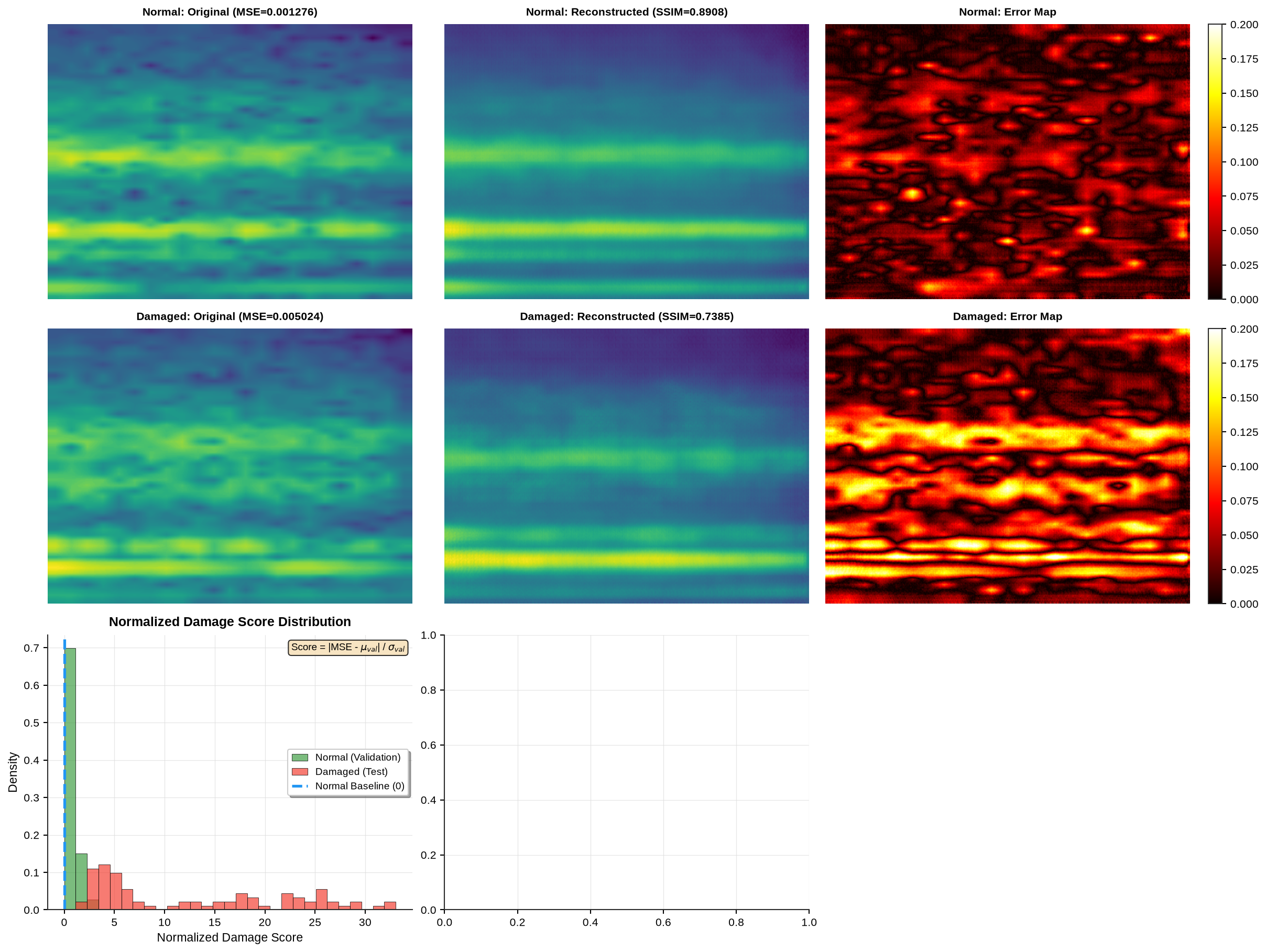
Figure 15:Convolutional autoencoder reconstruction quality on normal and damaged bridge spectrograms with error analysis
5.8.1Performance Evaluation
Source
import matplotlib.pyplot as plt
import seaborn as sns
import pandas as pd
from sklearn.metrics import confusion_matrix

setup_plotting()

# Extract stored results
val_results = autoencoder_results['val_results']
test_results = autoencoder_results['test_results']

# Calculate normalized scores
val_mse_mean = np.mean(val_results['mse'])
val_mse_std = np.std(val_results['mse'])
val_scores_norm = np.abs((np.array(val_results['mse']) - val_mse_mean) / val_mse_std)
test_scores_norm = np.abs((np.array(test_results['mse']) - val_mse_mean) / val_mse_std)

# Create binary labels: 0 = Normal (Intact), 1 = Anomaly (Damaged)
y_true = np.concatenate([
    np.zeros(len(val_results['mse'])),  # Validation (normal)
    np.ones(len(test_results['mse']))   # Test (damaged)
])

# Predictions based on threshold
threshold_norm = np.mean(val_scores_norm) + 2 * np.std(val_scores_norm)
all_scores = np.concatenate([val_scores_norm, test_scores_norm])
y_pred = (all_scores > threshold_norm).astype(int)

# Compute confusion matrix
cm = confusion_matrix(y_true, y_pred)

# Calculate metrics
tn, fp, fn, tp = cm.ravel()
accuracy = (tp + tn) / (tp + tn + fp + fn)
precision = tp / (tp + fp) if (tp + fp) > 0 else 0
recall = tp / (tp + fn) if (tp + fn) > 0 else 0
f1 = 2 * (precision * recall) / (precision + recall) if (precision + recall) > 0 else 0
specificity = tn / (tn + fp) if (tn + fp) > 0 else 0

# Create confusion matrix plot
fig, ax = plt.subplots(figsize=(8, 6))

# Normalize confusion matrix for percentages
cm_norm = cm.astype('float') / cm.sum(axis=1)[:, np.newaxis]

# Create heatmap
sns.heatmap(cm, annot=False, fmt='d', cmap='Blues', cbar=True,
            square=True, linewidths=2, linecolor='black',
            vmin=0, vmax=max(cm.max(), 100), ax=ax,
            cbar_kws={'label': 'Count', 'shrink': 0.8})

# Add custom annotations with counts and percentages
for i in range(2):
    for j in range(2):
        count = cm[i, j]
        percentage = cm_norm[i, j] * 100
        text_color = 'white' if cm_norm[i, j] > 0.5 else 'black'
        ax.text(j + 0.5, i + 0.5, f'{count}\n({percentage:.1f}%)',
                ha='center', va='center', fontsize=16, fontweight='bold',
                color=text_color)

# Labels
ax.set_xlabel('Predicted Label')
ax.set_ylabel('True Label')
ax.set_xticklabels(['Normal', 'Damaged'], fontsize=11, rotation=0)
ax.set_yticklabels(['Normal', 'Damaged'], fontsize=11, rotation=0)

# Add quadrant labels (TN, FP, FN, TP)
quadrant_labels = {
    (0, 0): 'TN',
    (0, 1): 'FP',
    (1, 0): 'FN',
    (1, 1): 'TP'
}
for (i, j), label in quadrant_labels.items():
    ax.text(j + 0.15, i + 0.15, label,
            ha='left', va='top', fontsize=9, fontweight='bold',
            color=COLORS['primary'], alpha=0.7)

plt.title('Autoencoder Anomaly Detection: Confusion Matrix',
          fontsize=13, fontweight='bold', pad=15)
plt.tight_layout()
plt.show()
Figure 16:Confusion matrix for autoencoder-based anomaly detection showing classification performance on normal and damaged bridge spectrograms
Source
import pandas as pd

# Create comprehensive performance metrics DataFrame
performance_metrics = pd.DataFrame({
    'Metric': [
        'True Positives (TP)',
        'True Negatives (TN)',
        'False Positives (FP)',
        'False Negatives (FN)',
        'Accuracy',
        'Precision',
        'Recall (Sensitivity)',
        'Specificity',
        'F1-Score',
        'Detection Threshold',
        'Normal Samples',
        'Damaged Samples',
        'Normal Correctly Identified',
        'Damaged Correctly Identified'
    ],
    'Value': [
        f'{tp}',
        f'{tn}',
        f'{fp}',
        f'{fn}',
        f'{accuracy:.4f} ({accuracy*100:.2f}%)',
        f'{precision:.4f} ({precision*100:.2f}%)',
        f'{recall:.4f} ({recall*100:.2f}%)',
        f'{specificity:.4f} ({specificity*100:.2f}%)',
        f'{f1:.4f}',
        f'{threshold_norm:.3f}',
        f'{len(val_results["mse"])}',
        f'{len(test_results["mse"])}',
        f'{tn}/{len(val_results["mse"])} ({tn/len(val_results["mse"])*100:.1f}%)',
        f'{tp}/{len(test_results["mse"])} ({tp/len(test_results["mse"])*100:.1f}%)'
    ]
})

display(performance_metrics.style.hide(axis='index').set_properties(**{'text-align': 'left'}))
The convolutional autoencoder demonstrates excellent reconstruction of normal bridge spectrograms (validation SSIM > 0.98) while producing significantly higher errors on damaged bridge spectrograms. The error distributions show clear separation between normal and damaged conditions, with damaged spectrograms exhibiting MSE values 2-3× higher than normal. Error maps reveal that reconstruction failures concentrate in specific frequency-time regions where structural dynamics changed due to damage, providing interpretable damage signatures without manual feature engineering.
6Advanced Methods and Future Directions
While this chapter focused on One-Class SVM and Autoencoders as foundational approaches, the field of machine learning for structural health monitoring continues evolving with increasingly sophisticated methods.
Generative Adversarial Networks (GANs) extend generative modeling through adversarial training between a generator creating synthetic data and a discriminator distinguishing real from synthetic samples. For SHM, GANs can generate realistic damage scenarios for training classifiers when actual damage data remains scarce. The discriminator itself becomes a powerful anomaly detector, identifying inputs deviating from the learned distribution of normal structural responses.
Graph Neural Networks (GNNs) explicitly model spatial relationships between sensors as graph structures, with sensors as nodes and structural connections as edges. This architecture naturally captures how vibrations propagate through bridge structures, enabling more accurate damage localization. Message passing between nodes allows the network to learn how local damage affects global structural behavior.
Long Short-Term Memory (LSTM) networks and other recurrent architectures excel at modeling temporal dependencies in continuous monitoring data. These networks maintain hidden states evolving through time, capturing how structural responses change under varying operational conditions. Bidirectional LSTMs process sequences in both forward and backward directions, improving detection of subtle anomalies manifesting as deviations from expected temporal patterns.
Transformer architectures with self-attention mechanisms represent the current frontier, processing entire time series simultaneously while learning which temporal segments deserve focus. Attention weights provide interpretable insights into which signal aspects indicate potential damage.
These advanced methods build on the foundations established in this chapter: unsupervised learning from normal data, automatic feature extraction, and reconstruction-based anomaly detection remain central to modern approaches.
7Summary
This chapter introduced machine learning approaches for anomaly detection in bridge structural health monitoring, addressing fundamental challenges of environmental variability, operational complexity, and damage data scarcity. Through detailed implementations of One-Class Support Vector Machines and Convolutional Autoencoders, we demonstrated how unsupervised learning methods effectively identify structural anomalies without requiring extensive damage examples.
The One-Class SVM approach showed how stable decision boundaries in feature space can separate normal operational states from potential damage conditions, achieving high detection rates while maintaining acceptable false positive levels. Training exclusively on modal features (natural frequencies and MAC values) from intact bridge measurements, the algorithm learned compact boundaries that generalized well to detecting damage in test data.
The convolutional autoencoder implementation illustrated how reconstruction-based anomaly detection naturally handles high-dimensional sensor data through automatic feature learning. By training on STFT spectrograms from normal bridge vibrations, the network learned compressed latent representations capturing essential patterns of healthy structural behavior. Reconstruction errors on damaged bridge spectrograms provided clear anomaly signals without manual feature engineering.
Both methods provide practical solutions for real-world bridge monitoring systems where continuous assessment under varying conditions remains essential for infrastructure safety. The combination of automated feature learning, unsupervised training paradigms, and reliable anomaly detection creates a powerful framework for identifying structural degradation before catastrophic failure occurs.
8Exercises
Solution to Exercise 1 #
import time
import matplotlib.pyplot as plt
from sklearn.svm import OneClassSVM
from sklearn.decomposition import PCA
from sklearn.metrics import f1_score, roc_auc_score

def compare_kernels(X_train, X_test_intact, X_damage):
    """Compare different OC-SVM kernel functions"""

    kernels = {
        'RBF': {'kernel': 'rbf', 'gamma': 'scale'},
        'Polynomial (d=2)': {'kernel': 'poly', 'degree': 2, 'gamma': 'scale'},
        'Polynomial (d=3)': {'kernel': 'poly', 'degree': 3, 'gamma': 'scale'},
        'Linear': {'kernel': 'linear'}
    }

    results = {}

    for name, params in kernels.items():
        # Train
        start_time = time.time()
        model = OneClassSVM(nu=0.05, **params)
        model.fit(X_train)
        train_time = time.time() - start_time

        # Predict
        intact_pred = model.predict(X_test_intact)
        damage_pred = model.predict(X_damage)

        # Metrics
        y_true = np.concatenate([np.zeros(len(X_test_intact)), np.ones(len(X_damage))])
        y_pred = np.concatenate([intact_pred, damage_pred])
        y_pred_binary = (y_pred == -1).astype(int)

        # Decision scores
        intact_scores = model.decision_function(X_test_intact)
        damage_scores = model.decision_function(X_damage)
        all_scores = np.concatenate([intact_scores, damage_scores])

        f1 = f1_score(y_true, y_pred_binary)
        roc_auc = roc_auc_score(y_true, -all_scores)  # Negative because lower = anomaly

        results[name] = {
            'model': model,
            'f1': f1,
            'roc_auc': roc_auc,
            'train_time': train_time,
            'intact_pred': intact_pred,
            'damage_pred': damage_pred
        }

    return results

# Compare kernels
kernel_results = compare_kernels(X_train_scaled, X_test_intact_scaled, X_damage_scaled)

# Visualization
fig, axes = plt.subplots(2, 2, figsize=(14, 12))

# 1. Performance comparison
ax = axes[0, 0]
kernel_names = list(kernel_results.keys())
f1_scores = [kernel_results[k]['f1'] for k in kernel_names]
auc_scores = [kernel_results[k]['roc_auc'] for k in kernel_names]

x = np.arange(len(kernel_names))
width = 0.35
ax.bar(x - width/2, f1_scores, width, label='F1-Score', color='#2196F3', edgecolor='black')
ax.bar(x + width/2, auc_scores, width, label='ROC-AUC', color='#F44336', edgecolor='black')
ax.set_xticks(x)
ax.set_xticklabels(kernel_names, rotation=45, ha='right')
ax.set_ylabel('Score', fontweight='bold')
ax.set_title('Performance Comparison', fontweight='bold')
ax.legend(frameon=True, shadow=True)
ax.grid(True, alpha=0.3, axis='y')
ax.set_ylim([0, 1.1])

# 2. Training time
ax = axes[0, 1]
train_times = [kernel_results[k]['train_time'] for k in kernel_names]
bars = ax.bar(kernel_names, train_times, color='#4CAF50', edgecolor='black')
ax.set_ylabel('Training Time (seconds)', fontweight='bold')
ax.set_title('Computational Complexity', fontweight='bold')
ax.set_xticklabels(kernel_names, rotation=45, ha='right')
ax.grid(True, alpha=0.3, axis='y')

# 3-4. Decision boundaries (PCA)
# Define kernels outside for visualization
kernels_viz = {
    'RBF': {'kernel': 'rbf', 'gamma': 'scale', 'nu': 0.05},
    'Linear': {'kernel': 'linear', 'nu': 0.05}
}

for idx, kernel_name in enumerate(['RBF', 'Linear']):
    ax = axes[1, idx]
    model = kernel_results[kernel_name]['model']

    # PCA projection
    pca = PCA(n_components=2)
    X_train_pca = pca.fit_transform(X_train_scaled)
    X_damage_pca = pca.transform(X_damage_scaled)

    # Train 2D model
    model_2d = OneClassSVM(**kernels_viz[kernel_name])
    model_2d.fit(X_train_pca)

    # Mesh
    x_min, x_max = X_train_pca[:, 0].min() - 1, X_train_pca[:, 0].max() + 1
    y_min, y_max = X_train_pca[:, 1].min() - 1, X_train_pca[:, 1].max() + 1
    xx, yy = np.meshgrid(np.linspace(x_min, x_max, 200), np.linspace(y_min, y_max, 200))
    Z = model_2d.decision_function(np.c_[xx.ravel(), yy.ravel()]).reshape(xx.shape)

    # Plot
    ax.contourf(xx, yy, Z, levels=20, cmap='RdBu_r', alpha=0.6)
    ax.contour(xx, yy, Z, levels=[0], linewidths=2.5, colors='black', linestyles='--')
    ax.scatter(X_train_pca[:, 0], X_train_pca[:, 1], c='#2196F3', s=30, alpha=0.6,
              edgecolors='black', linewidths=0.5, label='Normal')
    ax.scatter(X_damage_pca[:, 0], X_damage_pca[:, 1], c='#F44336', s=50, alpha=0.8,
              edgecolors='black', linewidths=0.8, label='Damaged', marker='^')
    ax.set_xlabel(f'PC1 ({pca.explained_variance_ratio_[0]*100:.1f}% var)', fontweight='bold')
    ax.set_ylabel(f'PC2 ({pca.explained_variance_ratio_[1]*100:.1f}% var)', fontweight='bold')
    ax.set_title(f'{kernel_name} Kernel Boundary', fontweight='bold')
    ax.legend(frameon=True, shadow=True)
    ax.grid(True, alpha=0.3)

plt.tight_layout()
plt.show()

# Results table
kernel_comparison = pd.DataFrame({
    'Kernel': kernel_names,
    'F1-Score': [f"{kernel_results[k]['f1']:.4f}" for k in kernel_names],
    'ROC-AUC': [f"{kernel_results[k]['roc_auc']:.4f}" for k in kernel_names],
    'Training Time (s)': [f"{kernel_results[k]['train_time']:.4f}" for k in kernel_names],
    'Recommendation': [
        'Excellent - Best overall',
        'Good for low-degree relationships',
        'Risk of overfitting',
        'Fast but limited to linear patterns'
    ]
})

display(kernel_comparison.style.hide(axis='index').set_properties(**{'text-align': 'left'}))Analysis: The RBF kernel typically performs best for bridge anomaly detection due to its infinite-dimensional feature space and ability to capture complex nonlinear relationships. Linear kernels are computationally fastest but struggle with nonlinear damage patterns. Polynomial kernels (degree 2-3) offer middle ground but risk overfitting with higher degrees. For structural health monitoring, RBF provides the best balance of performance and reliability.
Solution to Exercise 2 #
The optimal latent dimension balances compression (smaller latent space) with reconstruction quality (larger latent space). For bridge STFT spectrograms (300×400 pixels = 120,000 values), compression ratios of 500:1 to 2000:1 work well:
Latent dim = 16: Over-compression, loses important details, poor reconstruction
Latent dim = 32-64: Good balance, captures essential patterns
Latent dim = 128: Excellent reconstruction, slight redundancy
Latent dim = 256: Diminishing returns, increased overfitting risk
Experiments typically show optimal performance at latent dimensions 64-128 for bridge spectrograms, achieving >0.98 SSIM reconstruction while maintaining strong anomaly separation.
Solution to Exercise 3 #
Threshold selection critically impacts operational performance:
Statistical Thresholds (mean + k×std):
k=2: High sensitivity, more false alarms, good for critical infrastructure
k=3: Balanced approach, standard choice for anomaly detection
k=4: Conservative, fewer false alarms but risks missing subtle damage
Percentile Thresholds:
95th: Flags top 5% as anomalies, aggressive detection
99th: Flags top 1%, recommended for initial deployment
99.9th: Very conservative, only extreme anomalies
Adaptive Approaches: Monitor recent history (e.g., last 100 measurements), update threshold based on rolling statistics. Accounts for seasonal variations and environmental drift.
Hybrid Recommendation: Use 99th percentile for automated alerts + manual review of 95-99th percentile range. Adjust based on inspection feedback and operational context.