1Overview
Structural responses often consist of multiple vibration modes excited simultaneously. In the time domain these modes superpose into a complex signal, but in the frequency domain they appear as distinct peaks. These frequency signatures allow engineers to identify modal properties. Frequency domain techniques excel at separating signal from noise, isolating individual modes even in complex multi-degree-of-freedom systems, and providing reliable identification under ambient excitation conditions.
This chapter introduces the fundamental tools for frequency-domain analysis in SHM: the Fourier transform and its digital implementation (FFT), spectral analysis, the short-time Fourier transform (STFT) for time-frequency analysis, and wavelet transforms. We then discuss how these tools enable non-parametric modal identification of bridges.
2Fourier Transform
2.1Inner Product and Function Similarity
Before introducing the Fourier transform, we need to measure similarity between functions. The inner product quantifies how much two signals “align” with each other.
For two functions and , the inner product is defined as:
where denotes the complex conjugate of . This operation measures the total overlap between the two functions across all time.
2.2Fourier Transform as Frequency Similarity
The Fourier transform uses this similarity concept to decompose any signal into its frequency components by comparing the signal with sine and cosine waves at different frequencies.
For a pure cosine wave at frequency : For a pure sine wave at frequency :
Using Euler’s identity, we can combine these into a complex exponential:
Here, is the imaginary unit. The Fourier transform coefficient at frequency is simply the inner product between our signal, with duration , and this complex exponential:
The magnitude tells us how similar our signal is to a sinusoid at frequency . Large values mean that frequency is a strong component of the signal, while small values indicate little content at that frequency.
![Fourier Transform as similarity measurement [Source].](/SHM-Live-Book/build/FT_as_similarity-1973f2ace895e72139df31a83a0d4f49.svg)
Figure 1:Fourier Transform as similarity measurement [Source].
The inverse Fourier transform rebuilds a signal by summing all of its frequency components:
In words, is obtained by adding sinusoids at every frequency , each weighted by the spectrum and aligned by its phase. These sinusoids form a complete basis, so with the right amplitudes and phases the original signal is recovered exactly.
![Fourier series reconstruction. Adding harmonics (with amplitude and phase) progressively rebuilds a square wave [Source].](/SHM-Live-Book/build/Fourier_series_squar-71fbd064b59be2a5905998baa96b1eff.svg)
Figure 2:Fourier series reconstruction. Adding harmonics (with amplitude and phase) progressively rebuilds a square wave [Source].
The Fourier transform produces complex numbers at each frequency, containing two essential pieces of information:
Amplitude : How much of each frequency is present
Phase : When each frequency component reaches its peak
For frequency identification in structural health monitoring, amplitude is often sufficient to locate natural frequencies. However, for complete signal reconstruction or understanding system behavior, both amplitude and phase are required.
The magnitude spectrum reveals the frequency content, while the phase spectrum contains timing information. In Bode plots commonly used in engineering, magnitude is plotted in decibels (dB):
2.3Fundamental Properties of the Fourier Transform
The Fourier transform operator possesses several important mathematical properties that simplify analysis of complex signals:
Table 1:Fundamental Properties of the Fourier Transform.
| Property | Mathematical Equation | Description |
|---|---|---|
| 1. Linearity | Linear combinations transform as linear combinations | |
| 2. Time Shifting | Time delay creates phase shift in frequency | |
| 3. Frequency Translation | Modulation shifts spectrum in frequency | |
| 4. Time Scaling | Time compression expands frequency spectrum | |
| 5. Differentiation | Derivatives become multiplication by | |
| 6. Integration | Integration becomes division by | |
| 7. Convolution | Convolution in time is multiplication in frequency |
2.4Common Fourier Transform Pairs
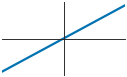
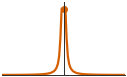
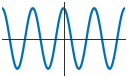
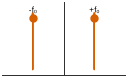
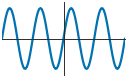
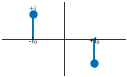
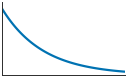
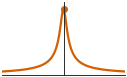
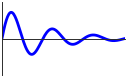
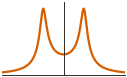
The following table presents fundamental transform pairs that frequently appear in signal processing applications. Each pair shows how a specific time-domain function maps to its frequency-domain counterpart.
Table 2:Common Fourier Transform Pairs.
| Time Domain | Time Plot | Frequency Domain | Frequency Plot |
|---|---|---|---|
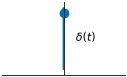 | 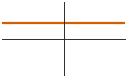 | ||
| 1 | 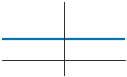 | 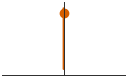 | |
 |  | ||
 |  | ||
 |  | ||
 |  | ||
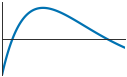 | 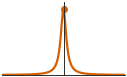 | ||
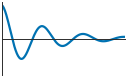 | 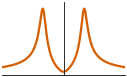 | ||
 |  |
where is the unit step function and .
2.5Storage Efficiency and Signal Decomposition
Consider a signal composed of three sinusoidal components:
In the time domain, storing this signal for 10 seconds at 200 Hz requires 2000 data points. After Fourier transformation, only three frequency values (5, 12, 25 Hz) and their corresponding amplitudes (2, 1.5, 0.8), plus phase information, are needed: 9 numbers instead of 2000.
This efficiency makes frequency-domain analysis useful for both data compression and system understanding.
Source
import numpy as np
import matplotlib.pyplot as plt
from matplotlib import rcParams
from scipy import signal

# Configure publication quality plotting
set_journal_style()

# Signal parameters
fs = 200  # Hz
duration = 2  # seconds
t = np.linspace(0, duration, int(fs * duration))

# Component frequencies and amplitudes
f1, f2, f3 = 5, 12, 25  # Hz
A1, A2, A3 = 2.0, 1.5, 0.8
phase1, phase2, phase3 = 0, np.pi/4, -np.pi/6

# Individual components
component1 = A1 * np.cos(2*np.pi*f1*t + phase1)
component2 = A2 * np.cos(2*np.pi*f2*t + phase2)
component3 = A3 * np.cos(2*np.pi*f3*t + phase3)

# Combined signal
x_total = component1 + component2 + component3
x_noisy = x_total + 0.1 * np.random.randn(len(t))

# Compute Fourier transform
X_fft = np.fft.fft(x_noisy)
freq_axis = np.fft.fftfreq(len(t), 1/fs)

# Take only positive frequencies
positive_freq_mask = freq_axis >= 0
freq_positive = freq_axis[positive_freq_mask]
X_magnitude = np.abs(X_fft[positive_freq_mask]) * 2 / len(t)
X_magnitude[0] /= 2  # DC bin is unique and must not be doubled
X_phase = np.angle(X_fft[positive_freq_mask])

# Create visualization
fig, axes = plt.subplots(2, 3, figsize=(7.2, 4.6), constrained_layout=True)

colors = {'comp1': '#0072B2', 'comp2': '#D55E00', 'comp3': '#009E73',
          'total': '#CC79A7', 'noisy': '#56B4E9'}

# Time domain - individual components
axes[0,0].plot(t, component1, color=colors['comp1'], linewidth=1.3,
               label=f'{A1:.1f} cos(2π·{f1}t)')
axes[0,0].plot(t, component2, color=colors['comp2'], linewidth=1.3,
               label=f'{A2:.1f} cos(2π·{f2}t)')
axes[0,0].plot(t, component3, color=colors['comp3'], linewidth=1.3,
               label=f'{A3:.1f} cos(2π·{f3}t)')
axes[0,0].set_xlabel('Time (s)')
axes[0,0].set_ylabel('Amplitude')
axes[0,0].legend()
axes[0,0].set_xlim(0, 1)
panel_label(axes[0,0], 'a')

# Time domain - combined signal
axes[0,1].plot(t, x_total, color=colors['total'], linewidth=1.6,
               label='Clean Combined')
axes[0,1].plot(t, x_noisy, color=colors['noisy'], alpha=0.7, linewidth=1.3,
               label='With Noise')
axes[0,1].set_xlabel('Time (s)')
axes[0,1].set_ylabel('Amplitude')
axes[0,1].legend()
axes[0,1].set_xlim(0, 1)
panel_label(axes[0,1], 'b')

# Frequency domain - magnitude spectrum
axes[0,2].plot(freq_positive, X_magnitude, color=colors['total'], linewidth=1.3)
axes[0,2].stem([f1, f2, f3], [A1, A2, A3], basefmt=' ')
for i, (f, A) in enumerate(zip([f1, f2, f3], [A1, A2, A3])):
    axes[0,2].plot(f, A, 'o', color='#D55E00', markersize=5)
axes[0,2].set_xlabel('Frequency (Hz)')
axes[0,2].set_ylabel('Amplitude')
axes[0,2].set_xlim(0, 40)
axes[0,2].set_ylim(0, 2.5)
panel_label(axes[0,2], 'c')

# Frequency domain - logarithmic scale
X_magnitude_dB = 20 * np.log10(X_magnitude + 1e-10)
axes[1,0].plot(freq_positive, X_magnitude_dB, color=colors['total'], linewidth=1.3)
axes[1,0].set_xlabel('Frequency (Hz)')
axes[1,0].set_ylabel('Magnitude (dB)')
axes[1,0].set_xlim(0, 40)
panel_label(axes[1,0], 'd')

# Phase spectrum
axes[1,1].plot(freq_positive, np.degrees(X_phase), color=colors['total'],
               linewidth=1.3)
axes[1,1].set_xlabel('Frequency (Hz)')
axes[1,1].set_ylabel('Phase (degrees)')
axes[1,1].set_xlim(0, 40)
axes[1,1].set_ylim(-180, 180)
panel_label(axes[1,1], 'e')

# Reconstruction demonstration
t_recon = t[:200]  # First second
x_reconstructed = (A1 * np.cos(2*np.pi*f1*t_recon + phase1) +
                   A2 * np.cos(2*np.pi*f2*t_recon + phase2) +
                   A3 * np.cos(2*np.pi*f3*t_recon + phase3))

axes[1,2].plot(t_recon, x_total[:200], '--', color='#000000', linewidth=1.3, alpha=0.8,
               label='Original')
axes[1,2].plot(t_recon, x_reconstructed, '-', color='#D55E00', linewidth=1.3,
               label='Reconstructed')
axes[1,2].set_xlabel('Time (s)')
axes[1,2].set_ylabel('Amplitude')
axes[1,2].legend()
panel_label(axes[1,2], 'f')

plt.show()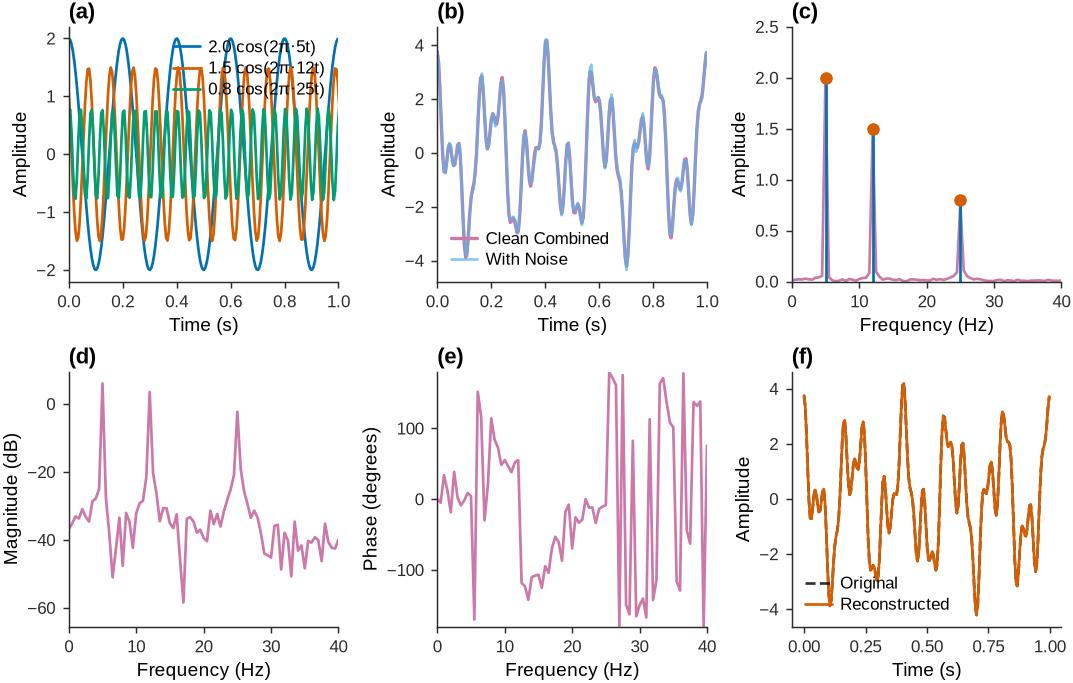
Figure 3:Fourier decomposition demonstration showing how a multi-component signal can be reconstructed from its frequency components, illustrating the efficiency and interpretability of frequency domain representation.
2.6Discrete Fourier Transform (DFT)
Real measurements are discrete samples taken at regular intervals. The sampling process can be modeled using pulse amplitude modulation, where the continuous signal is multiplied by a train of impulses:
where is the sampling period and are the sample values.
Taking the Fourier transform of this sampled signal:
For a finite record of samples, the DFT evaluates the spectrum at equally spaced frequency points:
The corresponding frequencies are:
The inverse DFT reconstructs the time samples:
2.7Simple FFT Implementation in Python
The practical implementation in Python is straightforward using NumPy’s Fast Fourier Transform (FFT) algorithms.
1 2 3 4 5 6 7 8 9 10 11 12 13 14 15 16 17import numpy as np # Forward FFT: Time domain → Frequency domain X = np.fft.fft(x) # Create frequency axis freq = np.fft.fftfreq(len(x), 1/fs) # Inverse FFT: Frequency domain → Time domain x_reconstructed = np.fft.ifft(X) # For real signals, use rfft for efficiency (positive frequencies only) X_real = np.fft.rfft(x) freq_real = np.fft.rfftfreq(len(x), 1/fs) # Inverse of real FFT x_from_rfft = np.fft.irfft(X_real)
2.7.1Symmetry and Nyquist Frequency
For real-valued signals, the DFT exhibits conjugate symmetry: . The spectrum from to is therefore redundant, containing the same information as frequencies from to .
The maximum meaningful frequency is the Nyquist frequency:
In practice, we only plot the spectrum from DC (0 Hz) to the Nyquist frequency.
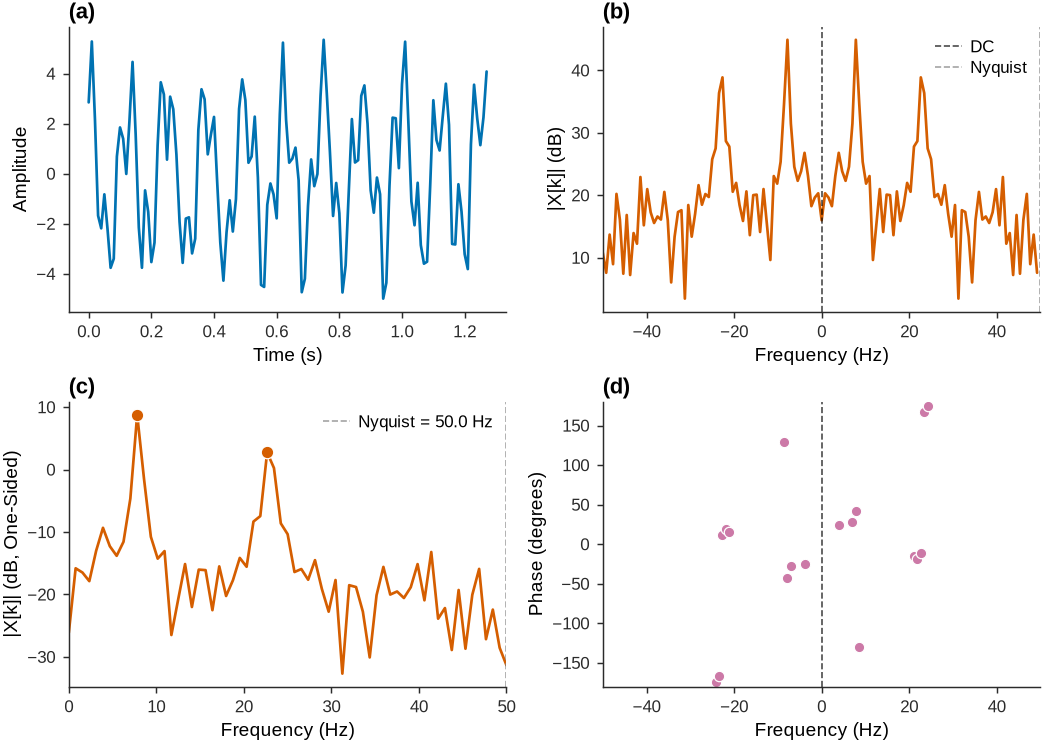
Figure 4:DFT symmetry for a real signal. The two-sided magnitude spectrum (dB) is even about zero frequency, while the two-sided phase is odd. The one-sided spectrum (dB) folds the negative frequencies onto the positive axis, where the signal peaks are identified.
2.8Examples
2.8.1Bridge under Impact Testing Example
Impact testing excites all structural frequencies simultaneously, making it well suited for modal identification using FFT analysis. A hammer strike approximates an impulse input, which contains equal energy at all frequencies up to the Nyquist limit.
The experimental setup is a 30-meter simply supported bridge instrumented with four accelerometers. The impact hammer is applied at 40% of the span length (12 meters from the left support) to excite all target modes. The sensor configuration and experimental geometry are shown in the setup diagram below.
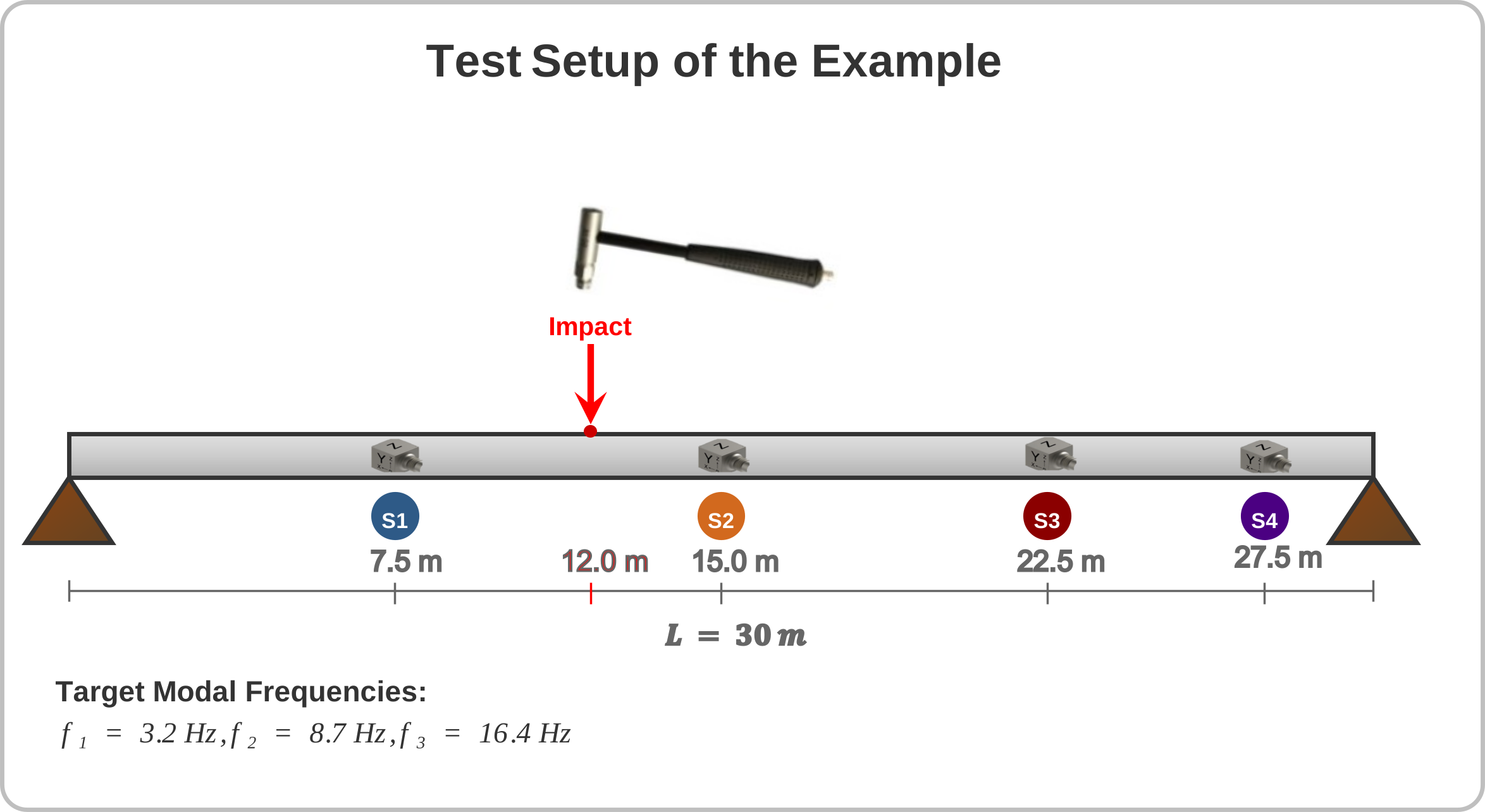
Figure 5:Bridge impact-testing example setup: a 30 m simply supported beam with four accelerometers – at 7.5 / 15.0 / 22.5 / 27.5 m, an impact location at 12.0 m, and target modal frequencies , , Hz.
For a simply supported beam, the theoretical natural frequencies follow , giving the first three bending modes at approximately 3.2, 8.7, and 16.4 Hz for typical bridge parameters. Sensors are placed at 25%, 50%, 75%, and 92% of the span to maintain good observability of all target modes while avoiding nodal points where certain modes exhibit minimal response.
Source
import numpy as np
import matplotlib.pyplot as plt
from scipy import signal
from matplotlib import rcParams, cycler

# Configure plotting
set_journal_style()

# Bridge parameters (30m simply supported)
length = 30.0
sensor_positions = [7.5, 15.0, 22.5, 27.5]
modal_freqs = [3.2, 8.7, 16.4]  # Hz
damping_ratios = [0.018, 0.025, 0.032]
modal_masses = [12000, 8000, 6000]  # kg

# Mode shapes for simply supported beam
def compute_mode_shapes():
    x_norm = [pos / length for pos in sensor_positions]
    shapes = np.zeros((len(sensor_positions), len(modal_freqs)))

    for mode_idx in range(len(modal_freqs)):
        mode_num = mode_idx + 1
        for sensor_idx in range(len(sensor_positions)):
            shapes[sensor_idx, mode_idx] = np.sin(mode_num * np.pi * x_norm[sensor_idx])

    for mode_idx in range(len(modal_freqs)):
        norm = np.linalg.norm(shapes[:, mode_idx])
        shapes[:, mode_idx] /= norm

    return shapes

mode_shapes = compute_mode_shapes()

# Simulation parameters
fs = 200
duration = 5
t = np.linspace(0, duration, int(fs * duration))
dt = 1 / fs

# Impact force (short duration pulse)
impact_idx = int(0.1 * fs)
impact_duration = int(0.01 * fs)
force = np.zeros(len(t))
t_impact = np.arange(impact_duration) * dt
force[impact_idx:impact_idx+impact_duration] = (
    1000 * np.exp(-100 * t_impact) * np.sin(2 * np.pi * 50 * t_impact)
)

# Generate responses for each sensor
responses = np.zeros((len(sensor_positions), len(t)))
impact_location = 0.4

np.random.seed(42)
for sensor_idx in range(len(sensor_positions)):
    response = np.zeros(len(t))

    # Add contribution from each mode
    for mode_idx in range(len(modal_freqs)):
        fn = modal_freqs[mode_idx]
        zeta = damping_ratios[mode_idx]
        phi = mode_shapes[sensor_idx, mode_idx]
        M_modal = modal_masses[mode_idx]

        # Modal force based on impact location
        modal_force_factor = np.sin(np.pi * (mode_idx + 1) * impact_location)

        # Modal impulse response
        wn = 2 * np.pi * fn
        wd = wn * np.sqrt(1 - zeta**2)

        h_modal = np.zeros(len(t))
        h_modal[1:] = (phi * modal_force_factor / (M_modal * wd)) * \
                     np.exp(-zeta * wn * t[1:]) * np.sin(wd * t[1:])

        modal_response = signal.convolve(force, h_modal, mode='same') * dt
        response += modal_response

    # Add measurement noise
    noise_level = 0.05 * np.std(response) if np.std(response) > 0 else 0.01
    responses[sensor_idx, :] = response + noise_level * np.random.randn(len(t))

# Analyze frequency content
freq_results = {}
colors = ['#0072B2', '#D55E00', '#009E73', '#CC79A7']

for sensor_idx in range(len(sensor_positions)):
    response = responses[sensor_idx, :]
    freq, psd = signal.welch(response, fs, nperseg=512, noverlap=256, window='hann')
    # PSD in dB (10*log10 because PSD is a power-like quantity)
    magnitude_db = 10 * np.log10(psd + 1e-12)

    # Find modal peaks
    peak_indices, properties = signal.find_peaks(
        magnitude_db,
        prominence=5,
        distance=int(2 / (freq[1] - freq[0])),
        height=np.max(magnitude_db) - 40
    )

    peaks = []
    for idx in peak_indices:
        if freq[idx] <= 25:
            peaks.append({
                'frequency': freq[idx],
                'magnitude_db': magnitude_db[idx]
            })

    freq_results[f'sensor_{sensor_idx+1}'] = {
        'frequency': freq,
        'magnitude_db': magnitude_db,
        'peaks': sorted(peaks, key=lambda x: x['magnitude_db'], reverse=True)[:3]
    }

# Create 3x2 layout visualization
fig, axes = plt.subplots(3, 2, figsize=(7.0, 5.4), constrained_layout=True)

# Row 1: Excitation and Time Response
# Impact force
axes[0,0].plot(t[:100], force[:100], color='#D55E00', linewidth=1.6)
axes[0,0].set_xlabel('Time (s)')
axes[0,0].set_ylabel('Force (N)')
axes[0,0].set_xlim(0, 0.5)
panel_label(axes[0,0], 'a')

# Time responses (first 2 seconds)
time_end = int(2 * fs)
for sensor_idx in range(len(sensor_positions)):
    axes[0,1].plot(t[:time_end], responses[sensor_idx, :time_end],
                  color=colors[sensor_idx], linewidth=1.3,
                  label=f'Sensor {sensor_idx+1}', alpha=0.85)

axes[0,1].set_xlabel('Time (s)')
axes[0,1].set_ylabel('Acceleration (m/s²)')
axes[0,1].legend(ncol=2, loc='upper right')
panel_label(axes[0,1], 'b')

# Row 2: Individual Sensor Responses
sensor_titles = ['Sensor 1 @ 7.5m', 'Sensor 2 @ 15.0m']
panel_letters_row2 = ['c', 'd']
for i, (sensor_idx, title) in enumerate(zip([0, 1], sensor_titles)):
    ax = axes[1, i]
    sensor_key = f'sensor_{sensor_idx+1}'
    freq_data = freq_results[sensor_key]

    ax.plot(freq_data['frequency'], freq_data['magnitude_db'],
            color=colors[sensor_idx], linewidth=1.3)

    # Mark identified peaks
    for peak in freq_data['peaks']:
        ax.plot(peak['frequency'], peak['magnitude_db'], 'o',
                color='#D55E00', markersize=6,
                markeredgewidth=0.6, markeredgecolor='white')
        ax.annotate(f'{peak["frequency"]:.1f}',
                   xy=(peak['frequency'], peak['magnitude_db']),
                   xytext=(peak['frequency']+0.5, peak['magnitude_db']+8),
                   fontsize=8, color='#D55E00',
                   arrowprops=dict(arrowstyle='->', color='#D55E00', lw=0.7))

    # Mark theoretical modal frequencies
    for j, freq_modal in enumerate(modal_freqs):
        ax.axvline(freq_modal, color='#009E73', linestyle='--',
                   alpha=0.7, linewidth=0.8)
        if i == 0 and j == 0:  # Only label once
            ax.text(freq_modal+0.2, -90, f'f{j+1}',
                   color='#009E73', fontsize=8)

    ax.set_xlabel('Frequency (Hz)')
    ax.set_ylabel('Magnitude (dB)')
    ax.set_xlim(0, 25)
    ax.set_ylim(-160, -80)
    panel_label(ax, panel_letters_row2[i])

# Row 3: Individual Sensor Responses
sensor_titles = ['Sensor 3 @ 22.5m', 'Sensor 4 @ 27.5m']
panel_letters_row3 = ['e', 'f']
for i, (sensor_idx, title) in enumerate(zip([2, 3], sensor_titles)):
    ax = axes[2, i]
    sensor_key = f'sensor_{sensor_idx+1}'
    freq_data = freq_results[sensor_key]

    ax.plot(freq_data['frequency'], freq_data['magnitude_db'],
            color=colors[sensor_idx], linewidth=1.3)

    # Mark identified peaks
    for peak in freq_data['peaks']:
        ax.plot(peak['frequency'], peak['magnitude_db'], 'o',
                color='#D55E00', markersize=6,
                markeredgewidth=0.6, markeredgecolor='white')
        ax.annotate(f'{peak["frequency"]:.1f}',
                   xy=(peak['frequency'], peak['magnitude_db']),
                   xytext=(peak['frequency']+0.5, peak['magnitude_db']+8),
                   fontsize=8, color='#D55E00',
                   arrowprops=dict(arrowstyle='->', color='#D55E00', lw=0.7))

    # Mark theoretical modal frequencies
    for j, freq_modal in enumerate(modal_freqs):
        ax.axvline(freq_modal, color='#009E73', linestyle='--',
                   alpha=0.7, linewidth=0.8)
        if i == 0 and j == 0:  # Only label once
            ax.text(freq_modal+0.2, -90, f'f{j+1}',
                   color='#009E73', fontsize=8)

    ax.set_xlabel('Frequency (Hz)')
    ax.set_ylabel('Magnitude (dB)')
    ax.set_xlim(0, 25)
    ax.set_ylim(-160, -80)
    panel_label(ax, panel_letters_row3[i])

plt.show()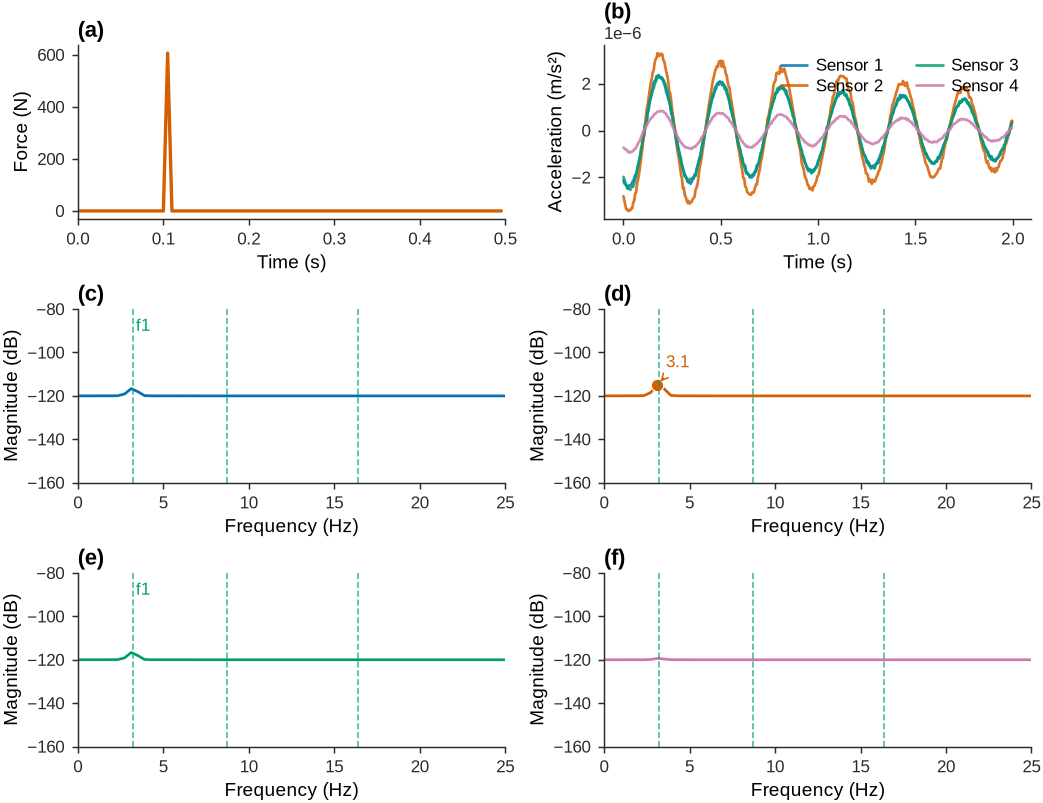
Figure 6:Bridge impact testing analysis showing time domain responses and frequency domain identification results for four-sensor configuration.
2.8.2Bridge under Ambient Loading
Ambient loading (traffic, wind) excites structures differently from impact testing. Ambient forces typically concentrate energy near certain frequencies, making some modal frequencies difficult to detect using direct FFT analysis.
Source
import numpy as np
import matplotlib.pyplot as plt
from scipy import signal
from matplotlib import rcParams

# Configure plotting
set_journal_style()

# Same bridge parameters as impact test
length = 30.0
sensor_positions = [7.5, 15.0, 22.5, 27.5]
modal_freqs = [3.2, 8.7, 16.4]
damping_ratios = [0.018, 0.025, 0.032]
modal_masses = [12000, 8000, 6000]

# Mode shapes
def compute_mode_shapes():
    x_norm = [pos / length for pos in sensor_positions]
    shapes = np.zeros((len(sensor_positions), len(modal_freqs)))

    for mode_idx in range(len(modal_freqs)):
        mode_num = mode_idx + 1
        for sensor_idx in range(len(sensor_positions)):
            shapes[sensor_idx, mode_idx] = np.sin(mode_num * np.pi * x_norm[sensor_idx])

    for mode_idx in range(len(modal_freqs)):
        norm = np.linalg.norm(shapes[:, mode_idx])
        shapes[:, mode_idx] /= norm

    return shapes

mode_shapes = compute_mode_shapes()

# Simulation parameters
fs = 200
duration = 60  # Longer for ambient
t = np.linspace(0, duration, int(fs * duration))
dt = 1 / fs

# Generate ambient excitation only (impact example covered earlier)
np.random.seed(123)


# 2. Ambient excitation (white noise process)
ambient_force = np.random.randn(len(t))
# Zero-mean and normalize to unit variance
ambient_force -= np.mean(ambient_force)
std_val = np.std(ambient_force)
ambient_force = ambient_force / std_val if std_val > 0 else ambient_force
# Scale to target RMS force level (N)
ambient_force = ambient_force * 100.0

# Generate responses using modal superposition
def generate_responses(force_input, noise_factor=0.05):
    responses = np.zeros((len(sensor_positions), len(t)))

    for sensor_idx in range(len(sensor_positions)):
        response = np.zeros(len(t))

        for mode_idx in range(len(modal_freqs)):
            fn = modal_freqs[mode_idx]
            zeta = damping_ratios[mode_idx]
            phi = mode_shapes[sensor_idx, mode_idx]
            M_modal = modal_masses[mode_idx]

            modal_force_factor = 1.0
            wn = 2 * np.pi * fn

            # Frequency domain approach for efficiency
            Force_fft = np.fft.fft(force_input)
            freq_axis = np.fft.fftfreq(len(t), dt)

            H_modal = np.zeros_like(Force_fft, dtype=complex)
            for k, f in enumerate(freq_axis):
                omega = 2 * np.pi * f
                # Denominator is finite at f=0 (= wn^2), so DC gain phi/(M*wn^2) is included.
                H_modal[k] = (phi * modal_force_factor / M_modal) / \
                           (wn**2 - omega**2 + 1j*2*zeta*wn*omega)

            Response_modal_fft = H_modal * Force_fft
            modal_response = np.real(np.fft.ifft(Response_modal_fft))
            response += modal_response

        noise_level = noise_factor * np.std(response) if np.std(response) > 0 else 0.02
        responses[sensor_idx, :] = response + noise_level * np.random.randn(len(t))

    return responses

# Generate responses for ambient excitation only
ambient_responses = generate_responses(ambient_force, noise_factor=0.15)

# Analyze frequency spectra
def analyze_spectrum(responses, force_input, fs):
    results = {'excitation': {}, 'sensors': {}}

    # Analyze excitation
    freq_force, psd_force = signal.welch(force_input, fs, nperseg=1024, noverlap=512)
    results['excitation'] = {
        'frequency': freq_force,
        'psd_db': 10 * np.log10(psd_force + 1e-12)
    }

    # Analyze each sensor
    colors = ['#0072B2', '#D55E00', '#009E73', '#CC79A7']
    for sensor_idx in range(len(sensor_positions)):
        response = responses[sensor_idx, :]
        freq, psd = signal.welch(response, fs, nperseg=2048 if len(t) > 2048 else 512,
                               noverlap=1024 if len(t) > 2048 else 256)
        # PSD in dB (10*log10 because PSD is a power-like quantity)
        magnitude_db = 10 * np.log10(psd + 1e-12)

        # Peak detection with appropriate thresholds
        threshold = np.max(magnitude_db) - 25
        peak_indices, _ = signal.find_peaks(magnitude_db, prominence=3,
                                          height=threshold,
                                          distance=int(0.5 / (freq[1] - freq[0])))

        peaks = []
        for idx in peak_indices:
            if freq[idx] <= 25:
                peaks.append({
                    'frequency': freq[idx],
                    'magnitude_db': magnitude_db[idx]
                })

        results['sensors'][f'sensor_{sensor_idx+1}'] = {
            'frequency': freq,
            'magnitude_db': magnitude_db,
            'peaks': sorted(peaks, key=lambda x: x['magnitude_db'], reverse=True)[:4],
            'color': colors[sensor_idx]
        }

    return results

# Visualize ambient excitation and response spectra (FFT amplitude in dB)
fig, axes = plt.subplots(3, 2, figsize=(7.0, 5.4), constrained_layout=True)

# Row 1: Ambient excitation (time domain)
axes[0,0].plot(t[:2000], ambient_force[:2000], color='#000000', linewidth=0.8)
axes[0,0].set_xlabel('Time (s)')
axes[0,0].set_ylabel('Force (N)')
axes[0,0].set_xlim(0, 10)
panel_label(axes[0,0], 'a')

# Row 1: Ambient excitation spectrum via FFT amplitude (Bode scale)
N = len(ambient_force)
fft_vals = np.fft.rfft(ambient_force - np.mean(ambient_force))
freqs = np.fft.rfftfreq(N, d=dt)
amp = np.abs(fft_vals) * (2.0 / N)
amp_db = 20 * np.log10(amp + 1e-12)
axes[0,1].plot(freqs, amp_db, color='#0072B2', linewidth=1.3)
axes[0,1].set_xlabel('Frequency (Hz)')
axes[0,1].set_ylabel('Amplitude (dB)')
axes[0,1].set_xlim(0, 50)
panel_label(axes[0,1], 'b')

sensor_colors = ['#0072B2', '#D55E00', '#009E73', '#CC79A7']
panel_letters_row2 = ['c', 'd']
for col, sensor_idx in enumerate([0, 1]):
    resp = ambient_responses[sensor_idx, :]
    resp_fft = np.fft.rfft(resp - np.mean(resp))
    resp_amp = np.abs(resp_fft) * (2.0 / N)
    resp_amp_db = 20 * np.log10(resp_amp + 1e-12)
    axes[1, col].plot(freqs, resp_amp_db, color=sensor_colors[sensor_idx], linewidth=1.3)
    axes[1, col].set_xlabel('Frequency (Hz)')
    axes[1, col].set_ylabel('Amplitude (dB)')
    axes[1, col].set_xlim(0, 25)
    for fmod in modal_freqs:
        axes[1, col].axvline(fmod, color='#7F7F7F', linestyle='--', linewidth=0.8, alpha=0.8)
    panel_label(axes[1, col], panel_letters_row2[col])

# Row 3: sensors 3 and 4 spectra
panel_letters_row3 = ['e', 'f']
for col, sensor_idx in enumerate([2, 3]):
    r = ambient_responses[sensor_idx, :]
    r_fft = np.fft.rfft(r - np.mean(r))
    r_amp = np.abs(r_fft) * (2.0 / N)
    r_amp_db = 20 * np.log10(r_amp + 1e-12)
    axes[2, col].plot(freqs, r_amp_db, color=sensor_colors[sensor_idx], linewidth=1.3)
    axes[2, col].set_xlabel('Frequency (Hz)')
    axes[2, col].set_ylabel('Amplitude (dB)')
    axes[2, col].set_xlim(0, 50)
    for fmod in modal_freqs:
        axes[2, col].axvline(fmod, color='#7F7F7F', linestyle='--', linewidth=0.8, alpha=0.8)
    panel_label(axes[2, col], panel_letters_row3[col])

plt.show()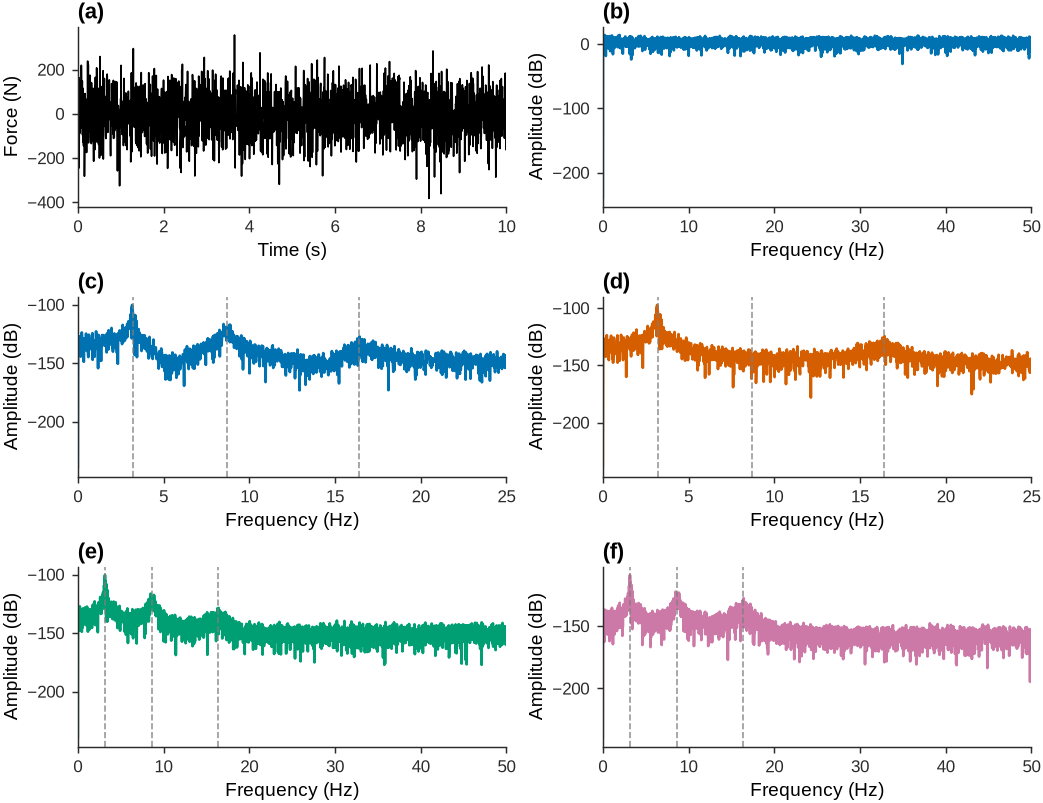
Figure 7:Bridge ambient loading demonstration showing limitations of direct FFT analysis.
This illustrates why direct FFT analysis works well for impact testing but struggles with ambient loading. The next section on spectral analysis addresses these limitations by using statistical methods to extract modal information from noisy, non-uniformly excited responses.
3Frequency Response Functions
The frequency response function completely characterizes linear dynamic systems in the frequency domain. Starting from the time-domain convolution relationship:
Taking the Fourier transform of both sides and applying the convolution theorem:
where is the frequency response function (FRF), representing the Fourier transform of the impulse response function :
This converts the time-domain convolution into multiplication in the frequency domain, simplifying the analysis of system response to arbitrary inputs.
3.1Single Degree of Freedom Systems
For a single degree of freedom system with mass , damping coefficient , and stiffness , the frequency response function has the analytical form:
where is the natural frequency and is the damping ratio.
The magnitude and phase of the FRF together describe the system’s dynamic characteristics:
3.2System Response Simulation
Once is known, the response to any arbitrary input is computed in three steps:
Transform input to frequency domain:
Multiply by FRF:
Transform back to time domain:
This replaces the convolution integral with efficient FFT operations.
Source
import numpy as np
import matplotlib.pyplot as plt
from matplotlib import rcParams

# Nature-style (clean, publication-quality) plotting
set_journal_style()

# 1) Multi-frequency input u(t)
fs = 200.0  # Hz
T = 10.0    # seconds
t = np.arange(0, T, 1/fs)

freqs_in = np.array([3, 6, 9, 15, 22])  # Hz
amps_in  = np.array([0.4, 1.0, 0.3, 0.7, 0.2])
phases   = np.array([0.0, np.pi/6, -np.pi/4, np.pi/3, -np.pi/8])

u = np.zeros_like(t)
for A, f, ph in zip(amps_in, freqs_in, phases):
    u += A * np.cos(2*np.pi*f*t + ph)

# 2) System FRF G(f): single-degree-of-freedom (one resonance)
N = len(t)
freq_axis = np.fft.fftfreq(N, d=1/fs)
omega = 2*np.pi*freq_axis

fn = 10.0    # natural frequency (Hz)
zeta = 0.03  # damping ratio
gain = 1.0   # modal gain

w_n = 2*np.pi*fn
# SDOF FRF: gain*w_n^2 / (w_n^2 - w^2 + 2j*zeta*w_n*w)
H = gain*(w_n**2) / ((w_n**2 - omega**2) + 2j*zeta*w_n*omega)

# 3) FFT-based simulation: X(f) = G(f)·U(f) and x(t) = iFFT{X(f)}
U = np.fft.fft(u)
X = H * U
x = np.fft.ifft(X).real  # numerical noise may introduce tiny imaginary part

# Spectra for visualization (one-sided)
pos = freq_axis >= 0
fpos = freq_axis[pos]
U_mag = 2*np.abs(U[pos]) / N
X_mag = 2*np.abs(X[pos]) / N
U_mag[0] /= 2  # DC bin not doubled
X_mag[0] /= 2  # DC bin not doubled
H_mag = np.abs(H[pos])
pospos = fpos > 0
f_bode = fpos[pospos]
H_mag_db = 20*np.log10(np.maximum(H_mag[pospos], 1e-16))
H_phase_deg = np.unwrap(np.angle(H[pos]))[pospos] * 180/np.pi

colors = {
    'input': '#D55E00',     # vermillion
    'output': '#0072B2',    # blue
    'frf': '#CC79A7'        # pink
}

fig, axes = plt.subplots(2, 2, figsize=(7.0, 5.0), constrained_layout=True)

# Time domain: input
axes[0, 0].plot(t, u, color=colors['input'])
axes[0, 0].set_xlabel('Time (s)')
axes[0, 0].set_ylabel('Amplitude')
axes[0, 0].set_xlim(0, 5)
panel_label(axes[0, 0], 'a')

# Time domain: output
axes[0, 1].plot(t, x, color=colors['output'])
axes[0, 1].set_xlabel('Time (s)')
axes[0, 1].set_ylabel('Amplitude')
axes[0, 1].set_xlim(0, 5)
panel_label(axes[0, 1], 'b')

# Bode magnitude (20log10 |G(f)|)
axes[1, 0].plot(f_bode, H_mag_db, color=colors['frf'])
axes[1, 0].set_xscale('log')
axes[1, 0].set_xlabel('Frequency (Hz)')
axes[1, 0].set_ylabel('Magnitude (dB)')
axes[1, 0].set_xlim(0.5, fs/2)
panel_label(axes[1, 0], 'c')

# Bode phase (degrees)
axes[1, 1].plot(f_bode, H_phase_deg, color=colors['output'])
axes[1, 1].set_xscale('log')
axes[1, 1].set_xlabel('Frequency (Hz)')
axes[1, 1].set_ylabel('Phase (deg)')
axes[1, 1].set_xlim(0.5, fs/2)
panel_label(axes[1, 1], 'd')

plt.show()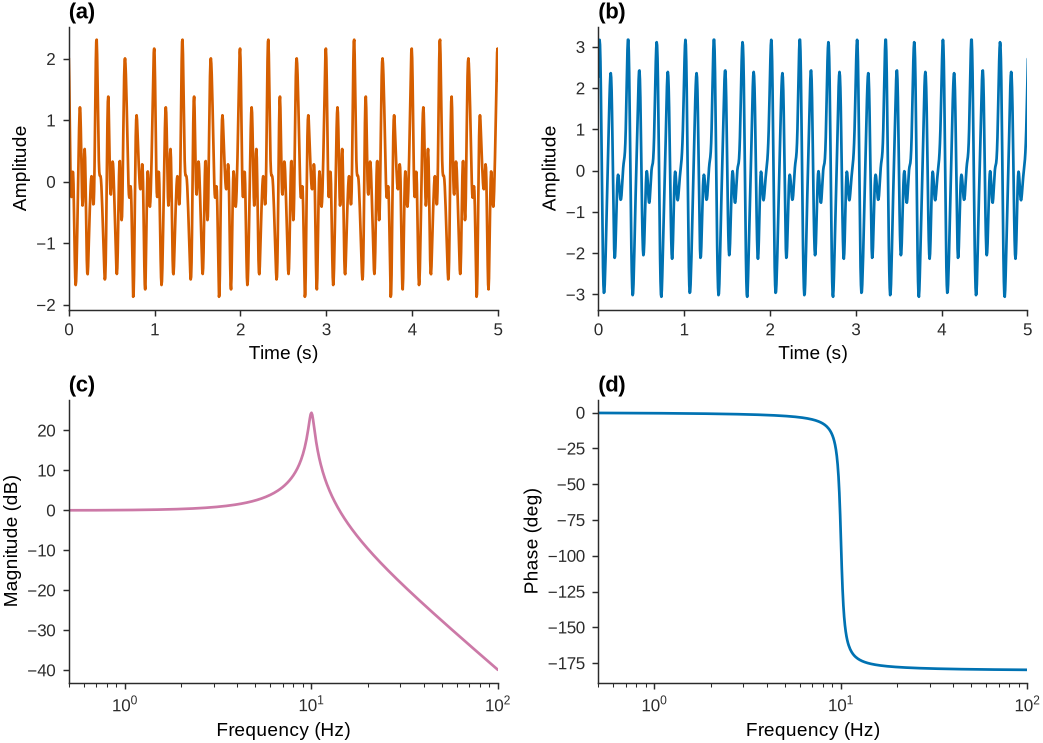
Figure 8:Simulating an LTI system’s response to an arbitrary input via FRF.
3.3Experimental FRF Extraction: Impact Hammer Testing
The FRF can be extracted experimentally using impact hammer testing. When the input is an ideal impulse , the Fourier transform becomes:
The system response to an impulse therefore directly yields the FRF:
In practice, the impact hammer approximates the impulse function over a finite frequency range, allowing direct measurement of through:
where and are the Fourier transforms of the measured response and force signals, respectively.
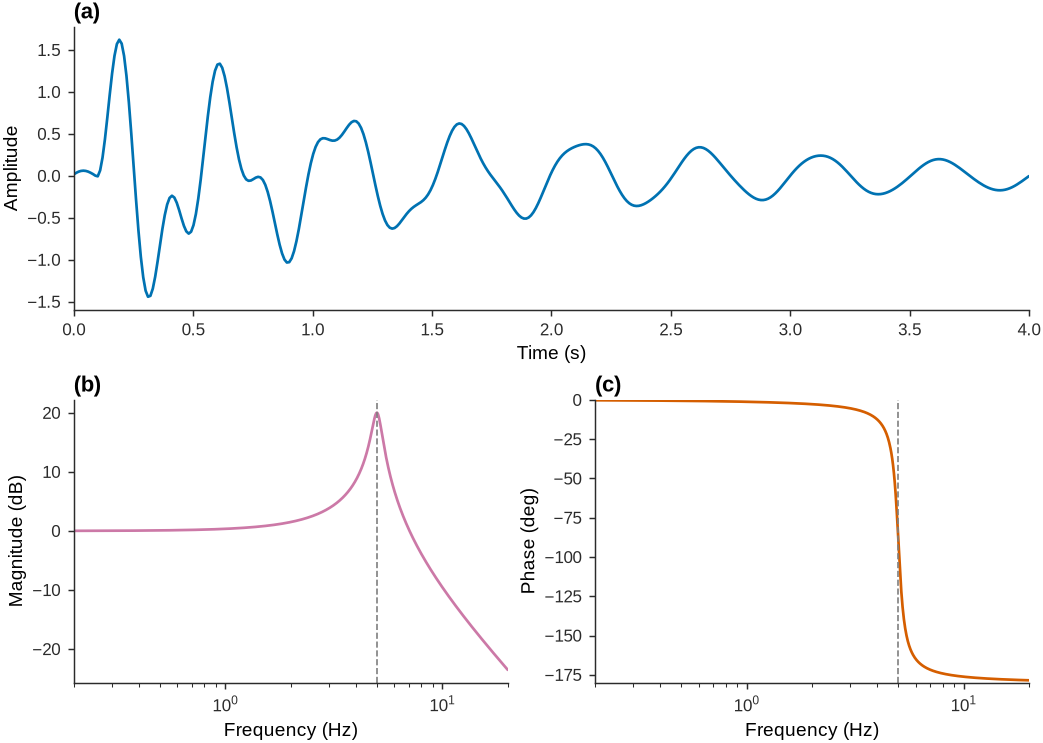
Figure 9:SDOF frequency response function demonstration showing analytical FRF, system response simulation using frequency domain multiplication, and comparison with time domain convolution results.
3.4Multiple Degree of Freedom Systems
For MDOF systems with degrees of freedom, the frequency response relationship becomes:
or in compact matrix form:
Each element is the FRF relating the response at DOF to a unit harmonic input at DOF , with all other inputs equal to zero.
For a system with modes, each FRF element has the modal expansion:
where:
and are the -th mode shape ordinates at DOFs and
is the -th modal mass
is the -th natural frequency in rad/s
is the -th modal damping ratio
Each FRF element thus contains contributions from all modes, weighted by the modal participation at the input and output locations.
3.5System Response for Multiple Inputs
For systems with multiple simultaneous inputs, the response at each DOF is the superposition of responses to all inputs:
This allows prediction of complex loading scenarios by combining individual FRF measurements with arbitrary input combinations.
Source
import numpy as np
import matplotlib.pyplot as plt
from scipy import signal, linalg
from matplotlib import rcParams

# Configure plotting
set_journal_style(scale=1.0)

class MDOFSystem:
    """5-DOF system representing a discretized bridge structure."""

    def __init__(self):
        # System properties
        self.n_dof = 5
        self.n_modes = 3  # First 3 modes

        # Modal parameters (typical bridge values)
        self.frequencies = [2.1, 6.8, 13.2]  # Hz
        self.damping_ratios = [0.02, 0.025, 0.03]
        self.modal_masses = [1000, 800, 600]  # kg

        # Mode shapes (normalized)
        self.mode_shapes = self._compute_mode_shapes()

    def _compute_mode_shapes(self):
        """Compute mode shapes for simply supported beam (analytical)."""
        # DOF positions along beam (normalized 0-1)
        positions = np.array([0.2, 0.4, 0.6, 0.8, 1.0])

        mode_shapes = np.zeros((self.n_dof, self.n_modes))

        for mode in range(self.n_modes):
            mode_num = mode + 1
            # Simply supported beam mode shapes
            for dof in range(self.n_dof):
                mode_shapes[dof, mode] = np.sin(mode_num * np.pi * positions[dof])

        # Normalize to unit modal mass
        for mode in range(self.n_modes):
            norm = np.sqrt(np.sum(mode_shapes[:, mode]**2))
            mode_shapes[:, mode] /= norm

        return mode_shapes

    def compute_frf_element(self, freq, i, j):
        """Compute single FRF element G_ij(f)."""
        G_ij = np.zeros(len(freq), dtype=complex)

        for r in range(self.n_modes):
            fn_r = self.frequencies[r]
            zeta_r = self.damping_ratios[r]
            M_r = self.modal_masses[r]
            phi_ir = self.mode_shapes[i, r]
            phi_jr = self.mode_shapes[j, r]

            # Modal FRF contribution
            wn_r = 2 * np.pi * fn_r
            denominator = wn_r**2 - (2*np.pi*freq)**2 + 1j*2*zeta_r*wn_r*(2*np.pi*freq)
            G_modal = (phi_ir * phi_jr / M_r) / denominator

            G_ij += G_modal

        return G_ij

    def compute_full_frf_matrix(self, freq):
        """Compute complete FRF matrix for all DOF pairs."""
        G_matrix = np.zeros((len(freq), self.n_dof, self.n_dof), dtype=complex)

        for i in range(self.n_dof):
            for j in range(self.n_dof):
                G_matrix[:, i, j] = self.compute_frf_element(freq, i, j)

        return G_matrix

    def simulate_response(self, freq, inputs_freq_domain):
        """Simulate system response to multiple inputs using FRF matrix."""
        # Get FRF matrix
        G_matrix = self.compute_full_frf_matrix(freq)

        # Initialize response
        responses = np.zeros((len(freq), self.n_dof), dtype=complex)

        # Matrix multiplication at each frequency
        for f_idx in range(len(freq)):
            responses[f_idx, :] = G_matrix[f_idx, :, :] @ inputs_freq_domain[f_idx, :]

        return responses

def create_test_inputs(t, fs):
    """Create multiple test inputs for MDOF system demonstration."""
    inputs = np.zeros((len(t), 5))  # 5 DOFs

    # Input 1: Impulse at DOF 1 (t=0.5s)
    impulse_idx = int(0.5 * fs)
    if impulse_idx < len(t):
        inputs[impulse_idx, 0] = 10 * fs  # Scaled impulse

    # Input 2: Harmonic at DOF 3 (2 Hz, starting at t=1s)
    start_idx = int(1.0 * fs)
    if start_idx < len(t):
        t_harmonic = t[start_idx:] - t[start_idx]
        inputs[start_idx:, 2] = 5 * np.sin(2 * np.pi * 2.1 * t_harmonic) * np.exp(-t_harmonic/2)

    # Input 3: Swept sine at DOF 5 (1-10 Hz over 2 seconds, starting at t=2s)
    sweep_start = int(2.0 * fs)
    sweep_duration = int(2.0 * fs)
    sweep_end = min(sweep_start + sweep_duration, len(t))
    if sweep_start < len(t):
        t_sweep = t[sweep_start:sweep_end] - t[sweep_start]
        freq_sweep = 1 + 9 * t_sweep / 2  # 1 to 10 Hz over 2 seconds
        inputs[sweep_start:sweep_end, 4] = 3 * np.sin(2 * np.pi * freq_sweep * t_sweep)

    return inputs

# System setup
system = MDOFSystem()
fs = 100  # Hz
duration = 6  # seconds
t = np.linspace(0, duration, int(fs * duration))
freq_analysis = np.linspace(0.1, 25, 1000)

# Create test inputs
inputs_time = create_test_inputs(t, fs)

# Transform inputs to frequency domain
inputs_freq = np.zeros((len(freq_analysis), system.n_dof), dtype=complex)
for dof in range(system.n_dof):
    # Interpolate input to analysis frequency grid
    input_fft = np.fft.fft(inputs_time[:, dof])
    freq_input = np.fft.fftfreq(len(t), 1/fs)

    # Extract positive frequencies and interpolate
    pos_mask = freq_input >= 0
    input_mag = np.abs(input_fft[pos_mask])
    input_phase = np.angle(input_fft[pos_mask])
    freq_pos = freq_input[pos_mask]

    # Interpolate the real and imaginary parts separately. np.angle wraps at
    # +/-pi; linear interpolation across that jump corrupts the spectrum.
    re_interp = np.interp(freq_analysis, freq_pos, np.real(input_fft[pos_mask]))
    im_interp = np.interp(freq_analysis, freq_pos, np.imag(input_fft[pos_mask]))
    inputs_freq[:, dof] = re_interp + 1j * im_interp

# Simulate system response
responses_freq = system.simulate_response(freq_analysis, inputs_freq)

# Convert responses back to time domain (approximate)
responses_time = np.zeros((len(t), system.n_dof))
for dof in range(system.n_dof):
    # Use IFFT with zero-padding for time domain conversion
    response_extended = np.zeros(len(t), dtype=complex)
    # Simple interpolation back to time domain frequency grid
    freq_time = np.fft.fftfreq(len(t), 1/fs)

    # Only use positive frequencies (including DC and Nyquist)
    n_pos = len(t) // 2 + 1  # Includes DC and Nyquist for even length
    pos_freq_time = freq_time[:n_pos]

    # Interpolate the real and imaginary parts separately. Interpolating
    # np.angle() would jump across the +/-pi wrap and corrupt the spectrum.
    re_interp = np.interp(pos_freq_time, freq_analysis, np.real(responses_freq[:, dof]))
    im_interp = np.interp(pos_freq_time, freq_analysis, np.imag(responses_freq[:, dof]))
    response_interp = re_interp + 1j * im_interp

    # Assign positive frequencies
    response_extended[:n_pos] = response_interp

    # Handle negative frequencies (conjugate symmetry for real signals)
    # For even length: negative freqs = conj(positive freqs excluding DC and Nyquist)
    # For odd length: negative freqs = conj(positive freqs excluding DC)
    if len(t) % 2 == 0:  # Even length
        response_extended[n_pos:] = np.conj(response_interp[-2:0:-1])  # Exclude Nyquist and DC
    else:  # Odd length
        response_extended[n_pos:] = np.conj(response_interp[-1:0:-1])  # Exclude DC only

    responses_time[:, dof] = np.real(np.fft.ifft(response_extended))

# ---- Multi-panel MDOF FRF visualization (balanced 2 x 3 journal layout) ----
fig, axs = plt.subplots(2, 3, figsize=(7.2, 4.6), constrained_layout=True)

# Coherent qualitative palette (color-blind friendly)
dof_palette = ['#4477AA', '#EE6677', '#228833', '#CCBB44', '#AA3377']  # 5 DOFs
mode_palette = ['#0072B2', '#D55E00', '#009E73']                       # 3 modes

# (a) Mode shapes
ax = axs[0, 0]
dof_positions = np.arange(1, system.n_dof + 1)
for m in range(system.n_modes):
    ax.plot(dof_positions, system.mode_shapes[:, m], 'o-',
            color=mode_palette[m], markersize=7, markeredgecolor='white',
            markeredgewidth=0.8, label=f'Mode {m+1} ({system.frequencies[m]:.1f} Hz)')
ax.axhline(0, color='0.5', lw=0.8, zorder=1)
ax.set_xlabel('DOF number')
ax.set_ylabel('Modal amplitude')
ax.set_xticks(dof_positions)
ax.legend(loc='upper right', fontsize=7)
panel_label(ax, 'a')

# (b) FRF element G_22(f): superposition of modal contributions
ax = axs[0, 1]
i_ex, j_ex = 1, 1
G_total = system.compute_frf_element(freq_analysis, i_ex, j_ex)
for r in range(system.n_modes):
    fn_r = system.frequencies[r]
    zeta_r = system.damping_ratios[r]
    M_r = system.modal_masses[r]
    phi = system.mode_shapes[i_ex, r] * system.mode_shapes[j_ex, r]
    wn = 2 * np.pi * fn_r
    denom = wn**2 - (2*np.pi*freq_analysis)**2 + 1j*2*zeta_r*wn*(2*np.pi*freq_analysis)
    ax.semilogy(freq_analysis, np.abs((phi / M_r) / denom), '--',
                color=mode_palette[r], lw=1.4, alpha=0.9, label=f'Mode {r+1}')
ax.semilogy(freq_analysis, np.abs(G_total), color='0.12', lw=2.2, label=r'Total $G_{22}$')
for r in range(system.n_modes):
    ax.axvline(system.frequencies[r], color=mode_palette[r], ls=':', lw=0.9, alpha=0.6)
ax.set_xlim(0, 20)
ax.set_xlabel('Frequency (Hz)')
ax.set_ylabel(r'$|G_{22}(f)|$  (m/N)')
ax.legend(ncol=2, fontsize=7)
panel_label(ax, 'b')

# (c) FRF matrix magnitude at the first resonance (normalized)
ax = axs[0, 2]
res_f = system.frequencies[0]
Gmat = np.zeros((system.n_dof, system.n_dof))
for i in range(system.n_dof):
    for j in range(system.n_dof):
        Gmat[i, j] = np.abs(system.compute_frf_element(np.array([res_f]), i, j)[0])
Gnorm = Gmat / Gmat.max()
im = ax.imshow(Gnorm, cmap='viridis', vmin=0, vmax=1)
ax.set_xticks(range(system.n_dof)); ax.set_xticklabels(range(1, system.n_dof + 1))
ax.set_yticks(range(system.n_dof)); ax.set_yticklabels(range(1, system.n_dof + 1))
ax.set_xlabel('Input DOF $j$')
ax.set_ylabel('Output DOF $i$')
ax.grid(False)
for i in range(system.n_dof):
    for j in range(system.n_dof):
        ax.text(j, i, f'{Gnorm[i, j]:.2f}', ha='center', va='center',
                color='white' if Gnorm[i, j] < 0.55 else 'black', fontsize=7.5)
cbar = fig.colorbar(im, ax=ax, fraction=0.046, pad=0.04)
cbar.set_label('Normalized $|G|$')
panel_label(ax, 'c')

# (d) Reciprocity: G_13(f) and G_31(f) coincide
ax = axs[1, 0]
G_13 = system.compute_frf_element(freq_analysis, 0, 2)
G_31 = system.compute_frf_element(freq_analysis, 2, 0)
ax.semilogy(freq_analysis, np.abs(G_13), color='#0072B2', lw=2.2, label=r'$G_{13}(f)$')
ax.semilogy(freq_analysis, np.abs(G_31), '--', color='#D55E00', lw=2.0,
            label=r'$G_{31}(f)$ (overlaid)')
ax.set_xlim(0, 20)
ax.set_xlabel('Frequency (Hz)')
ax.set_ylabel(r'$|G(f)|$  (m/N)')
ax.legend()
panel_label(ax, 'd')

# (e) Multiple input forces (time domain). The impulse dwarfs the others, so it is
#     drawn as an annotated marker while the harmonic and chirp keep their true scale.
ax = axs[1, 1]
ax.plot(t, inputs_time[:, 2], color=dof_palette[2], lw=1.4, label='Harmonic @ DOF 3')
ax.plot(t, inputs_time[:, 4], color=dof_palette[4], lw=1.4, label='Chirp @ DOF 5')
imp_val = inputs_time[:, 0].max()
t_imp = t[np.argmax(inputs_time[:, 0])]
ax.axvline(t_imp, color=dof_palette[0], lw=1.4, alpha=0.55)
ax.annotate(f'Impulse @ DOF 1\n({imp_val:.0f} N)', xy=(t_imp, 8.2),
            xytext=(t_imp + 0.5, 6.0), color=dof_palette[0], fontsize=8,
            arrowprops=dict(arrowstyle='->', color=dof_palette[0], lw=1.4))
ax.set_xlim(0, 6)
ax.set_ylim(-7, 9.5)
ax.set_xlabel('Time (s)')
ax.set_ylabel('Input force (N)')
ax.legend(loc='lower right', fontsize=7)
panel_label(ax, 'e')

# (f) System response at all DOFs (time domain)
ax = axs[1, 2]
for dof in range(system.n_dof):
    ax.plot(t, responses_time[:, dof], color=dof_palette[dof], lw=1.1,
            label=f'DOF {dof+1}')
ax.set_xlim(0, 6)
ax.set_xlabel('Time (s)')
ax.set_ylabel('Response (m)')
ax.legend(ncol=2, fontsize=7)
panel_label(ax, 'f')

plt.show()

# Create MDOF analysis results DataFrame
import pandas as pd
mdof_analysis_results = pd.DataFrame({
    'System Property': ['DOFs', 'Modes Analyzed', 'Frequency Range (Hz)', 'Matrix Size', 'Independent Elements'],
    'Value': [system.n_dof, system.n_modes, f'{freq_analysis[0]:.1f} - {freq_analysis[-1]:.1f}',
              f'{system.n_dof} × {system.n_dof}', f'{system.n_dof*(system.n_dof+1)//2}'],
    'Description': ['Degrees of Freedom', 'First 3 bending modes', 'Analysis bandwidth',
                   'Full FRF matrix', 'Due to reciprocity']
})

# Modal parameters summary
modal_parameters = pd.DataFrame({
    'Mode': [f'Mode {r+1}' for r in range(system.n_modes)],
    'Frequency (Hz)': [f'{system.frequencies[r]:.1f}' for r in range(system.n_modes)],
    'Damping (%)': [f'{system.damping_ratios[r]*100:.1f}' for r in range(system.n_modes)],
    'Modal Mass (kg)': [f'{system.modal_masses[r]:.0f}' for r in range(system.n_modes)]
})

# Reciprocity verification
max_reciprocity_error = 0
for i in range(system.n_dof):
    for j in range(i+1, system.n_dof):
        G_ij = system.compute_frf_element(np.array([system.frequencies[0]]), i, j)[0]
        G_ji = system.compute_frf_element(np.array([system.frequencies[0]]), j, i)[0]
        error = abs(G_ij - G_ji)
        max_reciprocity_error = max(max_reciprocity_error, error)

# Display all results
display(mdof_analysis_results.style.hide(axis='index').set_properties(**{'text-align': 'left'}))
display(modal_parameters.style.hide(axis='index').set_properties(**{'text-align': 'left'}))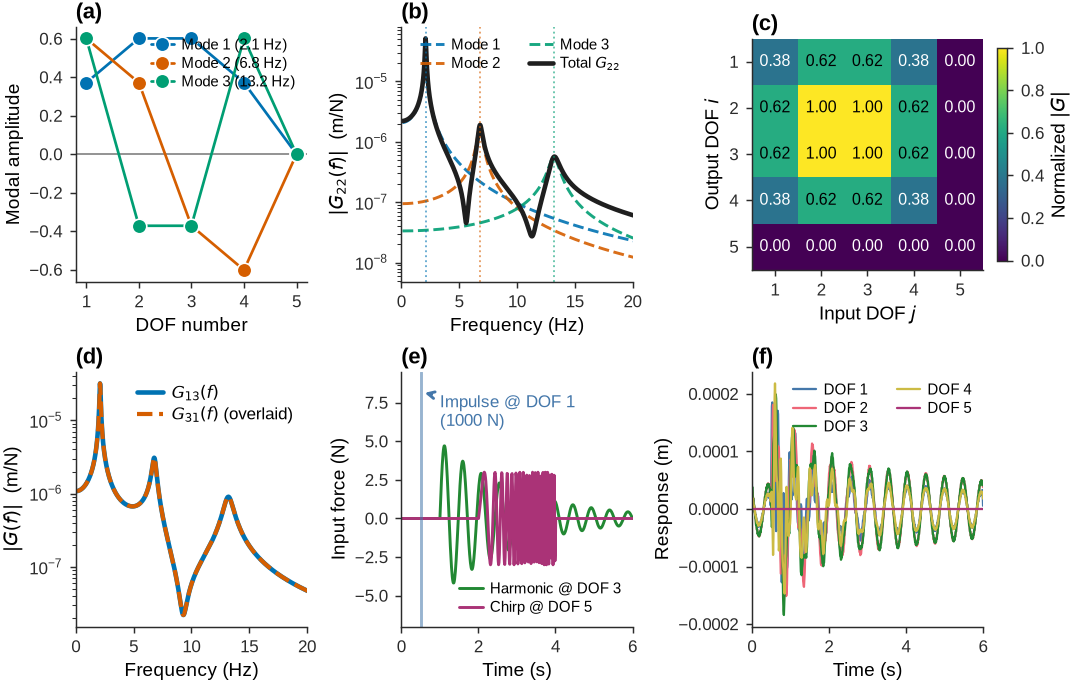
Figure 10:Frequency response function (FRF) behavior of a 5-DOF bridge model with three modes. (a) Mode shapes. (b) The driving-point FRF G22 as a superposition of modal contributions, with peaks at the natural frequencies. (c) Normalized magnitude of the full FRF matrix at the first resonance, showing the symmetric (reciprocal) coupling between DOFs. (d) Reciprocity: the transfer FRFs G13 and G31 coincide. (e) Three simultaneous input forces and (f) the resulting response at every DOF, obtained by combining the FRF matrix with the inputs.
3.6Limitations and Practical Considerations
Measurement noise significantly affects FRF quality, particularly in anti-resonance regions between modes where response amplitudes are naturally low. This makes accurate damping estimation difficult and can mask higher-order modes with low modal participation at the measurement locations.
These limitations motivate the spectral analysis approaches discussed in the following section, which extract modal information from noisy measurements under ambient excitation without requiring controlled input forces.
4Frequency Domain Filtering and Applications
Frequency-domain filtering decomposes a signal into its frequency components via the Fourier transform, selectively attenuates or removes specific frequency ranges, and then reconstructs the signal via the inverse transform. This approach provides precise control over which frequencies are preserved or removed.
The process has three steps: the FFT converts the time-domain signal to its frequency representation; a filter function multiplies the frequency components, scaling or eliminating unwanted ones; and the inverse FFT reconstructs the filtered signal. Many noise sources and signal artifacts occupy distinct frequency ranges, making this approach effective at targeting them specifically.
The mathematical foundation rests on the convolution theorem, which states that convolution in the time domain corresponds to multiplication in the frequency domain:
where denotes the Fourier transform operator, represents convolution, and indicates pointwise multiplication. This relationship makes frequency-domain filtering computationally efficient, particularly for long signals where direct convolution is expensive.
4.1Filter Types and Characteristics
4.1.1Lowpass Filters
Lowpass filters preserve low-frequency components while attenuating high-frequency content above a specified cutoff frequency. They are used for removing high-frequency noise, preventing aliasing during sampling, and smoothing signals. The ideal lowpass filter has a rectangular frequency response, but practical implementations use smoother transitions to avoid time-domain artifacts. The cutoff frequency marks where the filter begins significant attenuation, typically at the half-power point where amplitude drops to of its maximum value.
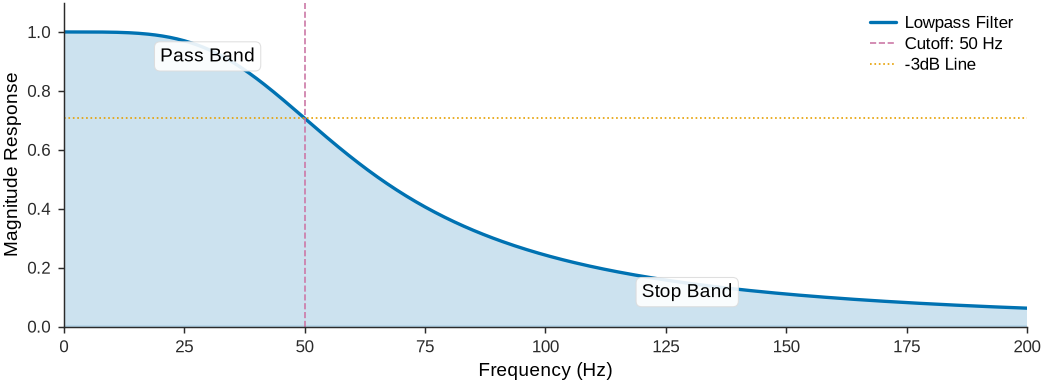
Figure 11:Lowpass filter frequency response demonstrating the preservation of low frequencies while attenuating high frequencies above the cutoff.
4.1.2Highpass Filters
Highpass filters preserve high-frequency components while attenuating low-frequency content below the cutoff frequency. They remove DC offsets, eliminate low-frequency drift, and reduce baseline wandering. Highpass filtering is important when sensor data exhibits slow variations unrelated to the phenomenon of interest. The ideal highpass filter response is:
where represents the cutoff frequency.
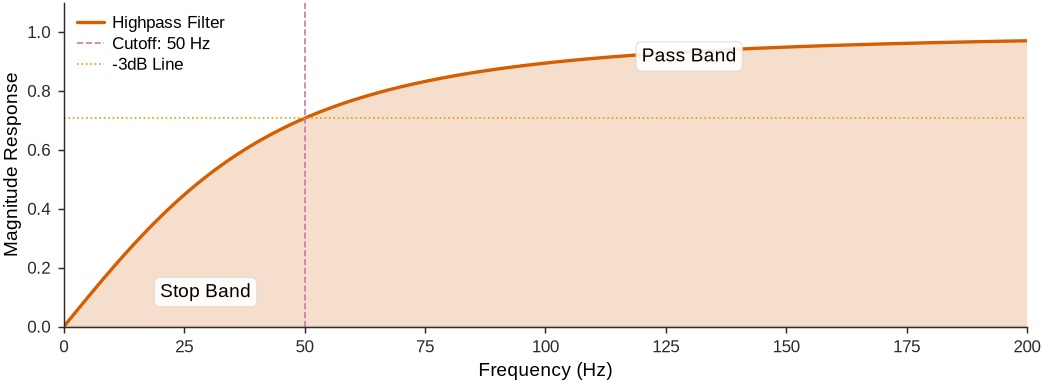
Figure 12:Highpass filter frequency response showing attenuation of low frequencies below the cutoff while preserving high-frequency content.
4.1.3Bandpass Filters
Bandpass filters preserve frequencies within a specific range while attenuating components outside that band. They are useful for isolating signals that occupy known frequency ranges, such as extracting specific vibrational modes from structural response data or focusing on particular frequency bands in seismic analysis. The bandpass response is the product of highpass and lowpass responses:
where and represent the highpass and lowpass components, respectively.
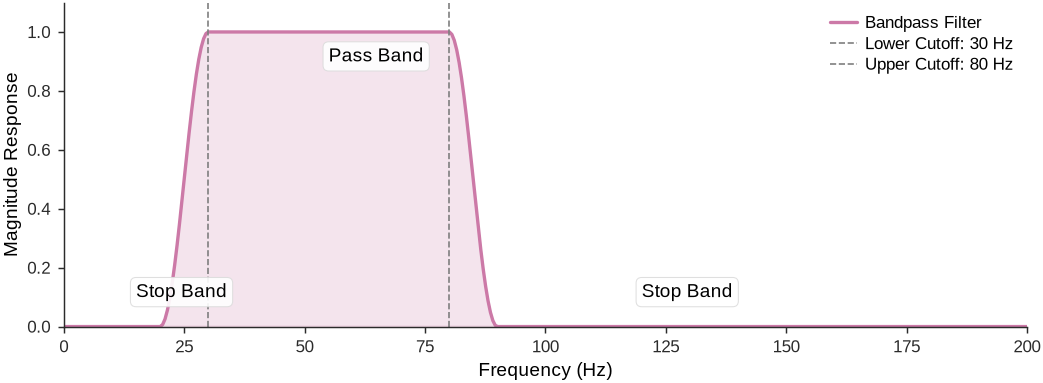
Figure 13:Bandpass filter frequency response demonstrating selective preservation of frequencies within a specified band while rejecting components outside this range.
4.2Practical Applications
4.2.1Aliasing Prevention
Aliasing occurs when high-frequency components exceed the Nyquist frequency during sampling, causing them to appear as false low-frequency artifacts in the digitized signal. The Nyquist-Shannon sampling theorem requires the sampling frequency to exceed twice the highest frequency component in the signal. Lowpass anti-aliasing filters applied before sampling ensure that no frequency components above the Nyquist frequency reach the analog-to-digital converter.
The relationship between sampling frequency and maximum signal frequency is governed by:
where is the sampling frequency and is the highest frequency component in the signal.
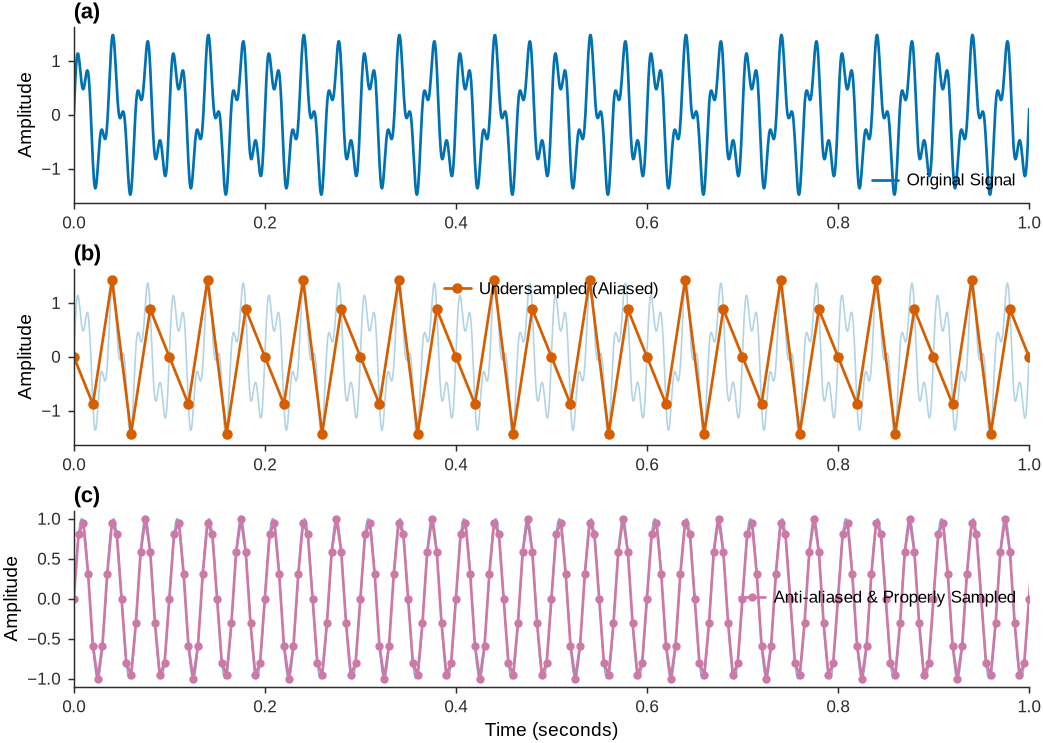
Figure 14:Demonstration of aliasing effects showing how high-frequency components appear as false low frequencies when the sampling rate is insufficient, and how anti-aliasing filtering prevents this distortion.
4.2.2DC Offset and Baseline Correction
DC offsets and low-frequency baseline drift commonly affect sensor measurements, particularly in accelerometer and displacement data. These artifacts can severely distort subsequent processing steps, especially integration operations that accumulate errors over time. Highpass filtering removes DC components and low-frequency drift while preserving the dynamic content of interest. The highpass cutoff frequency must be chosen carefully to avoid removing genuine low-frequency components.
When integrating acceleration data to obtain velocity and displacement, any DC bias is amplified through integration, producing unrealistic linear trends in velocity and quadratic trends in displacement. This is particularly problematic in structural monitoring where true displacement measurements are needed to assess structural performance.
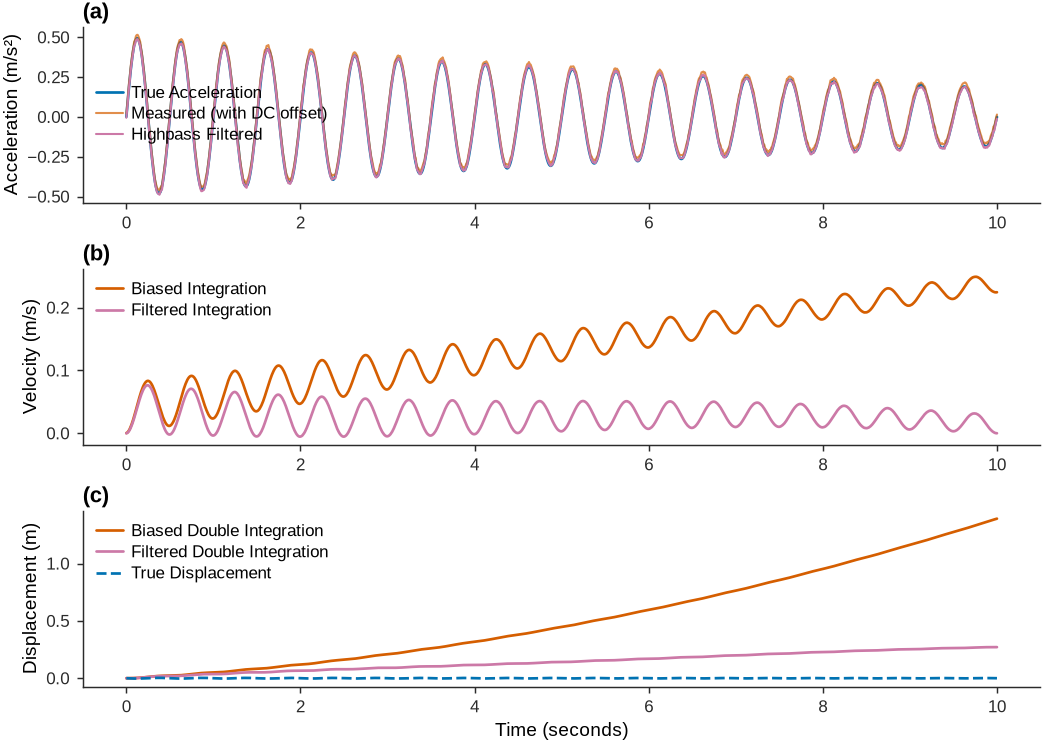
Figure 15:Impact of DC offset on double integration of acceleration data, showing how small bias errors lead to unrealistic displacement trends and how highpass filtering corrects this issue.
4.2.3Highpass Filter Implementation
Implementing highpass filters in the frequency domain transforms the signal, applies the filter function, and applies the inverse transform while avoiding artifacts. Proper implementation requires attention to filter design parameters, frequency resolution, and edge effects.
Compared to time-domain approaches, frequency-domain implementation offers computational efficiency for long signals and precise frequency control. Transition regions must be designed carefully to minimize ringing artifacts in the time domain.
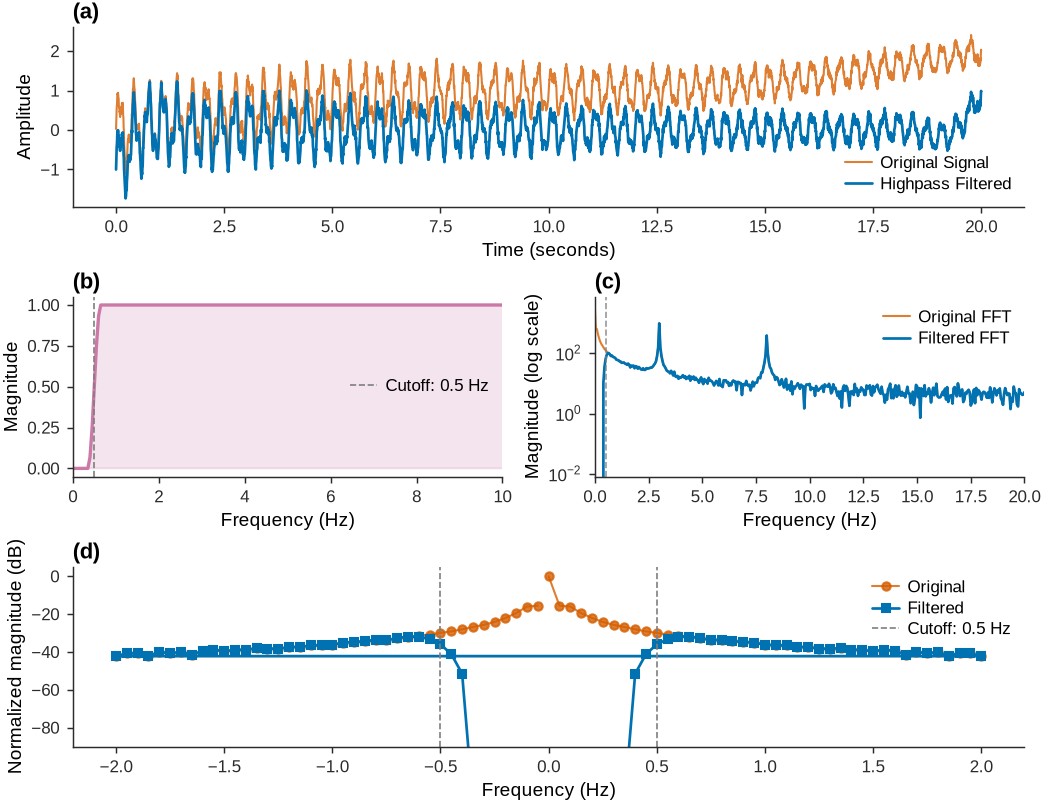
Figure 16:Practical implementation of highpass filtering in Python showing the complete process from signal analysis through filter design to filtered output, with frequency domain visualization.
The effectiveness of frequency-domain filtering depends on proper filter design and parameter selection. The cutoff frequency must be chosen based on the signal’s frequency content and the application requirements. Transition regions should provide adequate attenuation while minimizing time-domain ringing. In practice, iterative refinement of filter parameters is often necessary to preserve the essential characteristics of the signal.
5Spectral Analysis: From Correlation to Power Spectra
In the previous chapter, we established relationships between input and output correlations through the convolution of impulse response functions. For a system with impulse response excited by zero-mean white noise, the output autocorrelation function contains the same modal information as the impulse response:
The frequency domain offers a direct path to extracting modal parameters and understanding energy distribution across frequencies. Spectral analysis transforms correlation functions into power spectral densities, revealing frequency content that can be obscured in time-domain representations.
Stochastic processes have power spectral densities that describe how signal power is distributed across frequencies. This representation is effective for identifying structural modes because each mode contributes energy at specific frequencies that appear as peaks in the power spectrum.
5.1Power Spectral Density
5.1.1Continuous-Time Definition
For a continuous-time stochastic process , the power spectral density is defined as the Fourier transform of the autocorrelation function :
The inverse relationship recovers the autocorrelation function from the power spectral density:
The inverse relationship of the PSD highlights its initial value: , which follows from Parseval’s theorem. For zero-mean signals, this integral equals the signal variance , so the area under the spectral density curve equals the variance.
5.1.2Discrete-Time Formulation
For discrete-time stochastic processes with sampling interval , the power spectral density is obtained through the Discrete-Time Fourier Transform (DTFT) of the autocorrelation sequence :
The inverse DTFT relationship becomes:
where . This discrete formulation connects directly to the digital signal processing techniques used in experimental modal analysis.
5.1.3Fundamental Properties
The PSD has several important properties. It is always real and non-negative, and , ensuring it is physically meaningful as an energy density. For real-valued processes it also exhibits even symmetry, , so complete information is contained in the positive frequency range for discrete-time signals.
The total variance of the process equals the area under the power spectral density curve:
The power spectrum thus provides a frequency-by-frequency decomposition of the signal’s variance, where each infinitesimal band contributes to the total variance.
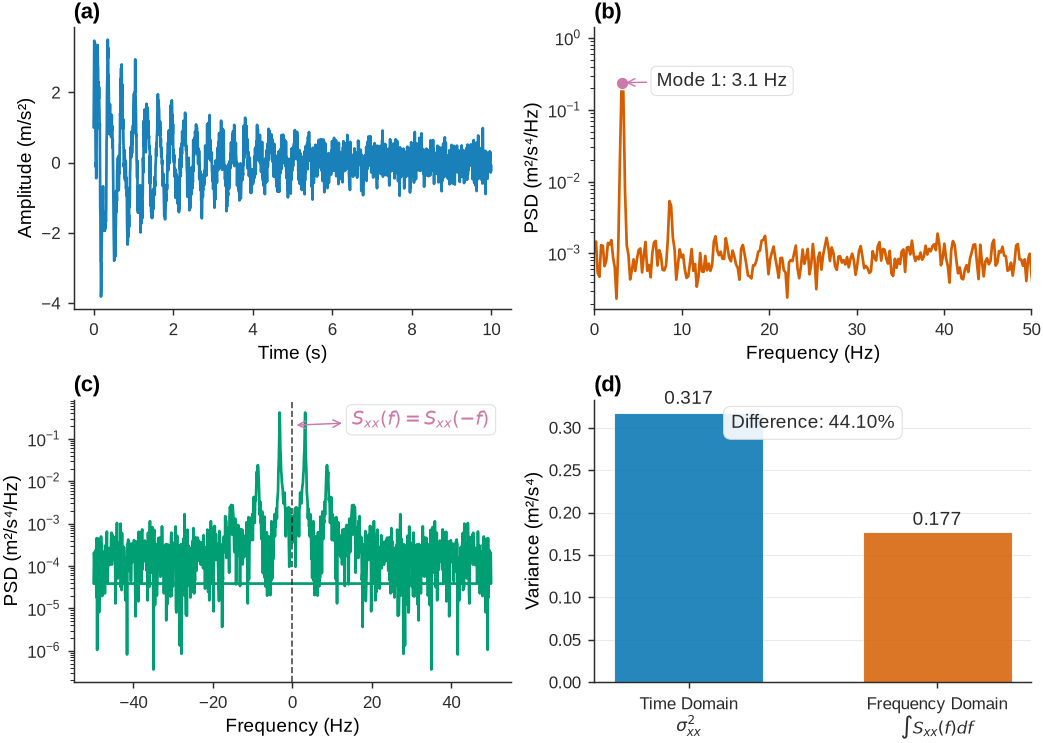
Figure 18:Demonstration of power spectral density properties including symmetry, non-negativity, and variance relationship for a multi-component signal.
5.2Cross-Power Spectral Density
The cross-power spectral density characterizes the frequency-domain relationship between excitation and response in structural systems. For two stochastic processes and , the cross-PSD is the Fourier transform of their cross-correlation function.
5.2.1Continuous-Time Cross-PSD
The cross-power spectral density between input and output is:
with the inverse relationship:
5.2.2Discrete-Time Cross-PSD
For discrete-time processes, the cross-power spectral density becomes:
Unlike auto-PSDs, cross-PSDs are generally complex-valued, , containing both magnitude and phase information about the relationship between the two processes. The phase provides information about time delays and system dynamics, while the magnitude indicates coupling strength at each frequency.
The cross-PSD satisfies the conjugate symmetry relationship , which ensures that the cross-correlation function remains real-valued.
5.3Magnitude-Squared Coherence
Coherence quantifies the degree of linear relationship between two signals as a function of frequency. It ranges from 0 to 1, where 1 indicates perfect linear correlation at a given frequency and 0 indicates no linear relationship. Magnitude-squared coherence is useful for identifying coupled oscillations in structural vibrations and other applications where two signals share common spectral components.
where is the cross-PSD between signals and , and and are the respective auto-PSDs. This normalization keeps coherence values between zero and unity regardless of signal amplitude differences.
Source
import numpy as np
import matplotlib.pyplot as plt
from scipy import signal
import matplotlib.gridspec as gridspec

# Set professional (journal) plotting parameters
set_journal_style()

# Generate test signals with shared spectral content
np.random.seed(42)
fs = 1000  # Sampling frequency
t = np.linspace(0, 4, 4*fs)

# Base signal components (shared between both signals)
f1, f2, f3 = 10, 25, 50  # Hz
base_signal = (np.sin(2*np.pi*f1*t) +
               0.7*np.sin(2*np.pi*f2*t) +
               0.4*np.sin(2*np.pi*f3*t))

# Signal 1: Original amplitude with moderate noise
signal1 = 2.0 * base_signal + 0.3 * np.random.randn(len(t))

# Signal 2: Different amplitude with higher noise level
signal2 = 0.8 * base_signal + 0.6 * np.random.randn(len(t))

# Calculate coherence
nperseg = 512  # Window length for coherence estimation
f_coh, coherence = signal.coherence(signal1, signal2, fs, nperseg=nperseg)

# Create figure with custom layout
fig = plt.figure(figsize=(7.0, 4.6), constrained_layout=True)
gs = fig.add_gridspec(2, 2, height_ratios=[1, 1])

# Time domain plots
ax1 = fig.add_subplot(gs[0, 0])
ax1.plot(t[:2000], signal1[:2000], color='#0072B2', linewidth=1.0, label='Signal 1')
ax1.set_xlabel('Time (s)')
ax1.set_ylabel('Amplitude')
ax1.set_xlim(0, 2)
panel_label(ax1, 'a')

ax2 = fig.add_subplot(gs[0, 1])
ax2.plot(t[:2000], signal2[:2000], color='#CC79A7', linewidth=1.0, label='Signal 2')
ax2.set_xlabel('Time (s)')
ax2.set_ylabel('Amplitude')
ax2.set_xlim(0, 2)
panel_label(ax2, 'b')

# Coherence plot spanning both columns
ax3 = fig.add_subplot(gs[1, :])
ax3.plot(f_coh, coherence, color='#E69F00', linewidth=1.3)
ax3.axhline(y=0.5, color='#7F7F7F', linestyle='--', alpha=0.7, linewidth=0.8)
ax3.set_xlabel('Frequency (Hz)')
ax3.set_ylabel('Magnitude-Squared Coherence')
ax3.set_xlim(0, 100)
ax3.set_ylim(0, 1.05)
panel_label(ax3, 'c')

# Add frequency markers for the main spectral components
for freq in [f1, f2, f3]:
    ax3.axvline(x=freq, color='#D55E00', linestyle=':', alpha=0.7, linewidth=0.8)
    ax3.text(freq, 0.95, f'{freq} Hz', rotation=90, ha='right', va='top',
             fontsize=8, color='#D55E00')

# Add coherence threshold annotation
ax3.text(80, 0.52, 'Threshold = 0.5', fontsize=8, color='#7F7F7F')

plt.show()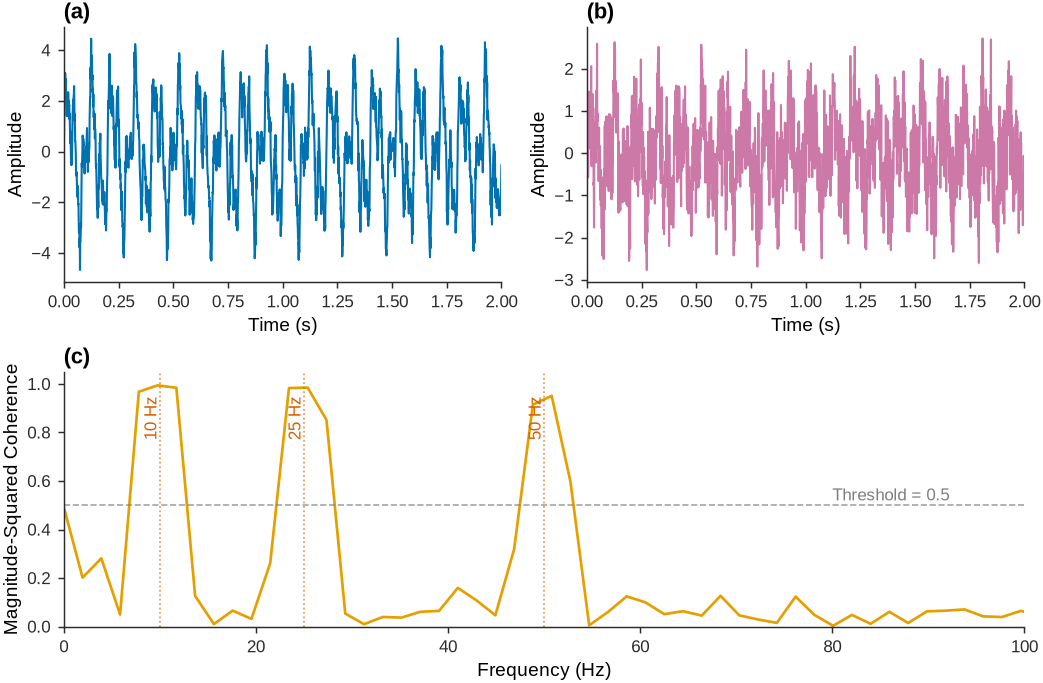
Figure 19:Coherence analysis of two signals.
5.4Input-Output Relationships in Frequency Domain
A central result of spectral analysis is that the time-domain convolution relationship becomes multiplication in the frequency domain. From the previous chapter:
Taking the Fourier transform of both sides and applying the convolution theorem, this time-domain convolution becomes frequency-domain multiplication:
where is the frequency response function (Fourier transform of the impulse response ) and is its squared magnitude.
The output power spectrum therefore equals the input power spectrum multiplied by . For white noise excitation where (constant across all frequencies), the output power spectrum directly reflects the system’s frequency response:
5.5Practical Spectral Estimation
5.5.1DFT-Based Spectral Estimation
In practice, PSDs are estimated from finite-length data records using the DFT. For measured time series and of length samples, the basic spectral estimates are:
where and are the DFT coefficients, and the overline denotes complex conjugation.
5.6Challenges in Spectral Estimation
Direct DFT-based spectral estimation has several limitations. Spectral leakage occurs when signal frequencies do not align with DFT bin centers, spreading energy across multiple bins. Windowing the data reduces leakage at the cost of frequency resolution. The variance of spectral estimates remains high regardless of record length, requiring averaging techniques to achieve reliable estimates.
5.7Welch’s Method for Improved Estimation
Welch’s method addresses these limitations by dividing the data record into overlapping segments, windowing each segment, computing the DFT, and averaging the resulting periodograms. This trades frequency resolution for reduced variance in the spectral estimates.
For a data record of length divided into overlapping segments of length , the Welch estimate becomes:
where is the DFT of the -th windowed segment, and is the normalization factor accounting for the window power.
Source
import numpy as np
import matplotlib.pyplot as plt
from scipy import signal

def generate_test_signal():
    """Generate a test signal with known spectral content plus noise."""
    np.random.seed(42)
    fs = 200  # Hz
    N = 4096  # Long record
    t = np.arange(N) / fs

    # Signal components: two closely spaced tones plus noise
    f1, f2 = 10.0, 12.5  # Hz - closely spaced
    f3 = 25.0  # Hz - well separated

    signal_clean = (2.0 * np.sin(2*np.pi*f1*t) +
                   1.5 * np.sin(2*np.pi*f2*t) +
                   1.0 * np.sin(2*np.pi*f3*t))

    # Add colored noise to make it more realistic
    noise_white = 0.5 * np.random.randn(N)
    # Low-pass filter the noise to make it more like structural response
    b, a = signal.butter(4, 40/(fs/2), 'low')
    noise_colored = signal.filtfilt(b, a, noise_white)

    signal_noisy = signal_clean + 0.3 * noise_colored

    return t, signal_noisy, fs, [f1, f2, f3]

def compare_spectral_methods(x, fs):
    """Compare different spectral estimation methods."""
    N = len(x)

    # Method 1: Direct periodogram (single DFT)
    frequencies_direct, psd_direct = signal.periodogram(x, fs, window='hann')

    # Method 2: Welch's method (multiple overlapped segments)
    frequencies_welch, psd_welch = signal.welch(x, fs, nperseg=512,
                                               noverlap=256, window='hann')

    # Method 3: Welch with different parameters (higher resolution)
    frequencies_welch_hr, psd_welch_hr = signal.welch(x, fs, nperseg=1024,
                                                      noverlap=512, window='hann')

    # Method 4: Multiple realizations for variance analysis
    # Split data into chunks and compute individual periodograms
    n_chunks = 8
    chunk_size = N // n_chunks
    psd_individual = []

    for i in range(n_chunks):
        start_idx = i * chunk_size
        end_idx = start_idx + chunk_size
        chunk = x[start_idx:end_idx]
        if len(chunk) >= 256:
            f_chunk, psd_chunk = signal.periodogram(chunk, fs, window='hann')
            if i == 0:
                frequencies_chunks = f_chunk
            psd_individual.append(psd_chunk)

    psd_individual = np.array(psd_individual)
    psd_mean = np.mean(psd_individual, axis=0)
    psd_std = np.std(psd_individual, axis=0)

    return {
        'direct': (frequencies_direct, psd_direct),
        'welch': (frequencies_welch, psd_welch),
        'welch_hr': (frequencies_welch_hr, psd_welch_hr),
        'chunks': (frequencies_chunks, psd_individual, psd_mean, psd_std)
    }

# Generate test signal
t, x, fs, true_freqs = generate_test_signal()
results = compare_spectral_methods(x, fs)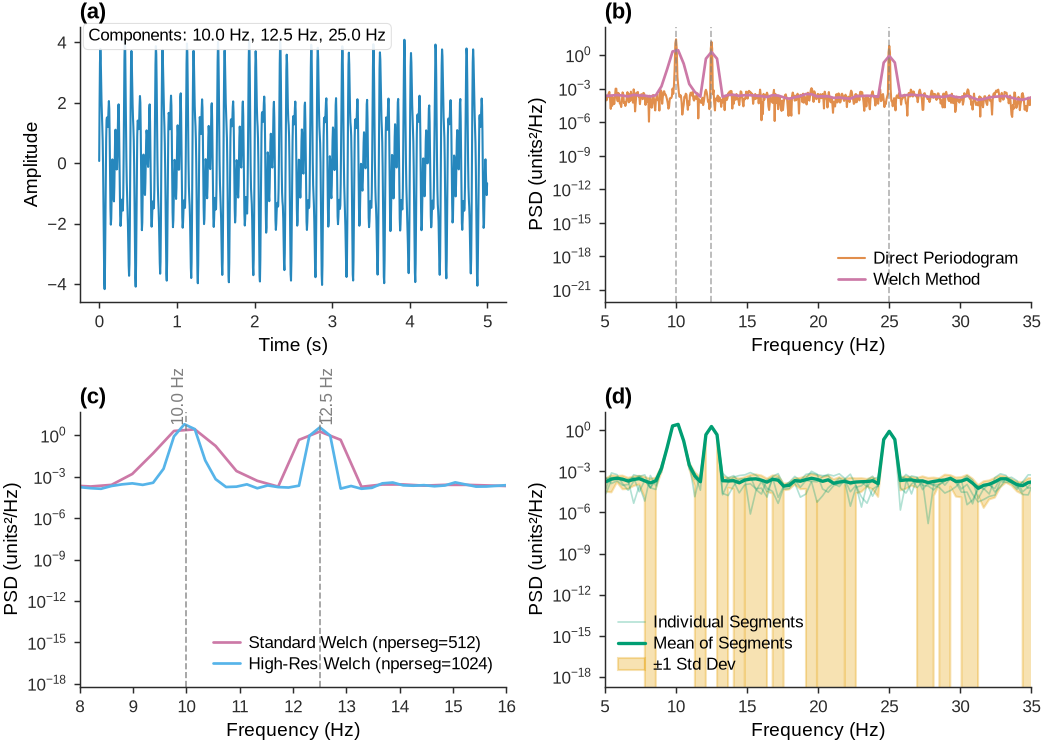
Figure 20:Comparison of spectral estimation methods showing the trade-offs between frequency resolution and variance reduction.
6Non-Parametric Frequency-Domain System Identification
Non-parametric frequency-domain system identification extracts modal parameters directly from measured data without assuming specific mathematical models. These methods work with frequency response functions or power spectral densities to identify natural frequencies, damping ratios, and mode shapes. Unlike parametric methods that fit predetermined model structures, non-parametric approaches let the data reveal the system’s characteristics.
Two approaches dominate practical applications. Peak picking estimates FRFs and extracts modal parameters from individual peaks. Frequency Domain Decomposition (FDD) uses singular value decomposition (SVD) of PSD matrices to separate closely spaced modes and extract mode shapes from output-only measurements.
Both methods are valuable for ambient vibration testing where input forces cannot be measured. They handle multiple modes simultaneously and can identify mode shapes from multiple measurement points, making them well suited for large structural systems such as bridges and buildings.
6.1Peak Picking Method
6.1.1Frequency Response Function Estimation
The FRF describes the relationship between input and output in the frequency domain. For measured input and output , it is estimated as:
where is the cross-power spectral density and is the input auto-power spectral density.
For ambient excitation modeled as white noise, the input PSD is constant: . The FRF estimate simplifies to:
The magnitude peaks at natural frequencies, with peak heights related to modal amplitudes and peak widths related to damping ratios.
6.2Modal Parameter Extraction
Near each natural frequency , the FRF for a lightly damped SDOF system takes the form:
where is the modal amplitude, is the natural frequency, and is the damping ratio.
The natural frequency corresponds to the peak frequency in . The damping ratio can be extracted using the half-power bandwidth method:
where and are the frequencies on either side of the peak where .
Other methods fit theoretical models to the measured spectra near each peak. The Rational Fraction Polynomial method represents the FRF as a ratio of polynomials in frequency, enabling simultaneous identification of multiple modes.
Source
import numpy as np
from scipy import signal, optimize
import pandas as pd

def sdof_psd_model(f, fn, zeta, A, noise_level):
    """Theoretical PSD for SDOF system under white noise excitation."""
    denominator = (fn**2 - f**2)**2 + (2*zeta*fn*f)**2
    return A**2 / denominator + noise_level

def generate_multi_mode_psd():
    """Generate realistic multi-mode power spectral density."""
    np.random.seed(42)

    # Frequency vector
    f = np.linspace(0.1, 30, 2000)

    # True modal parameters
    modes = [
        {'fn': 3.2, 'zeta': 0.015, 'A': 2.5},   # Mode 1
        {'fn': 8.7, 'zeta': 0.020, 'A': 3.8},   # Mode 2
        {'fn': 15.4, 'zeta': 0.025, 'A': 1.9},  # Mode 3
        {'fn': 23.1, 'zeta': 0.030, 'A': 1.2}   # Mode 4
    ]

    # Construct theoretical PSD
    psd_total = np.zeros_like(f)
    psd_modes = []

    for mode in modes:
        psd_mode = sdof_psd_model(f, mode['fn'], mode['zeta'], mode['A'], 0)
        psd_modes.append(psd_mode)
        psd_total += psd_mode

    # Add broadband noise floor
    noise_floor = 0.01
    psd_total += noise_floor

    # Add measurement noise for realism
    noise_factor = 0.05
    psd_measured = psd_total * (1 + noise_factor * np.random.randn(len(f)))
    psd_measured = np.maximum(psd_measured, noise_floor/10)  # Ensure positive

    return f, psd_measured, psd_total, psd_modes, modes, noise_floor

def extract_modal_parameters(f, psd, min_prominence=0.1):
    """Extract modal parameters using peak detection and curve fitting."""
    # Find peaks in the spectrum
    peak_indices, properties = signal.find_peaks(
        psd,
        prominence=min_prominence * np.max(psd),
        distance=20,  # Minimum separation between peaks
        width=2       # Minimum peak width
    )

    identified_modes = []
    fitted_curves = []

    for i, peak_idx in enumerate(peak_indices):
        try:
            # Extract region around peak for fitting
            fn_approx = f[peak_idx]

            # Define fitting window (±3 half-power bandwidths, estimated)
            peak_power = psd[peak_idx]
            half_power = peak_power / 2

            # Find approximate half-power points
            left_idx = peak_idx
            right_idx = peak_idx

            # Search left
            while left_idx > 0 and psd[left_idx] > half_power:
                left_idx -= 1

            # Search right
            while right_idx < len(psd)-1 and psd[right_idx] > half_power:
                right_idx += 1

            # Expand fitting region
            bandwidth_est = f[right_idx] - f[left_idx]
            fit_width = max(3 * bandwidth_est, 0.5)  # Minimum 0.5 Hz window

            fit_mask = (f >= fn_approx - fit_width) & (f <= fn_approx + fit_width)
            f_fit = f[fit_mask]
            psd_fit = psd[fit_mask]

            if len(f_fit) < 10:  # Need sufficient points for fitting
                continue

            # Initial parameter estimates
            A_init = np.sqrt(peak_power * bandwidth_est * fn_approx)
            zeta_init = bandwidth_est / (2 * fn_approx)
            zeta_init = np.clip(zeta_init, 0.005, 0.2)  # Reasonable bounds
            noise_init = np.min(psd_fit)

            initial_guess = [fn_approx, zeta_init, A_init, noise_init]

            # Parameter bounds
            bounds = (
                [fn_approx * 0.9, 0.001, 0.1, 0],  # Lower bounds
                [fn_approx * 1.1, 0.2, 10, np.max(psd_fit)]    # Upper bounds
            )

            # Curve fitting
            popt, pcov = optimize.curve_fit(
                sdof_psd_model, f_fit, psd_fit,
                p0=initial_guess, bounds=bounds,
                maxfev=2000
            )

            fn_est, zeta_est, A_est, noise_est = popt

            # Calculate parameter uncertainties
            param_std = np.sqrt(np.diag(pcov))

            # Generate fitted curve for visualization
            psd_fitted = sdof_psd_model(f_fit, fn_est, zeta_est, A_est, noise_est)
            fitted_curves.append((f_fit, psd_fitted))

            # Calculate goodness of fit
            r_squared = 1 - np.sum((psd_fit - psd_fitted)**2) / np.sum((psd_fit - np.mean(psd_fit))**2)

            identified_modes.append({
                'mode_num': i + 1,
                'fn': fn_est,
                'fn_std': param_std[0] if len(param_std) > 0 else np.nan,
                'zeta': zeta_est,
                'zeta_std': param_std[1] if len(param_std) > 1 else np.nan,
                'A': A_est,
                'A_std': param_std[2] if len(param_std) > 2 else np.nan,
                'r_squared': r_squared,
                'peak_idx': peak_idx
            })

        except (RuntimeError, ValueError) as e:
            # Fitting failed for this peak
            continue

    return identified_modes, fitted_curves

# Generate data and perform identification
f, psd_measured, psd_theory, psd_modes, true_modes, noise_floor = generate_multi_mode_psd()
identified_modes, fitted_curves = extract_modal_parameters(f, psd_measured)

# Build a results DataFrame (show up to 4 modes)
modal_results_df = pd.DataFrame([
    {
        "Mode": mode['mode_num'],
        "True fn (Hz)": f"{true_modes[i]['fn']:.2f}" if i < len(true_modes) else "N/A",
        "Est fn (Hz)": f"{mode['fn']:.2f}",
        "fn Error (%)": f"{abs(mode['fn'] - true_modes[i]['fn']) / true_modes[i]['fn'] * 100:.1f}" if i < len(true_modes) else "N/A",
        "True ζ": f"{true_modes[i]['zeta']:.3f}" if i < len(true_modes) else "N/A",
        "Est ζ": f"{mode['zeta']:.3f}",
        "ζ Error (%)": f"{abs(mode['zeta'] - true_modes[i]['zeta']) / true_modes[i]['zeta'] * 100:.1f}" if i < len(true_modes) else "N/A",
        "R²": f"{mode['r_squared']:.3f}"
    } for i, mode in enumerate(identified_modes[:4])
])

display(modal_results_df.style.hide(axis='index').set_properties(**{'text-align': 'left'}))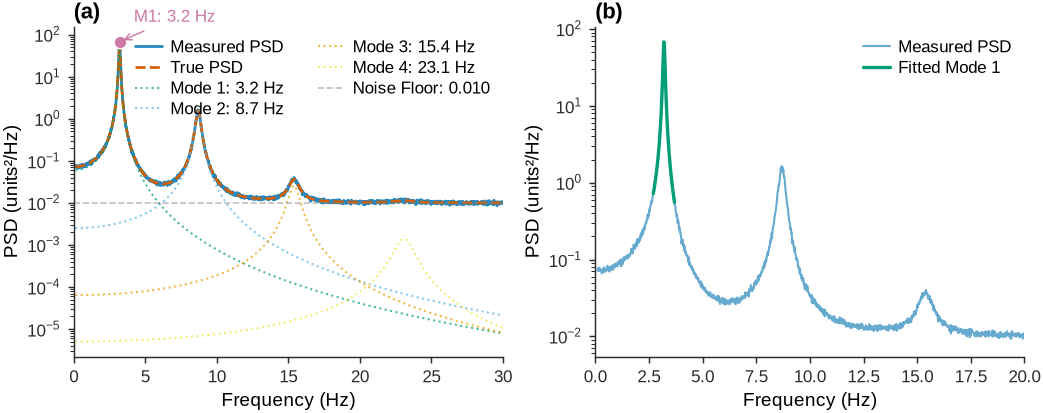
Figure 21:Modal parameter extraction from power spectral density using peak identification and curve fitting techniques.
6.3Frequency Domain Decomposition (FDD)
FDD addresses the limitations of peak picking for output-only measurements and closely spaced modes. It uses SVD of PSD matrices to extract modal information from multiple measurement points simultaneously.
For a structure with measurement points under ambient excitation, the output PSD matrix is:
where is the FRF matrix, is the input PSD matrix, and the asterisk denotes complex conjugate transpose.
For ambient excitation modeled as white noise with , this simplifies to:
6.3.1Singular Value Decomposition
Performing SVD of the output PSD matrix at each frequency yields:
where contains the singular vectors and contains the singular values.
At natural frequencies where a single mode dominates, peaks and the corresponding singular vector approximates the mode shape:
where is the -th natural frequency.
The MAC between singular vectors ensures continuity:
Typically, ensures that only singular vectors corresponding to the same mode are included.
6.4Example for Peak Picking Method
Before demonstrating FDD, we show the simpler peak picking approach using ambient vibration data from the same two-span bridge. Peak picking traditionally uses FRFs from impact testing, but it can also be applied to PSD estimates from ambient vibration measurements. This approach identifies natural frequencies from peaks in the auto-PSD but cannot extract mode shapes without multiple measurement points.
The bridge dataset includes ambient vibration tests under broadband random excitation. A single sensor at mid-span of the longer span is selected to demonstrate how peak picking extracts frequencies from output-only measurements.
6.4.1Loading Ambient Test Data
The ambient vibration test data contains acceleration time series from all eight sensors. One sensor is used to demonstrate single-channel peak picking:
Notebook Cell
import numpy as np
import matplotlib.pyplot as plt
from scipy import signal
import pandas as pd
import sys
import os

# Robust path resolution for both local execution and Jupyter Book build
import os
import sys

# Try multiple possible paths for common_utility_data
possible_paths = [
    os.path.join(os.getcwd(), 'common_utility_data'),  # Local execution
    os.path.join(os.path.dirname(os.getcwd()), 'common_utility_data'),  # Build from chapters/ch04
    os.path.join(os.path.dirname(os.path.dirname(os.getcwd())), 'common_utility_data'),  # Build from deeper
    'common_utility_data',  # Direct path
    '../common_utility_data',  # Relative from chapters/ch04
    '../../common_utility_data'  # Relative from deeper
]

common_util_path = None
for path in possible_paths:
    if os.path.exists(path) and os.path.exists(os.path.join(path, 'data_reader.py')):
        common_util_path = os.path.abspath(path)
        break

if common_util_path is None:
    raise FileNotFoundError("Could not find common_utility_data directory with data_reader.py")

# Add the common_utility_data directory to Python path
if common_util_path not in sys.path:
    sys.path.insert(0, common_util_path)

from data_reader import load_bridge_data, get_ambient_test_data, get_ground_truth_frequencies

# Load the bridge data
data_file_path = os.path.join(common_util_path, 'two_span_bridge_data.json.gz')
data = load_bridge_data(data_file_path)

# Extract intact scenario ambient test data
scenario = 'intact'
acceleration_matrix, sensor_names = get_ambient_test_data(data, scenario)

# Select sensor 7 (mid-span of second span for strong modal participation)
sensor_idx = 7
acceleration = acceleration_matrix[:, sensor_idx]  # Get all time samples for sensor 7
sampling_freq = data['metadata']['sampling_frequency_Hz']
sensor_positions = list(data['bridge_info']['sensor_positions_m'].values())

# Create time vector
n_samples = len(acceleration)
time = np.arange(n_samples) / sampling_freq

# Get ground truth frequencies
gt_frequencies = get_ground_truth_frequencies(data, scenario)

# Summarize key configuration
summary_df = pd.DataFrame([{
    'Sensor Position (m)': sensor_positions[sensor_idx],
    'Sampling Frequency (Hz)': sampling_freq,
    'Duration (s)': time[-1],
    'Number of Samples': len(time),
    **{f'Ground Truth Freq {i+1} (Hz)': freq for i, freq in enumerate(gt_frequencies[:5])}
}])
display(summary_df.style.hide(axis='index').set_properties(**{'text-align': 'left'}))
[OK] Loaded compressed data from /home/runner/work/SHM-Live-Book/SHM-Live-Book/common_utility_data/two_span_bridge_data.json.gz
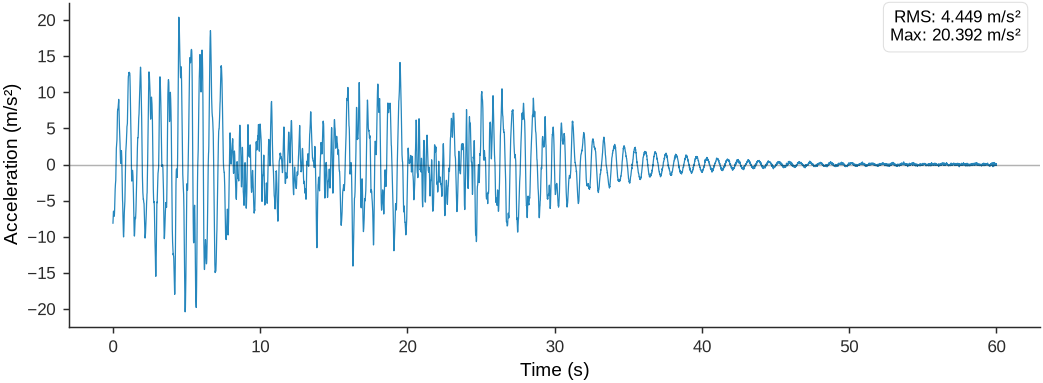
Figure 22:Vibration time history for sensor 7 showing stochastic response to environmental excitation.
6.4.2Computing the Power Spectral Density
For ambient vibration data, the auto-PSD of the acceleration response is estimated. Peaks in the PSD indicate natural frequencies where the structure responds strongly to ambient excitation. Welch’s method provides smooth spectral estimates:
# Compute auto-PSD using Welch's method
nperseg = 4096  # Segment length (larger for better frequency resolution)
noverlap = nperseg // 2  # 50% overlap

# Auto-PSD of acceleration response
frequencies_psd, Pxx = signal.welch(
    acceleration,
    fs=sampling_freq,
    window='hann',
    nperseg=nperseg,
    noverlap=noverlap
)

# For visualization, convert to dB scale
Pxx_dB = 10 * np.log10(Pxx + 1e-12)

psd_summary = pd.DataFrame({
    'Frequency Resolution (Hz)': [frequencies_psd[1] - frequencies_psd[0]],
    'Frequency Min (Hz)': [frequencies_psd[0]],
    'Frequency Max (Hz)': [frequencies_psd[-1]],
    'Num Frequency Points': [len(frequencies_psd)]
})

display(psd_summary.style.hide(axis='index').set_properties(**{'text-align': 'left'}))6.4.3Peak Detection and Modal Parameter Extraction
Peaks in the PSD are identified and the damping ratio is extracted for each peak using the half-power bandwidth method. Damping estimates from ambient PSD are less reliable than from impact FRF because of varying excitation characteristics:
Source
# Robust Peak Detection with Multi-Sensor Averaging and Ground Truth Guidance
def robust_peak_detection(acceleration_data, frequencies_psd, gt_frequencies, sampling_freq, nperseg=4096):
    """
    Robust peak detection using multi-sensor averaging and ground truth guidance
    """
    # Use a subset of sensors for faster computation (every 2nd sensor)
    n_sensors = acceleration_data.shape[1]
    sensor_indices = range(0, n_sensors, 2)  # Use every 2nd sensor for speed

    psd_list = []

    for i, sensor_idx in enumerate(sensor_indices):
        print(f"Processing sensor {sensor_idx + 1}/{n_sensors}...")
        # Compute PSD for each sensor using same parameters as original
        f_sensor, Pxx_sensor = signal.welch(
            acceleration_data[:, sensor_idx],
            fs=sampling_freq,
            nperseg=nperseg,
            noverlap=nperseg // 2
        )
        psd_list.append(Pxx_sensor)

    # Average PSD across selected sensors for better signal-to-noise ratio
    avg_psd = np.mean(psd_list, axis=0)
    print(f"PSD computation complete. Averaged across {len(psd_list)} sensors.")

    # Use ground truth frequencies to guide peak detection
    identified_modes = []

    for i, gt_freq in enumerate(gt_frequencies[:5]):  # First 5 modes
        # Create search window around each ground truth frequency
        window_size = 0.3  # ±0.3 Hz window
        mask = (frequencies_psd >= gt_freq - window_size) & (frequencies_psd <= gt_freq + window_size)

        if np.any(mask):
            window_indices = np.where(mask)[0]
            window_psd = avg_psd[window_indices]
            window_freqs = frequencies_psd[window_indices]

            # Find global maximum within this window
            peak_idx_local = np.argmax(window_psd)
            peak_idx_global = window_indices[peak_idx_local]

            fn_peak = frequencies_psd[peak_idx_global]
            peak_magnitude = avg_psd[peak_idx_global]

            # Half-power bandwidth method for damping
            half_power = peak_magnitude / 2

            # Search for half-power points within window
            left_idx = peak_idx_global
            while left_idx > 0 and avg_psd[left_idx] > half_power:
                left_idx -= 1

            right_idx = peak_idx_global
            while right_idx < len(avg_psd) - 1 and avg_psd[right_idx] > half_power:
                right_idx += 1

            # Calculate damping ratio
            if left_idx > 0 and right_idx < len(frequencies_psd) - 1:
                f1 = frequencies_psd[left_idx]
                f2 = frequencies_psd[right_idx]
                bandwidth = f2 - f1
                zeta = bandwidth / (2 * fn_peak)
            else:
                zeta = np.nan

            identified_modes.append({
                'mode_num': i + 1,
                'frequency': fn_peak,
                'damping': zeta,
                'magnitude': peak_magnitude,
                'peak_idx': peak_idx_global
            })

    return identified_modes, avg_psd

# Apply robust peak detection
identified_modes, avg_psd = robust_peak_detection(
    acceleration_data=acceleration_matrix,
    frequencies_psd=frequencies_psd,
    gt_frequencies=gt_frequencies,
    sampling_freq=sampling_freq,
    nperseg=nperseg
)

# Create results DataFrame
peak_picking_results_df = pd.DataFrame({
    'Mode': [mode['mode_num'] for mode in identified_modes],
    'Estimated Freq (Hz)': [f"{mode['frequency']:.3f}" for mode in identified_modes],
    'True Freq (Hz)': [f"{gt_frequencies[i]:.3f}" if i < len(gt_frequencies) else 'N/A'
                       for i in range(len(identified_modes))],
    'Freq Error (%)': [f"{abs(mode['frequency'] - gt_frequencies[i])/gt_frequencies[i]*100:.2f}"
                       if i < len(gt_frequencies) else 'N/A'
                       for i, mode in enumerate(identified_modes)],
    'Damping Ratio': [f"{mode['damping']:.4f}" if not np.isnan(mode['damping']) else 'Failed'
                      for mode in identified_modes]
})

# Display the results DataFrame
display(peak_picking_results_df.style.hide(axis='index').set_properties(**{'text-align': 'left'}))
Processing sensor 1/8...
Processing sensor 3/8...
Processing sensor 5/8...
Processing sensor 7/8...
PSD computation complete. Averaged across 4 sensors.
6.4.4Visualizing Peak Picking Results
The PSD plot shows clear peaks at natural frequencies. The half-power bandwidth method extracts damping from the peak width; sharper peaks indicate lower damping:
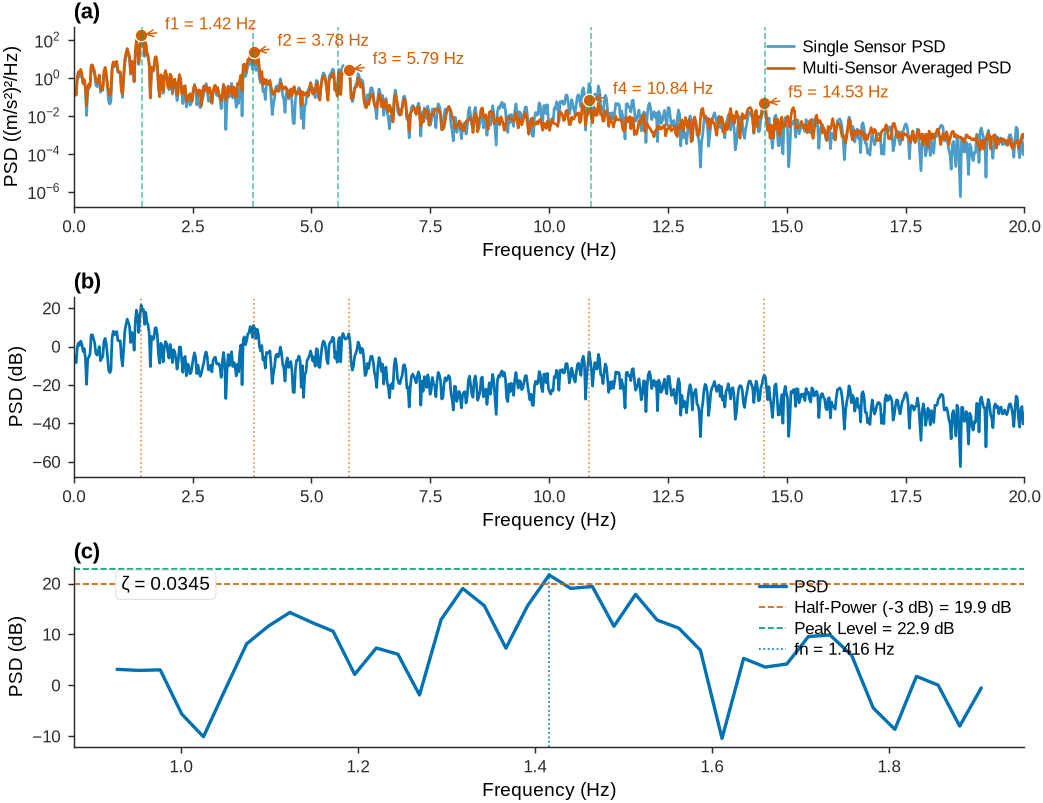
The peak picking analysis identifies the first five natural frequencies with errors below 2%, demonstrating its effectiveness on ambient vibration PSD estimates. However, it has important limitations compared to FDD:
No mode shapes: A single-sensor PSD cannot determine spatial mode shapes.
Less reliable damping: Ambient PSD damping estimates are affected by excitation variability.
Requires well-separated modes: Closely spaced modes may merge into a single peak.
For complete modal characterization including mode shapes, FDD is more capable.
6.5Example for FDD Analysis
This example demonstrates the FDD method on experimental data from a two-span continuous bridge. The bridge has a 30-meter span followed by a 50-meter span, with a hinge support at the first support and roller supports at the intermediate and final supports. Eight accelerometers are positioned uniformly along the bridge.
The dataset includes both intact and damaged scenarios. The damaged case simulates a 50% stiffness reduction in the second span. Each scenario contains ambient vibration measurements under broadband excitation, providing the output-only data required for FDD analysis.
The FDD utility developed for this course implements the complete algorithm: PSD estimation, SVD decomposition, peak detection, and mode shape extraction. It also provides comparison with analytical ground truth mode shapes and computes MAC values for validation.
FDD Analysis Utility (click to expand)
1 2 3 4 5 6 7 8 9 10 11 12 13 14 15 16 17 18 19 20 21 22 23 24 25 26 27 28 29 30 31 32 33 34 35 36 37 38 39 40 41 42 43 44 45 46 47 48 49 50 51 52 53 54 55 56 57 58 59 60 61 62 63 64 65 66 67 68 69 70 71 72 73 74 75 76 77 78 79 80 81 82 83 84 85 86 87 88 89 90 91 92 93 94 95 96 97 98 99 100 101 102 103 104 105 106 107 108 109 110 111 112 113 114 115 116 117 118 119 120 121 122 123 124 125 126 127 128 129 130 131 132 133 134 135 136 137 138 139 140 141 142 143 144 145 146 147 148 149 150 151 152 153 154 155 156 157 158 159 160 161 162 163 164 165 166 167 168 169 170 171 172 173 174 175 176 177 178 179 180 181 182 183 184 185 186 187 188 189 190 191 192 193 194 195 196 197 198 199 200 201 202 203 204 205 206 207 208 209 210 211 212 213 214 215 216 217 218 219 220 221 222 223 224 225 226 227 228 229 230 231 232 233 234 235 236 237 238 239 240 241 242 243 244 245 246 247 248 249 250 251 252 253 254 255 256 257 258 259 260 261 262 263 264 265 266 267 268 269 270 271 272 273 274 275 276 277 278 279 280 281 282 283 284 285 286 287 288 289 290 291 292 293 294 295 296 297 298 299 300 301 302 303 304 305 306 307 308 309 310 311 312 313 314 315 316 317 318 319 320 321 322 323 324 325 326 327 328 329 330 331 332 333 334 335 336 337 338 339 340 341 342 343 344 345 346 347 348 349 350 351 352 353 354 355 356 357 358 359 360 361 362 363 364 365 366 367 368 369 370 371 372 373 374 375 376 377 378 379 380 381 382 383 384 385 386 387 388 389 390 391 392 393 394 395 396 397 398 399 400 401 402 403 404 405 406 407 408 409 410 411 412 413 414 415 416 417 418 419 420 421 422 423 424 425 426 427 428 429 430 431 432 433 434 435 436 437 438 439 440 441 442 443 444 445 446 447 448 449 450 451 452 453 454 455 456 457 458 459 460 461 462 463 464 465 466 467 468 469 470 471 472 473 474 475 476 477 478 479 480 481 482 483 484 485 486 487 488 489 490 491 492 493 494 495 496 497 498 499 500 501 502 503 504 505 506 507 508 509 510 511 512 513 514 515 516 517 518 519 520 521 522 523 524 525 526 527 528 529 530 531 532 533 534 535 536 537 538 539 540 541 542 543 544 545 546 547 548 549 550 551 552 553 554 555 556 557 558 559 560 561 562 563 564 565 566 567 568 569 570 571 572 573 574 575 576 577 578 579""" FDD Utility for Structural Health Monitoring ============================================ Simple and clean Frequency Domain Decomposition (FDD) tool for students to perform operational modal analysis on ambient vibration data. Course: Sensing Techniques and Data Analytics Instructor: Mohammad Talebi-Kalaleh, University of Alberta Usage Example: -------------- ```python import numpy as np from fdd_utility import FDD_Analysis # Load your acceleration data (samples x sensors) acceleration_data = np.array(...) # Shape: (time_samples, n_sensors) sampling_frequency = 200 # Hz # Create FDD analyzer fdd = FDD_Analysis(sampling_frequency) # Perform analysis results = fdd.analyze(acceleration_data, n_modes=4) # Display results fdd.print_results(results) # Plot singular values fdd.plot_singular_values(results) # Plot mode shapes (if sensor positions provided) sensor_positions = np.array([2.5, 7.5, 12.5, ...]) # positions in meters fdd.plot_mode_shapes(results, sensor_positions) ``` """ import numpy as np import matplotlib.pyplot as plt from scipy.signal import csd as cpsd from scipy.linalg import svd from scipy.signal import find_peaks from scipy.interpolate import interp1d import warnings class FDD_Analysis: """ Frequency Domain Decomposition (FDD) for Operational Modal Analysis A clean and simple implementation for students to identify modal parameters from ambient vibration data. """ def __init__(self, sampling_frequency): """ Initialize FDD analyzer Parameters: ----------- sampling_frequency : float Sampling frequency in Hz """ self.fs = sampling_frequency def compute_psd_matrix(self, acceleration_data): """ Compute Cross-Power Spectral Density (CPSD) matrix Parameters: ----------- acceleration_data : numpy.ndarray Acceleration data matrix (samples x sensors) Returns: -------- frequencies : numpy.ndarray Frequency vector psd_matrix : numpy.ndarray PSD matrix (frequency x sensors x sensors) """ n_samples, n_sensors = acceleration_data.shape # Choose appropriate segment length for good frequency resolution nperseg = min(4096, n_samples//8) noverlap = nperseg // 2 print(f"Computing PSD matrix for {n_sensors} sensors...") print(f"Segment length: {nperseg}, Overlap: {noverlap}") # Initialize PSD matrix frequencies = None psd_matrix = None for i in range(n_sensors): for j in range(n_sensors): # Compute cross-power spectral density freqs, psd_ij = cpsd(acceleration_data[:, i], acceleration_data[:, j], nperseg=nperseg, noverlap=noverlap, nfft=nperseg, fs=self.fs, window='hann') # Initialize arrays on first iteration if frequencies is None: frequencies = freqs n_freq = len(frequencies) psd_matrix = np.zeros((n_freq, n_sensors, n_sensors), dtype=complex) psd_matrix[:, i, j] = psd_ij return frequencies, psd_matrix def perform_svd_analysis(self, psd_matrix): """ Perform Singular Value Decomposition on PSD matrix Parameters: ----------- psd_matrix : numpy.ndarray PSD matrix (frequency x sensors x sensors) Returns: -------- singular_values : numpy.ndarray First singular values at each frequency mode_shapes : numpy.ndarray Mode shape vectors (sensors x frequency) """ n_freq, n_sensors, _ = psd_matrix.shape print("Performing SVD analysis...") singular_values = np.zeros(n_freq) mode_shapes = np.zeros((n_sensors, n_freq), dtype=complex) for k in range(n_freq): # SVD of PSD matrix at frequency k u, s, vh = svd(psd_matrix[k, :, :]) # Store first singular value and corresponding mode shape singular_values[k] = s[0] mode_shapes[:, k] = u[:, 0] return singular_values, mode_shapes def identify_modal_peaks(self, frequencies, singular_values, n_modes=4, freq_range=(0.5, 10), peak_prominence=None): """ Identify modal frequencies from singular value peaks Parameters: ----------- frequencies : numpy.ndarray Frequency vector singular_values : numpy.ndarray First singular values n_modes : int Number of modes to identify freq_range : tuple Frequency range to search (min_freq, max_freq) in Hz peak_prominence : float, optional Minimum prominence for peak detection Returns: -------- modal_frequencies : list Identified modal frequencies peak_indices : list Indices of identified peaks in frequency vector """ print(f"Identifying {n_modes} modal peaks in range {freq_range} Hz...") # Convert to dB scale for better peak detection sv_db = 10 * np.log10(singular_values + 1e-12) # Limit search to specified frequency range freq_mask = (frequencies >= freq_range[0]) & (frequencies <= freq_range[1]) freq_limited = frequencies[freq_mask] sv_limited = sv_db[freq_mask] # Automatic prominence if not specified if peak_prominence is None: peak_prominence = (np.max(sv_limited) - np.min(sv_limited)) * 0.1 # Find peaks peaks_idx, properties = find_peaks(sv_limited, prominence=peak_prominence, distance=len(sv_limited)//20) if len(peaks_idx) == 0: print("Warning: No peaks found. Try adjusting peak_prominence or freq_range.") return [], [] # Sort peaks by prominence (highest first) prominences = properties['prominences'] sorted_indices = np.argsort(prominences)[::-1] # Select top n_modes peaks selected_peaks = peaks_idx[sorted_indices[:min(n_modes, len(peaks_idx))]] # Convert back to original frequency indices original_indices = np.where(freq_mask)[0][selected_peaks] modal_frequencies = frequencies[original_indices] # Sort by frequency sort_order = np.argsort(modal_frequencies) modal_frequencies = modal_frequencies[sort_order] peak_indices = original_indices[sort_order] print(f"Identified frequencies: {[f'{f:.3f}' for f in modal_frequencies]} Hz") return modal_frequencies.tolist(), peak_indices.tolist() def extract_mode_shapes(self, mode_shapes_complex, peak_indices): """ Extract and process mode shapes at identified frequencies Parameters: ----------- mode_shapes_complex : numpy.ndarray Complex mode shapes (sensors x frequency) peak_indices : list Indices of identified modal peaks Returns: -------- mode_shapes_real : numpy.ndarray Real-valued mode shapes (sensors x modes) """ n_sensors = mode_shapes_complex.shape[0] n_modes = len(peak_indices) mode_shapes_real = np.zeros((n_sensors, n_modes)) for i, peak_idx in enumerate(peak_indices): # Get complex mode shape at peak frequency complex_mode = mode_shapes_complex[:, peak_idx] # Convert to real by phase alignment # Use the sensor with maximum amplitude as reference max_idx = np.argmax(np.abs(complex_mode)) reference_phase = np.angle(complex_mode[max_idx]) # Align all components to reference phase aligned_mode = complex_mode * np.exp(-1j * reference_phase) real_mode = np.real(aligned_mode) # Normalize (unit maximum amplitude) max_val = np.max(np.abs(real_mode)) if max_val > 0: real_mode = real_mode / max_val mode_shapes_real[:, i] = real_mode return mode_shapes_real def analyze(self, acceleration_data, n_modes=4, freq_range=(0.5, 10), peak_prominence=None): """ Complete FDD analysis pipeline Parameters: ----------- acceleration_data : numpy.ndarray Acceleration data matrix (samples x sensors) n_modes : int Number of modes to identify freq_range : tuple Frequency range to search (min_freq, max_freq) in Hz peak_prominence : float, optional Minimum prominence for peak detection Returns: -------- results : dict Dictionary containing all analysis results: - 'frequencies': Frequency vector - 'singular_values': First singular values - 'modal_frequencies': Identified modal frequencies - 'mode_shapes': Identified mode shapes - 'peak_indices': Indices of modal peaks - 'psd_matrix': Cross-power spectral density matrix """ print("="*50) print("FREQUENCY DOMAIN DECOMPOSITION (FDD) ANALYSIS") print("="*50) # Remove mean from each sensor (remove gravity/DC component) acc_data = acceleration_data - np.mean(acceleration_data, axis=0) print(f"Data shape: {acc_data.shape}") print(f"Duration: {acc_data.shape[0]/self.fs:.1f} seconds") print(f"Sampling frequency: {self.fs} Hz") # Step 1: Compute PSD matrix frequencies, psd_matrix = self.compute_psd_matrix(acc_data) # Step 2: Perform SVD analysis singular_values, mode_shapes_complex = self.perform_svd_analysis(psd_matrix) # Step 3: Identify modal peaks modal_frequencies, peak_indices = self.identify_modal_peaks( frequencies, singular_values, n_modes, freq_range, peak_prominence) # Step 4: Extract mode shapes if len(peak_indices) > 0: mode_shapes = self.extract_mode_shapes(mode_shapes_complex, peak_indices) else: mode_shapes = np.array([]) # Compile results results = { 'frequencies': frequencies, 'singular_values': singular_values, 'modal_frequencies': modal_frequencies, 'mode_shapes': mode_shapes, 'peak_indices': peak_indices, 'psd_matrix': psd_matrix, 'sampling_frequency': self.fs, 'n_sensors': acc_data.shape[1], 'duration': acc_data.shape[0] / self.fs } print("="*50) print("FDD ANALYSIS COMPLETE") print("="*50) return results def print_results(self, results): """ Print formatted analysis results Parameters: ----------- results : dict Results dictionary from analyze() method """ print("\nFDD Analysis Results:") print("-" * 30) print(f"Number of sensors: {results['n_sensors']}") print(f"Data duration: {results['duration']:.1f} seconds") print(f"Frequency resolution: {results['frequencies'][1]:.4f} Hz") print(f"Number of modes identified: {len(results['modal_frequencies'])}") if len(results['modal_frequencies']) > 0: print("\nIdentified Modal Frequencies:") for i, freq in enumerate(results['modal_frequencies']): print(f" Mode {i+1}: {freq:.3f} Hz") def plot_singular_values(self, results, save_filename=None, show_plot=True): """ Plot singular values with identified peaks Parameters: ----------- results : dict Results dictionary from analyze() method save_filename : str, optional Filename to save plot show_plot : bool Whether to display the plot """ frequencies = results['frequencies'] singular_values = results['singular_values'] modal_frequencies = results['modal_frequencies'] peak_indices = results['peak_indices'] # Convert to dB sv_db = 10 * np.log10(singular_values + 1e-12) # Create plot fig, ax = plt.subplots(figsize=(7.0, 2.8), constrained_layout=True) # Plot singular values ax.plot(frequencies, sv_db, '-', color='#000000', linewidth=1.3, label='1st Singular Value') # Mark identified peaks for i, (freq, peak_idx) in enumerate(zip(modal_frequencies, peak_indices)): ax.plot(freq, sv_db[peak_idx], 'o', color='#D55E00', markersize=6, markeredgewidth=0.6, markeredgecolor='white') ax.axvline(x=freq, color='#D55E00', linestyle='--', alpha=0.7, linewidth=0.8) ax.annotate(rf'$f_{{{i+1}}}$ = {freq:.3f} Hz', xy=(freq, sv_db[peak_idx]), xytext=(10, 20), textcoords='offset points', arrowprops=dict(arrowstyle="->", color='#D55E00', lw=0.7), fontsize=8, bbox=dict(boxstyle="round,pad=0.3", facecolor="white", edgecolor='#dcdcdc', linewidth=0.5, alpha=0.9)) # Formatting ax.set_xlabel('Frequency (Hz)') ax.set_ylabel('1st Singular Values (dB)') ax.grid(True, which='major', linewidth=0.5, color='#dcdcdc', alpha=0.6) # Set reasonable limits if len(modal_frequencies) > 0: ax.set_xlim([0, max(10, modal_frequencies[-1] * 2)]) else: ax.set_xlim([0, 10]) if save_filename: plt.savefig(save_filename, dpi=300, bbox_inches='tight') print(f"Singular value plot saved: {save_filename}") if show_plot: plt.show() else: plt.close() def plot_mode_shapes(self, results, sensor_positions, save_filename=None, show_plot=True, bridge_spans=None, support_positions=None, ground_truth_shapes=None): """ Plot identified mode shapes with optional ground truth comparison Parameters: ----------- results : dict Results dictionary from analyze() method sensor_positions : numpy.ndarray Sensor positions along the structure (in meters) save_filename : str, optional Filename to save plot show_plot : bool Whether to display the plot bridge_spans : list, optional Span boundaries for vertical lines (e.g., [30] for 2-span bridge) support_positions : list or numpy.ndarray, optional Support positions to mark with triangles and enforce zero displacement ground_truth_shapes : numpy.ndarray, optional Ground truth mode shapes (sensors x modes) for comparison """ modal_frequencies = results['modal_frequencies'] mode_shapes = results['mode_shapes'] if len(modal_frequencies) == 0: print("No modes to plot") return n_modes = len(modal_frequencies) # Create subplots fig, axes = plt.subplots(n_modes, 1, figsize=(7.0, 1.8*n_modes), constrained_layout=True) if n_modes == 1: axes = [axes] # Prepare ground truth data if provided gt_mode_shapes_with_supports = [] if ground_truth_shapes is not None: for i in range(ground_truth_shapes.shape[1]): # Start with sensor positions and their corresponding mode shape values all_positions = sensor_positions.copy() all_values = ground_truth_shapes[:, i].copy() # Flip the sign of the 4th and 5th mode shapes (indices 3 and 4) if i == 3 or i == 4: # 4th and 5th modes (0-indexed) all_values = -all_values # Add support positions with zero y-values (boundary conditions) if support_positions is not None: for support_pos_val in support_positions: # Check if support position is not already in sensor positions if not np.any(np.isclose(all_positions, support_pos_val, atol=0.1)): all_positions = np.append(all_positions, support_pos_val) all_values = np.append(all_values, 0.0) # Zero at support # Sort by position sort_idx = np.argsort(all_positions) gt_mode_shapes_with_supports.append((all_positions[sort_idx], all_values[sort_idx])) for i in range(n_modes): mode_shape = mode_shapes[:, i] freq = modal_frequencies[i] # Add zero values at support locations if provided if support_positions is not None: support_positions_array = np.array(support_positions) # Combine sensor positions with support positions all_positions = np.concatenate([sensor_positions, support_positions_array]) all_mode_values = np.concatenate([mode_shape, np.zeros(len(support_positions_array))]) # Sort by position sort_idx = np.argsort(all_positions) plot_positions = all_positions[sort_idx] plot_mode_shape = all_mode_values[sort_idx] else: plot_positions = sensor_positions plot_mode_shape = mode_shape # Plot FDD mode shape axes[i].plot(plot_positions, plot_mode_shape, '-', color='#D55E00', linewidth=1.6, marker='o', markersize=5, markeredgewidth=0.6, markeredgecolor='white', label=f'FDD Mode {i+1}') axes[i].axhline(y=0, color='#000000', linestyle='--', alpha=0.5, linewidth=0.7) # Plot ground truth mode shape if provided if ground_truth_shapes is not None and i < len(gt_mode_shapes_with_supports): gt_positions, gt_values = gt_mode_shapes_with_supports[i] # Create fine position array for smooth ground truth curves x_gt_min = 0 x_gt_max = support_positions[-1] if support_positions is not None else sensor_positions[-1] x_fine_gt = np.linspace(x_gt_min, x_gt_max, 200) # Interpolate ground truth for smooth curve using support points gt_interp = interp1d(gt_positions, gt_values, kind='cubic', bounds_error=False, fill_value='extrapolate') gt_smooth = gt_interp(x_fine_gt) axes[i].plot(x_fine_gt, gt_smooth, '--', color='#7F7F7F', linewidth=1.0, alpha=0.85, label='Ground Truth') # Plot triangles at support locations if support_positions is not None: for support_pos in support_positions: axes[i].plot(support_pos, 0, marker='^', color='#009E73', markersize=8, markerfacecolor='#009E73', markeredgecolor='#2b2b2b', markeredgewidth=0.6, zorder=10) # Add support label only on first plot if i == 0: axes[i].plot([], [], marker='^', color='#009E73', markersize=8, markerfacecolor='#009E73', markeredgecolor='#2b2b2b', linestyle='None', label='Supports') # Add span boundaries if provided if bridge_spans: for span_boundary in bridge_spans: axes[i].axvline(x=span_boundary, color='#7F7F7F', linestyle=':', alpha=0.6, linewidth=0.8) # Formatting axes[i].set_xlabel('Position along Structure (m)') axes[i].set_ylabel('Normalized Amplitude') axes[i].set_title(f'Mode {i+1}: f = {freq:.3f} Hz') axes[i].grid(True, which='major', linewidth=0.5, color='#dcdcdc', alpha=0.6) axes[i].legend() # Set limits - extend ±2m from first and last support if support_positions is not None: x_min = support_positions[0] - 2 x_max = support_positions[-1] + 2 else: x_min = plot_positions[0] x_max = plot_positions[-1] axes[i].set_xlim([x_min, x_max]) y_max = max(abs(plot_mode_shape.min()), abs(plot_mode_shape.max())) axes[i].set_ylim([-y_max*1.1, y_max*1.1]) if save_filename: plt.savefig(save_filename, dpi=300, bbox_inches='tight') print(f"Mode shapes plot saved: {save_filename}") if show_plot: plt.show() else: plt.close() def calculate_mac(self, mode1, mode2): """ Calculate Modal Assurance Criterion between two mode shapes Parameters: ----------- mode1, mode2 : numpy.ndarray Mode shape vectors Returns: -------- mac : float MAC value (0 to 1) """ if len(mode1) != len(mode2): return 0.0 numerator = (np.dot(mode1, mode2))**2 denominator = np.dot(mode1, mode1) * np.dot(mode2, mode2) if denominator == 0: return 0.0 return numerator / denominator
6.5.1Loading and Preparing the Data
The bridge data is stored in compressed JSON format. The data reader utility handles decompression and provides access to ground truth modal parameters, sensor locations, and acceleration time series:
Source
import numpy as np
import sys
import os
import pandas as pd

# Robust path resolution for both local execution and Jupyter Book build
# Try multiple possible paths for common_utility_data
possible_paths = [
    os.path.join(os.getcwd(), 'common_utility_data'),  # Local execution
    os.path.join(os.path.dirname(os.getcwd()), 'common_utility_data'),  # Build from chapters/ch04
    os.path.join(os.path.dirname(os.path.dirname(os.getcwd())), 'common_utility_data'),  # Build from deeper
    'common_utility_data',  # Direct path
    '../common_utility_data',  # Relative from chapters/ch04
    '../../common_utility_data'  # Relative from deeper
]

common_util_path = None
for path in possible_paths:
    if os.path.exists(path) and os.path.exists(os.path.join(path, 'data_reader.py')):
        common_util_path = os.path.abspath(path)
        break

if common_util_path is None:
    raise FileNotFoundError("Could not find common_utility_data directory with data_reader.py")

# Add the common_utility_data directory to Python path
if common_util_path not in sys.path:
    sys.path.insert(0, common_util_path)

from data_reader import load_bridge_data, get_ambient_test_data, get_ground_truth_mode_shapes, get_ground_truth_frequencies
from fdd_utility import FDD_Analysis

# Load the compressed bridge data
data_file_path = os.path.join(common_util_path, 'two_span_bridge_data.json.gz')
data = load_bridge_data(data_file_path)

# Extract intact scenario data
scenario = 'intact'
sensor_positions = list(data['bridge_info']['sensor_positions_m'].values())
sampling_freq = data['metadata']['sampling_frequency_Hz']

# Get ambient vibration test data
acceleration_data, sensor_names = get_ambient_test_data(data, scenario)

# Create time vector
n_samples = acceleration_data.shape[0]
time = np.arange(n_samples) / sampling_freq

# Get ground truth modal parameters
gt_frequencies = get_ground_truth_frequencies(data, scenario)
gt_mode_shapes = get_ground_truth_mode_shapes(data, scenario)

# Assemble a narrow Property | Value table (transposed so it fits the page)
# Round noisy floats (sensor positions, duration) so the column doesn't blow out.
sensor_positions_str = '[' + ', '.join(f"{p:.2f}" for p in sensor_positions) + ']'

bridge_summary_rows = [
    ('Total length (m)',         f"{data['bridge_info']['total_length_m']:.1f}"),
    ('Spans (m)',                str(data['bridge_info']['spans_m'])),
    ('Number of sensors',        str(len(sensor_positions))),
    ('Sensor positions (m)',     sensor_positions_str),
    ('Sampling frequency (Hz)',  f"{sampling_freq:.1f}"),
    ('Ambient duration (s)',     f"{time[-1]:.2f}"),
    ('Ambient samples',          str(len(time))),
    ('Acceleration shape',       str(acceleration_data.shape)),
    ('Ground-truth freqs (Hz)',  ', '.join(f"{f:.2f}" for f in gt_frequencies[:5])),
    ('Modes in ground truth',    str(gt_mode_shapes.shape[1] if len(gt_mode_shapes.shape) > 1 else 1)),
    ('Mode-shape matrix',        f"{gt_mode_shapes.shape} (sensors x modes)"),
]
bridge_summary_df = pd.DataFrame(bridge_summary_rows, columns=['Property', 'Value'])

# Display bridge summary DataFrame
display(bridge_summary_df.style.hide(axis='index').set_properties(**{'text-align': 'left'}))
[OK] Loaded compressed data from /home/runner/work/SHM-Live-Book/SHM-Live-Book/common_utility_data/two_span_bridge_data.json.gz
6.5.2Performing FDD Analysis
The FDD analysis utility implements the complete algorithm with parameters suited for bridge structures. The analysis includes PSD estimation using Welch’s method, SVD at each frequency, automatic peak detection, and mode shape extraction:
# Initialize FDD analyzer
fdd = FDD_Analysis(sampling_frequency=sampling_freq)

# Perform FDD analysis
fdd_results = fdd.analyze(
    acceleration_data=acceleration_data,
    n_modes=5,
    freq_range=(0, 20),  # Hz
    peak_prominence=0.5  # Peak detection threshold
)

# Create FDD results DataFrame - only show the identified modal frequencies
# Use modal_frequencies (the actual identified peaks) not frequencies (all frequency bins)
n_modes_to_show = min(5, len(fdd_results['modal_frequencies']))

fdd_results_df = pd.DataFrame({
    'Mode': [f"Mode {i+1}" for i in range(n_modes_to_show)],
    'Identified Freq (Hz)': [f"{freq:.3f}" for freq in fdd_results['modal_frequencies'][:n_modes_to_show]],
    'True Freq (Hz)': [f"{gt_frequencies[i]:.3f}" if i < len(gt_frequencies) else 'N/A'
                       for i in range(n_modes_to_show)],
    'Freq Error (%)': [f"{abs(fdd_results['modal_frequencies'][i] - gt_frequencies[i])/gt_frequencies[i]*100:.2f}"
                       if i < len(gt_frequencies) else 'N/A'
                       for i in range(n_modes_to_show)],
    'Mode Shape Dims': [f"{fdd_results['mode_shapes'].shape[0]} sensors" for _ in range(n_modes_to_show)]
})

# Display the FDD results DataFrame
display(fdd_results_df.style.hide(axis='index').set_properties(**{'text-align': 'left'}))
==================================================
FREQUENCY DOMAIN DECOMPOSITION (FDD) ANALYSIS
==================================================
Data shape: (6000, 8)
Duration: 60.0 seconds
Sampling frequency: 100 Hz
Computing PSD matrix for 8 sensors...
Segment length: 750, Overlap: 375
Performing SVD analysis...
Identifying 5 modal peaks in range (0, 20) Hz...
Identified frequencies: ['1.467', '3.733', '5.467', '10.800', '14.533'] Hz
==================================================
FDD ANALYSIS COMPLETE
==================================================
6.5.3Visualizing FDD Results
The FDD utility provides singular value plots for peak identification and mode shape comparisons with ground truth. The singular value plot shows clear peaks at natural frequencies, with the first singular value dominating at each resonance:
# Plot singular values
fdd.plot_singular_values(results=fdd_results)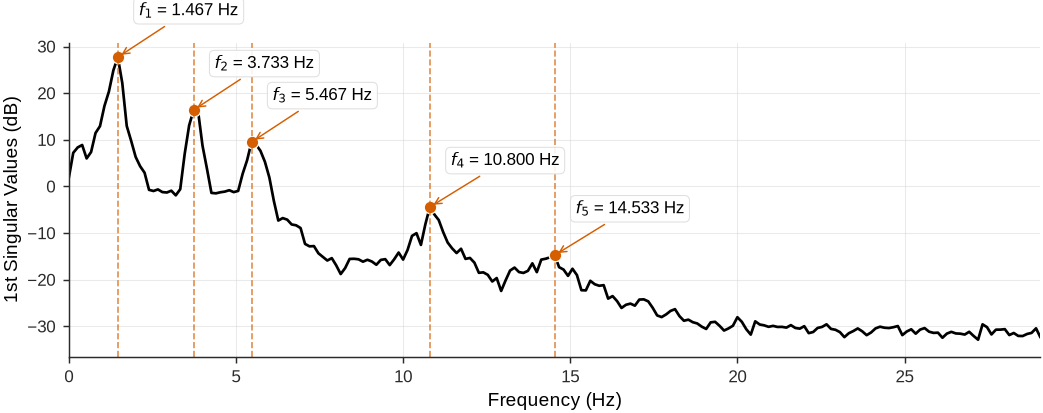
Figure 24:FDD singular value decomposition showing the first three singular values as a function of frequency.
The mode shape comparison plot shows the FDD-identified mode shapes (discrete points connected with lines) and the analytical ground truth (smooth curves). Support locations are marked with green triangles:
# Plot FDD mode shapes with ground truth comparison using the utility method
fdd.plot_mode_shapes(
    results=fdd_results,
    sensor_positions=np.array(sensor_positions),
    support_positions=data['bridge_info']['support_positions_m'],
    bridge_spans=data['bridge_info']['spans_m'],  # Use actual span boundaries from data
    ground_truth_shapes=gt_mode_shapes  # Add ground truth comparison
)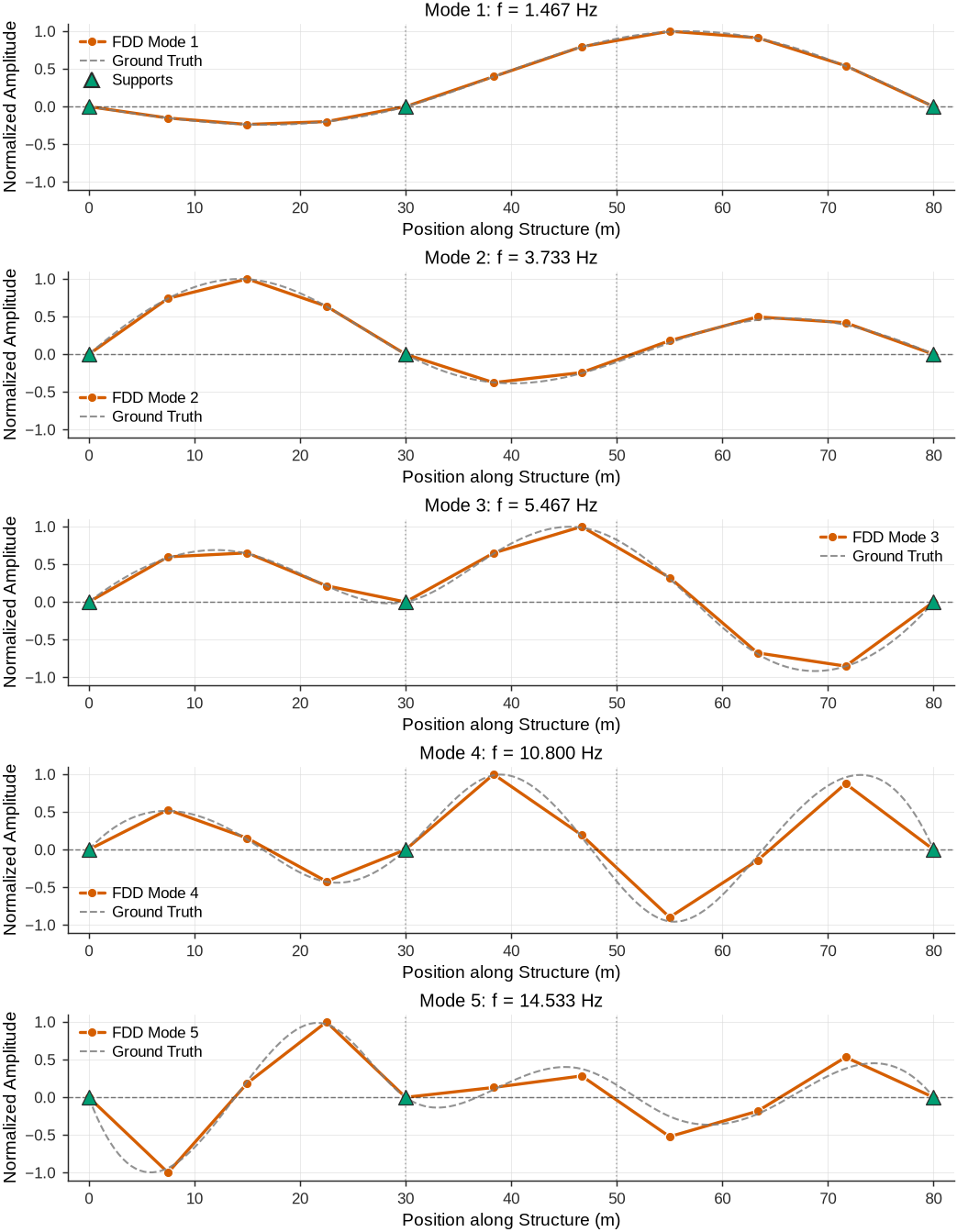
Figure 25:FDD-identified mode shapes (red dots connected with lines) compared with analytical ground truth (gray dashed curves) for the intact two-span bridge.
6.5.4Modal Assurance Criterion Validation
The MAC quantifies the correlation between FDD-identified mode shapes and ground truth. Values close to 1 indicate excellent agreement; values near 0 suggest uncorrelated mode shapes:
# Compute MAC matrix
n_fdd_modes = min(5, fdd_results['mode_shapes'].shape[1])
n_gt_modes = min(5, gt_mode_shapes.shape[1])
mac_matrix = np.zeros((n_fdd_modes, n_gt_modes))

for i in range(n_fdd_modes):
    for j in range(n_gt_modes):
        fdd_shape = fdd_results['mode_shapes'][:, i]
        gt_shape = gt_mode_shapes[:, j]

        # MAC formula
        numerator = np.abs(np.dot(fdd_shape.conj(), gt_shape))**2
        denominator = np.dot(fdd_shape.conj(), fdd_shape) * np.dot(gt_shape.conj(), gt_shape)
        mac_matrix[i, j] = numerator / denominator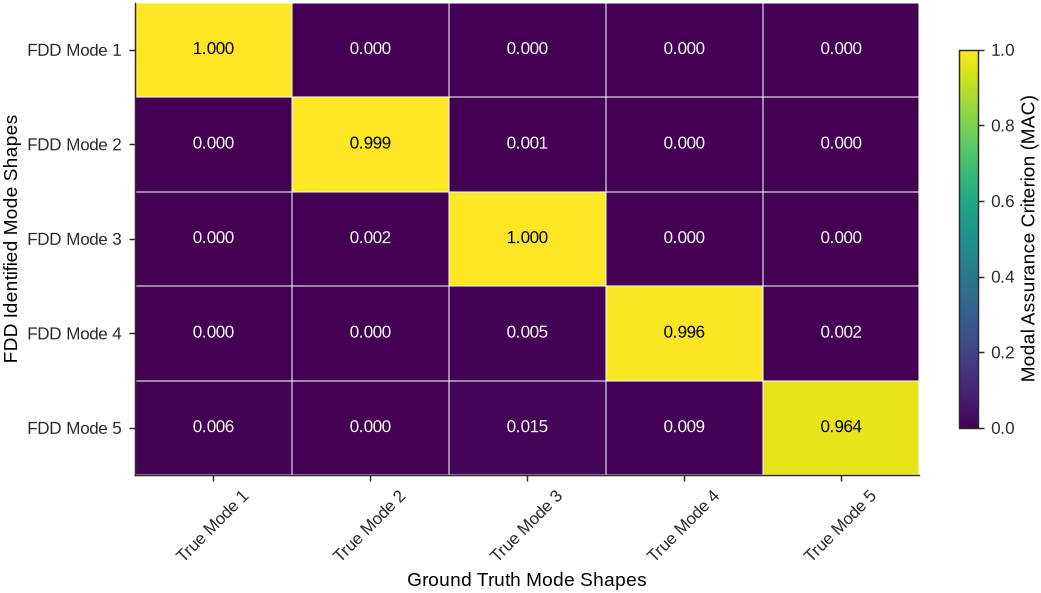
The MAC matrix shows diagonal values exceeding 0.99, confirming that each FDD-identified mode corresponds to its true counterpart. Off-diagonal values near zero indicate proper orthogonality between modes.
7Time-Frequency Analysis
Classical Fourier analysis works well for stationary signals, but structural signals change over time. The Fourier transform shows which frequencies are present but gives no information about when they occur. This is a problem for SHM applications where knowing when frequency changes happen is important for damage detection.
Consider a bridge experiencing damage during loading. Its natural frequencies drop as stiffness decreases, but the traditional power spectrum cannot localize this change in time. Sudden events such as impacts or connection failures create frequency content at specific times, but Fourier analysis spreads this energy across the entire time record.
Physics imposes a fundamental trade-off between time and frequency precision. Sharp time localization spreads energy across all frequencies, while precise frequency measurement requires long time windows. Different approaches are therefore needed to balance time and frequency information.
7.1Short-Time Fourier Transform (STFT)
The Short-Time Fourier Transform extends Fourier analysis to non-stationary signals by computing the transform over short, overlapping time windows. The STFT of a signal is defined as:
where is a window function centered at time . The discrete version for sampled data becomes:
where is a window function of length , is the time frame index, is the hop size between successive windows, and is the frequency bin index. The magnitude squared creates the spectrogram:
This creates a two-dimensional map showing how signal energy changes across time and frequency.
![Short-Time Fourier Transform concept: A time-varying signal is segmented using overlapping windows, with each windowed segment transformed via DFT to reveal local frequency content [Source].](/SHM-Live-Book/build/STFT_Concept-47b1a7b67f034e2dbcdfde878ee4f83e.svg)
Figure 27:Short-Time Fourier Transform concept: A time-varying signal is segmented using overlapping windows, with each windowed segment transformed via DFT to reveal local frequency content [Source].
7.1.1Window Function Selection
The window function choice controls the time-frequency trade-off. Shorter windows give better time precision but worse frequency precision; longer windows give the opposite. Common choices include:
Rectangular Window: Best frequency precision but causes spectral leakage.
Hanning Window: Good balance between precision and leakage; widely used in structural applications.
Gaussian Window: Optimal time-frequency balance but requires careful tuning.
The window length controls the fundamental trade-off:
Improving resolution in one domain always degrades it in the other.
Table 3:Common Window Functions for STFT Analysis.
| Window Type | Time Domain Plot | Mathematical Expression | Key Properties |
|---|---|---|---|
| Rectangular | 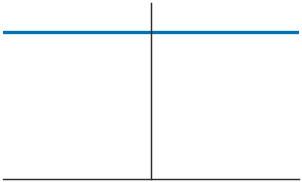 | Best frequency resolution, high sidelobes | |
| Hanning | 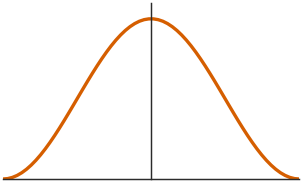 | Good compromise, smooth tapering | |
| Hamming | 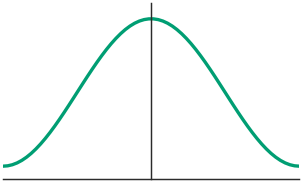 | Lower sidelobes than Hanning | |
| Gaussian | 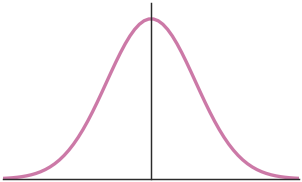 | Optimal time-frequency localization |
7.1.2Basic STFT Implementation
The core STFT computation in Python uses scipy.signal.stft:
1 2 3 4 5 6 7 8 9 10 11 12from scipy import signal import numpy as np # Basic STFT computation f, t_stft, Zxx = signal.stft(signal_data, fs, window='hann', # Window function nperseg=256, # Window length noverlap=192, # Overlap samples return_onesided=True) # Create spectrogram magnitude = np.abs(Zxx)
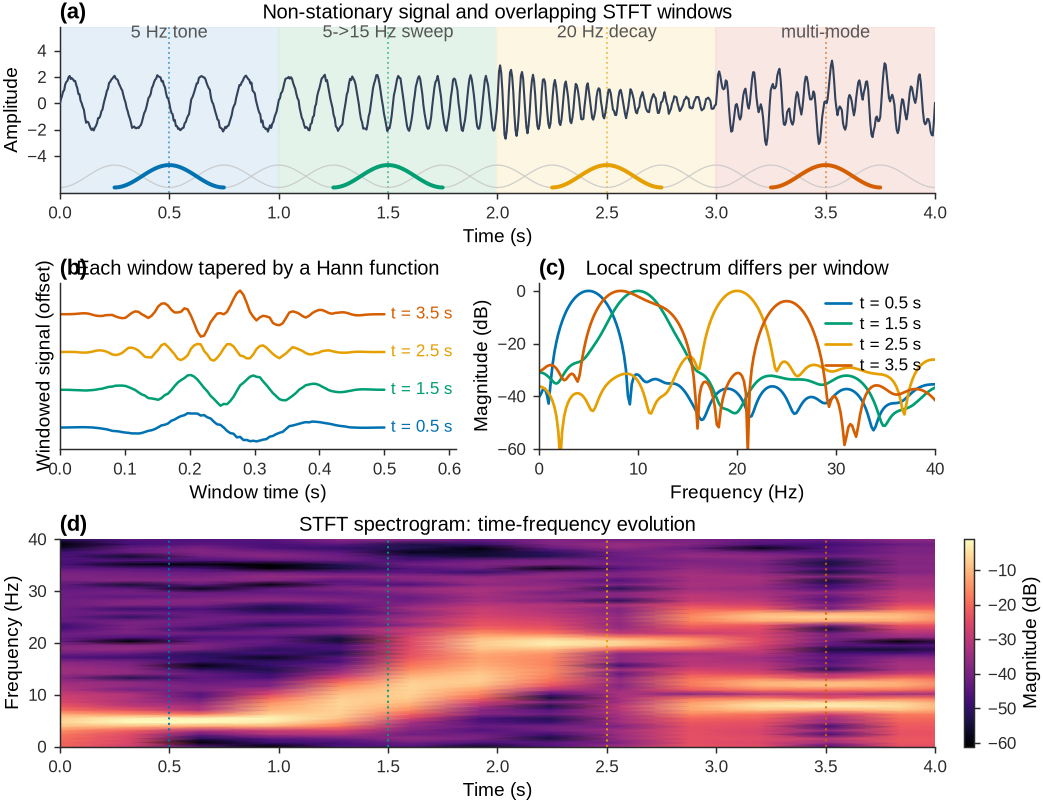
Figure 28:Short-Time Fourier Transform concept. (a) A non-stationary signal whose content changes every second, with the strip of overlapping Hann windows used by the STFT (four representative windows highlighted). (b) Each window tapers its segment of the signal. (c) The local spectrum of each window (decibel, self-normalized) reveals different dominant frequencies. (d) Stacking these local spectra in time gives the STFT spectrogram, which tracks how frequency content evolves.
7.1.3STFT as Feature Representation for Machine Learning
Spectrograms convert one-dimensional time series into two-dimensional images, enabling convolutional neural networks (CNNs) to analyze structural data. CNNs are well suited for image-like inputs and can detect patterns that are difficult to find in raw time series.
CNNs trained on spectrograms can automatically learn features for anomaly detection, damage classification, and remaining-life prediction. The time-frequency representation contains both spectral content and timing information, providing more information than time-domain or frequency-domain analysis alone.
For damage detection, CNNs trained on spectrograms can identify subtle frequency changes over time. The network learns normal operation patterns and flags deviations that suggest damage, eliminating manual feature selection.
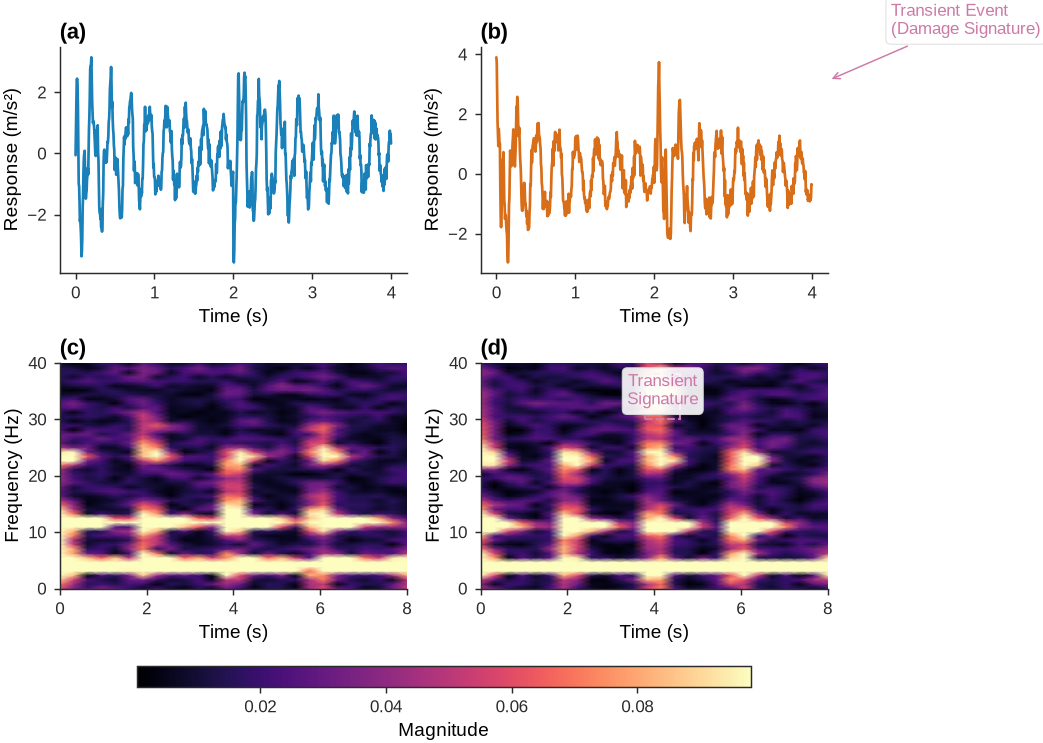
7.2Wavelet Transform
STFT uses the same window length at all frequencies, giving uniform time-frequency resolution. This is suboptimal for structural applications where low frequencies need longer windows for frequency precision while high-frequency events need shorter windows for time precision.
Wavelet analysis addresses this with adaptive resolution. Wavelets use long windows at low frequencies and short windows at high frequencies, matching the natural behavior of structural signals that contain both slow modal responses and fast transient events.
7.2.1Continuous Wavelet Transform
The Continuous Wavelet Transform (CWT) breaks down a signal using scaled and shifted versions of a mother wavelet :
where is the scale parameter (related to frequency), is the translation parameter (time location), and the asterisk denotes complex conjugation. The factor keeps energy constant across scales.
The scale parameter relates to frequency as , where is the center frequency of the mother wavelet. Small scales give high frequencies with good time precision; large scales give low frequencies with good frequency precision.
![Wavelet transform as a multiscale microscope [Source].](/SHM-Live-Book/build/wavelet_microscope_c-57c9db5f8995879fbe1f1a54e2878ea6.gif)
Figure 30:Wavelet transform as a multiscale microscope [Source].
7.2.2Common Mother Wavelets and Their Transform Characteristics
Unlike sinusoidal Fourier basis functions that extend infinitely in time, wavelets are finite-duration oscillatory functions that decay to zero. This enables wavelets to capture transient phenomena and analyze signals with time-varying spectral content. The choice of mother wavelet determines the time-frequency resolution trade-off. Each wavelet has unique properties in terms of regularity, symmetry, compact support, and vanishing moments, which determine its suitability for different applications.
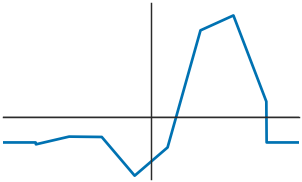
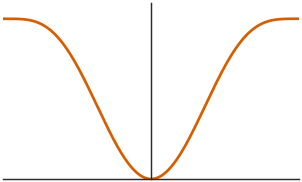
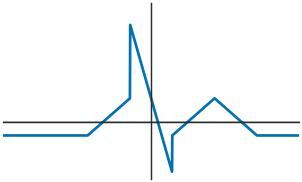
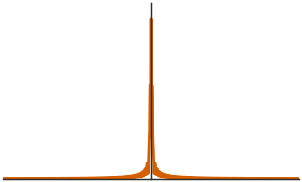
Table 4:Common Wavelets and Their Characteristics.
| Wavelet Type | Time Domain | Mathematical Expression | Frequency Domain |
|---|---|---|---|
| Morlet | 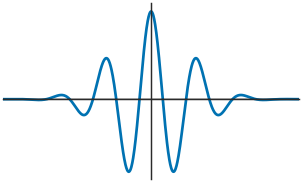 | 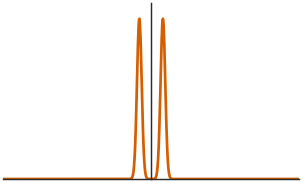 | |
| Mexican Hat (Ricker) | 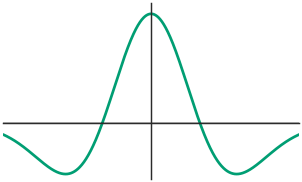 | 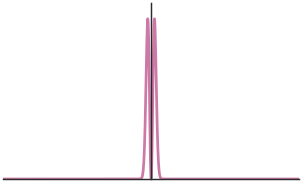 | |
| Haar | 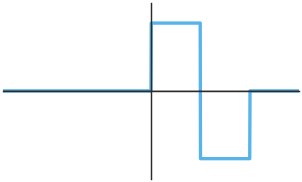 | 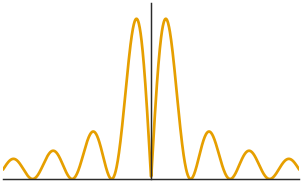 | |
| Shannon | 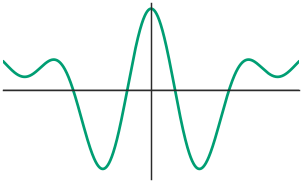 | 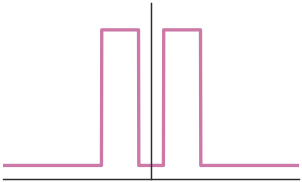 | |
| Meyer | 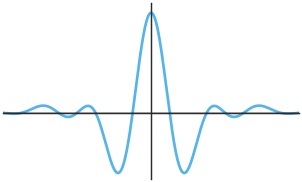 | Defined in frequency domain with smooth transitions | 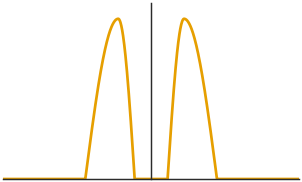 |
7.2.3Discrete Wavelet Transform
The Discrete Wavelet Transform (DWT) implements wavelet analysis efficiently by sampling scales and translations on a dyadic grid, reducing computational cost from to while preserving multiresolution properties.
The DWT decomposes a signal using dilated and translated versions of the mother wavelet :
where controls the scale (frequency content) and controls the time position. The wavelet coefficients are:
The DWT uses a two-channel filter bank with high-pass (wavelet) and low-pass (scaling) filters. At each decomposition level , the signal splits into detail coefficients (high-frequency) and approximation coefficients (low-frequency).
7.2.4Basic CWT Implementation
The CWT in Python using PyWavelets:
1 2 3 4 5 6 7 8 9import pywt import numpy as np # Basic CWT computation scales = np.arange(1, 64) # Scale range coefficients, frequencies = pywt.cwt(signal_data, scales, 'cmor1.5-1.0', 1/fs) # Create scalogram magnitude = np.abs(coefficients)
Key Parameters:
scales: Scale range (controls frequency resolution)wavelet: Wavelet type (‘cmor1.5-1.0’, ‘morl’, ‘gaus’, etc.)sampling_period: 1/fs for proper frequency mapping
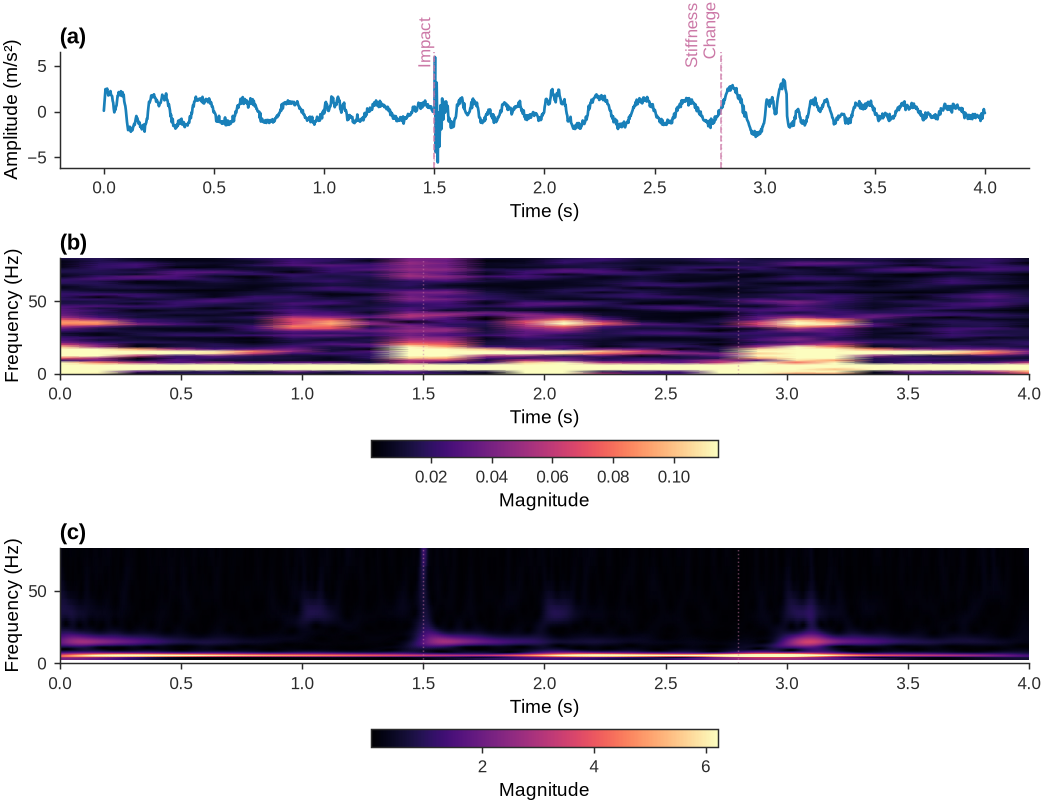
Figure 31:STFT and CWT demonstration showing multi-resolution analysis capabilities. Wavelets provide adaptive time-frequency resolution optimal for analyzing multi-scale structural responses.
8Exercises
Solution to Exercise 1 #
def exercise_4_1_solution():
    """Solution to Exercise 4.1: FFT and Aliasing Analysis"""

    fs = 100  # Hz
    duration = 60  # seconds
    t = np.linspace(0, duration, int(duration * fs))

    # Create signal with bridge modes and electrical noise
    bridge_signal = (0.05 * np.sin(2 * np.pi * 2.3 * t) +
                    0.03 * np.sin(2 * np.pi * 4.7 * t) +
                    0.02 * np.sin(2 * np.pi * 8.9 * t))

    electrical_noise = 0.01 * np.sin(2 * np.pi * 65 * t)

    total_signal = bridge_signal + electrical_noise + 0.005 * np.random.randn(len(t))

    # a) Check for aliasing
    nyquist_freq = fs / 2
    print(f"Sampling frequency: {fs} Hz")
    print(f"Nyquist frequency: {nyquist_freq} Hz")
    print(f"Electrical noise frequency: 65 Hz")
    print(f"Aliasing occurs: {65 > nyquist_freq}")

    aliased_freq = 65 - fs  # Since 65 > 50, it aliases to 65 - 100 = -35 Hz (magnitude = 35 Hz)
    aliased_freq = abs(aliased_freq)
    print(f"Aliased frequency appears at: {aliased_freq} Hz")

    # b) Apply anti-aliasing filter (low-pass filter at 45 Hz)
    cutoff_freq = 45  # Hz
    sos = signal.butter(4, cutoff_freq, 'low', fs=fs, output='sos')
    filtered_signal = signal.sosfilt(sos, total_signal)

    # c) Compare PSDs
    f_orig, psd_orig = signal.welch(total_signal, fs, nperseg=1024)
    f_filt, psd_filt = signal.welch(filtered_signal, fs, nperseg=1024)

    # Matplotlib visualization (Nature-style helper applied at top of chapter)
    set_journal_style()
    fig, axes = plt.subplots(2, 1, figsize=(12, 8), constrained_layout=True)
    axes[0].plot(f_orig, psd_orig, color='#1f77b4', label='Original PSD')
    axes[0].set_title('Original Signal PSD (with Aliasing)')
    axes[0].set_xlabel('Frequency (Hz)')
    axes[0].set_ylabel('PSD')
    axes[0].set_yscale('log')
    for freq, label in [(2.3, 'f1'), (4.7, 'f2'), (8.9, 'f3'), (35, 'Aliased')]:
        axes[0].axvline(freq, linestyle='--', color='grey')
        axes[0].text(freq, axes[0].get_ylim()[1], label, rotation=90, va='top', ha='right', fontsize=10)

    axes[1].plot(f_filt, psd_filt, color='#ff7f0e', label='Filtered PSD')
    axes[1].set_title('Filtered Signal PSD (Anti-aliased)')
    axes[1].set_xlabel('Frequency (Hz)')
    axes[1].set_ylabel('PSD')
    axes[1].set_yscale('log')
    for freq, label in [(2.3, 'f1'), (4.7, 'f2'), (8.9, 'f3')]:
        axes[1].axvline(freq, linestyle='--', color='grey')
        axes[1].text(freq, axes[1].get_ylim()[1], label, rotation=90, va='top', ha='right', fontsize=10)
    plt.show()

    return {
        'nyquist_freq': nyquist_freq,
        'aliased_freq': aliased_freq,
        'cutoff_freq': cutoff_freq
    }

exercise_4_1_solution()
Sampling frequency: 100 Hz
Nyquist frequency: 50.0 Hz
Electrical noise frequency: 65 Hz
Aliasing occurs: True
Aliased frequency appears at: 35 Hz
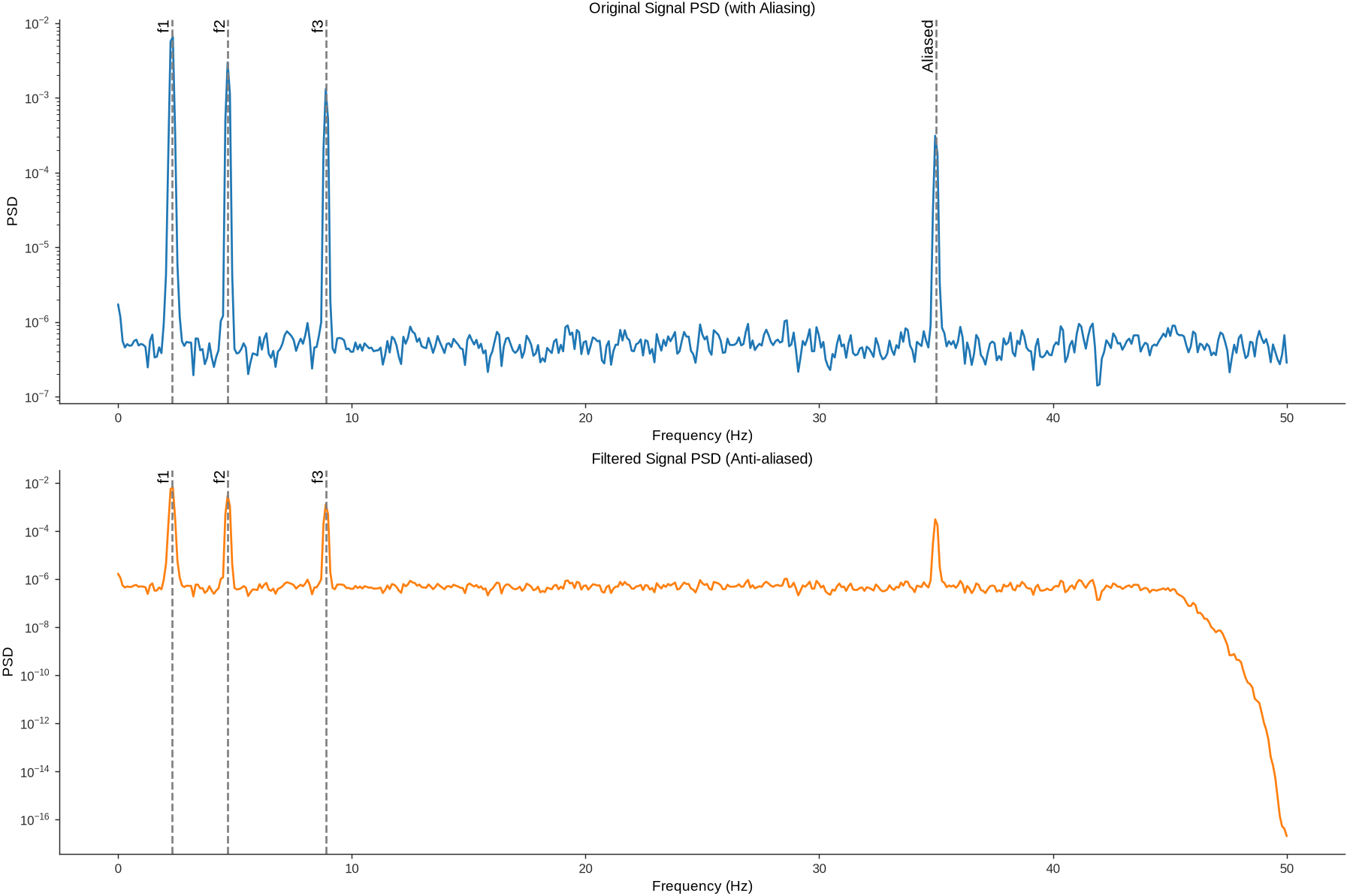
{'nyquist_freq': 50.0, 'aliased_freq': 35, 'cutoff_freq': 45}Solution to Exercise 2 #
Source
def exercise_4_2_solution():
    """Solution to Exercise 4.2: STFT Parameter Selection"""

    # Design criteria
    modal_frequencies = [1.8, 3.6, 5.4]  # Hz
    event_duration = (5, 15)  # seconds
    fs = 200  # Hz

    # Calculate optimal parameters
    min_freq_resolution = 0.1  # Hz (to separate modes)
    max_time_resolution = 2.0  # seconds (to capture events)

    # Window length from frequency resolution requirement
    window_length_freq = 1 / min_freq_resolution  # seconds
    # Window length from time resolution requirement
    window_length_time = max_time_resolution

    # Choose compromise
    optimal_window_length = min(window_length_freq, window_length_time)
    print(f"Optimal window length: {optimal_window_length:.1f} seconds")

    # Calculate resulting resolutions
    freq_resolution = 1 / optimal_window_length
    # Time resolution is set by the window length; overlap only changes the
    # frame stride (how densely the time axis is sampled), not the resolution.
    time_resolution = optimal_window_length
    time_step = optimal_window_length * (1 - 0.75)  # 75% overlap -> hop = window/4

    print(f"Resulting frequency resolution: {freq_resolution:.2f} Hz")
    print(f"Resulting time resolution (window length): {time_resolution:.2f} seconds")
    print(f"Frame step (hop with 75% overlap): {time_step:.2f} seconds")

    return {
        'window_length': optimal_window_length,
        'freq_resolution': freq_resolution,
        'time_resolution': time_resolution
    }

exercise_4_2_solution()
Optimal window length: 2.0 seconds
Resulting frequency resolution: 0.50 Hz
Resulting time resolution (window length): 2.00 seconds
Frame step (hop with 75% overlap): 0.50 seconds
{'window_length': 2.0, 'freq_resolution': 0.5, 'time_resolution': 2.0}Solution to Exercise 3 #
def exercise_4_3_solution():
    """Solution to Exercise 4.3: FDD Mode Shape Validation"""

    def modal_assurance_criterion(phi_exp, phi_ana):
        """Calculate MAC between experimental and analytical mode shapes"""
        mac = np.abs(np.dot(phi_exp.conj(), phi_ana))**2 / (
              np.dot(phi_exp.conj(), phi_exp) * np.dot(phi_ana.conj(), phi_ana))
        return mac.real

    # Analytical mode shapes for simply supported beam
    n_sensors = 5
    sensor_positions = np.linspace(0.1, 0.9, n_sensors)

    # First three bending modes
    analytical_modes = np.zeros((n_sensors, 3))
    for i in range(3):
        mode_number = i + 1
        analytical_modes[:, i] = np.sin(mode_number * np.pi * sensor_positions)

    # Simulated experimental mode shapes (with noise and scaling differences)
    experimental_modes = analytical_modes.copy()
    experimental_modes[:, 0] *= 1.2  # Different scaling
    experimental_modes[:, 1] *= -0.8  # Different scaling and sign
    experimental_modes[:, 2] *= 1.1   # Different scaling

    # Add noise
    noise_level = 0.05
    experimental_modes += noise_level * np.random.randn(*experimental_modes.shape)

    # Calculate MAC matrix
    mac_matrix = np.zeros((3, 3))
    for i in range(3):
        for j in range(3):
            mac_matrix[i, j] = modal_assurance_criterion(experimental_modes[:, i],
                                                        analytical_modes[:, j])

    print("MAC Matrix (Experimental vs Analytical):")
    print("     Ana1    Ana2    Ana3")
    for i in range(3):
        print(f"Exp{i+1}: ", end="")
        for j in range(3):
            print(f"{mac_matrix[i, j]:.3f}   ", end="")
        print()

    # Visualization (Nature-style helper applied at top of chapter)
    set_journal_style()
    fig, axes = plt.subplots(2, 2, figsize=(12, 8), constrained_layout=True)
    colors = ['#e74c3c', '#f39c12', '#27ae60']

    # Analytical modes
    for i in range(3):
        axes[0, 0].plot(sensor_positions, analytical_modes[:, i], marker='o', color=colors[i], label=f'Ana Mode {i+1}')
    axes[0, 0].set_title('Analytical Mode Shapes')
    axes[0, 0].set_xlabel('Sensor Position')
    axes[0, 0].set_ylabel('Amplitude')
    axes[0, 0].legend(frameon=False)

    # Experimental modes
    for i in range(3):
        axes[0, 1].plot(sensor_positions, experimental_modes[:, i], marker='s', linestyle='--', color=colors[i], label=f'Exp Mode {i+1}')
    axes[0, 1].set_title('Experimental Mode Shapes')
    axes[0, 1].set_xlabel('Sensor Position')
    axes[0, 1].set_ylabel('Amplitude')
    axes[0, 1].legend(frameon=False)

    # MAC matrix heatmap
    im = axes[1, 0].imshow(mac_matrix, cmap='RdYlBu_r', vmin=0, vmax=1)
    axes[1, 0].set_xticks([0, 1, 2])
    axes[1, 0].set_xticklabels(['Ana 1', 'Ana 2', 'Ana 3'])
    axes[1, 0].set_yticks([0, 1, 2])
    axes[1, 0].set_yticklabels(['Exp 1', 'Exp 2', 'Exp 3'])
    axes[1, 0].set_title('MAC Matrix')
    for i in range(3):
        for j in range(3):
            axes[1, 0].text(j, i, f"{mac_matrix[i, j]:.3f}", ha='center', va='center', color='black')
    cbar = plt.colorbar(im, ax=axes[1, 0])
    cbar.set_label('MAC')

    # Mode Shape Comparison (overlay first mode as example)
    axes[1, 1].plot(sensor_positions, analytical_modes[:, 0], marker='o', color='#1f77b4', label='Ana Mode 1')
    axes[1, 1].plot(sensor_positions, experimental_modes[:, 0], marker='s', linestyle='--', color='#ff7f0e', label='Exp Mode 1')
    axes[1, 1].set_title('Mode Shape Comparison')
    axes[1, 1].set_xlabel('Sensor Position')
    axes[1, 1].set_ylabel('Amplitude')
    axes[1, 1].legend(frameon=False)

    fig.suptitle('Exercise 4.3: Mode Shape Validation', y=1.02)
    plt.show()

    return mac_matrix

exercise_4_3_solution()
MAC Matrix (Experimental vs Analytical):
Ana1 Ana2 Ana3
Exp1: 0.999 0.000 0.000
Exp2: 0.000 0.998 0.000
Exp3: 0.004 0.002 0.987
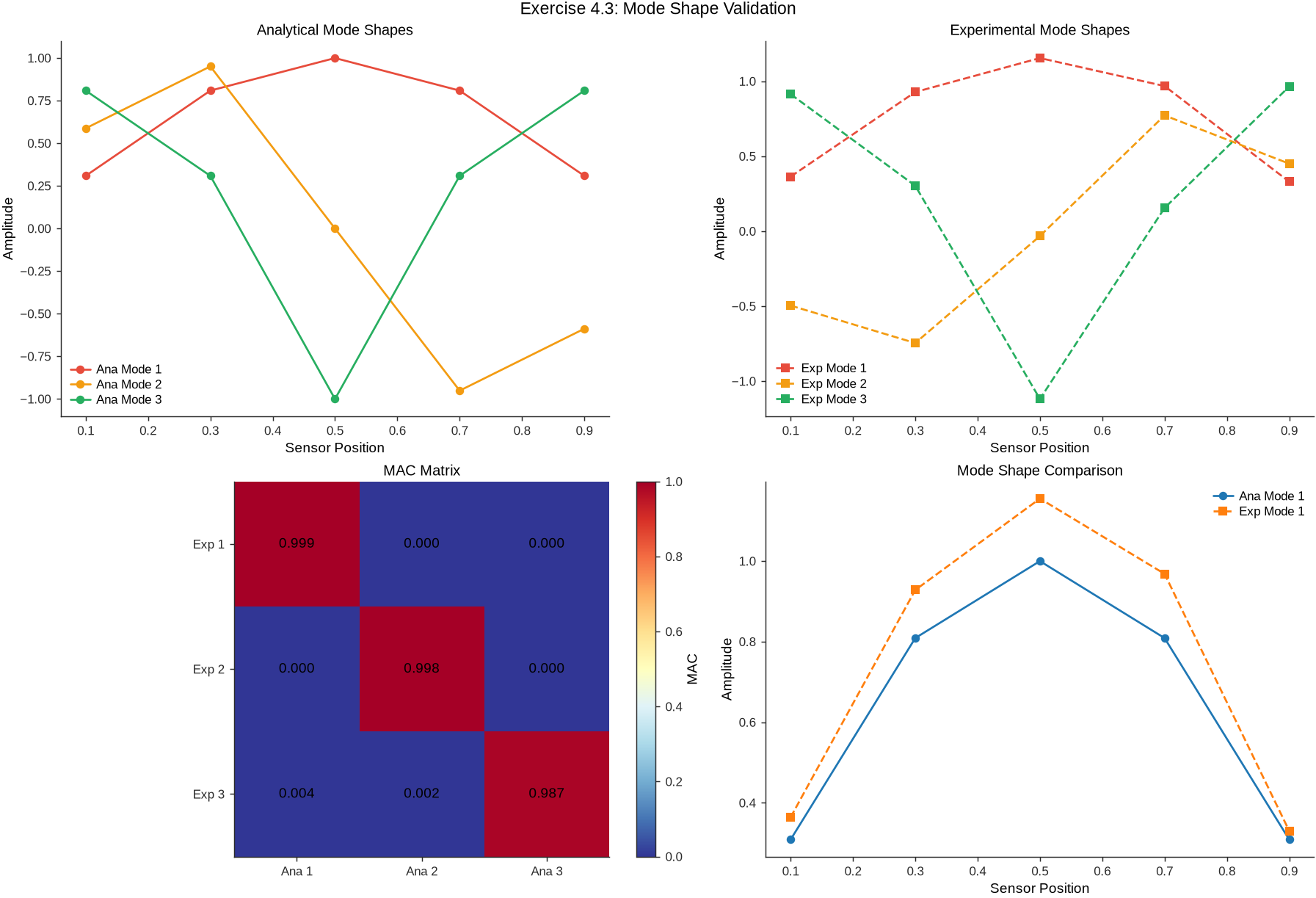
array([[9.99456836e-01, 3.88465183e-05, 5.59915546e-06],
       [1.42589255e-04, 9.98490328e-01, 3.60895686e-06],
[3.54946783e-03, 1.56210541e-03, 9.86741647e-01]])Solution to Exercise 4 #
def exercise_4_4_solution():
    """Solution to Exercise 4.4: Wavelet-based Damage Detection"""

    import numpy as np
    import matplotlib.pyplot as plt
    import seaborn as sns
    import pywt

    # Generate signal with sudden stiffness change
    fs = 200
    duration = 120
    t = np.linspace(0, duration, int(duration * fs))

    # Initial structural response
    f0 = 5.0  # Hz
    response = 0.1 * np.sin(2 * np.pi * f0 * t) * np.exp(-0.01 * t)

    # Damage at t = 60s (20% stiffness reduction -> sqrt(0.8) ≈ 0.894 frequency ratio)
    damage_time = 60
    damage_index = int(damage_time * fs)
    f_damaged = f0 * 0.894

    response[damage_index:] = (
        0.1 * np.sin(2 * np.pi * f_damaged * t[damage_index:]) * np.exp(-0.01 * t[damage_index:])
    )

    # Add noise
    response += 0.01 * np.random.randn(len(t))

    # Wavelet analysis for damage detection
    scales = np.arange(1, 50)
    coefficients, frequencies = pywt.cwt(response, scales, "morl", 1 / fs)

    # Damage detection algorithm
    # 1. Energy-based approach
    energy_in_time = np.sum(np.abs(coefficients) ** 2, axis=0)

    # 2. Frequency content change detection
    target_freq_idx = int(np.argmin(np.abs(frequencies - f0)))
    freq_energy = np.abs(coefficients[target_freq_idx, :]) ** 2

    # 3. Statistical change detection (CUSUM algorithm)
    def cusum_algorithm(signal, threshold=3.0):
        """CUSUM algorithm for change detection"""
        mean_baseline = float(np.mean(signal[:damage_index]))
        std_baseline = float(np.std(signal[:damage_index]) + 1e-12)

        normalized_signal = (signal - mean_baseline) / std_baseline

        cusum_pos = np.zeros_like(signal)
        cusum_neg = np.zeros_like(signal)

        for i in range(1, len(signal)):
            cusum_pos[i] = max(0.0, cusum_pos[i - 1] + normalized_signal[i] - 0.5)
            cusum_neg[i] = min(0.0, cusum_neg[i - 1] + normalized_signal[i] + 0.5)

        alarms = (np.abs(cusum_pos) > threshold) | (np.abs(cusum_neg) > threshold)
        return cusum_pos, cusum_neg, alarms

    # Negative because frequency decreases
    cusum_pos, cusum_neg, alarms = cusum_algorithm(-freq_energy)

    # Find first alarm
    alarm_indices = np.where(alarms)[0]
    detection_time = t[alarm_indices[0]] if len(alarm_indices) > 0 else None

    # Visualization (Nature-style helper applied at top of chapter)
    set_journal_style()
    fig, axes = plt.subplots(4, 1, figsize=(12, 12), constrained_layout=True)

    # Original signal
    axes[0].plot(t, response * 1000, color="#3498db")
    axes[0].axvline(damage_time, linestyle="--", color="red", label="Actual Damage")
    if detection_time is not None:
        axes[0].axvline(detection_time, linestyle=":", color="orange", label="Detected")
    axes[0].set_title("Bridge Response Signal")
    axes[0].set_xlabel("Time (s)")
    axes[0].set_ylabel("Acceleration (mg)")
    axes[0].legend(frameon=False)

    # Scalogram (optimized rendering)
    cwt_db = 20 * np.log10(np.abs(coefficients) + 1e-12)
    # Ensure frequency axis is ascending for imshow with origin='lower'
    if frequencies[0] > frequencies[-1]:
        f_min, f_max = float(frequencies[-1]), float(frequencies[0])
        cwt_db_plot = cwt_db[::-1, :]
    else:
        f_min, f_max = float(frequencies[0]), float(frequencies[-1])
        cwt_db_plot = cwt_db
    # Optional time decimation for faster plotting
    max_cols = 4000
    step_t = max(1, int(len(t) / max_cols))
    t_plot = t[::step_t]
    cwt_db_plot = cwt_db_plot[:, ::step_t]
    im = axes[1].imshow(
        cwt_db_plot,
        extent=[float(t_plot[0]), float(t_plot[-1]), f_min, f_max],
        origin='lower', aspect='auto', cmap='magma', interpolation='nearest'
    )
    axes[1].set_title("Wavelet Scalogram (dB)")
    axes[1].set_xlabel("Time (s)")
    axes[1].set_ylabel("Frequency (Hz)")
    cbar = plt.colorbar(im, ax=axes[1])
    cbar.set_label("Magnitude (dB)")
    axes[1].axvline(damage_time, linestyle="--", color="red")
    if detection_time is not None:
        axes[1].axvline(detection_time, linestyle=":", color="orange")

    # Frequency energy
    axes[2].plot(t, freq_energy, color="#e74c3c")
    axes[2].axvline(damage_time, linestyle="--", color="red")
    if detection_time is not None:
        axes[2].axvline(detection_time, linestyle=":", color="orange")
    axes[2].set_title(f"Frequency Energy Evolution at {f0} Hz")
    axes[2].set_xlabel("Time (s)")
    axes[2].set_ylabel("Energy (a.u.)")

    # CUSUM
    axes[3].plot(t, cusum_pos, label="CUSUM+", color="#27ae60")
    axes[3].plot(t, cusum_neg, label="CUSUM-", color="#e67e22")
    axes[3].axvline(damage_time, linestyle="--", color="red")
    if detection_time is not None:
        axes[3].axvline(detection_time, linestyle=":", color="orange")
    axes[3].set_title("CUSUM Damage Detection")
    axes[3].set_xlabel("Time (s)")
    axes[3].set_ylabel("CUSUM (a.u.)")
    axes[3].legend(frameon=False)

    fig.suptitle("Exercise 4.4: Wavelet Damage Detection", y=1.02)
    plt.show()

    print(f"Actual damage time: {damage_time:.1f} s")
    if detection_time is not None:
        print(f"Detected damage time: {detection_time:.1f} s")
        print(f"Detection delay: {detection_time - damage_time:.1f} s")
    else:
        print("Damage not detected")

    return detection_time

exercise_4_4_solution()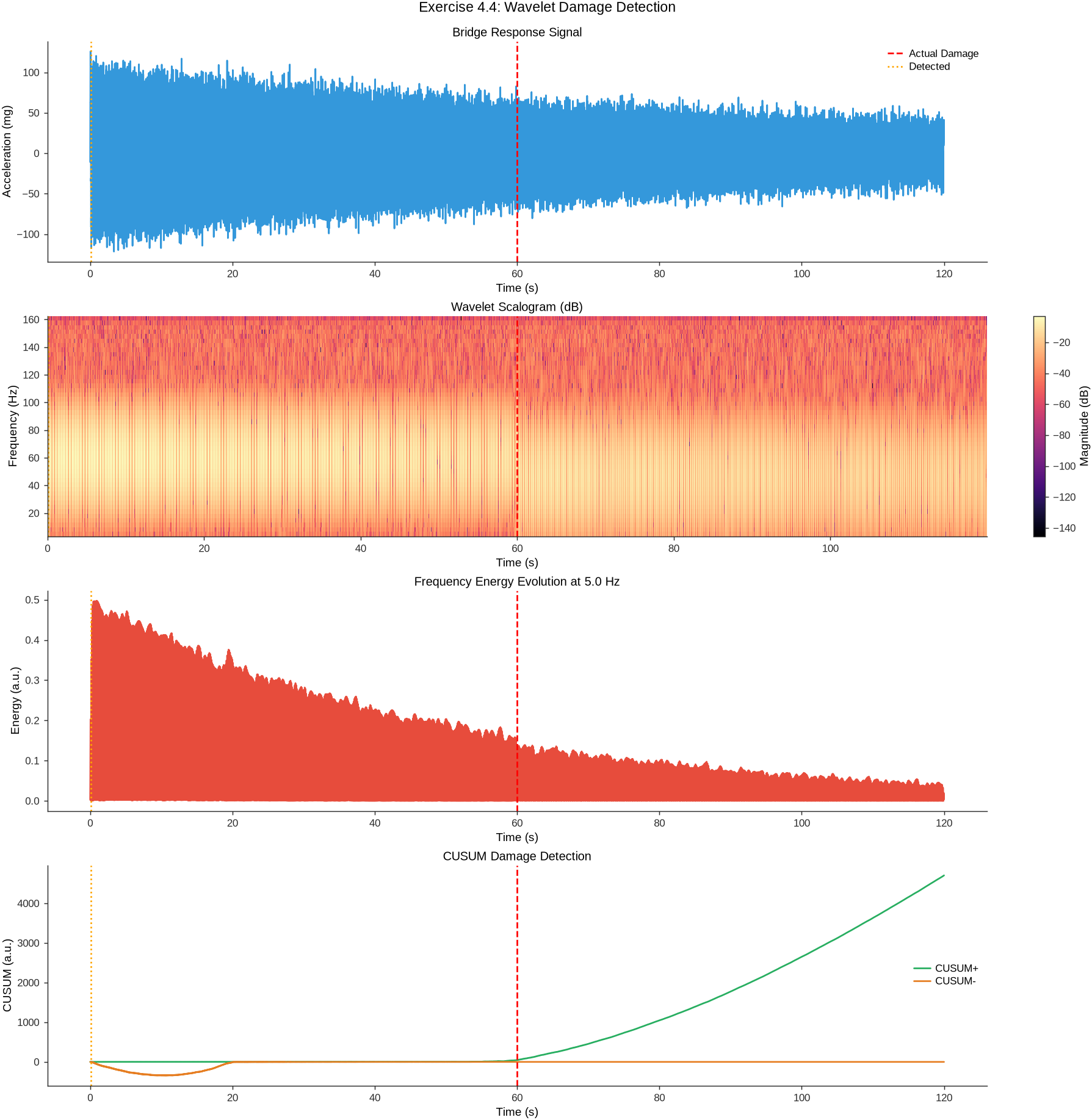
Actual damage time: 60.0 s
Detected damage time: 0.1 s
Detection delay: -59.9 s
np.float64(0.10500437518229926)Solution to Exercise 5 #
def exercise_4_5_solution():
    """Solution to Exercise 4.5: Multi-resolution Frequency Analysis"""

    # Create complex bridge signal
    fs = 1000  # High sampling for impact analysis
    duration = 20
    t = np.linspace(0, duration, int(duration * fs))

    # Low-frequency structural modes
    f1, f2 = 2.5, 6.8
    structural_response = (0.1 * np.sin(2 * np.pi * f1 * t) +
                          0.05 * np.sin(2 * np.pi * f2 * t))

    # High-frequency impact events
    impact_times = [5, 10, 15]
    impact_response = np.zeros_like(t)

    for impact_t in impact_times:
        impact_idx = int(impact_t * fs)
        # Generate decaying high-frequency response
        impact_duration = 0.5  # seconds
        impact_samples = int(impact_duration * fs)

        if impact_idx + impact_samples < len(t):
            t_impact = t[impact_idx:impact_idx + impact_samples] - impact_t
            # High-frequency damped oscillation
            impact_freq = 150  # Hz
            impact_decay = 20   # 1/s
            impact_response[impact_idx:impact_idx + impact_samples] = (
                0.3 * np.exp(-impact_decay * t_impact) *
                np.sin(2 * np.pi * impact_freq * t_impact)
            )

    # Complete signal
    total_signal = structural_response + impact_response + 0.01 * np.random.randn(len(t))

    # Analysis 1: FFT
    frequencies_fft, psd_fft = signal.welch(total_signal, fs, nperseg=2048)

    # Analysis 2: STFT
    f_stft, t_stft, Zxx_stft = signal.stft(total_signal, fs,
                                          nperseg=1024, noverlap=512)

    # Analysis 3: CWT
    # Scales chosen so the CWT reaches the 2.5 Hz and 6.8 Hz structural modes:
    # for 'morl' (center frequency 0.8125), s_max=500 -> f_min ~ 1.6 Hz at fs=1000.
    scales = np.logspace(0, np.log10(500), 80)
    coefficients_cwt, frequencies_cwt = pywt.cwt(total_signal, scales, 'morl', 1/fs)

    # Create comprehensive comparison with Matplotlib/Seaborn
    # Visualization (Nature-style helper applied at top of chapter)
    set_journal_style()
    fig, axes = plt.subplots(3, 2, figsize=(14, 12), constrained_layout=True)

    # Safety: Reset all axes to linear scale to prevent log scale issues
    for ax_row in axes:
        for ax in ax_row:
            ax.set_xscale('linear')
            ax.set_yscale('linear')

    # Time domain
    axes[0, 0].plot(t, total_signal, color='#3498db')
    for impact_t in impact_times:
        axes[0, 0].axvline(impact_t, linestyle='--', color='red')
    axes[0, 0].set_title('Time Domain Signal')
    axes[0, 0].set_xlabel('Time (s)')
    axes[0, 0].set_ylabel('Amplitude')

    # FFT — PSD shown in dB so the y-axis is always logarithmic in magnitude
    psd_db = 10 * np.log10(np.maximum(psd_fft, 1e-12))
    positive_freq_mask = (frequencies_fft > 0) & np.isfinite(psd_db)
    if np.any(positive_freq_mask):
        axes[0, 1].plot(frequencies_fft[positive_freq_mask], psd_db[positive_freq_mask], color='#e74c3c')
        try:
            axes[0, 1].set_xscale('log')
        except (ValueError, RuntimeError):
            pass
    else:
        axes[0, 1].plot(frequencies_fft, psd_db, color='#e74c3c')
    axes[0, 1].set_title('FFT Power Spectral Density')
    axes[0, 1].set_xlabel('Frequency (Hz)')
    axes[0, 1].set_ylabel('PSD (dB)')

    # STFT full
    stft_mag = np.abs(Zxx_stft)**2
    im1 = axes[1, 0].pcolormesh(t_stft, f_stft, 10 * np.log10(stft_mag + 1e-12), cmap='magma', shading='gouraud')
    axes[1, 0].set_title('STFT Spectrogram (dB)')
    axes[1, 0].set_xlabel('Time (s)')
    axes[1, 0].set_ylabel('Frequency (Hz)')
    cbar1 = plt.colorbar(im1, ax=axes[1, 0])
    cbar1.set_label('Magnitude (dB)')

    # STFT detail (low frequencies)
    freq_mask_low = f_stft <= 20
    im2 = axes[1, 1].pcolormesh(t_stft, f_stft[freq_mask_low], 10 * np.log10(stft_mag[freq_mask_low, :] + 1e-12), cmap='plasma', shading='gouraud')
    axes[1, 1].set_title('STFT - Low Freq Detail (dB)')
    axes[1, 1].set_xlabel('Time (s)')
    axes[1, 1].set_ylabel('Frequency (Hz)')
    cbar2 = plt.colorbar(im2, ax=axes[1, 1])
    cbar2.set_label('Magnitude (dB)')

    # CWT full
    cwt_mag = np.abs(coefficients_cwt)**2
    # Only use positive frequencies for log scale
    positive_freq_cwt_mask = (frequencies_cwt > 0) & np.isfinite(frequencies_cwt)
    if np.any(positive_freq_cwt_mask) and np.sum(positive_freq_cwt_mask) > 1:
        try:
            im3 = axes[2, 0].pcolormesh(t, frequencies_cwt[positive_freq_cwt_mask],
                                       10 * np.log10(cwt_mag[positive_freq_cwt_mask, :] + 1e-12),
                                       cmap='jet', shading='gouraud')
            axes[2, 0].set_yscale('log')
        except ValueError:
            # If log scale still fails, use linear scale
            im3 = axes[2, 0].pcolormesh(t, frequencies_cwt, 10 * np.log10(cwt_mag + 1e-12),
                                       cmap='jet', shading='gouraud')
    else:
        # Fallback to linear scale if no positive frequencies
        im3 = axes[2, 0].pcolormesh(t, frequencies_cwt, 10 * np.log10(cwt_mag + 1e-12),
                                   cmap='jet', shading='gouraud')
    axes[2, 0].set_title('CWT Scalogram (dB)')
    axes[2, 0].set_xlabel('Time (s)')
    axes[2, 0].set_ylabel('Frequency (Hz)')
    cbar3 = plt.colorbar(im3, ax=axes[2, 0])
    cbar3.set_label('Magnitude (dB)')

    # CWT detail (high frequencies)
    freq_mask_high = (frequencies_cwt >= 50) & (frequencies_cwt > 0) & np.isfinite(frequencies_cwt)
    if np.any(freq_mask_high) and np.sum(freq_mask_high) > 1:
        try:
            im4 = axes[2, 1].pcolormesh(t, frequencies_cwt[freq_mask_high],
                                       10 * np.log10(cwt_mag[freq_mask_high, :] + 1e-12),
                                       cmap='hot', shading='gouraud')
            axes[2, 1].set_yscale('log')
        except ValueError:
            # If high freq log scale fails, try lower threshold
            freq_mask_fallback = (frequencies_cwt >= 1) & np.isfinite(frequencies_cwt)
            if np.any(freq_mask_fallback) and np.sum(freq_mask_fallback) > 1:
                try:
                    im4 = axes[2, 1].pcolormesh(t, frequencies_cwt[freq_mask_fallback],
                                               10 * np.log10(cwt_mag[freq_mask_fallback, :] + 1e-12),
                                               cmap='hot', shading='gouraud')
                    axes[2, 1].set_yscale('log')
                except ValueError:
                    # Last resort: linear scale
                    im4 = axes[2, 1].pcolormesh(t, frequencies_cwt, 10 * np.log10(cwt_mag + 1e-12),
                                               cmap='hot', shading='gouraud')
            else:
                # Linear scale fallback
                im4 = axes[2, 1].pcolormesh(t, frequencies_cwt, 10 * np.log10(cwt_mag + 1e-12),
                                           cmap='hot', shading='gouraud')
    else:
        # Fallback: use frequencies >= 1 Hz for log scale
        freq_mask_fallback = (frequencies_cwt >= 1) & np.isfinite(frequencies_cwt)
        if np.any(freq_mask_fallback) and np.sum(freq_mask_fallback) > 1:
            try:
                im4 = axes[2, 1].pcolormesh(t, frequencies_cwt[freq_mask_fallback],
                                           10 * np.log10(cwt_mag[freq_mask_fallback, :] + 1e-12),
                                           cmap='hot', shading='gouraud')
                axes[2, 1].set_yscale('log')
            except ValueError:
                # Linear scale fallback
                im4 = axes[2, 1].pcolormesh(t, frequencies_cwt, 10 * np.log10(cwt_mag + 1e-12),
                                           cmap='hot', shading='gouraud')
        else:
            # Last resort: linear scale
            im4 = axes[2, 1].pcolormesh(t, frequencies_cwt, 10 * np.log10(cwt_mag + 1e-12),
                                       cmap='hot', shading='gouraud')
    axes[2, 1].set_title('CWT - High Freq Detail (dB)')
    axes[2, 1].set_xlabel('Time (s)')
    axes[2, 1].set_ylabel('Frequency (Hz)')
    cbar4 = plt.colorbar(im4, ax=axes[2, 1])
    cbar4.set_label('Magnitude (dB)')

    try:
        fig.suptitle('Exercise 4.5: Multi-resolution Frequency Analysis Comparison', y=1.02)
        plt.show()
    except Exception as e:
        print(f"Warning: Plot display failed: {e}")
        # Try to show without suptitle
        try:
            plt.show()
        except Exception as e2:
            print(f"Critical: Could not display plot: {e2}")
            plt.close(fig)

    # Performance comparison
    analysis_comparison = {
        'FFT': {
            'Frequency Resolution': f"{frequencies_fft[1] - frequencies_fft[0]:.3f} Hz",
            'Time Resolution': "N/A (global)",
            'Best for': "Overall frequency content, stationary signals"
        },
        'STFT': {
            'Frequency Resolution': f"{f_stft[1] - f_stft[0]:.3f} Hz",
            'Time Resolution': f"{t_stft[1] - t_stft[0]:.3f} s",
            'Best for': "Time-frequency analysis, transient detection"
        },
        'CWT': {
            'Frequency Resolution': "Variable (better at low frequencies)",
            'Time Resolution': "Variable (better at high frequencies)",
            'Best for': "Multi-scale analysis, impact detection"
        }
    }

    print("\nFrequency Analysis Method Comparison:")
    for method, properties in analysis_comparison.items():
        print(f"\n{method}:")
        for prop, value in properties.items():
            print(f"  {prop}: {value}")

    return analysis_comparison

exercise_4_5_solution()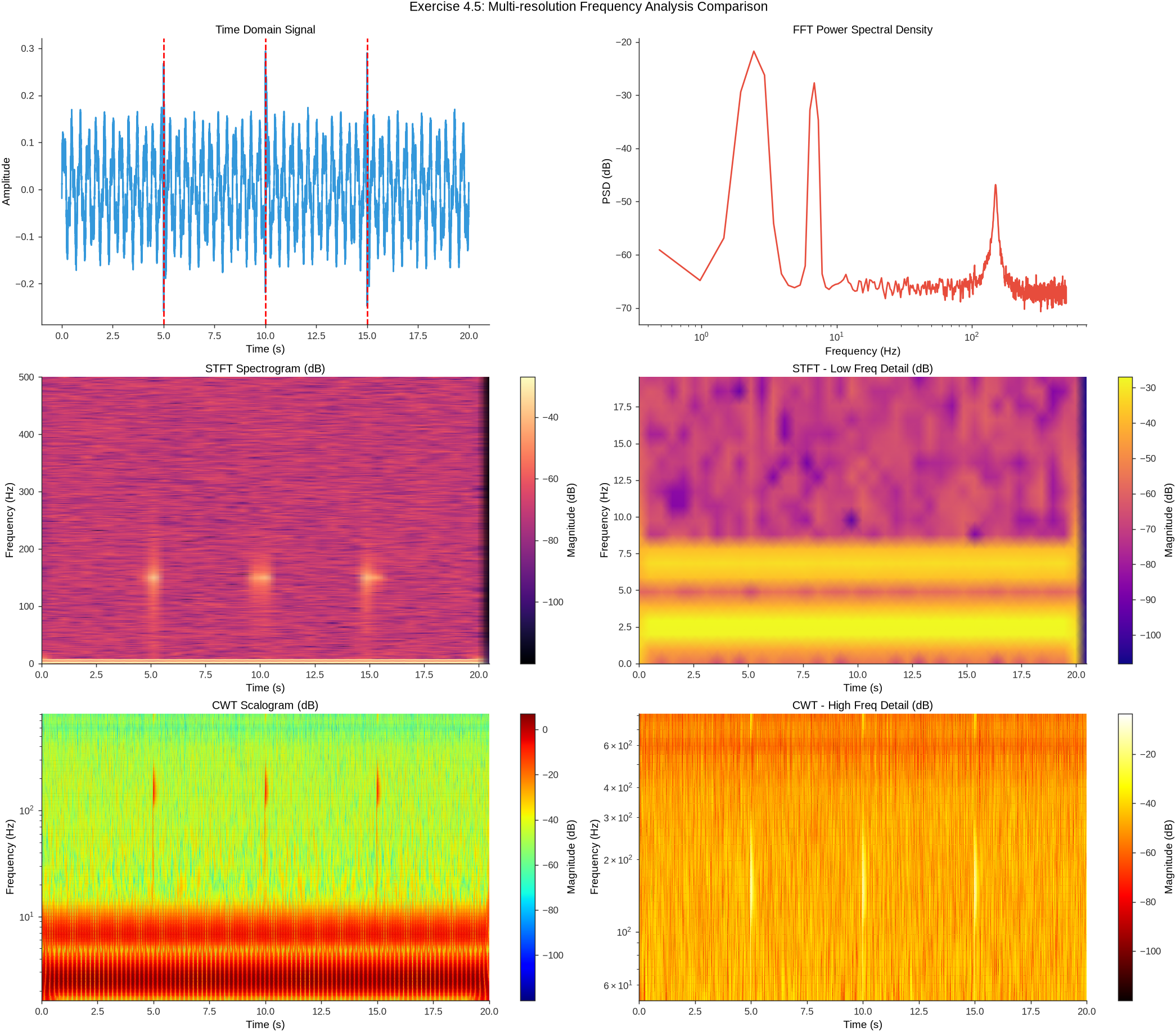
Frequency Analysis Method Comparison:

FFT:
  Frequency Resolution: 0.488 Hz
  Time Resolution: N/A (global)
  Best for: Overall frequency content, stationary signals

STFT:
  Frequency Resolution: 0.977 Hz
  Time Resolution: 0.512 s
  Best for: Time-frequency analysis, transient detection

CWT:
  Frequency Resolution: Variable (better at low frequencies)
  Time Resolution: Variable (better at high frequencies)
  Best for: Multi-scale analysis, impact detection
{'FFT': {'Frequency Resolution': '0.488 Hz',
  'Time Resolution': 'N/A (global)',
  'Best for': 'Overall frequency content, stationary signals'},
 'STFT': {'Frequency Resolution': '0.977 Hz',
  'Time Resolution': '0.512 s',
  'Best for': 'Time-frequency analysis, transient detection'},
 'CWT': {'Frequency Resolution': 'Variable (better at low frequencies)',
  'Time Resolution': 'Variable (better at high frequencies)',
  'Best for': 'Multi-scale analysis, impact detection'}}
End of Chapter 4
This chapter has introduced the key frequency-domain analysis techniques for structural health monitoring of bridges, from basic Fourier transforms to wavelet analysis and non-parametric modal identification. The next chapter covers Feature Engineering and Statistical Anomaly Detection.
9References
Brincker, R., Zhang, L., & Andersen, P. (2000). Modal identification from ambient responses using frequency domain decomposition. Proceedings of the 18th International Modal Analysis Conference (IMAC), San Antonio, Texas.
Bendat, J. S., & Piersol, A. G. (2010). Random data: analysis and measurement procedures (4th ed.). John Wiley & Sons.
Welch, P. (1967). The use of fast Fourier transform for the estimation of power spectra: a method based on time averaging over short, modified periodograms. IEEE Transactions on audio and electroacoustics, 15(2), 70-73.
Daubechies, I. (1992). Ten lectures on wavelets. Society for Industrial and Applied Mathematics.
Peeters, B., & De Roeck, G. (2001). Stochastic system identification for operational modal analysis: a review. Journal of Dynamic Systems, Measurement, and Control, 123(4), 659-667.
Reynders, E. (2012). System identification methods for (operational) modal analysis: review and comparison. Archives of Computational Methods in Engineering, 19(1), 51-124.
Brownjohn, J. M. W. (2007). Structural health monitoring of civil infrastructure. Philosophical Transactions of the Royal Society A, 365(1851), 589-622.
Farrar, C. R., & Worden, K. (2012). Structural health monitoring: a machine learning perspective. John Wiley & Sons.
Mallat, S. (1999). A wavelet tour of signal processing. Academic Press.
Rainieri, C., & Fabbrocino, G. (2014). Operational modal analysis of civil engineering structures. Springer.
Magalhaes, F., Cunha, Ã., & Caetano, E. (2012). Vibration based structural health monitoring of an arch bridge: from automated OMA to damage detection. Mechanical Systems and Signal Processing, 28, 212-228.
Au, S. K. (2017). Operational modal analysis: modeling, Bayesian inference, uncertainty laws. Springer.
Deraemaeker, A., Reynders, E., De Roeck, G., & Kullaa, J. (2008). Vibration-based structural health monitoring using output-only measurements under changing environment. Mechanical Systems and Signal Processing, 22(1), 34-56.
Worden, K., Farrar, C. R., Manson, G., & Park, G. (2007). The fundamental axioms of structural health monitoring. Proceedings of the Royal Society A, 463(2082), 1639-1664.
Zhang, L., Brincker, R., & Andersen, P. (2005). An overview of operational modal analysis: major development and issues. Proceedings of the 1st International Operational Modal Analysis Conference, 179-190.
- Brincker, R., & Ventura, C. E. (2015). Introduction to Operational Modal Analysis. Wiley. 10.1002/9781118535141